We would like to use third party cookies and scripts to improve the functionality of this website. Approve More info
Open Identity Platform // OpenAM: Access Management
Projects
OpenDJ: Directory Services OpenAM: Access Management OpenIG: Identity Gateway OpenIDM: Identity Management
API Reference (Javadoc)
Downloads
OpenDJ releases OpenAM releases OpenIG releases OpenIDM releases
Docker images
OpenDJ security advisories OpenAM security advisories OpenIDM security advisories

OpenAM: Access Management

    • Getting Started With OpenAM
      • Preface
      • Protecting a Web Site With OpenAM
      • Where To Go From Here
    • How-To Guides
      • Adaptive Authentication: How to Improve Security Without Annoying Users
      • Authentication in a Single‐Page Application via OpenAM using OAuth2 OIDC Protocol
      • Authentication modules
      • Captcha module
      • Config OpenAM as OAuth2 Service Provider
      • Configuring authentication in OpenAM via Yandex Cloud using the SAML protocol
      • How OpenAM Works Simple Explanation
      • How To Run OpenAM in Kubernetes
      • How To Setup Active Directory Authentication In OpenAM
      • How to Add Authorization and Protect Your Application With OpenAM and OpenIG Stack
      • How to Create Custom OpenAM DataStore Integration
      • How to Customise OpenAM
      • Creating a Custom Authentication Module
      • How to Protect Model Context Protocol (MCP) Servers with OpenAM and OpenIG
      • How to Setup 2FA with Google Authenticator in OpenAM
      • How to Setup Active Directory Authentication in a Spring Boot Application
      • How to Setup OAuth2 OIDC Federation in OpenAM
      • How to Setup SAMLv2 Federation in OpenAM
      • How to Setup Two Factor Authentication in OpenAM
      • How to Setup WebAuthn Authentication in OpenAM
      • How to Start OpenAM and OpenDJ in Separate Docker Containers
      • How to Use Apache Cassandra as User and Session DataStore in OpenAM
      • How to disable XUI by default
      • How to make OpenAM log more verbose
      • How to setup Kerberos Authentication with OpenAM
      • Login and Password Authentication
      • Login via Gosuslugi OAuth2 Identity Provider
      • Login via Facebook OAuth2 Identity Provider
      • Login via Odnoklassniki OAuth2 Identity Provider
      • Login via VK OAuth2 Identity Provider
      • Migrate OpenAM to Apache Cassandra without Single Point of Failure
      • OpenAM Monitoring Using Prometheus
      • OpenAM QR Authentication Module
      • OpenAM and Spring Boot 3 Integration via OIDC OAuth2 Protocol
      • OpenAM and Spring Boot 3 Integration via OpenAM Cookie
      • OpenAM and Spring Boot 3 Integration via SAMLv2 Protocol
      • OpenAM and Zero Trust: Confirming Critical Operations
      • OpenAM vs Keycloak
      • Passwordless Authentication Methods
      • Persistent Cookie module
      • Quick Start Guide
      • SAML Authentication in WordPress via OpenAM
      • SAML Authentication in Yandex Cloud via OpenAM
      • SSO Configuration: OpenIG as SAML Service Provider for OpenAM
      • Setup Tracing with OpenTelemetry and Jaeger
      • Stateful vs Stateless Authentication
      • Bootstrap OpenAM and OpenDJ Docker Containers
      • How to Enable CORS
      • How to Pass Additional System Property to CATALINA_OPTS to OpenAM Docker Container
      • How to Persist OpenAM Docker Container Data Between Restarts
      • Quick OpenAM Docker Configuration From a Command Line
      • Using Google Authenticator with OpenAM
      • Using Microsoft Authenticator with OpenAM
      • What is Single Sign On and How does it Work
    • Installation Guide
      • Preface
      • Preparing For Installation
      • Installing OpenAM Core Services
      • Installing OpenAM Tools
      • Installation Considerations for Multiple Servers
      • Customizing the OpenAM End User Pages
      • Configuring the Core Token Service
      • Setting Up OpenAM Session Failover
      • Removing OpenAM Software
    • Upgrade Guide
      • Preface
      • About Upgrading OpenAM
      • Upgrading OpenAM Servers
      • Migrating Legacy Servers
      • Upgrading OpenAM Components
    • Administration Guide
      • Preface
      • Administration Interfaces and Tools
      • Defining Authentication Services
      • Defining Authorization Policies
      • Configuring Realms
      • Configuring Policy Agent Profiles
      • Configuring Audit Logging
      • Working with Mobile Devices and Applications
      • Configuring User Self-Service Features
      • Configuring Session State
      • Configuring Single Sign-On Within One Domain
      • Configuring Cross-Domain Single Sign-On
      • Managing SAML v2.0 Federation
      • Managing OAuth 2.0 Authorization
      • Managing OpenID Connect 1.0 Authorization
      • Managing UMA Authorization
      • Managing SAML v1.x Single Sign-On
      • Configuring the Security Token Service
      • Configuring the Dashboard Service
      • Configuring OpenAM as a RADIUS Server
      • Configuring REST APIs
      • Backing Up and Restoring OpenAM Configurations
      • Managing Scripts
      • Managing Certificates and Keystores
      • Monitoring OpenAM Services
      • Tuning OpenAM
      • Changing Host Names
      • Securing OpenAM
      • Troubleshooting
      • OpenAM Glossary
      • Release Levels and Interface Stability
    • Developer’s Guide
      • Preface
      • OpenAM APIs and Protocols
      • Developing Client Applications
      • Customizing OpenAM
      • Extending OpenAM
      • Scripting OpenAM
      • Building SAML v2.0 Service Providers With Fedlets
      • Working With the Security Token Service
      • Using Secure Attribute Exchange
      • Deprecated REST APIs
    • Deployment Planning Guide
      • Preface
      • Introduction to Deployment Planning
      • Planning the Deployment Architecture
      • Example Deployment Topology
      • Sizing Hardware and Services For Deployment
      • OpenAM Hardware and Software Requirements
      • Getting Started for Architects and Deployers
    • Reference
      • Preface
      • OpenAM Command Line Tools
      • Configuration Reference
      • OpenAM Audit Logging
      • Ports Used
      • Localization
      • Supported Standards
      • Service Endpoints
      • XUI Configuration Parameters
      • Core Token Service (CTS) Object Identifiers
      • Log Files and Messages
      • Authentication Modules Reference
      • User Data Stores Reference
    • OpenAM Web Policy Agent User’s Guide
      • Preface
      • About OpenAM Web Policy Agents
      • Web Policy Agent Features
      • Configuring Web Policy Agents
      • Installing Web Policy Agents in Apache HTTP Server
      • Installing Web Policy Agents in Microsoft IIS
      • Troubleshooting
      • Command-Line Tool Reference
    • OpenAM J2EE Agents User’s Guide
      • Preface
      • About OpenAM Java EE Policy Agents
      • Java EE Policy Agent Features
      • Configuring Java EE Policy Agents
      • Installing Java EE Agents in Apache Tomcat
      • Installing Java EE Agents in Jetty Server
      • Troubleshooting
OpenAM: Access Management 16.x
  • OpenAM: Access Management
    • 16.x
    • 15.2.2
  • OpenDJ: Directory Services
    • 5.x
    • 4.10.2
  • OpenIDM: Identity Management
    • 7.x
    • 6.3.0
  • OpenIG: Identity Gateway
    • 6.x
    • 5.3.2
  • OpenAM: Access Management
  • How-To Guides
  • How to Enable CORS
16.x 15.2.2
Edit this Page
|
Download PDF

How to Enable CORS

Open the administrator console. In the top menu, select Configure → Global Services.
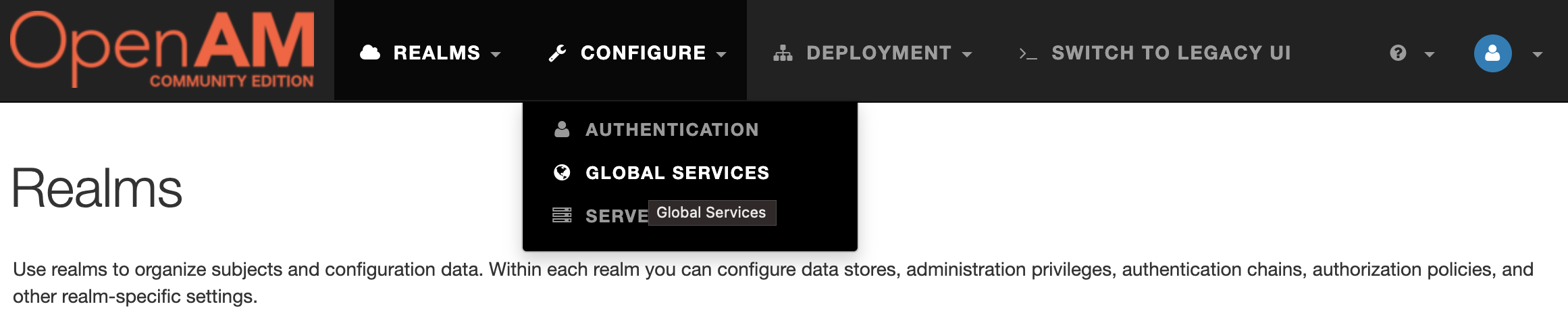
OpenAM Global Services

Next, go to CORS Settings and enable CORS support
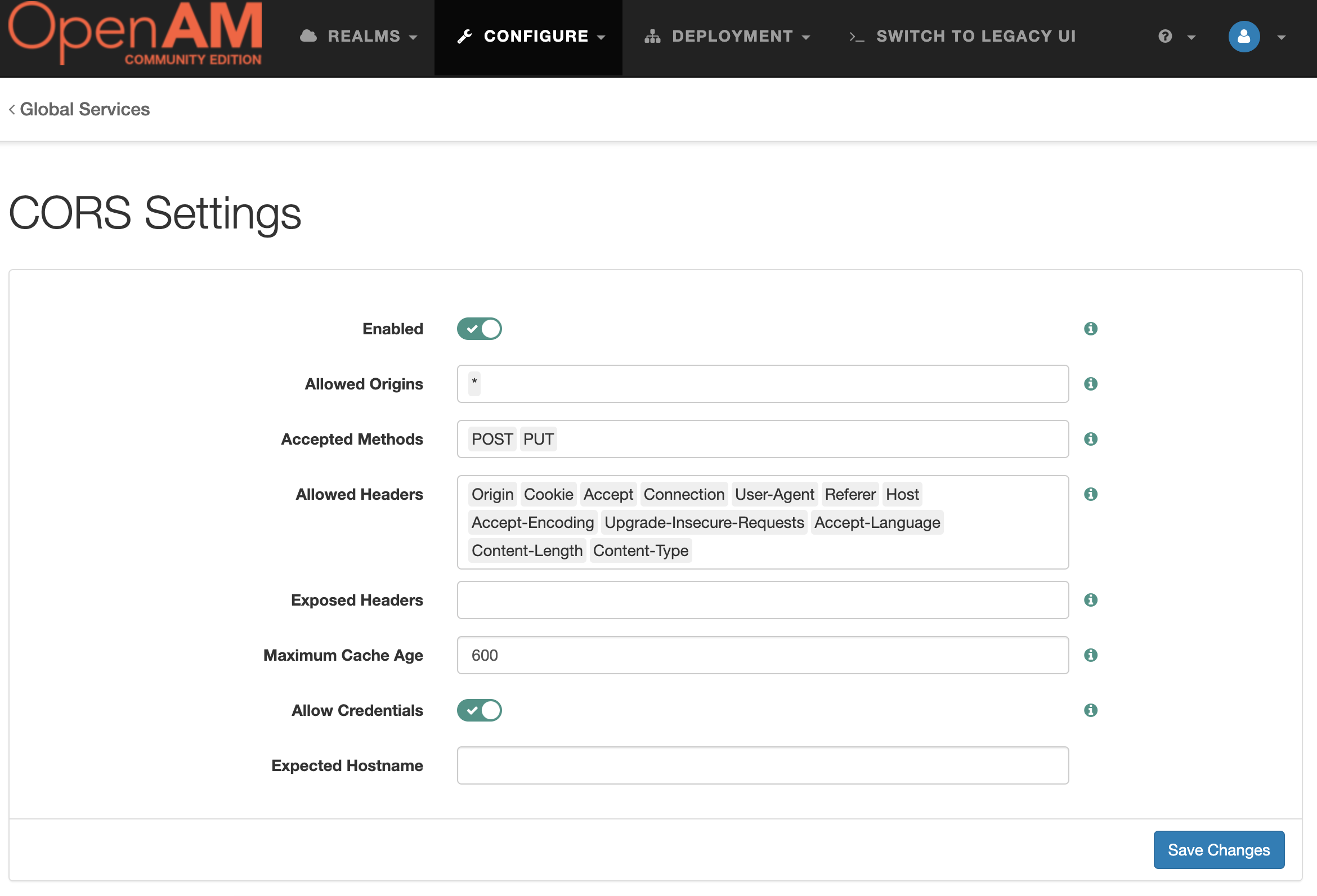
OpenAM CORS settings

Pres the Save Changes button.

Bootstrap OpenAM and OpenDJ Docker Containers How to Pass Additional System Property to CATALINA_OPTS to OpenAM Docker Container

© Open Identity Platform Community