Managing the OpenIDM Repository
OpenIDM stores managed objects, internal users, and configuration objects in a repository. By default, OpenIDM uses OrientDB for its internal repository. In production, you must replace OrientDB with a supported JDBC repository, as described in "Installing a Repository For Production" in the Installation Guide.
This chapter describes the JDBC repository configuration, the use of mappings in the repository, and how to configure a connection to the repository over SSL. It also describes how to interact with the OpenIDM repository over the REST interface.
Understanding the JDBC Repository Configuration File
OpenIDM provides configuration files for each supported JDBC repository, as well as example configurations for other repositories. These configuration files are located in the /path/to/openidm/db/database/conf directory. The configuration is defined in two files:
-
datasource.jdbc-default.json, which specifies the connection details to the repository. -
repo.jdbc.json, which specifies the mapping between OpenIDM resources and the tables in the repository, and includes a number of predefined queries.
Copy the configuration files for your specific database type to your project’s conf/ directory.
Understanding the JDBC Connection Configuration File
The default database connection configuration file for a MySQL database follows:
{
    "driverClass" : "com.mysql.jdbc.Driver",
    "jdbcUrl" : "jdbc:mysql://localhost:3306/openidm?allowMultiQueries=true&characterEncoding=utf8",
    "databaseName" : "openidm",
    "username" : "openidm",
    "password" : "openidm",
    "connectionTimeout" : 30000,
    "connectionPool" : {
        "type" : "bonecp",
        "partitionCount" : 4,
        "maxConnectionsPerPartition" : 25,
        "minConnectionsPerPartition" : 5
    }
}
The configuration file includes the following properties:
driverClass,jndiName, orjtaName-
Depending on the mechanism you use to acquire the data source, set one of these properties:
-
"driverClass" : stringTo use the JDBC driver manager to acquire a data source, set this property, as well as
"jdbcUrl","username", and"password". The driver class must be the fully qualified class name of the database driver to use for your database.Using the JDBC driver manager to acquire a data source is the most likely option, and the only one supported "out of the box". The remaining options in the sample repository configuration file assume that you are using a JDBC driver manager.
Example:
"driverClass" : "com.mysql.jdbc.Driver" -
"jndiName" : stringIf you use JNDI to acquire the data source, set this property to the JNDI name of the data source.
This option might be relevant if you want to run OpenIDM inside your own web container.
Example:
"jndiName" : "jdbc/my-datasource" -
"jtaName" : stringIf you use an OSGi service to acquire the data source, set this property to a stringified version of the OsgiName.
This option would only be relevant in a highly customized deployment, for example, if you wanted to develop your own connection pool.
Example:
"jtaName" : "osgi:service/javax.sql.DataSource/(osgi.jndi.service.name=jdbc/openidm)"
-
jdbcUrl-
The connection URL to the JDBC database. The URL should include all of the parameters required by your database. For example, to specify the encoding in MySQL use
'characterEncoding=utf8'.Example:
"jdbcUrl" : "jdbc:mysql://localhost:3306/openidm?characterEncoding=utf8" databaseName-
The name of the database to which OpenIDM connects. By default, this is
openidm. username-
The username with which to access the JDBC database.
password-
The password with which to access the JDBC database. OpenIDM automatically encrypts clear string passwords. To replace an existing encrypted value, replace the whole
crypto-objectvalue, including the brackets, with a string of the new password. connectionTimeout-
The period of time, in milliseconds, after which OpenIDM should consider an attempted connection to the database to have failed. The default period is 30000 milliseconds (30 seconds).
connectionPool-
Database connection pooling configuration. Currently OpenIDM supports the BoneCP pool library only (
"type" : "bonecp").OpenIDM uses the default BoneCP configuration, except for the following parameters. You might need to adjust these parameters, according to your database workload:
-
partitionCountThe partition count determines the lock segmentation in the connection pool. Each incoming connection request acquires a connection from a pool that has thread-affinity. Threads are dispatched to the appropriate lock by using a value of
threadId % partitionCount. A partition count that is greater than 1 protects the connection pool with more than a single lock, thereby reducing lock contention.By default, BoneCP creates a single partition. The JDBC Connection Configuration Files provided with OpenIDM set the partition count to
4. -
maxConnectionsPerPartitionThe maximum number of connections to create per partition. The maximum number of database connections is equal to
partitionCount * maxConnectionsPerPartition. BoneCP does not create all these connections at once, but starts off with theminConnectionsPerPartitionand gradually increases connections as required.By default, BoneCP creates a maximum of
20connections per partition. The JDBC Connection Configuration Files provided with OpenIDM set the maximum connections per partition to25. -
minConnectionsPerPartitionThe number of connections to start off with, per partition. The minimum number of database connections is equal to
partitionCount * minConnectionsPerPartition.By default, BoneCP starts with a minimum of
1connection per partition. The JDBC Connection Configuration Files provided with OpenIDM set the minimum connections per partition to5.
For more information about the BoneCP configuration parameters, see http://www.jolbox.com/configuration.html.
-
Understanding the Database Table Configuration
An excerpt from an database table configuration file follows:
{
    "dbType" : "MYSQL",
    "useDataSource" : "default",
    "maxBatchSize" : 100,
    "maxTxRetry" : 5,
    "queries" : {...},
    "commands" : {...},
    "resourceMapping" : {...}
}
The configuration file includes the following properties:
"dbType": string, optional-
The type of database. The database type might affect the queries used and other optimizations. Supported database types include MYSQL, SQLSERVER, ORACLE, MS SQL, and DB2.
"useDataSource": string, optional-
This option refers to the connection details that are defined in the configuration file, described previously. The default configuration file is named
datasource.jdbc-default.json. This is the file that is used by default (and the value of the"useDataSource"is therefore"default"). You might want to specify a different connection configuration file, instead of overwriting the details in the default file. In this case, set your connection configuration filedatasource.jdbc-name.jsonand set the value of"useDataSource"to whatever name you have used. "maxBatchSize"-
The maximum number of SQL statements that will be batched together. This parameter allows you to optimize the time taken to execute multiple queries. Certain databases do not support batching, or limit how many statements can be batched. A value of
1disables batching. "maxTxRetry"-
The maximum number of times that a specific transaction should be attempted before that transaction is aborted.
"queries"-
Enables you to create predefined queries that can be referenced from the configuration. For more information about predefined queries, see "Parameterized Queries". The queries are divided between those for
"genericTables"and those for"explicitTables".The following sample extract from the default MySQL configuration file shows two credential queries, one for a generic mapping, and one for an explicit mapping. Note that the lines have been broken here for legibility only. In a real configuration file, the query would be all on one line.
"queries" : {
    "genericTables" : {
        "credential-query" : "SELECT fullobject FROM ${_dbSchema}.${_mainTable}
          obj INNER JOIN ${_dbSchema}.${_propTable} prop ON
          obj.id = prop.${_mainTable}_id INNER JOIN ${_dbSchema}.objecttypes
          objtype ON objtype.id = obj.objecttypes_id WHERE prop.propkey='/userName'
          AND prop.propvalue = ${username} AND objtype.objecttype = ${_resource}",
        ...
    "explicitTables" : {
        "credential-query" : "SELECT * FROM ${_dbSchema}.${_table}
          WHERE objectid = ${username} and accountStatus = 'active'",
        ...
    }
}
Options supported for query parameters include the following:
-
A default string parameter, for example:
openidm.query("managed/user", { "_queryId": "for-userName", "uid": "jdoe" });For more information about the query function, see "openidm.query(resourceName, params, fields)".
-
A list parameter (
${list:propName}).Use this parameter to specify a set of indeterminate size as part of your query. For example:
WHERE targetObjectId IN (${list:filteredIds}) -
An integer parameter (
${int:propName}).Use this parameter if you need query for non-string values in the database. This is particularly useful with explicit tables.
-
"commands"-
Specific commands configured for to managed the database over the REST interface. Currently, only two default commands are included in the configuration:
-
purge-by-recon-expired -
purge-by-recon-number-of
Both of these commands assist with removing stale reconciliation audit information from the repository, and preventing the repository from growing too large. For more information about repository commands, see "Running Queries and Commands on the Repository".
-
"resourceMapping"-
Defines the mapping between OpenIDM resource URIs (for example,
managed/user) and JDBC tables. The structure of the resource mapping is as follows:"resourceMapping" : { "default" : { "mainTable" : "genericobjects", "propertiesTable" : "genericobjectproperties", "searchableDefault" : true }, "genericMapping" : {...}, "explicitMapping" : {...} }The default mapping object represents a default generic table in which any resource that does not have a more specific mapping is stored.
The generic and explicit mapping objects are described in the following section.
Using Explicit or Generic Object Mapping With a JDBC Repository
For JDBC repositories, there are two ways of mapping OpenIDM objects to the database tables:
-
Generic mapping, which allows arbitrary objects to be stored without special configuration or administration.
-
Explicit mapping, which allows for optimized storage and queries by explicitly mapping objects to tables and columns in the database.
These two mapping strategies are discussed in the following sections.
Using Generic Mappings
Generic mapping speeds up development, and can make system maintenance more flexible by providing a more stable database structure. However, generic mapping can have a performance impact and does not take full advantage of the database facilities (such as validation within the database and flexible indexing). In addition, queries can be more difficult to set up.
In a generic table, the entire object content is stored in a single large-character field named fullobject in the mainTable for the object. To search on specific fields, you can read them by referring to them in the corresponding properties table for that object. The disadvantage of generic objects is that, because every property you might like to filter by is stored in a separate table, you must join to that table each time you need to filter by anything.
The following diagram shows a pared down database structure for the default generic table, and indicates the relationship between the main table and the corresponding properties table for each object.
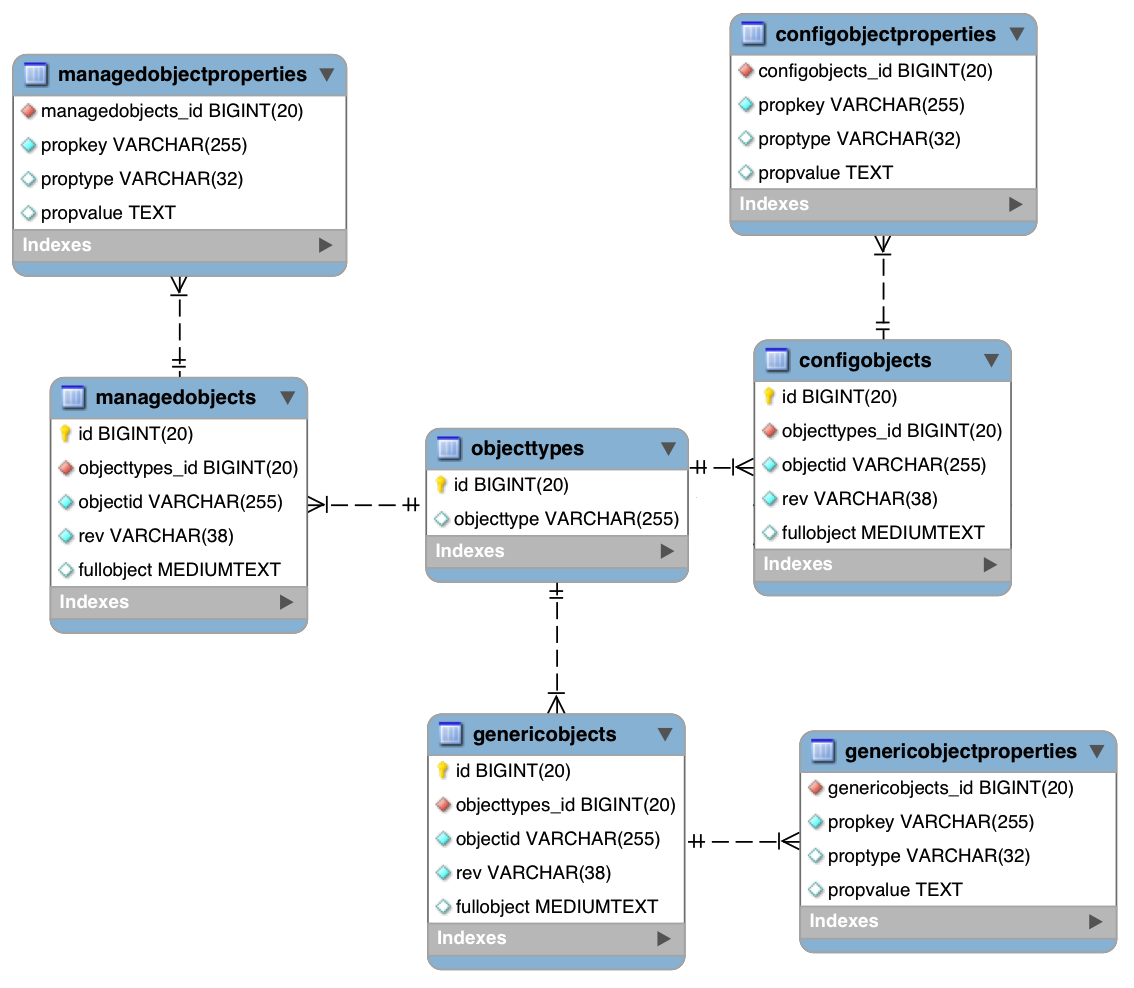
These separate tables can make the query syntax particularly complex. For example, a simple query to return user entries based on a user name would need to be implemented as follows:
SELECT fullobject FROM ${_dbSchema}.${_mainTable} obj INNER JOIN ${_dbSchema}.${_propTable} prop
    ON obj.id = prop.${_mainTable}_id INNER JOIN ${_dbSchema}.objecttypes objtype
    ON objtype.id = obj.objecttypes_id WHERE prop.propkey='/userName' AND prop.propvalue = ${uid}
    AND objtype.objecttype = ${_resource}",
The query can be broken down as follows:
-
Select the full object from the main table:
SELECT fullobject FROM ${_dbSchema}.${_mainTable} obj -
Join to the properties table and locate the object with the corresponding ID:
INNER JOIN ${_dbSchema}.${_propTable} prop ON obj.id = prop.${_mainTable}_id -
Join to the object types table to restrict returned entries to objects of a specific type. For example, you might want to restrict returned entries to
managed/userobjects, ormanaged/roleobjects:INNER JOIN ${_dbSchema}.objecttypes objtype ON objtype.id = obj.objecttypes_id -
Filter records by the
userNameproperty, where the userName is equal to the specifieduidand the object type is the specified type (in this case, managed/user objects):WHERE prop.propkey='/userName' AND prop.propvalue = ${uid} AND objtype.objecttype = ${_resource}",The value of the
uidfield is provided as part of the query call, for example:openidm.query("managed/user", { "_queryId": "for-userName", "uid": "jdoe" });
Tables for user definable objects use a generic mapping by default.
The following sample generic mapping object illustrates how managed/ objects are stored in a generic table:
"genericMapping" : {
      "managed/*" : {
          "mainTable" : "managedobjects",
          "propertiesTable" : "managedobjectproperties",
          "searchableDefault" : true,
          "properties" : {
              "/picture" : {
                  "searchable" : false
              }
          }
      }
},mainTable(string, mandatory)-
Indicates the main table in which data is stored for this resource.
The complete object is stored in the
fullobjectcolumn of this table. The table includes anentityTypeforeign key that is used to distinguish the different objects stored within the table. In addition, the revision of each stored object is tracked, in therevcolumn of the table, enabling multi version concurrency control (MVCC). For more information, see "Manipulating Managed Objects Programmatically". propertiesTable(string, mandatory)-
Indicates the properties table, used for searches.
The contents of the properties table is a defined subset of the properties, copied from the character large object (CLOB) that is stored in the
fullobjectcolumn of the main table. The properties are stored in a one-to-many style separate table. The set of properties stored here is determined by the properties that are defined assearchable.The stored set of searchable properties makes these values available as discrete rows that can be accessed with SQL queries, specifically, with
WHEREclauses. It is not otherwise possible to query specific properties of the full object.The properties table includes the following columns:
-
${_mainTable}_idcorresponds to theidof the full object in the main table, for example,manageobjects_id, orgenericobjects_id. -
propkeyis the name of the searchable property, stored in JSON pointer format (for example/mail). -
proptypeis the data type of the property, for examplejava.lang.String. The property type is obtained from the Class associated with the value. -
propvalueis the value of property, extracted from the full object that is stored in the main table.Regardless of the property data type, this value is stored as a string, so queries against it should treat it as such.
-
searchableDefault(boolean, optional)-
Specifies whether all properties of the resource should be searchable by default. Properties that are searchable are stored and indexed. You can override the default for individual properties in the
propertieselement of the mapping. The preceding example indicates that all properties are searchable, with the exception of thepictureproperty.For large, complex objects, having all properties searchable implies a substantial performance impact. In such a case, a separate insert statement is made in the properties table for each element in the object, every time the object is updated. Also, because these are indexed fields, the recreation of these properties incurs a cost in the maintenance of the index. You should therefore enable
searchableonly for those properties that must be used as part of a WHERE clause in a query. properties-
Lists any individual properties for which the searchable default should be overridden.
Note that if an object was originally created with a subset of
searchableproperties, changing this subset (by adding a newsearchableproperty in the configuration, for example) will not cause the existing values to be updated in the properties table for that object. To add the new property to the properties table for that object, you must update or recreate the object.
Improving Search Performance for Generic Mappings
All properties in a generic mapping are searchable by default. In other words, the value of the searchableDefault property is true unless you explicitly set it to false. Although there are no individual indexes in a generic mapping, you can improve search performance by setting only those properties that you need to search as searchable. Properties that are searchable are created within the corresponding properties table. The properties table exists only for searches or look-ups, and has a composite index, based on the resource, then the property name.
The sample JDBC repository configuration files (db/database/conf/repo.jdbc.json) restrict searches to specific properties by setting the searchableDefault to false for managed/user mappings. You must explicitly set searchable to true for each property that should be searched. The following sample extract from repo.jdbc.json indicates searches restricted to the userName property:
"genericMapping" : {
    "managed/user" : {
        "mainTable" : "manageduserobjects",
        "propertiesTable" : "manageduserobjectproperties",
        "searchableDefault" : false,
        "properties" : {
            "/userName" : {
            "searchable" : true
            }
        }
    }
},
With this configuration, OpenIDM creates entries in the properties table only for userName properties of managed user objects.
If the global searchableDefault is set to false, properties that do not have a searchable attribute explicitly set to true are not written in the properties table.
Using Explicit Mappings
Explicit mapping is more difficult to set up and maintain, but can take complete advantage of the native database facilities.
An explicit table offers better performance and simpler queries. There is less work in the reading and writing of data, since the data is all in a single row of a single table. In addition, it is easier to create different types of indexes that apply to only specific fields in an explicit table. The disadvantage of explicit tables is the additional work required in creating the table in the schema. Also, because rows in a table are inherently more simple, it is more difficult to deal with complex objects. Any non-simple key:value pair in an object associated with an explicit table is converted to a JSON string and stored in the cell in that format. This makes the value difficult to use, from the perspective of a query attempting to search within it.
Note that it is possible to have a generic mapping configuration for most managed objects, and to have an explicit mapping that overrides the default generic mapping in certain cases. The sample configuration provided in /path/to/openidm/db/mysql/conf/repo.jdbc-mysql-explicit-managed-user.json has a generic mapping for managed objects, but an explicit mapping for managed user objects.
OpenIDM uses explicit mapping for internal system tables, such as the tables used for auditing.
Depending on the types of usage your system is supporting, you might find that an explicit mapping performs better than a generic mapping. Operations such as sorting and searching (such as those performed in the default UI) tend to be faster with explicitly-mapped objects, for example.
The following sample explicit mapping object illustrates how internal/user objects are stored in an explicit table:
"explicitMapping" : {
    "internal/user" : {
        "table" : "internaluser",
        "objectToColumn" : {
            "_id" : "objectid",
            "_rev" : "rev",
            "password" : "pwd",
            "roles" : "roles"
        }
    },
    ...
}<resource-uri>(string, mandatory)-
Indicates the URI for the resources to which this mapping applies, for example,
"internal/user". table(string, mandatory)-
The name of the database table in which the object (in this case internal users) is stored.
objectToColumn(string, mandatory)-
The way in which specific managed object properties are mapped to columns in the table.
The mapping can be a simple one to one mapping, for example
"userName": "userName",or a more complex JSON map or list. When a column is mapped to a JSON map or list, the syntax is as shown in the following examples:"messageDetail" : { "column" : "messagedetail", "type" : "JSON_MAP" }or
"roles": { "column" : "roles", "type" : "JSON_LIST" }
|
Support for data types in columns is restricted to If the conversion does work, the format might not be the same when it is read from the database as it was when it was saved. For example, your database might parse a date in the format |
Configuring SSL with a JDBC Repository
To configure SSL with a JDBC repository, you need to import the CA certificate file for the server into the OpenIDM truststore. That certificate file could have a name like ca-cert.pem. If you have a different genuine or self-signed certificate file, substitute accordingly.
To import the CA certificate file into the OpenIDM truststore, use the keytool command native to the Java environment, typically located in the /path/to/jre-version/bin directory. On some UNIX-based systems, /usr/bin/keytool may link to that command.
-
Import the
ca-cert.pemcertificate into the OpenIDM truststore file with the following command:$ keytool \ -importcert \ -trustcacerts \ -file ca-cert.pem \ -alias "DB cert" \ -keystore /path/to/openidm/security/truststoreYou are prompted for a keystore password. You must use the same password as is shown in the your project’s
conf/boot/boot.propertiesfile. The default truststore password is:openidm.truststore.password=changeitAfter entering a keystore password, you are prompted with the following question. Assuming you have included an appropriate
ca-cert.pemfile, enteryes.Trust this certificate? [no]: -
Open the repository connection configuration file,
datasource.jdbc-default.json.Look for the
jdbcUrlproperties. You should see ajdbcURL. Add a?characterEncoding=utf8&useSSL=trueto the end of that URL.The
jdbcUrlthat you configure depends on your JDBC repository. The following entries correspond to appropriatejdbcURLproperties for MySQL, MSSQL, PostgreSQL, and Oracle DB, respectively:"jdbcUrl" : "jdbc:mysql://localhost:3306/openidm?characterEncoding=utf8&useSSL=true""jdbcUrl" : "jdbc:sqlserver://localhost:1433;instanceName=default; databaseName=openidm;applicationName=OpenIDM?characterEncoding=utf8&useSSL=true""jdbcUrl" : "jdbc:postgresql://localhost:5432/openidm?characterEncoding=utf8&useSSL=true""jdbcUrl" : "jdbc:oracle:thin:@//localhost:1521/openidm?characterEncoding=utf8&useSSL=true" -
Open your project’s
conf/config.propertiesfile. Find theorg.osgi.framework.bootdelegationproperty. Make sure that property includes a reference to thejavax.net.ssloption. If you started with the default version ofconfig.propertiesthat line should now read as follows:org.osgi.framework.bootdelegation=sun.*,com.sun.*,apple.*,com.apple.*,javax.net.ssl -
Open your project’s
conf/system.propertiesfile. Add the following line to that file. If appropriate, substitute the path to your own truststore:# Set the truststore javax.net.ssl.trustStore=&{launcher.install.location}/security/truststoreEven if you are setting up this instance of OpenIDM as part of a cluster, you still need to configure this initial truststore. After this instance joins a cluster, the SSL keys in this particular truststore are replaced. For more information on clustering, see "Configuring OpenIDM for High Availability".
Interacting With the Repository Over REST
The OpenIDM repository is accessible over the REST interface, at the openidm/repo endpoint.
In general, you must ensure that external calls to the openidm/repo endpoint are protected. Native queries and free-form command actions on this endpoint are disallowed by default, as the endpoint is vulnerable to injection attacks. For more information, see "Running Queries and Commands on the Repository".
Changing the Repository Password
In the case of an embedded OrientDB repository, the default username and password are admin and admin. You can change the default password, by sending the following POST request on the repo endpoint:
$ curl \
 --cacert self-signed.crt \
 --header "X-OpenIDM-Username: openidm-admin" \
 --header "X-OpenIDM-Password: openidm-admin" \
 --request POST \
 "https://localhost:8443/openidm/repo?_action=updateDbCredentials&user=admin&password=newPassword"
You must restart OpenIDM for the change to take effect.
Running Queries and Commands on the Repository
Free-form commands and native queries on the repository are disallowed by default and should remain so in production to reduce the risk of injection attacks.
Common filter expressions, called with the _queryFilter keyword, enable you to form arbitrary queries on the repository, using a number of supported filter operations. For more information on these filter operations, see "Constructing Queries". Parameterized or predefined queries and commands (using the _queryId and _commandId keywords) can be authorized on the repository for external calls if necessary. For more information, see "Parameterized Queries".
Running commands on the repository is supported primarily from scripts. Certain scripts that interact with the repository are provided by default, for example, the scripts that enable you to purge the repository of reconciliation audit records.
You can define your own commands, and specify them in the database table configuration file (either repo.orientdb.json or repo.jdbc.json). In the following simple example, a command is called to clear out UI notification entries from the repository, for specific users.
The command is defined in the repository configuration file, as follows:
"commands" : {
"delete-notifications-by-id" : "DELETE FROM ui_notification WHERE receiverId = ${username}"
...
},
The command can be called from a script, as follows:
openidm.action("repo/ui/notification", "command", {},
{ "commandId" : "delete-notifications-by-id", "userName" : "scarter"});
Exercise caution when allowing commands to be run on the repository over the REST interface, as there is an attached risk to the underlying data.