Additional Audit Details
From OpenIDM 4.5.1-20 onwards, the audit service supports audit event handlers that connect to third-party tools. As described in "Configuring Audit Event Handlers", an audit event handler manages audit events, sends audit output to a defined location, and controls their format.
As we do not endorse or support the use of any third-party tools, we present the handlers for such tools in this separate appendix. For the purpose of this appendix, we assume that the third-party tool is configured on the same system as your instance of OpenIDM. We realize that you may prefer to set up a third-party tool on a remote system.
If you have configured a third-party tool on a remote system, the reliability of audit data may vary, depending on the reliability of your network connection. However, you can limit the risks with appropriate buffer settings, which can mitigate issues related to your network connection, free space on your system, and related resources such as RAM. (This is not an exhaustive list.)
Elasticsearch Audit Event Handler
Starting with OpenIDM 4.5.0, you can configure the Elasticsearch audit event handler. It allows you to log OpenIDM events in file formats compatible with the Elasticsearch search server.
Installing and Configuring Elasticsearch
This appendix assumes that you are installing Elasticsearch on the same system as OpenIDM. For Elasticsearch downloads and installation instructions, see the Elasticsearch Getting Started document.
You can set up Elasticsearch Shield with basic authentication to help protect your audit logs. To do so, read the following Elasticsearch document on Getting Started with Shield. Follow up with the following Elasticsearch document on how you can Control Access with Basic Authentication.
You can configure SSL for Elasticsearch Shield. For more information, see the following Elasticsearch document: Setting Up SSL/TLS on a Cluster.
Import the certificate that you use for Elasticsearch into OpenIDM’s truststore, with the following command:
$ keytool \
-import \
-trustcacerts \
-alias elasticsearch \
-file /path/to/cacert.pem \
-keystore /path/to/openidm/security/truststore
Once imported, you can activate the useSSL option in the audit.json file. If you created an Elasticsearch Shield username and password, you can also associate that information with the username and password entries in that same audit.json file.
Creating an Audit Index for Elasticsearch
If you want to create an audit index for Elasticsearch, you must set it up before starting OpenIDM, for the audit event topics described in this section: "OpenIDM Audit Event Topics".
To do so, execute the REST call shown in the following audit index file. Note the properties that are not_analyzed. Such fields are not indexed within Elasticsearch.
The REST call in the audit index file includes the following URL:
http://myUsername:myPassword@localhost:9200/auditThat URL assumes that your Elasticsearch deployment is on the localhost system, accessible on default port 9200, configured with an indexName of audit.
It also assumes that you have configured basic authentication on Elasticsearch Shield, with a username of myUsername and a password of myPassword.
If any part of your Elasticsearch deployment is different, revise the URL accordingly.
|
Do not transmit usernames and passwords over an insecure connection. Enable the |
Configuring the Elasticsearch Audit Event Handler
"Configuring the Elasticsearch Audit Event Handler via the Admin UI" and "Configuring the Elasticsearch Audit Event Handler in audit.json" illustrate how you can configure the Elasticsearch Audit Event Handler.
If you activate the Elasticsearch audit event handler, we recommend that you enable buffering for optimal performance, by setting:
"enabled" : true,The buffering settings shown are not recommendations for any specific environment. If performance and audit data integrity are important in your environment, you may need to adjust these numbers.
If you choose to protect your Elasticsearch deployment with the plugin known as Shield, and configure the ability to Control Access with Basic Authentication, you can substitute your Elasticsearch Shield admin or power_user credentials for myUsername and myPassword.
If you activate the useSSL option, install the SSL certificate that you use for Elasticsearch into the OpenIDM keystore. For more information, see the following section: "Accessing the Security Management Service".
Configuring the Elasticsearch Audit Event Handler via the Admin UI
To configure this event handler through the Admin UI, click Configure > System Preferences > Audit. Select ElasticsearchAuditEventHandler from the drop-down text box, click Add Event Handler, and configure it in the window that appears.
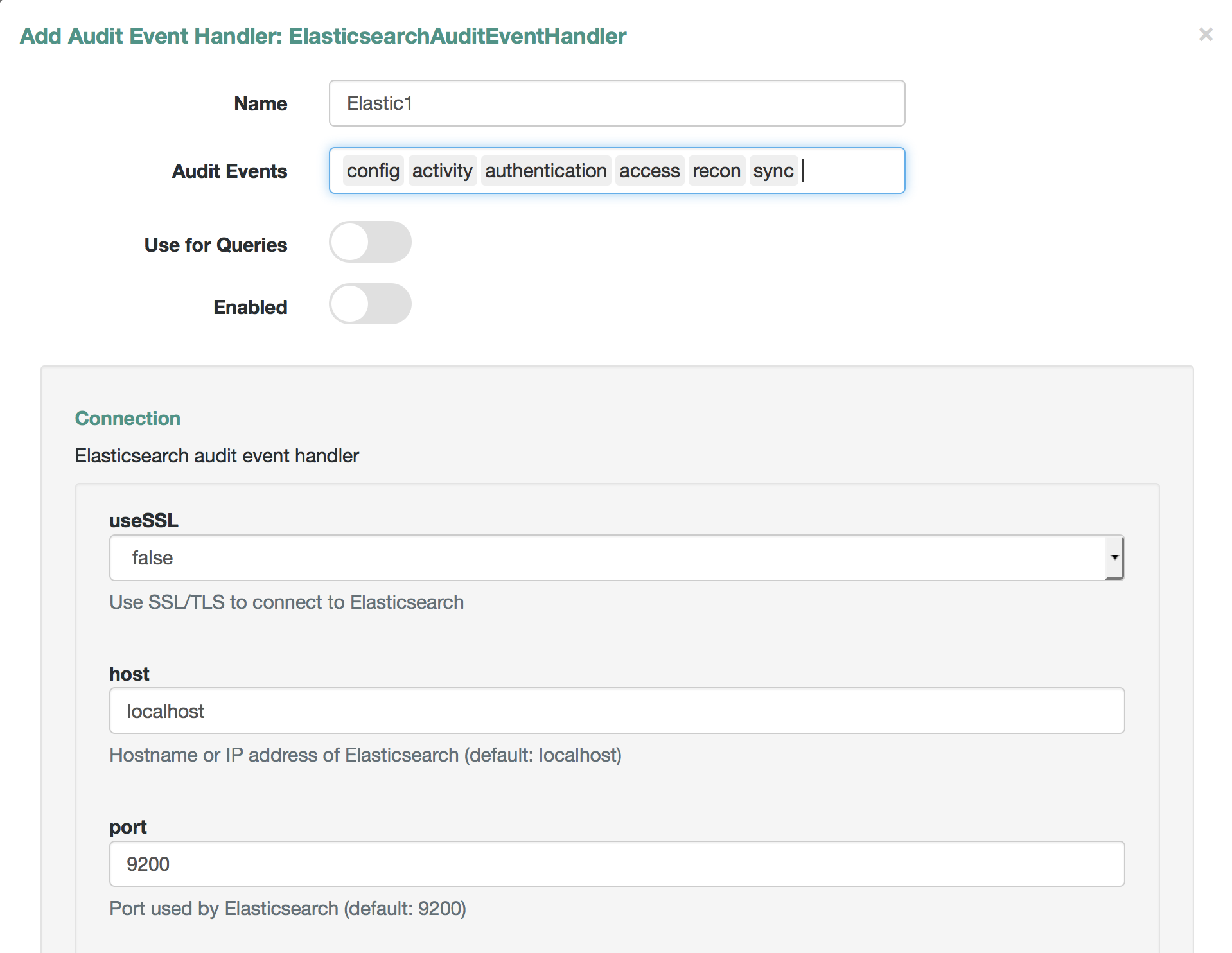
For a list of properties, see "Common Audit Event Handler Property Configuration".
Configuring the Elasticsearch Audit Event Handler in audit.json
Alternatively, you can configure the Elasticsearch audit event handler in the audit.json file for your project.
The following code is an excerpt from the audit.json file, with Elasticsearch configured as the handler for audit queries:
{
   "auditServiceConfig" : {
      "handlerForQueries" : "elasticsearch",
      "availableAuditEventHandlers" : [
         "org.forgerock.audit.handlers.elasticsearch.ElasticsearchAuditEventHandler",
         "org.forgerock.audit.handlers.csv.CsvAuditEventHandler",
         "org.forgerock.openidm.audit.impl.RepositoryAuditEventHandler",
         "org.forgerock.openidm.audit.impl.RouterAuditEventHandler"
      ],
You should also set up configuration for the Elasticsearch event handler. The entries shown are defaults, and can be configured. In fact, if you have set up Elasticsearch Shield, with or without SSL/TLS, as described in "Installing and Configuring Elasticsearch", you should change some of these defaults.
"eventHandlers" : [
   {
      "name" : "elasticsearch"
      "class" : "org.forgerock.audit.handlers.elasticsearch.ElasticsearchAuditEventHandler",
      "config" : {
         "connection" : {
            "useSSL" : false,
            "host" : "localhost",
            "port" : "9200"
         },
         "indexMapping" : {
            "indexName" : "audit"
         },
         "buffering" : {
            "enabled" : false,
            "maxSize" : 20000,
            "writeInterval" : "1 second",
            "maxBatchedEvents" : "500"
         }
         "topics" : [
            "access",
            "activity",
            "recon",
            "sync",
            "authentication",
            "config"
         ]
      }
   }
],
If you set useSSL to true, add the following properties to the connection code block:
"username" : "myUsername",
"password" : "myPassword",
For more information on the other options shown in audit.json, see "Common Audit Event Handler Property Configuration".
Querying and Reading Elasticsearch Audit Events
By default, Elasticsearch uses pagination. As noted in the following Elasticsearch document on Pagination, queries are limited to the first 10 results.
For example, the following query is limited to the first 10 results:
$ curl \
--header "X-OpenIDM-Username: openidm-admin" \
--header "X-OpenIDM-Password: openidm-admin" \
--header "Content-Type: application/json" \
--request GET \
"http://localhost:8080/openidm/audit/access?_queryFilter=true"
To override the limit of 10 results, follow the guidance shown in "Paging and Counting Query Results" for pageSize.
To set up a queryFilter that uses a "starts with" sw or "equals" eq comparison expression, you will need to set it up as a not_analyzed string field, as described in the following Elasticsearch document on Term Query.. You should also review the section on "Comparison Expressions". If you haven’t already done so, you may need to modify and rerun the REST call described in "Creating an Audit Index for Elasticsearch".
The queryFilter output should include UUIDs as id values for each audit event. To read audit data for that event, include that UUID in the URL. For example, the following REST call specifies an access event, which includes data on the client:
$ curl \
--header "X-OpenIDM-Username: openidm-admin" \
--header "X-OpenIDM-Password: openidm-admin" \
--header "Content-Type: application/json" \
--request GET
"http://localhost:8080/openidm/audit/access/75ca07f5-836c-4e7b-beaa-ae968325a529-622"
Audit Configuration Schema
The following tables depict schema for the six audit event topics used by OpenIDM. Each topic is associated with the following files that you can find in the openidm/audit directory:
-
access.csv: see "Access Event Topic Properties" -
activity.csv: see "Activity Event Topic Properties" -
authentication.csv: see "Authentication Event Topic Properties" -
config.csv: see "Configuration Event Topic Properties" -
recon.csv: see "Reconciliation Event Topic Properties" -
sync.csv: see "Synchronization Event Topic Properties"
If you open the CSV files from that directory in a spreadsheet application, those files can help you read through the tables shown in this appendix.
OpenIDM Specific Audit Event Topics
| Event Property | Description |
|---|---|
|
UUID for the message object, such as |
|
The UUID of the transaction; you may see the same ID in different audit event topics. |
|
The time that OpenIDM logged the message, in UTC format; for example |
|
The name of the audit event: |
|
User ID |
|
A unique value for an object being tracked |
|
Reconciliation action, depicted as a CREST action. For more information, see "Synchronization Actions" |
|
The stack trace of the exception |
|
The link qualifier applied to the action; For more information, see "Mapping a Single Source Object to Multiple Target Objects" |
|
The name of the mapping used for the synchronization operation, defined in |
|
Description of the synchronization action |
|
Details from the synchronization run, shown as CREST output |
|
The synchronization situation described in "Synchronization Situations" |
|
The object ID on the source system, such as |
|
Reconciliation result status, such as SUCCESS or FAILURE |
|
The object ID on the target system, such as |
|
What OpenIDM is reconciling, |
|
When the |
|
The reconciliation action, typically |
|
The type of reconciliation log entry, such as |
|
UUID for the reconciliation operation |
| Event Property | Description |
|---|---|
|
UUID for the message object, such as |
|
The UUID of the transaction; you may see the same ID in different audit event topics. |
|
The time that OpenIDM logged the message, in UTC format; for example |
|
The name of the audit event: |
|
User ID |
|
A unique value for an object being tracked |
|
Synchronization action, depicted as a CREST action. For more information, see "Synchronization Actions" |
|
The stack trace of the exception |
|
The link qualifier applied to the action; For more information, see "Mapping a Single Source Object to Multiple Target Objects" |
|
The name of the mapping used for the synchronization operation, defined in |
|
Description of the synchronization action |
|
Details from the reconciliation run, shown as CREST output |
|
The synchronization situation described in "Synchronization Situations" |
|
The object ID on the source system, such as |
|
Reconciliation result status, such as SUCCESS or FAILURE |
|
The object ID on the target system, such as |
Commons Audit Event Topics
| Event Property | Description |
|---|---|
|
UUID for the message object, such as |
|
The time that OpenIDM logged the message, in UTC format; for example |
|
The name of the audit event: |
|
The UUID of the transaction; you may see the same transaction for the same event in different audit event topics |
|
User ID |
|
A unique value for an object being tracked |
|
IP address of the OpenIDM server |
|
Port number used by the OpenIDM server |
|
Client IP address |
|
Client port number |
|
Protocol for request, typically CREST |
|
Typically a CREST operation |
|
Typically details for an ACTION request |
|
Boolean for request security |
|
HTTP method requested by the client |
|
Path of the HTTP request |
|
Parameters sent in the HTTP request, such as a key/value pair |
|
HTTP headers for the request (optional) |
|
HTTP cookies for the request (optional) |
|
HTTP response headers (optional) |
|
Normally, SUCCESSFUL, FAILED, or null |
|
SUCCESS in |
|
Message associated with |
|
Time to execute the access event |
|
Units for response time |
|
OpenIDM roles associated with the request |
| Event Property | Description |
|---|---|
|
UUID for the message object, such as |
|
The time that OpenIDM logged the message, in UTC format; for example |
|
The name of the audit event: |
|
The UUID of the transaction; you may see the same transaction for the same event in different audit event topics. |
|
User ID |
|
A unique value for the object being tracked |
|
User to run the activity as; may be used in delegated administration |
|
Object identifier, such as |
|
Typically a CREST operation |
|
JSON representation of the object prior to the activity |
|
JSON representation of the object after the activity |
|
Fields that were changed, based on "Watched Fields: Defining Fields to Monitor" |
|
Object revision number |
|
Result, such as SUCCESS |
|
Human readable text about the action |
|
True/False entry on changes to the password |
| Event Property | Description |
|---|---|
|
UUID for the message object, such as |
|
The time that OpenIDM logged the message, in UTC format; for example |
|
The name of the audit event: |
|
The UUID of the transaction; you may see the same transaction for the same event in different audit event topics. |
|
User ID |
|
A unique value for an object being tracked |
|
The result of the transaction, either "SUCCESSFUL", or "FAILED" |
|
An array of the accounts used to authenticate, such as [ "openidm-admin" ] |
|
The complete security context of the authentication operation, including the authenticating ID, the targeted endpoint, the roles applied, and the IP address from which the authentication request was made. |
|
The JSON representation of the authentication session |
| Event Property | Description |
|---|---|
|
UUID for the message object, such as |
|
The time that OpenIDM logged the message, in UTC format; for example |
|
The name of the audit event: |
|
The UUID of the transaction; you may see the same transaction for the same event in different audit event topics. |
|
User ID |
|
A unique value for an object being tracked |
|
User to run the activity as; may be used in delegated administration |
|
Object identifier, such as |
|
Typically a CREST operation |
|
JSON representation of the object prior to the activity |
|
JSON representation of the object after to the activity |
|
Fields that were changed, based on "Watched Fields: Defining Fields to Monitor" |
|
Object revision number |
Audit Event Handler Configuration
When you set up an audit event handler, you can configure several properties. Most of the properties in the following table are used by the CSV audit event handler, and may be configured in the audit configuration file for your project: project-dir/conf/audit.json.
In several cases, the following table does not include an entry for description, as the UI Label / Text is sufficient.
If you’re reviewing this from the OpenIDM Admin UI, click Configure > System Preferences > Audit, and click the edit icon associated with your event handler.
The tables shown in this section reflect the order in which properties are shown in the Admin UI. That order differs when you review the properties in your project’s audit.json file.
| UI Label / Text | audit.json File Label | Description |
|---|---|---|
Name |
|
|
Audit Events |
|
|
Use for Queries |
|
Audit Event Handler to use for Queries |
Enabled |
|
|
n/a |
|
The JSON object used to configure the handler; includes several sub-properties |
Shown only in |
|
The class name in the Java file(s) used to build the handler |
Two properties shown only in the audit.json file for your project are:
-
The class name used to build the handler, which may shown as one of the
availableAuditEventHandlers, as shown in this excerpt from theaudit.jsonfile:"availableAuditEventHandlers" : [ "org.forgerock.audit.handlers.elasticsearch.ElasticsearchAuditEventHandler", "org.forgerock.audit.handlers.csv.CsvAuditEventHandler", "org.forgerock.openidm.audit.impl.RepositoryAuditEventHandler", "org.forgerock.openidm.audit.impl.RouterAuditEventHandler" ], -
The audit event handler
configproperty, which comes after a second instance of the class name of that audit event handler. For an example, see the following excerpt of anaudit.jsonfile:"eventHandlers" : [ { "class" : "org.forgerock.audit.handlers.csv.CsvAuditEventHandler", "config" : { "name" : "csv", "logDirectory" : "&{launcher.working.location}/audit", "topics" : [
The following table includes config properties for the CSV audit event handler. That is different from the audit event topic config property, a category of logging data described in "OpenIDM Audit Event Topics".
| UI Label / Text | audit.json File Label | Description |
|---|---|---|
File Rotation |
|
File rotation options |
rotationEnabled |
|
File rotation: true or false boolean |
maxFileSize |
|
File rotation: Maximum size for an audit file, before rotation is triggered |
rotationFilePrefix |
|
File rotation: Prefix to add to the start of an audit file, after rotation |
Rotation Times |
|
File rotation: Time to trigger, after midnight; may use entries such as 5 seconds, 5 minutes, 5 hours, disabled |
File Rotation Suffix |
|
File rotation: Suffix appended to the end of audit file names |
Rotation Interval |
|
File rotation: Time period between log rotation; may use 5 seconds, 5 minutes, 5 hours, disabled |
File Retention |
|
Specifies how long to keep an audit file |
Maximum Number of Historical Files |
|
File retention: Maximum number of backup audit files |
Maximum Disk Space |
|
File retention: Maximum disk space for audit files |
Minimum Free Space Required |
|
File retention: Minimum disk space required on system with audit files |
rotationRetentionCheckInterval |
|
Interval for periodically checking file rotation and retention policies |
Log Directory |
|
Directory with CSV audit event handler files |
CSV Output Formatting |
|
|
quoteChar |
|
Formatting: Character used around a CSV field |
delimiterChar |
|
Formatting: Character between CSV fields |
End of Line Symbols |
|
Formatting: end of line symbol, such as |
Security: CSV Tamper Evident Configuration |
|
Uses keystore-based signatures |
Enabled |
|
CSV Tamper Evident Configuration: true or false |
Filename |
|
CSV Tamper Evident Configuration: Path to the Java keystore |
Password |
|
CSV Tamper Evident Configuration: Password for the Java keystore |
Keystore Handler |
|
CSV Tamper Evident Configuration: Keystore name |
Signature Interval |
|
CSV Tamper Evident Configuration: Signature generation interval. Default = 1 hour. Units described in "Minimum Admin UI CSV Audit Handler Configuration Requirements". |
Buffering |
|
Configuration for optional event buffering |
enabled |
|
Buffering: true or false |
autoFlush |
|
Buffering: avoids flushing after each event |
Except for the common properties shown in "Common Audit Event Handler Property Configuration", the Repository and Router audit event handlers share one unique property: resourcePath:
{
    "class" : "org.forgerock.openidm.audit.impl.RouterAuditEventHandler",
    "config" : {
        "name" : "router",
        "topics" : [ "access", "activity", "recon", "sync", "authentication", "config" ],
        "resourcePath" : "system/auditdb"
    }
},| UI Label / Text | audit.json File Label | Description |
|---|---|---|
resourcePath |
|
Path to the repository resource |
|
Take care when reading JMS properties in the |
| UI Label / Text | audit.json File Label | Description |
|---|---|---|
Delivery Mode |
|
For messages from a JMS provider; may be |
Session Mode |
|
Acknowledgement mode, in sessions without transactions. May be |
Batch Configuration Settings |
|
Options when batch messaging is enabled |
Batch Enabled |
|
Boolean for batch delivery of audit events |
Capacity |
|
Maximum event count in the batch queue; additional events are dropped |
Thread Count |
|
Number of concurrent threads that pull events from the batch queue |
Maximum Batched Events |
|
Maximum number of events per batch |
Insert Timeout (Seconds) |
|
Waiting period (seconds) for available capacity, when a new event enters the queue |
Polling Timeout (Seconds) |
|
Worker thread waiting period (seconds) for the next event, before going idle |
Shutdown Timeout (Seconds) |
|
Application waiting period (seconds) for worker thread termination |
JNDI Configuration |
|
Java Naming and Directory Interface (JNDI) Configuration Settings |
JNDI Context Properties |
|
Settings to populate the JNDI initial context with |
JNDI Context Factory |
|
Initial JNDI context factory, such as |
JNDI Provider URL |
|
Depends on provider; options include |
JNDI Topic |
|
Relevant JNDI topic; default=audit |
JNDI Topic Name |
|
JNDI lookup name for the JMS topic |
Connection Factory |
|
JNDI lookup name for the JMS connection factory |
The Elasticsearch audit event handler is relatively complex, with config subcategories for connection, indexMapping, buffering, and topics.
| UI Label / Text | audit.json File Label | Description |
|---|---|---|
Connection |
|
Elasticsearch audit event handler |
useSSL |
|
Connection: Use SSL/TLS to connect to Elasticsearch |
host |
|
Connection: Hostname or IP address of Elasticsearch (default: localhost) |
port |
|
Connection: Port used by Elasticsearch (default: 9200) |
username |
|
Connection: Username when Basic Authentication is enabled via Elasticsearch Shield |
password |
|
Connection: Password when Basic Authentication is enabled via Elasticsearch Shield |
Index Mapping |
|
Defines how an audit event and its fields are stored and indexed |
indexName |
|
Index Mapping: Index Name (default=audit). Change if 'audit' conflicts with an existing Elasticsearch index |
Buffering |
|
Configuration for buffering events and batch writes (increases write-throughput) |
enabled |
|
Buffering: recommended |
maxSize |
|
Buffering: Fixed maximum number of events that can be buffered (default: 10000) |
Write Interval |
|
Buffering: Interval (default: 1 s) at which buffered events are written to Elasticsearch (units of 'ms' or 's' are recommended) |
maxBatchedEvents |
|
Buffering: Maximum number of events per batch-write to Elasticsearch for each Write Interval (default: 500) |