Scripted SSH Connector
The scripted SSH connector is an implementation of the Scripted Groovy Connector Toolkit, and is based on Java Secure Channel (JSch) and the Java implementation of the Expect library (Expect4j). This connector enables you to interact with any SSH server, using Groovy scripts for the OpenICF operations.
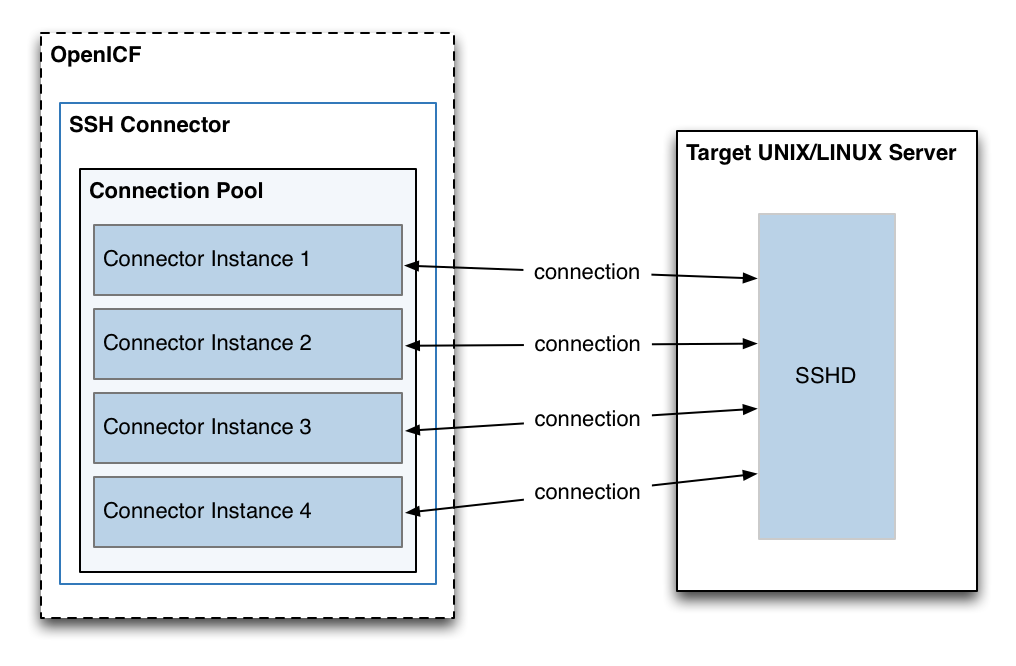
The SSH connector is a poolable connector. This means that each connector instance is placed into a connection pool every time an action is completed. Subsequent actions can re-use connector instances from the connector pool. When a new connector instance is created, a new SSH client connection is created against the target SSH server. This SSH connection remains open as long as the connector instance is in the connection pool. Note that when a new action is performed, it finds the SSH connection in the exact state that it was left by the previous action.
The following image shows the relationship between SSH connector instances and SSH connections to the target server:
Configuring Authentication to the SSH Server
The SSH connector authenticates to the SSH server using either a login/password or a public/private key. The authentication method is specified in the authenticationType property in the connector configuration file (conf/provisioner.openicf-ssh.json).
- Authenticating with a login and password
-
To authenticate with a login and password, set the
authenticationTypetoPASSWORDin the connector configuration file, and set auserandpassword. For example:"configurationProperties" : { ... "authenticationType" : "PASSWORD", "user" : "<USERNAME>", "password" : "<PASSWORD>", ...The password is encrypted when OpenIDM loads the provisioner file.
- Authenticating with a passphrase and private key
-
To authenticate with a secure certificate, generate a pair of public/private keys. Install the public key on the server side and the private key on the OpenIDM host (where the connector is located). Set the
authenticationTypetoPUBKEYin the connector configuration file and set theuser,password,passphraseandprivateKeyproperties. For example:"configurationProperties" : { ... "authenticationType" : "PUBKEY", "user" : "<USERNAME>", "password" : "<PASSWORD>", "passphrase" : "secret", "privateKey" : ["-----BEGIN DSA PRIVATE KEY-----", "MIIBugIBAAKBgQDcB0ztVMCFptpJhqlLNZSdN/5cDL3S7aOVy52Ae7vwwCqQPCQr", "6NyUk+wtkDr07NlYd3sg7a9hbsEnlYChsuX+/WUIvbOKdMfeqcQ+jKK26YdkTCGj", "g86dBj9JYhobSHDoQ9ov31pYN/cfW5BAZwkm9TdpEjHPvMIaOxx7GPGKWwIVALbD", "CEuf1yJk9UB7v0dmJS7bKkbxAoGARcbAuDP4rB6MsgAAkVwf+1sHXEiGPShYWrVV", "qBgCZ/S45ELqUuiaN/1N/nip/Cc/0SBPKqwl7o50CUg9GH9kTAjmXiwmbkwvtUv+", "Xjn5vCHS0w18yc3rGwyr2wj+D9KtDLFJ8+T5HmsbPoDQ3mIZ9xPmRQuRFfVMd9wr", "DY0Rs7cCgYAxjGjWDSKThowsvOUCiE0ySz6tWggHH3LTrS4Mfh2t0tnbUfrXq2cw", "3CN+T6brgnpYbyX5XI17p859C+cw90MD8N6vvBxaN8QMDRFk+hHNUeSy8gXeem9x", "O0vdIxCgKvA4dh5nSVb5VGKENEGNEHRlYxEPzbqlPa/C/ZvzIvdKXQIUQMoidPFC", "n9z+mE2dAADnPf2m9vk=", "-----END DSA PRIVATE KEY-----" ], ...The default value for the
passphraseproperty isnull. If you do not set a passphrase for the private key, the passphrase value must be equal to an empty string.You must set a value for the
passwordproperty, because the connector uses sudo to perform actions on the SSH server.The private key (PEM certificate) must be defined as a JSON String array.
The values of the
passphrase,passwordandprivateKeyare encrypted when OpenIDM loads the provisioner file.
Configuring the SSH Connector
OpenIDM provides a sample connector configuration (provisioner.openicf-ssh.json) in the /path/to/openidm/samples/ssh/conf/ directory. You can copy the sample connector configuration to your project’s conf/ directory, and adjust it to match your Kerberos environment.
Set the authentication properties, as described in "Configuring Authentication to the SSH Server". In addition, set at least the following properties:
host-
Specify the hostname or IP address of the SSH server.
port-
Set the port on which the SSH server listens.
Default:
22 user-
The username of the account that connects to the SSH server.
This account must be able to
sshinto the server, with the password provided in the next parameter. password-
The password of the account that is used to connect to the SSH server.
prompt-
A string representing the remote SSH session prompt. This must be the exact prompt string, in the format
username@target:, for exampleadmin@myserver:~$. Include any trailing spaces.
The following list describes the configuration properties of the SSH connector shown in the sample connector configuration file. You can generally use the defaults provided in the sample connector configuration file, in most cases. For a complete list of all the configuration properties of the SSH connector, see "Configuration Properties".
sudoCommand-
A string that shows the full path to the
sudocommand, for example/usr/bin/sudo. echoOff-
If set to
true(the default), the input command echo is disabled. If set tofalse, every character that is sent to the server is sent back to the client in theexpect()call. terminalType-
Sets the terminal type to use for the session. The list of supported types is determined by your Linux/UNIX system. For more information, see the
terminfomanual page ($ man terminfo).Default:
vt102 setLocale-
If set to
true, indicates that the default environment locale should be changed to the value of thelocaleproperty.Default:
false locale-
Sets the locale for the LC_ALL, LANG and LANGUAGE environment variables, if
setLocaleis set totrue.Default:
en_US.utf8 connectionTimeout-
Specifies the connection timeout to the remote server, in milliseconds.
Default:
5000 expectTimeout-
Specifies the timeout used by the
expect()calls in scripts, in milliseconds.Default:
5000 authenticationType-
Sets the authentication type, either
PASSWORDorPUBKEY. For more information, see "Configuring Authentication to the SSH Server".Default:
PASSWORD throwOperationTimeoutException-
If
true, the connector throws an exception when theexpectTimeoutis reached for an operation. Otherwise, the operation fails silently.Default:
true scriptRoots-
The path to the Groovy scripts that will perform the OpenICF operations, relative to your OpenIDM installation directory. The sample connector configuration expects the scripts in
project-dir/tools, so this parameter is set to&{launcher.project.location}/toolsin the sample configuration. classpath-
The directory in which the compiler should look for compiled classes. The default classpath, if not is specified, is
install-dir/lib. reloadScriptOnExecution-
By default, scripts are loaded and compiled when a connector instance is created and initialized. Setting
reloadScriptOnExecutionto true makes the connector load and compile the script every time it is called. Do not set this property totruein a production environment, because it will have a significant impact on performance.Default:
false *ScriptFileName-
The name of the Groovy script that is used for each OpenICF operation.
OpenICF Interfaces Implemented by the SSH Connector
The SSH Connector implements the following OpenICF interfaces.
- Authenticate
-
Provides simple authentication with two parameters, presumed to be a user name and password.
- Create
-
Creates an object and its
uid. - Delete
-
Deletes an object, referenced by its
uid. - Resolve Username
-
Resolves an object by its username and returns the
uidof the object. - Schema
-
Describes the object types, operations, and options that the connector supports.
- Script on Connector
-
Enables an application to run a script in the context of the connector. Any script that runs on the connector has the following characteristics:
-
The script runs in the same execution environment as the connector and has access to all the classes to which the connector has access.
-
The script has access to a
connectorvariable that is equivalent to an initialized instance of the connector. At a minimum, the script can access the connector configuration. -
The script has access to any script-arguments passed in by the application.
-
- Script on Resource
-
Runs a script on the target resource that is managed by this connector.
- Search
-
Searches the target resource for all objects that match the specified object class and filter.
- Sync
-
Polls the target resource for synchronization events, that is, native changes to objects on the target resource.
- Test
-
Tests the connector configuration. Testing a configuration checks all elements of the environment that are referred to by the configuration are available. For example, the connector might make a physical connection to a host that is specified in the configuration to verify that it exists and that the credentials that are specified in the configuration are valid.
This operation might need to connect to a resource, and, as such, might take some time. Do not invoke this operation too often, such as before every provisioning operation. The test operation is not intended to check that the connector is alive (that is, that its physical connection to the resource has not timed out).
You can invoke the test operation before a connector configuration has been validated.
- Update
-
Updates (modifies or replaces) objects on a target resource.