Authentication and Session Module Configuration Details
This appendix includes configuration details for authentication modules described here: "Supported Authentication and Session Modules".
Authentication modules, as configured in the authentication.json file, include a number of properties. Except for the "OPENAM_SESSION Module Configuration Options", Those properties are listed in the following tables:
| Authentication Property | Property as Listed in the Admin UI | Description |
|---|---|---|
|
(not shown) |
Used by the Jetty Web server to service SSL requests. |
|
(not shown) |
Defaults to |
|
(not shown) |
Defaults to |
|
(not shown) |
Defaults to |
|
(not shown) |
Defaults to |
|
Max Token Life (in seconds) |
Maximum time before a session is cancelled. Note the different units for the property and the UI. |
|
Token Idle Time (in seconds) |
Maximum time before an idle session is cancelled. Note the different units for the property and the UI. |
|
Session Only |
Whether the session continues after browser restarts. |
| Authentication Property | Property as Listed in the Admin UI | Description |
|---|---|---|
|
Module Enabled |
Does OpenIDM use the module |
|
Query on Resource |
Endpoint hard coded to user |
|
Static User Name |
Default for the static user, |
|
Static User Password |
Default for the static user, |
|
Static User Role |
Normally set to |
The following table applies to several authentication modules:
-
Managed User -
Internal User -
Client Cert -
Passthrough -
IWAThe IWA module includes several Kerberos-related properties listed at the end of the table.
| Authentication Property | Property as Listed in the Admin UI | Description |
|---|---|---|
|
Module Enabled |
Does OpenIDM use the module |
|
Query on Resource |
Endpoint to query |
|
Use Query ID |
A defined |
|
Default User Roles |
Normally blank for managed users |
|
Authentication ID |
Defines how account credentials are derived from a |
|
User Credential |
Defines how account credentials are derived from a |
|
User Roles |
Defines how account roles are derived from a |
|
Group Membership |
Provides more information for calculated roles |
|
Group Role Mapping |
Provides more information for calculated roles |
|
Group Comparison Method |
Provides more information for calculated roles |
|
Managed User Link |
Applicable mapping (Passthrough module only) |
|
Augment Security Context |
Includes a script that is executed only after a successful authentication request. |
|
Kerberos Service Principal |
(IWA only) For more information, see "Configuring IWA Authentication" |
|
Keytab File Name |
(IWA only) For more information, see "Configuring IWA Authentication" |
|
Kerberos Realm |
(IWA only) For more information, see "Configuring IWA Authentication" |
|
Kerberos Server Name |
(IWA only) For more information, see "Configuring IWA Authentication" |
OPENAM_SESSION Module Configuration Options
The OPENAM_SESSION module uses OpenAM authentication to protect an OpenIDM deployment.
The options shown in the screen are subdivided into basic and advanced properties. You may need to click Advanced Properties to review those details.
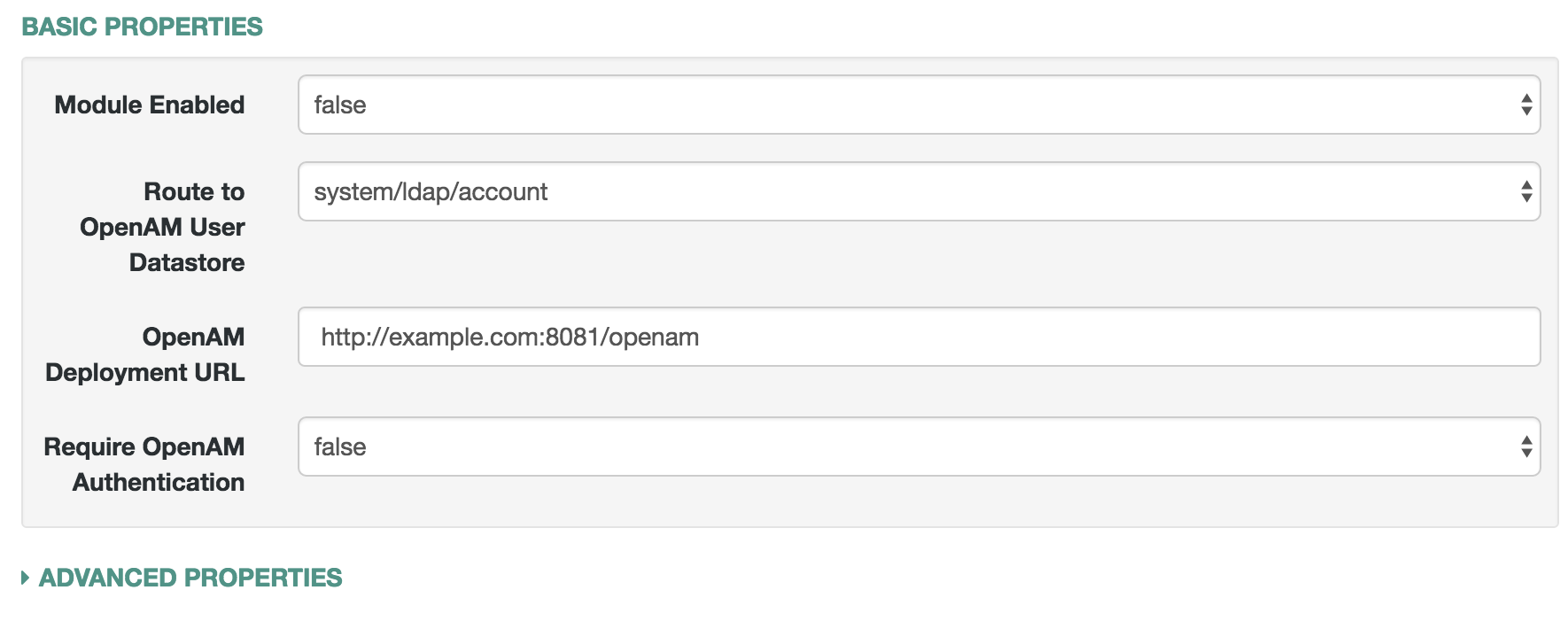
The following table describes the label that you see in the Admin UI, the default value (if any), a brief description, and the associated configuration file. If you need the property name, look at the configuration file.
The default values shown depict what you see if you use the OPENAM_SESSION module with the Full Stack Sample. For more information, see "Full Stack Sample - Using OpenIDM in the Open Identity Platform" in the Samples Guide.
| Admin UI Label | Default | Description | Configuration File |
|---|---|---|---|
Module Enabled |
false |
Whether to enable the module |
authentication.json |
Route to OpenAM User Datastore |
system/ldap/account |
External repository with OpenAM Data Store Information |
authentication.json |
OpenAM Deployment URL |
blank |
FQDN of the deployed instance of OpenAM |
authentication.json |
Require OpenAM Authentication |
false |
Whether to make the OpenIDM UI redirect users to OpenAM for authentication |
ui-configuration.json |
| Admin UI Label | Default | Description | Configuration File |
|---|---|---|---|
OpenAM Login URL |
FQDN of the login endpoint of the deployed instance of OpenAM |
ui-configuration.json |
|
OpenAM Login Link Text |
Login with OpenAM |
UI text that links to OpenAM |
ui-configuration.json |
Default User Roles |
openidm-authorized |
OpenIDM assigns such roles to the security context of a user |
authentication.json |
OpenAM User Attribute |
uid |
User identifier for the OpenAM data store |
authentication.json |
Authentication ID |
uid |
User identifier |
authentication.json |
User Credential |
blank |
Credential, sometimes a password |
authentication.json |
User Roles or Group Membership |
Select an option |
For an explanation, see "Common Module Properties". |
authentication.json |
Group Membership (if selected) |
ldapGroups |
Group Membership |
authentication.json |
Role Name |
openidm-admin |
Default role for the user, normally a group role mapping |
authentication.json |
Group Mappings |
cn=idmAdmins,ou=Groups,dc=example,dc=com |
Mapping from a user to a LDAP entry |
authentication.json |
TruststorePath Property Name |
truststorePath |
File path to the OpenIDM truststore |
authentication.json |
TruststorePath Property Type |
security/truststore |
Truststore file location, relative to /path/to/openidm |
authentication.json (from boot.properties) |
Augment Security Context |
Javascript |
Supports Javascript or Groovy |
authentication.json |
File Path |
auth/populateAsManagedUser.js |
Path to security context script, in the |
authentication.json |
In general, if you add a custom property, the Admin UI writes changes to the authentication.json or ui-configuration.json files.