Configuring Web Policy Agents
You install policy agents in web servers and web application containers to enforce access policies OpenAM applies to protected web sites and web applications. Policy agents depend on OpenAM for all authentication and authorization decisions. Their primary responsibility consists in enforcing what OpenAM decides in a way that is unobtrusive to the user. In organizations with many servers, you might well install many policy agents.
Policy agent configuration is distinct from policy configuration. The only policy-like configurations that you apply to policy agents are:
-
URLs to exclude from policy enforcement (not enforced URLs)
-
Client IP addresses to exclude from policy enforcement (not enforced IPs)
Configuration Location
Policy agent configuration properties are either stored:
-
Centrally, in the OpenAM configuration store
-
Locally, as a flat file
Centrally Stored Agent Configuration
By default, policy agent configuration settings are stored centrally in the OpenAM configuration store. Storing the policy agent configuration centrally allows you to configure your policy agents by using the OpenAM console, the ssoadm command line tool, or the REST API for easier management. Any property change made in OpenAM is immediately communicated to the agent by using a notification. Many policy agent properties are hot-swap enabled, allowing the change to take effect immediately without restarting the policy agent.
You configure policy agents in realms. To access the centralized web policy agent configuration, select Realms > Realm Name > Agents > Web > Agent Name in the OpenAM console.
For more information on creating centrally-stored agent profiles, see Creating Agent Profiles.
Locally Stored Agent Configuration
The policy agent installer can create a flat file with the agent configuration. The file is named agent.conf and is stored at the path /web_agents/agent_versioninstances/Agent_nnn/config.
If you choose to use a locally-stored agent configuration, you make all configuration changes by modifying property values in the agent.conf file. You cannot make changes using the OpenAM console, command-line interface, or REST API.
When using a locally-stored agent configuration, provide valid values for configuration properties ending in the following strings:
-
.cookie.name -
.fqdn.default -
.agenturi.prefix -
.naming.url -
.login.url -
.instance.name -
.username -
.password -
.connection_timeout -
.policy_clock_skew
The web policy agent installer populates properties required to connect to an OpenAM instance. Additional properties are needed when settings are stored locally.
OpenIG or Policy Agent?
OpenAM supports both OpenIG and also a variety of policy agents. OpenIG and the policy agents can both enforce policy, redirecting users to authenticate when necessary, and controlling access to protected resources. OpenIG runs as a self-contained reverse proxy located between the users and the protected applications. Policy agents are installed into the servers where applications run, intercepting requests in that context.
Use OpenIG to protect access to applications not suited for a policy agent. Not all web servers and Java EE applications have policy agents. Not all operating systems work with policy agents.
Policy agents have the advantage of sitting within your existing server infrastructure. Once you have agents installed into the servers with web applications or sites to protect, then you can manage their configurations centrally from OpenAM.
For organizations with both servers on which you can install policy agents and also applications that you must protect without touching the server, you can use policy agents on the former and OpenIG for the latter.
Types of Agent
When you open the OpenAM console to configure agents for the top-level realm, you can choose from a number of different types of agents.
Each agent type requires an agent profile in OpenAM. The agent profile contains essential configuration for agent operation, such as a password to authenticate the agent, and the URL the agent resides at. For agents that support it, the agent profile can store all agent configuration centrally, rather than locally on the agent server.
Web and J2EE policy agents are the most common, requiring the least integration effort. The available agent types are:
- Web
-
You install web agents in web servers to protect web sites.
- J2EE
-
You install J2EE agents in web application containers to protect web applications.
- Web Service Provider
-
WSP agents are for use with Web Services Security.
- Web Service Client
-
WSC agents are for use with Web Services Security.
- STS Client
-
The Security Token Service client agent is for securing requests to the Security Token Service.
- 2.2 Agents
-
Version 2.2 web and Java EE policy agents hold their configuration locally, connecting to OpenAM with a username/password combination. This agent type is provided for backwards compatibility.
- OAuth 2.0 Client Agent
-
OAuth 2.0 clients are registered using this type of policy agent profile.
- Agent Authenticator
-
The agent authenticator can read agent profiles by connecting to OpenAM with a user name, password combination, but unlike the agent profile administrator, cannot change agent configuration.
Creating Agent Profiles
This section concerns creating agent profiles, and creating groups that let agents inherit settings when you have many agents with nearly the same profile settings.
To create a new Web or Java EE policy agent profile, you need to create a name and password for the agent. You also need the URLs to OpenAM and the application to protect:
-
Login to OpenAM Console as an administrative user.
-
On the Realms menu of the OpenAM console, select the realm in which the agent profile is to be managed.
-
Click the Agents link, click the tab page for the kind of agent profile you want to create, and then click the New button in the Agent table.
-
In the Name field, enter a name for the agent profile.
-
In the Password and Re-Enter Password fields, enter a password for the new agent profile.
-
Click
LocalorCentralized(Default) to determine where the agent properties are stored. If you selectLocal, the properties are stored on the server on which the agent is running. If you selectCentralized, the properties are stored on the OpenAM server. -
In the Server URL field, enter the URL to OpenAM. For example,
http://openam.example.com:8080/openam. -
In the Agent URL field, enter the primary URL of the web or application server protected by the policy agent. Note for web agents, an example URL would look like:
http://www.example.com:80. For Java EE policy agents, an example URL must include theagentappcontext:http://www.example.com:8080/agentapp.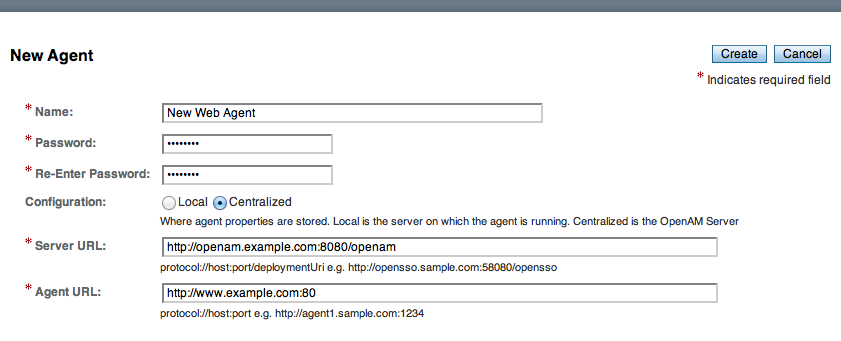
-
Click Create. After creating the agent profile, you can click the link to the new profile to adjust and export the configuration.
Agent profile groups let you set up multiple agents to inherit settings from the group. To create a new agent profile group, you need a name and the URL to the OpenAM server in which you store the profile:
-
Login to OpenAM Console as an administrative user.
-
On the Realms menu of the OpenAM console, Select the realm in which you manage agents.
-
Click the Agents link, click the tab page for the kind of agent group you want to create, and then in the Group table, click New.
After creating the group profile, you can click the link to the new group profile to fine-tune or export the configuration.
-
Inherit group settings by selecting your agent profile, and then selecting the group name in the Group drop-down list near the top of the profile page.
You can then adjust inheritance by clicking Inheritance Settings on the agent profile page.
You can create a policy agent profile in OpenAM using the ssoadm command-line tool. You do so by specifying the agent properties either as a list of attributes, or by using an agent properties file as shown below. Export an existing policy agent configuration before you start to see what properties you want to set when creating the agent profile.
The following procedure demonstrates creating a policy agent profile using the ssoadm command:
-
Make sure the
ssoadmcommand is installed. See To Set Up Administration Tools in the OpenAM Installation Guide. -
Determine the list of properties to set in the agent profile.
The following properties file shows a minimal configuration for a policy agent profile:
$ cat myAgent.properties com.sun.identity.agents.config.agenturi.prefix=http://www.example.com:80/amagent com.sun.identity.agents.config.cdsso.cdcservlet.url[0]= \ https://openam.example.com:8443/openam/cdcservlet com.sun.identity.agents.config.fqdn.default=www.example.com com.sun.identity.agents.config.login.url[0]= \ http://openam.example.com:8443/openam/UI/Login com.sun.identity.agents.config.logout.url[0]= \ http://openam.example.com:8443/openam/UI/Logout com.sun.identity.agents.config.remote.logfile=amAgent_www_example_com_80.log com.sun.identity.agents.config.repository.location=centralized com.sun.identity.client.notification.url= \ http://www.example.com:80/UpdateAgentCacheServlet?shortcircuit=false sunIdentityServerDeviceKeyValue[0]=agentRootURL=http://www.example.com:80/ sunIdentityServerDeviceStatus=Active userpassword=password -
Set up a password file used when authenticating to OpenAM. The password file must be read-only for the user who creates the policy agent profile, and must not be accessible to other users:
$ echo password > /tmp/pwd.txt $ chmod 400 /tmp/pwd.txt -
Create the profile in OpenAM:
$ ssoadm create-agent \
  --realm / \
  --agentname myAgent \
  --agenttype J2EE \
  --adminid amadmin
  --password-file /tmp/pwd.txt \
  --datafile myAgent.properties

Agent configuration was created.
At this point you can view the profile in OpenAM Console under Realms > Realm Name > Agents to make sure the configuration is what you expect.
Delegating Agent Profile Creation
If you want to create policy agent profiles when installing policy agents, then you need the credentials of an OpenAM user who can read and write agent profiles.
You can use the OpenAM administrator account when creating policy agent profiles. If you delegate policy agent installation, then you might not want to share OpenAM administrator credentials with everyone who installs policy agents.
Follow these steps to create agent administrator users for a realm:
-
In OpenAM console, browse to Realms > Realm Name > Subjects.
-
Under Group click New… and create a group for agent administrators.
-
Switch to the Privileges tab for the realm, and click the name of the group you created.
-
Select Read and write access to all configured agents, and then Save your work.
-
Return to the Subjects tab, and under User create as many agent administrator users as needed.
-
For each agent administrator user, edit the user profile.
Under the Group tab of the user profile, add the user to agent profile administrator group, and then Save your work.
-
Provide each system administrator who installs policy agents with their agent administrator credentials.
When installing the policy agent with the
--custom-installoption, the system administrator can choose the option to create the profile during installation, and then provide the agent administrator user name and the path to a read-only file containing the agent administrator password. For silent installs, you can add the--acceptLicenseoption to auto-accept the software license agreement.
Configuring Web Policy Agent Properties
When you create a web policy agent profile and install the agent, you can choose to store the agent configuration centrally and configure the agent through OpenAM console. Alternatively, you can choose to store the agent configuration locally and configure the agent by changing values in the properties file. This section covers centralized configuration, indicating the corresponding properties for use in a local configuration file where applicable. [1]
Some properties do not yet appear in the OpenAM Console, so they need to be configured as custom properties, see Configuring Web Policy Agent Custom Properties, or locally in the agent properties configuration file, agent.conf.
|
To show the agent properties in configuration file format that correspond to what you see in the console, click Export Configuration after editing agent properties. This corresponds to the local Java properties configuration file that is set up when you install an agent, for example in |
After changing properties specified as "Hot swap: no", you must restart the agent’s container for the changes to take effect.
Configuring Web Policy Agent Global Properties
This section covers global web agent properties. After creating the agent profile, you access these properties in the OpenAM console under Realms > Realm Name > Agents > Web > Agent Name > Global.
This section describes the following property groups:
- Group,
agentgroup -
For assigning the agent to a previously configured web agent group in order to inherit selected properties from the group.
Property:
agentgroup - Password
-
Agent password used when creating the password file and when installing the agent.
Property:
userpassword - Status
-
Status of the agent configuration.
Property:
sunIdentityServerDeviceStatus - Location of Agent Configuration Repository
-
Whether the agent’s configuration is managed centrally through OpenAM (
centralized) or locally in the policy agent configuration file (local).If you change this to a local configuration, you can no longer manage the policy agent configuration through OpenAM console.
Property:
com.sun.identity.agents.config.repository.location - Agent Configuration Change Notification
-
Enable agent to receive notification messages from OpenAM server for configuration changes.
Property:
com.sun.identity.agents.config.change.notification.enable - Enable Notifications
-
If enabled, the agent receives policy updates from the OpenAM notification mechanism to maintain its internal cache. If disabled, the agent must poll OpenAM for changes.
Property:
com.sun.identity.agents.config.notification.enableHot swap: no
- Agent Notification URL
-
URL used by agent to register notification listeners.
Property:
com.sun.identity.client.notification.urlHot swap: no
- Agent Deployment URI Prefix
-
The default value is
agent-root-URL/amagent.Property:
com.sun.identity.agents.config.agenturi.prefixHot swap: yes
- Configuration Reload Interval
-
Interval in minutes to fetch agent configuration from OpenAM. Used if notifications are disabled. Default: 60.
Property:
com.sun.identity.agents.config.polling.intervalHot swap: no
- Configuration Cleanup Interval
-
Interval in minutes to cleanup old agent configuration entries unless they are referenced by current requests. Default: 30.
Property:
com.sun.identity.agents.config.cleanup.intervalHot swap: no
- Agent Root URL for CDSSO
-
The agent root URL for CDSSO. The valid value is in the format
protocol://hostname:port/where protocol represents the protocol used, such ashttporhttps, hostname represents the host name of the system where the agent resides, and port represents the port number on which the agent is installed. The slash following the port number is required.If your agent system also has virtual host names, add URLs with the virtual host names to this list as well. OpenAM checks that the
gotoURLs match one of the agent root URLs for CDSSO.Property:
sunIdentityServerDeviceKeyValue[0]=agentRootURL
- SSO Only Mode
-
When enabled, the agent enforces authentication, so that upon verification of the user’s identity, the user receives a session token.
When
true, the web policy agent only manages user authentication. The filter invokes the OpenAM Authentication service to verify the identity of the user. If the user’s identity is verified, the user is issued a session token through OpenAM’s Session service.When
false, which is the default, the web policy agents will also manage user authorization, by using the policy engine in OpenAM.Property:
com.sun.identity.agents.config.sso.only - Resources Access Denied URL
-
The URL of the customized access denied page. If no value is specified (default), then the agent returns an HTTP status of 403 (Forbidden).
Property:
com.sun.identity.agents.config.access.denied.url - Agent Debug Level
-
Default is
Error. Increase toMessageor evenAllfor fine-grained detail.Valid values for the property are:
-
All
-
Error
-
Info
-
Message
-
Warning
Property:
com.sun.identity.agents.config.debug.level -
- Agent Debug File Rotation
-
When enabled, rotate the debug file when specified file size is reached.
Property:
com.sun.identity.agents.config.debug.file.rotate - Agent Debug File Size
-
Debug file size in bytes beyond which the log file is rotated. The minimum is 5242880 bytes (5 MB), and lower values are reset to 5 MB. OpenAM console sets a default of 10000000 bytes (approximately 10 MB).
If
com.sun.identity.agents.config.debug.file.rotateis enabled, settingcom.sun.identity.agents.config.debug.file.sizeto-1in theagent.conffile will rotate debug log files once every 24 hours rather than at a specified size limit.Property:
com.sun.identity.agents.config.debug.file.sizeDefault: 10000000
com.sun.identity.agents.config.local.logfile(Not yet in OpenAM console)-
Name of file stored locally on the agent that contains agent debug messages.
Default:
/web_agents/agent_version/instances/agent_nnn/logs/debug/debug.log
- Audit Access Types
-
Types of messages to log based on user URL access attempts.
Property:
com.sun.identity.agents.config.audit.accesstypeValid values for the configuration file property include
LOG_NONE,LOG_ALLOW,LOG_DENY, andLOG_BOTH. - Audit Log Location
-
Specifies where audit messages are logged. By default, audit messages are logged remotely.
Property:
com.sun.identity.agents.config.log.dispositionValid values for the configuration file property include
REMOTE,LOCAL, andALL. - Remote Log Filename
-
Name of file stored on OpenAM server that contains agent audit messages if log location is remote or all.
Property:
com.sun.identity.agents.config.remote.logfileHot swap: no
- Remote Audit Log Interval
-
Periodic interval in minutes in which audit log messages are sent to the remote log file.
Property:
com.sun.identity.agents.config.remote.log.intervalDefault: 5
Hot swap: no
- Rotate Local Audit Log
-
When enabled, audit log files are rotated when reaching the specified size.
Property:
com.sun.identity.agents.config.local.log.rotate - Local Audit Log Rotation Size
-
Beyond this size limit in bytes, the agent rotates the local audit log file if rotation is enabled. The minimum is 5242880 bytes (5 MB), and lower values are reset to 5 MB. OpenAM console sets a default of 52428800 bytes (50 MB).
Property:
com.sun.identity.agents.config.local.log.sizeDefault: 52428800
com.sun.identity.agents.config.local.audit.logfile(Not yet in OpenAM console)-
Name of file stored locally on the agent that contains agent audit messages if log location is LOCAL or ALL.
Default:
/web_agents/agent_version/instances/agent_nnn/logs/audit/audit.log
- FQDN Check
-
Enables checking of FQDN default value and FQDN map values.
Property:
com.sun.identity.agents.config.fqdn.check.enable - FQDN Default
-
FQDN that the users should use in order to access resources. Without this value, the web server can fail to start, thus you set the property on agent installation, and only change it when absolutely necessary.
This property ensures that when users access protected resources on the web server without specifying the FQDN, the agent can redirect the users to URLs containing the correct FQDN.
Property:
com.sun.identity.agents.config.fqdn.default - FQDN Virtual Host Map
-
Enables virtual hosts, partial hostname, and IP address to access protected resources. Maps invalid or virtual name keys to valid FQDN values so the agent can properly redirect users and the agents receive cookies belonging to the domain.
To map
myservertomyserver.mydomain.example, entermyserverin the Map Key field, and entermyserver.mydomain.examplein the Corresponding Map Value field. This corresponds tocom.sun.identity.agents.config.fqdn.mapping[myserver]= myserver.mydomain.example.Invalid FQDN values can cause the web server to become unusable or render resources inaccessible.
Property:
com.sun.identity.agents.config.fqdn.mapping
Configuring Web Policy Agent Application Properties
This section covers application web agent properties. After creating the agent profile, you access these properties in the OpenAM console under Realms > Realm Name > Agents > Web > Agent Name > Application.
This section describes the following property groups:
- Ignore Path Info for Not Enforced URLs
-
When enabled, the path info and query are stripped from the request URL before being compared with the URLs of the not enforced list for those URLs containing a wildcard character. This prevents a user from accessing
http://host/index.htmlby requestinghttp://host/index.html/hack.gifwhen the not enforced list includeshttp://host/*.gif.For a more generally applicable setting, see Ignore Path Info Properties.
Property:
com.sun.identity.agents.config.ignore.path.info.for.not.enforced.list - Enable Regular Expressions for Not Enforced URLs (Not yet in OpenAM console)
-
Enable use of Perl-compatible regular expressions in Not Enforced URL settings by using the following property under Advanced > Custom Properties in the agent profile.
Property:
com.forgerock.agents.notenforced.url.regex.enable - Not Enforced URLs
-
List of URLs for which no authentication is required. You can use wildcards to define a pattern for a URL.
The
wildcard matches all characters except question mark (?), cannot be escaped, and spans multiple levels in a URL. Multiple forward slashes do not match a single forward slash, somatchesmult/iple/dirs, yetmult/*/dirsdoes not matchmult/dirs.The
--wildcard matches all characters except forward slash (/) or question mark (?), and cannot be escaped. As it does not match/,--does not span multiple levels in a URL.OpenAM does not let you mix
and--in the same URL.Examples include
http://www.example.com/logout.html,http://www.example.com/images/,http://www.example.com/css/--, andhttp://www.example.com/.jsp?locale=.Trailing forward slashes are not recognized as part of a resource name. Therefore
http://www.example.com/images//andhttp://www.example.com/imagesare equivalent.Property:
com.sun.identity.agents.config.notenforced.urlIf you enabled use of Perl-compatible regular expressions to match Not Enforced URLs, then all your settings must be done using regular expressions. (Do not mix settings; use either the mechanism described above or Perl-compatible regular expressions, but not both.)
The following example shows settings where no authentication is required for URLs whose path ends
/PublicServletAor/PublicServletB(with or without query string parameters), and no authentication is required to access .png, .jpg, .gif, .js, or .css files under URLs that do not contain/protectedA/or/protectedB/..*/(PublicServletA|PublicServletB)(\?.*|$) ^(?!.*(/protectedA/|/protectedB/)).*\.(png|jpg|gif|js|css)(\?.*|$) - Invert Not Enforced URLs
-
When set to
true, enforce policy for the URLS and patterns specified in the Not Enforced URLs property instead of allowing access to them without authentication. Consider the following points when configuring this property:-
An empty Not Enforced URL property results in all URLs being enforced
-
At least one URL must be enforced. To allow access to any URL without authentication, consider disabling the policy agent
Property:
com.sun.identity.agents.config.notenforced.url.invert -
- Fetch Attributes for Not Enforced URLs
-
When enabled, the agent fetches profile, response, and session attributes that are mapped by doing policy evaluation, and forwards these attributes to not enforced URLs.
Property:
com.sun.identity.agents.config.notenforced.url.attributes.enable
- Not Enforced Client IP List
-
No authentication and authorization are required for the requests coming from these client IP addresses.
- Individual IP Address Example
-
To disable policy agent enforcement for addresses 192.18.145.128 and 192.18.146.123, use the following setting:
com.sun.identity.agents.config.notenforced.ip[0]=192.18.145.128 com.sun.identity.agents.config.notenforced.ip[1]=192.18.146.123 - Netmask Example
-
To disable policy agent enforcement for addresses in 192.168.1.1 to 192.168.1.255, use the following setting:
com.sun.identity.agents.config.notenforced.ip = 192.168.1.1/24The following example shows an IPv6 address with a corresponding network mask.
com.sun.identity.agents.config.notenforced.ip = 2001:5c0:9168:0:0:0:0:2/128Currently the policy agent stops evaluating properties after reaching an invalid netmask in the list.
- IP Range Example
-
To disable policy agent enforcement for addresses between 192.168.1.1 to 192.168.4.3 inclusive, use the following setting:
com.sun.identity.agents.config.notenforced.ip = 192.168.1.1-192.168.4.3The following example shows a range of IPv6 addresses. The example is displayed over two lines for formatting purposes.
com.sun.identity.agents.config.notenforced.ip = \
2001:5c0:9168:0:0:0:0:1-2001:5c0:9168:0:0:0:0:2
Property:
com.sun.identity.agents.config.notenforced.ip[n]=Not enforced IP patternLoopback addresses are not considered valid IPs on the Not Enforced IP list. If specified, the policy agent ignores the loopback address.
- Client IP Validation
-
When enabled, validate that the subsequent browser requests come from the same IP address that the SSO token is initially issued against.
Property:
com.sun.identity.agents.config.client.ip.validation.enable
org.forgerock.agents.config.notenforced.ipurl-
No authentication and authorization are required for requests coming from specified client IP addresses that are requesting specified resource URLs.
Specify a list of IP addresses separated by spaces, the pipe (|) character, and a list of URLs separated by spaces.
The IP list can be specified by using either netmask or IP range notation:
- Netmask Example
-
To specify requests coming from addresses in the range 192.168.1.1 to 192.168.1.255, use the following setting.
192.168.1.1/24The following example shows an IPv6 address with a corresponding network mask.
2001:5c0:9168:0:0:0:0:2/128 - IP Range Example
-
To specify requests coming from addresses in the range 192.168.1.1 to 192.168.4.3 inclusive, use the following setting.
192.168.1.1-192.168.4.3The following example shows a range of IPv6 addresses.
2001:5c0:9168:0:0:0:0:1-2001:5c0:9168:0:0:0:0:2
The URL list can be specified by using wildcards (*) or regular expressions. To use regular expression matches in the URL list, set
org.forgerock.agents.config.notenforced.ext.regex.enable=true. Do not mix using wildcards and regular expressions. Multiple values should be separated by space characters.The following example will not require authentication or authorization for any requests coming from the specified IP addresses, when also requesting access to a
/reportsURL, or certain files under the/imagesURL. The example is displayed over three lines for formatting purposes.org.forgerock.agents.config.notenforced.ipurl[0]= \ 10.1.2.1-10.1.2.7|/reports ^(?=.*(/images/)).*\.(png|jpg|gif)(\?.*|$) org.forgerock.agents.config.notenforced.ext.regex.enable=true org.forgerock.agents.config.notenforced.ext.regex.enable-
Enable use of Perl-compatible regular expressions in Not Enforced URL from IP settings.
- Profile Attribute Fetch Mode
-
When set to
HTTP_COOKIEorHTTP_HEADER, profile attributes are introduced into the cookie or the headers, respectively.Property:
com.sun.identity.agents.config.profile.attribute.fetch.mode - Profile Attribute Map
-
Maps the profile attributes to HTTP headers for the currently authenticated user. Map keys are LDAP attribute names, and map values are HTTP header names.
To populate the value of profile attribute CN under
CUSTOM-Common-Name, enter CN in the Map Key field, and enterCUSTOM-Common-Namein the Corresponding Map Value field. This corresponds tocom.sun.identity.agents.config.profile.attribute.mapping[cn]=CUSTOM-Common-Name.In most cases, in a destination application where an HTTP header name shows up as a request header, it is prefixed by
HTTP_, lower case letters become upper case, and hyphens (-) become underscores (_). For example,common-namebecomesHTTP_COMMON_NAME.Property:
com.sun.identity.agents.config.profile.attribute.mapping
- Response Attribute Fetch Mode
-
When set to
HTTP_COOKIEorHTTP_HEADER, response attributes are introduced into the cookie or the headers, respectively.Property:
com.sun.identity.agents.config.response.attribute.fetch.mode - Response Attribute Map
-
Maps the policy response attributes to HTTP headers for the currently authenticated user. The response attribute is the attribute in the policy response to be fetched.
To populate the value of response attribute
uidunderCUSTOM-User-Name: enteruidin the Map Key field, and enterCUSTOM-User-Namein the Corresponding Map Value field. This corresponds tocom.sun.identity.agents.config.response.attribute.mapping[uid]=Custom-User-Name.In most cases, in a destination application where an HTTP header name shows up as a request header, it is prefixed by
HTTP_, lower case letters become upper case, and hyphens (-) become underscores (_). For example,response-attr-onebecomesHTTP_RESPONSE_ATTR_ONE.Property:
com.sun.identity.agents.config.response.attribute.mapping
- Session Attribute Fetch Mode
-
When set to
HTTP_COOKIEorHTTP_HEADER, session attributes are introduced into the cookie or the headers, respectively.Property:
com.sun.identity.agents.config.session.attribute.fetch.mode - Session Attribute Map
-
Maps session attributes to HTTP headers for the currently authenticated user. The session attribute is the attribute in the session to be fetched.
To populate the value of session attribute
UserTokenunderCUSTOM-userid: enterUserTokenin the Map Key field, and enterCUSTOM-useridin the Corresponding Map Value field. This corresponds tocom.sun.identity.agents.config.session.attribute.mapping[UserToken] =CUSTOM-userid.In most cases, in a destination application where an HTTP header name shows up as a request header, it is prefixed by
HTTP_, lower case letters become upper case, and hyphens (-) become underscores (_). For example,success-urlbecomesHTTP_SUCCESS_URL.Property:
com.sun.identity.agents.config.session.attribute.mapping
- Attribute Multi-Value Separator
-
Specifies separator for multiple values. Applies to all types of attributes, such as profile, session, and response attributes. Default:
|.Property:
com.sun.identity.agents.config.attribute.multi.value.separator
Configuring Web Policy Agent SSO Properties
This section covers SSO web agent properties. After creating the agent profile, you access these properties in the OpenAM console under Realms > Realm Name > Agents > Web > Agent Name > SSO.
This section describes the following property groups:
- Cross Domain SSO
-
Enables Cross Domain Single Sign On (CDSSO) for OpenAM deployments that use stateful sessions. CDSSO is not supported for OpenAM deployments that use stateless sessions.
Property:
com.sun.identity.agents.config.cdsso.enable - CDSSO Servlet URL
-
List of URLs of the available CDSSO controllers that the agent can use for CDSSO processing. For example,
http://openam.example.com:8080/openam/cdcservlet.Property:
com.sun.identity.agents.config.cdsso.cdcservlet.url - Cookies Domain List
-
List of domains, such as
.example.com, in which cookies have to be set in CDSSO. If this property is left blank, then the fully qualified domain name of the cookie for the agent server is used to set the cookie domain, meaning that a host cookie rather than a domain cookie is set.To set the list to
.example.com, and.example.netusing the configuration file property, include the following.com.sun.identity.agents.config.cdsso.cookie.domain[0]=.example.com com.sun.identity.agents.config.cdsso.cookie.domain[1]=.example.netProperty:
com.sun.identity.agents.config.cdsso.cookie.domain
Configuring Web Policy Agent OpenAM Services Properties
This section covers OpenAM services web agent properties. After creating the agent profile, you access these properties in the OpenAM console under Realms > Realm Name > Agents > Web > Agent Name > OpenAM Services.
This section describes the following property groups:
- OpenAM Login URL
-
OpenAM login page URL, such as
http://openam.example.com:8080/openam/UI/Login, to which the agent redirects incoming users without sufficient credentials so that they can authenticate.Property:
com.sun.identity.agents.config.login.url - OpenAM Conditional Login URL (Not yet in OpenAM console)
-
To conditionally redirect users based on the incoming request URL, set this property.
This takes the incoming request domain to match, a vertical bar (
|), and then a comma-separated list of URLs to which to redirect incoming users.If the domain before the vertical bar matches an incoming request URL, then the policy agent uses the list of URLs to determine how to redirect the user-agent. If the global property FQDN Check (
com.sun.identity.agents.config.fqdn.check.enable) is enabled for the policy agent, then the policy agent iterates through the list until it finds an appropriate redirect URL that matches the FQDN check. Otherwise, the policy agent redirects the user-agent to the first URL in the list.Property:
com.forgerock.agents.conditional.login.urlExamples:
com.forgerock.agents.conditional.login.url[0]= login.example.com|http://openam1.example.com/openam/UI/Login, http://openam2.example.com/openam/UI/Login,com.forgerock.agents.conditional.login.url[1]= signin.example.com|http://openam3.example.com/openam/UI/Login, http://openam4.example.com/openam/UI/LoginIf CDSSO is enabled for the policy agent, then this property takes CDSSO Servlet URLs for its values (
com.sun.identity.agents.config.cdsso.cdcservlet.url), rather than OpenAM login URLs.CDSSO examples:
com.forgerock.agents.conditional.login.url[0]= login.example.com|http://openam1.example.com/openam/cdcservlet, http://openam2.example.com/openam/cdcservlet,com.forgerock.agents.conditional.login.url[1]= signin.example.com|http://openam3.example.com/openam/cdcservlet, http://openam4.example.com/openam/cdcservlet - Agent Connection Timeout
-
Timeout period in seconds for an agent connection with OpenAM auth server.
Property:
com.sun.identity.agents.config.auth.connection.timeoutDefault: 2
- Polling Period for Primary Server
-
Interval in minutes, agent polls to check the primary server is up and running. Default: 5.
Property:
com.sun.identity.agents.config.poll.primary.serverHot swap: no
- OpenAM Logout URL
-
OpenAM logout page URL, such as
http://openam.example.com:8080/openam/UI/Logout.Property:
com.sun.identity.agents.config.logout.url - Enable Logout URL Redirect (Not yet in OpenAM console)
-
Logout URL redirect is enabled by default.
When this is disabled, instead of redirecting the user-agent, the policy agent performs session logout in the background and then continues processing access to the current URL. Disable this using Advanced > Custom Properties in the agent profile.
Property:
com.forgerock.agents.config.logout.redirect.disable
- Logout URL List
-
List of application logout URLs, such as
http://www.example.com/logout.html. The user is logged out of the OpenAM session when these URLs are accessed. When using this property, specify a value for the Logout Redirect URL property.Property:
com.sun.identity.agents.config.agent.logout.url - Agent Logout URL Regular Expression (Not yet in OpenAM console)
-
Perl-compatible regular expression that matches logout URLs. Set this using Advanced > Custom Properties in the agent profile.
For example, to match URLs with
protectedAorprotectedBin the path andop=logoutin the query string, use the following setting:com.forgerock.agents.agent.logout.url.regex= \ .*(/protectedA\?|/protectedB\?/).*(\&op=logout\&)(.*|$)When you use this property, the agent ignores the settings for Logout URL List.
- Logout Cookies List for Reset
-
Cookies to be reset upon logout in the same format as the cookie reset list.
Property:
com.sun.identity.agents.config.logout.cookie.reset - Logout Redirect URL
-
User gets redirected to this URL after logout. Specify this property alongside a Logout URL List.
Property:
com.sun.identity.agents.config.logout.redirect.url
- Policy Cache Polling Period
-
Polling interval in minutes during which an entry remains valid after being added to the agent’s cache.
Property:
com.sun.identity.agents.config.policy.cache.polling.intervalHot swap: no
- SSO Cache Polling Period
-
Polling interval in minutes during which an SSO entry remains valid after being added to the agent’s cache.
Property:
com.sun.identity.agents.config.sso.cache.polling.intervalHot swap: no
- User ID Parameter
-
Agent sets this value for User Id passed in the session from OpenAM to the
REMOTE_USERserver variable. Default:UserToken.Property:
com.sun.identity.agents.config.userid.param - User ID Parameter Type
-
User ID can be fetched from either SESSION or LDAP attributes. Default:
SESSION.Property:
com.sun.identity.agents.config.userid.param.type - Fetch Policies From The Root Resource
-
When enabled, the agent caches the policy decision of the resource and all resources from the root of the resource down. For example, if the resource is
http://host/a/b/c, then the root of the resource ishttp://host/. This setting can be useful when a client is expect to access multiple resources on the same path. Yet, caching can be expensive if very many policies are defined for the root resource.Property:
com.sun.identity.agents.config.fetch.from.root.resourceDefault: false
Hot swap: no
- Retrieve Client Hostname
-
When enabled, get the client hostname through DNS reverse lookup for use in policy evaluation. This setting can impact performance.
Property:
com.sun.identity.agents.config.get.client.host.name - Policy Clock Skew
-
Time in seconds used adjust time difference between agent system and OpenAM. Clock skew in seconds = AgentTime - OpenAMServerTime.
Use this property to adjust for small time differences encountered despite use of a time-synchronization service. When this property is not set and agent time is greater than OpenAM server time, the agent can make policy calls to the OpenAM server before the policy subject cache has expired, or you can see infinite redirection occur.
Property:
com.sun.identity.agents.config.policy.clock.skewHot swap: no
- Realm
-
Realm where OpenAM starts policy evaluation for this policy agent.
Default: / (top-level realm)
Edit this property when OpenAM should start policy evaluation in a realm other than the top-level realm,
/, when handling policy decision requests from this policy agent.This property is recognized by OpenAM, not the policy agent, and does not support realm aliases.
Property:
org.forgerock.openam.agents.config.policy.evaluation.realmHot swap: yes
- Application
-
Application where OpenAM looks for policies to evaluate for this policy agent.
Default:
iPlanetAMWebAgentServiceEdit this property when OpenAM should look for policies that belong to an application other than
iPlanetAMWebAgentServicewhen handling policy decision requests from this policy agent.This property is recognized by OpenAM, not the policy agent.
Property:
org.forgerock.openam.agents.config.policy.evaluation.applicationHot swap: yes
Configuring Web Policy Agent Miscellaneous Properties
This section covers miscellaneous web agent properties. After creating the agent profile, you access these properties in the OpenAM console under Realms > Realm Name > Agents > Web > Agent Name > Miscellaneous.
This section describes the following property groups:
- Composite Advice Handling (Not yet in OpenAM console)
-
As of version 3.0.4, when set to
true, the agent sends composite advice in the query (GET request) instead of sending it through a POST request.Property:
com.sun.am.use_redirect_for_advice
- Agent Locale
-
The default locale for the agent.
Property:
com.sun.identity.agents.config.localeHot swap: no
- Anonymous User
-
Enable or disable REMOTE_USER processing for anonymous users.
Property:
com.sun.identity.agents.config.anonymous.user.enable
- URL Comparison Case Sensitivity Check
-
When enabled, enforces case insensitivity in both policy and not enforced URL evaluation.
Property:
com.sun.identity.agents.config.url.comparison.case.ignore - Encode URL’s Special Characters
-
When enabled, encodes the URL which has special characters before doing policy evaluation.
Property:
com.sun.identity.agents.config.encode.url.special.chars.enable
- Ignore Preferred Naming URL in Naming Request
-
When enabled, do not send a preferred naming URL in the naming request.
Property:
com.sun.identity.agents.config.ignore.preferred.naming.url
- Invalid URL Regular Expression
-
Use a Perl-compatible regular expression to filter out invalid request URLs. The policy agent rejects requests to invalid URLs with HTTP 403 Forbidden status without further processing. Use Advanced > Custom Properties to set this in the agent profile.
For example, to filter out URLs containing the symbols in the list ./, /., /, ., ,\, %00-%1f, %7f-%ff, %25, %2B, %2C, %7E, .info, use the following setting.
com.forgerock.agents.agent.invalid.url.regex= \
     ^((?!(|/\.|\./||*|\.info|%25|%2B|%2C|%[0-1][0-9a-fA-F]|%[7-9a-fA-F][0-9a-fA-F])).)$
- Ignore Server Check
-
When enabled, do not check whether OpenAM is up before doing a 302 redirect.
Property:
com.sun.identity.agents.config.ignore.server.check
- Ignore Path Info in Request URL
-
When enabled, strip path info from the request URL while doing the Not Enforced List check, and URL policy evaluation. This is designed to prevent a user from accessing a URI by appending the matching pattern in the policy or not enforced list.
For example, if the not enforced list includes
http://host/*.gif, then stripping path info from the request URI prevents access tohttp://host/index.htmlby usinghttp://host/index.html?hack.gif.However, when a web server is configured as a reverse proxy for a J2EE application server, the path info is interpreted to map a resource on the proxy server rather than the application server. This prevents the not enforced list or the policy from being applied to the part of the URI below the application server path if a wildcard character is used.
For example, if the not enforced list includes
http://host/webapp/servcontext/*and the request URL ishttp://host/webapp/servcontext/example.jsp, the path info is/servcontext/example.jspand the resulting request URL with path info stripped ishttp://host/webapp/, which does not match the not enforced list. Thus when this property is enabled, path info is not stripped from the request URL even if there is a wildcard in the not enforced list or policy.Make sure therefore when this property is enabled that there is nothing following the wildcard in the not enforced list or policy.
Property:
com.sun.identity.agents.config.ignore.path.info
- Native Encoding of Profile Attributes
-
When enabled, the agent encodes the LDAP header values in the default encoding of operating system locale. When disabled, the agent uses UTF-8.
Property:
com.sun.identity.agents.config.convert.mbyte.enable
- Goto Parameter Name
-
Property used only when CDSSO is enabled. Only change the default
gotovalue when the login URL has a landing page specified, such ascom.sun.identity.agents.config.cdsso.cdcservlet.url = http://openam.example.com:8080/openam/cdcservlet?goto= http://www.example.com/landing.jsp. The agent uses this parameter to append the original request URL to this cdcservlet URL. The landing page consumes this parameter to redirect to the original URL.As an example, if you set this value to
goto2, then the complete URL sent for authentication ishttp://openam.example.com:8080/openam/cdcservlet?goto= http://www.example.com/landing.jsp?goto2=http://www.example.com/original.jsp.Property:
com.sun.identity.agents.config.redirect.param
- Anonymous User Default Value
-
User ID of unauthenticated users. Default:
anonymous.Property:
com.sun.identity.agents.config.anonymous.user.id
Configuring Web Policy Agent Advanced Properties
This section covers advanced web agent properties. After creating the agent profile, you access these properties in the OpenAM console under Realms > Realm Name > Agents > Web > Agent Name > Advanced.
This section describes the following property groups:
If the agent is behind a proxy or load balancer, then the agent can get client IP and host name values from the proxy or load balancer. For proxies and load balancer that support providing the client IP and host name in HTTP headers, you can use the following properties.
When multiple proxies or load balancers sit in the request path, the header values can include a comma-separated list of values with the first value representing the client, as in client,next-proxy,first-proxy.
- Client IP Address Header
-
HTTP header name that holds the IP address of the client.
Property:
com.sun.identity.agents.config.client.ip.header - Client Hostname Header
-
HTTP header name that holds the hostname of the client.
Property:
com.sun.identity.agents.config.client.hostname.header
- Load Balancer Setup
-
Enable if a load balancer is used for OpenAM services.
Property:
com.sun.identity.agents.config.load.balancer.enableHot swap: no
- Override Request URL Protocol
-
Enable if the agent is sitting behind a SSL/TLS off-loader, load balancer, or proxy such that the protocol users use is different from the protocol the agent uses. When enabled, the protocol is overridden with the value from the Agent Deployment URI Prefix (property:
com.sun.identity.agents.config.agenturi.prefix).Property:
com.sun.identity.agents.config.override.protocol - Override Request URL Host
-
Enable if the agent is sitting behind a SSL/TLS off-loader, load balancer, or proxy such that the host name users use is different from the host name the agent uses. When enabled, the host is overridden with the value from the Agent Deployment URI Prefix (property:
com.sun.identity.agents.config.agenturi.prefix).Property:
com.sun.identity.agents.config.override.host - Override Request URL Port
-
Enable if the agent is sitting behind a SSL/TLS off-loader, load balancer, or proxy such that the port users use is different from the port the agent uses. When enabled, the port is overridden with the value from the Agent Deployment URI Prefix (property:
com.sun.identity.agents.config.agenturi.prefix).Property:
com.sun.identity.agents.config.override.port - Override Notification URL
-
Enable if the agent is sitting behind a SSL/TLS off-loader, load balancer, or proxy such that the URL users use is different from the URL the agent uses. When enabled, the URL is overridden with the value from the Agent Deployment URI Prefix (property:
com.sun.identity.agents.config.agenturi.prefix).Property:
com.sun.identity.agents.config.override.notification.url com.sun.identity.agents.config.postdata.preserve.stickysession.mode(Not yet in OpenAM Console)-
Specifies whether to create a cookie, or to append a query string to the URL to assist with sticky load balancing.
com.sun.identity.agents.config.postdata.preserve.stickysession.value(Not yet in OpenAM Console)-
Specifies the key-value pair for stickysession mode. For example, a setting of
lb=myservereither sets anlbcookie withmyservervalue, or addslb=myserverto the URL query string.
- POST Data Preservation
-
Enables HTTP POST data preservation. This feature is available in the Apache 2.2, Microsoft IIS 6, Microsoft IIS 7, and Sun Java System Web Server web policy agents as of version 3.0.3.
Property:
com.sun.identity.agents.config.postdata.preserve.enable - POST Data Entries Cache Period
-
POST cache entry lifetime in minutes. Default: 10.
Property:
com.sun.identity.agents.config.postcache.entry.lifetime - POST Data Preservation Cookie Name (Not yet in OpenAM Console)
-
When HTTP POST data preservation is enabled, override properties are set to true, and the agent is behind a load balancer, then this property sets the name and value of the sticky cookie to use.
Property:
com.sun.identity.agents.config.postdata.preserve.lbcookie org.forgerock.agents.config.postdata.preserve.dir(Not yet in OpenAM Console)-
The directory on the agent server where preserved post data will be written whilst authorization is requested from OpenAM.
Default:
/web_agents/agent_version/log - Post Data Preservation URI Prefix (Not yet in OpenAM Console)
-
If you run multiple web servers with policy agents behind a load balancer that directs traffic based on the request URI, and you need to preserve POST data, then set this property.
By default, policy agents use a dummy URL for POST data preservation,
http://agent.host:port/dummypost/sunpostpreserve, to handle POST data across redirects to and from OpenAM. When you set this property, the policy agent prefixes the property value to the dummy URL path. In other words, when you setcom.forgerock.agents.config.pdpuri.prefix = app1, the policy agent uses the dummy URL,http://agent.host:port/app1/dummypost/sunpostpreserve.Next, use the prefix you set when you define load balancer URI rules. This ensures that clients end up being redirected to the policy agent that preserved the POST data.
Property:
com.forgerock.agents.config.pdpuri.prefix org.forgerock.agents.pdp.javascript.repost(Not yet in OpenAM Console)-
When set to
true, preserved post data will be resubmitted to the destination server after authentication by using JavaScript.
- Override Proxy Server’s Host and Port
-
When enabled ignore the host and port settings.
Property:
com.sun.identity.agents.config.proxy.override.host.portHot swap: no
- Authentication Type
-
The agent should normally perform authentication, so this is not required. If necessary, set to
none.Property:
com.sun.identity.agents.config.iis.auth.typeHot swap: no
- Replay Password Key
-
DES key for decrypting the basic authentication password in the session.
Property:
com.sun.identity.agents.config.replaypasswd.key - Filter Priority
-
The loading priority of filter, DEFAULT, HIGH, LOW, or MEDIUM.
Property:
com.sun.identity.agents.config.iis.filter.priority - Filter configured with OWA
-
Enable if the IIS agent filter is configured for OWA.
Property:
com.sun.identity.agents.config.iis.owa.enable - Change URL Protocol to HTTPS
-
Enable to avoid IE6 security pop-ups.
Property:
com.sun.identity.agents.config.iis.owa.enable.change.protocol - Idle Session Timeout Page URL
-
This property is no longer used.
Property:
com.sun.identity.agents.config.iis.owa.enable.session.timeout.url - Show Password in HTTP Header
-
Set to
trueif encrypted password should be set in HTTP headerAUTH_PASSWORD.Property:
com.sun.identity.agents.config.iis.password.header - Logon and Impersonation
-
Set to
trueif agent should do Windows Logon and User Impersonation.Property:
com.sun.identity.agents.config.iis.logonuser
- Check User in Domino Database
-
When enabled, the agent checks whether the user exists in the Domino name database.
Property:
com.sun.identity.agents.config.domino.check.name.database - Use LTPA token
-
Enable if the agent needs to use LTPA Token.
Property:
com.sun.identity.agents.config.domino.ltpa.enable - LTPA Token Cookie Name
-
The name of the cookie that contains the LTPA token.
Property:
com.sun.identity.agents.config.domino.ltpa.cookie.name - LTPA Token Configuration Name
-
The configuration name that the agent uses in order to employ the LTPA token mechanism.
Property:
com.sun.identity.agents.config.domino.ltpa.config.name - LTPA Token Organization Name
-
The organization name to which the LTPA token belongs.
Property:
com.sun.identity.agents.config.domino.ltpa.org.name
- Custom Properties
-
Additional properties to augment the set of properties supported by agentd. Such properties take the following forms.
-
customproperty=custom-value1 -
customlist[0]=customlist-value-0 -
customlist[1]=customlist-value-1 -
custommap[key1]=custommap-value-1 -
custommap[key2]=custommap-value-2
Property:
com.sun.identity.agents.config.freeformproperties -
Configuring Web Policy Agent Custom Properties
This section covers custom web agent properties.
|
These settings do not appear as configurable options in the OpenAM Console, so must be added as custom properties, or set in the local configuration file. If using a centralized configuration, you create these properties in the OpenAM console under Realms > Realm Name > Agents > Web > Agent Name > Advanced > Custom Properties. |
This section describes the following property groups:
These properties are only used within the local configuration file. They are not available in the OpenAM admin console. The agent uses these bootstrap properties to connect to OpenAM.
com.sun.identity.agents.config.organization.name-
The OpenAM realm where the agent profile is located.
Default:
/ com.sun.identity.agents.config.username-
The name of the agent profile in OpenAM.
com.sun.identity.agents.config.password-
The password required by the agent profile, encrypted with the key specified in
com.sun.identity.agents.config.key. com.sun.identity.agents.config.key-
The encryption key used to encrypt the agent profile password, which should be provided in
com.sun.identity.agents.config.password. org.forgerock.agents.config.tls-
Set this property to a list of protocols to support. The list consists of one or more protocol strings separated by colons. For example
TLSv1.2:TLSv1.1:TLSv1. com.sun.identity.agents.config.connect.timeout-
Set this to the number of seconds to keep the socket connection open before timing out. Applies to both TCP connect and receive operations.
To disable timeouts, set this value to 0.
Default: 4 (seconds)
com.forgerock.agents.config.cert.ca.file-
Set this property to the file name that contains one or more CA certificates. The file should be Privacy Enhanced Mail (PEM) encoded. OpenAM requires PEM files to be base64-encoded ASCII data.
You must set this property if
com.sun.identity.agents.config.trust.server.certsis set tofalse. com.forgerock.agents.config.cert.file-
When OpenAM is configured to perform client authentication, set this property to the name of the file that contains the public PEM-encoded client certificate that corresponds with the private key specified in
com.forgerock.agents.config.cert.key. com.forgerock.agents.config.cert.key-
Set this property to the name of the file that contains the private key. On UNIX systems, that key should be encoded in PEM format.
On Windows systems, that entry depends. If SSL mutual authentication is required with OpenAM, that entry should contain the name of the private key or certificate imported in the Windows Certificate Manager, part of the Microsoft Management Console. For a web server, that should point to the Local Machine or Service certificate store, depending on the account associated with the Web server.
com.forgerock.agents.config.cert.key.password-
Set this property to the obfuscated private key password. Obfuscate the password by using
agentadmin --p, as demonstrated in the following example to generate the value:$ cd /web_agents/agent-type/bin $ ./agentadmin --p "key" "password"Here, agent-type corresponds to the file system directory for the particular agent type, such as
apache24_agent, password is the private key password, and key is the obfuscation key as specified bycom.sun.identity.agents.config.key.You can generate a new obfuscation key by using
agentadmin --k.This property is not used on Microsoft Windows systems.
com.forgerock.agents.config.ciphers-
Set this property to a list of ciphers to support. The list consists of one or more cipher strings separated by colons, as defined in the man page for
ciphersavailable at http://www.openssl.org/docs/apps/ciphers.html.Default:
HIGH:MEDIUM. com.sun.identity.agents.config.trust.server.certs-
When SSL is configured, set to
falseto trust the OpenAM SSL certificate only if the certificate is found to be correct and valid. Default istrueto make it easy to try SSL during evaluation.Notice that the default setting,
true, means that the web policy agent trusts all server certificates. Change this tofalse, and test that your web policy agent can trust server certificates before deploying the policy agent in production.
com.forgerock.agents.ext.url.validation.default.url.set-
This property takes a comma-separated list of indexes for URL values indicating the order in which to fail over, where the indexes are taken from the values set for
com.sun.identity.agents.config.naming.url,com.sun.identity.agents.config.login.url,com.sun.identity.agents.config.cdsso.cdcservlet.url, andcom.sun.identity.agents.config.logout.url.For example if
com.sun.identity.agents.config.naming.urlis set as follows:com.sun.identity.agents.config.naming.url= http://zero.example.com:8080/openam/namingservice http://one.example.com:8080/openam/namingserviceThen the following setting means first use OpenAM on
zero.example.com, then fail over if necessary to OpenAM onone.example.com, assumingcom.forgerock.agents.ext.url.validation.levelis set to enable validation.com.forgerock.agents.ext.url.validation.default.url.set=0,1When using this failover capability make sure you synchronize URL settings in
com.sun.identity.agents.config.naming.url,com.sun.identity.agents.config.login.url,com.sun.identity.agents.config.cdsso.cdcservlet.url, andcom.sun.identity.agents.config.logout.urlsuch that each service shares the same index across all properties. In other words, in the example above each service underhttp://zero.example.com:8080/openamwould be the first item (index: 0) for each property. This ensures the policy agent fails over and fails back from one server to another in synchronized fashion for all services.This property has no default setting.
com.forgerock.agents.ext.url.validation.level-
This bootstrap configuration property lets you configure naming URL validation during the initial bootstrap phase when the policy agent reads its configuration, and then thereafter if the policy agent is configured fail over when a naming URL becomes invalid.
When URL validation is fully disabled the policy agent does not need to connect to OpenAM during the bootstrap phase.
If you leave naming URL validation disabled, then make sure that the URLs in the policy agent bootstrap configuration file are valid and correct. As the policy agent performs no further validation after the bootstrap phase, incorrect naming URLs can cause the agent to crash.
When naming URL validation is enabled you should also ensure the
com.sun.identity.agents.config.connect.timeoutproperty is set to a reasonable value, such as 4 seconds, which is the default.To enable full URL validation, set the property as shown:
com.forgerock.agents.ext.url.validation.level = 0This property can take the following values.
- 0
-
Fully validate naming URLs specified by using the
com.sun.identity.agents.config.naming.urlproperty. The web policy agent logs into and logs out of OpenAM to check that a naming URL is valid. - 1
-
Check that naming URLs are valid by performing an HTTP GET, which should receive an HTTP 200 response.
- 2 (Default)
-
Disable all naming URL validation.
com.forgerock.agents.ext.url.validation.ping.interval-
Set this to the seconds between validation requests against the current naming URL.
The value of the
com.sun.identity.agents.config.connect.timeoutproperty must not exceed this value.Default: 60 (seconds)
com.forgerock.agents.ext.url.validation.ping.miss.count-
If validation requests against the current naming URL fail this number of times in a row, the web policy agent fails over to the next service in
com.forgerock.agents.ext.url.validation.default.url.set.Default: 3
com.forgerock.agents.ext.url.validation.ping.ok.count-
After failover, if validation requests against the default naming URL succeed this number of times in a row, the web policy agent fails back to that service, the first URL in the
com.forgerock.agents.ext.url.validation.default.url.setlist.Default: 3
com.sun.identity.agents.config.naming.url-
Set this to the naming service URL(s) used for naming lookups in OpenAM. Separate multiple URLs with single space characters.
com.forgerock.agents.cache_control_header.enable-
Set this property to
trueto enable use of Cache-Control headers that prevent proxies from caching resources accessed by unauthenticated users. Default:false. org.forgerock.agents.config.json.url-
Use regular expressions to specify a list of resource URLs that should trigger JSON-formatted errors to be returned rather than HTTP error codes.
org.forgerock.agents.config.keepalive.disable-
The web policy agents by default use a single connection and specify
Connection:Keep-alivewhen logging in to OpenAM and fetching attributes or policy decisions.If a load-balancer or reverse-proxy is being used it may be necessary to disable the use of keep-alive, in which case set this property to
true.Default: false
Configuring Web Policy Agent Environment Variables
This section covers web agent properties that are configured by using environment variables. You must restart the container in which web policy agents are running to apply changes to these settings.
AM_MAX_SHARED_POOL_SIZE-
Configure the maximum amount of shared memory, in bytes, that the web policy agents use for caching. The maximum size the cache can grow to is approximately 2 gigabytes (exactly 0x7FFFF000 bytes).
You can reduce the maximum size by setting
AM_MAX_SHARED_POOL_SIZE, specified in bytes. You should not reduce the cache size to less than 10 megabytes. You cannot increase the default maximum cache size.Reducing the size of the cache may affect web policy agent performance under heavy workloads, such as handling thousands of concurrent sessions.
Configuring Web Policy Agents Behind Load Balancers
This chapter addresses the question of configuring policy agents on protected servers that operate behind network load balancers.
The Role of the Load Balancing Layer
A load balancing layer that stands between clients and protected servers can distribute the client load, and fail client traffic over when a protected server goes offline. In the simplest case, the load balancing layer passes requests from the clients to servers and responses from servers to clients, managing the traffic so the client experience is as smooth as possible.
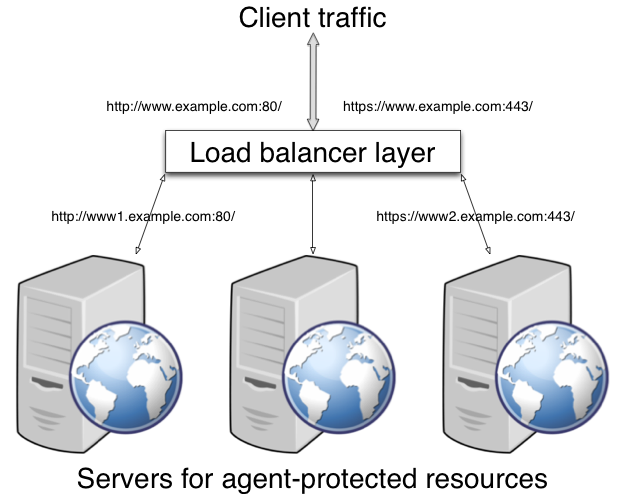
If your deployment has protocols and port numbers on the load balancer that match those of the protected servers, see When Protocols and Port Number Match.
A load balancing layer can also offload processor-intensive public-key encryption algorithms involved in SSL transactions to a hardware accelerator, reducing the load on the protected servers. The client connects to the load balancer over HTTPS, but the load balancer connects to the servers over HTTP.
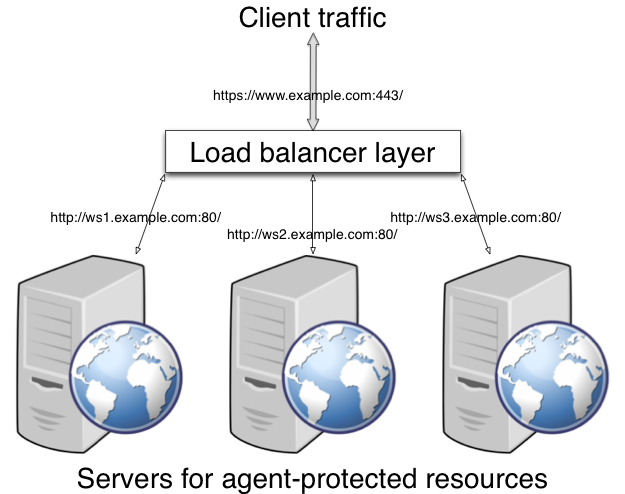
If your deployment uses SSL offloading, see When Protocols and Port Number Differ.
When Protocols and Port Number Match
When the protocol on the load balancer, such as HTTP or HTTPS, matches the protocol on the protected web server, and the port number the load balancer listens on, such as 80 or 443, matches the port number the protected web server listens on, then the main difference between URLs is in the host names. Map the agent host name to the host name for the load balancer.
When protocols and port numbers match, configure fully qualified domain name (FQDN) mapping.
This procedure explains how to do so for a centralized web policy agent profile configured in OpenAM Console. The steps also mention the properties for web agent profiles that rely on local, file-based configurations:
-
Login to OpenAM Console as an administrative user with rights to modify the policy agent profile.
-
Browse to Realms > Realm Name > Agents > Web > Agent Name to open the web agent profile for editing.
-
In the Global tab page section Fully Qualified Domain Name Checking, make sure FQDN checking is selected (the default).
The equivalent property setting is
com.sun.identity.agents.config.fqdn.check.enable=true. -
Set FQDN Default to the fully qualified domain name of the load balancer, such as
lb.example.com, rather than the protected server FQDN where the policy agent is installed.The equivalent property setting is
com.sun.identity.agents.config.fqdn.default=lb.example.com. -
Set FQDN Virtual Host Map to map the protected server FQDN to the load balancer FQDN, for example, where the key
agent.example.com(protected server) has valuelb.example.com(load balancer).The equivalent property setting is
com.sun.identity.agents.config.fqdn.mapping[agent.example.com]=lb.example.com. -
Save your work, and then restart the protected server.
When Protocols and Port Number Differ
When the load balancer protocol and port, such as HTTPS and 443, differ from the protocol on the protected web server, such as HTTP and 80, then you must override these in the policy agent configuration.
Use the Agent Deployment URI Prefix setting to override the agent protocol, host, and port with that of the load balancer.
|
The web policy agent configuration for SSL offloading has the side effect of preventing FQDN checking and mapping. As a result, URL rewriting and redirection does not work correctly when the policy agent is accessed directly and not through the load balancer. This should not be a problem for client traffic, but potentially could be an issue for applications accessing the protected server directly, from behind the load balancer. |
This procedure explains how to do so for a centralized web policy agent profile configured in OpenAM Console. The steps also mention the properties for web agent profiles that rely on local, file-based configurations:
-
Login to OpenAM Console as an administrative user with rights to modify the policy agent profile.
-
Browse to Realms > Realm Name > Agents > Web > Agent Name to open the web agent profile for editing.
-
In the Global tab page Profile section, set the Agent Deployment URI Prefix to that of the load balancer.
The value you set here is used when overriding protocol, host, and port on the protected server with the web policy agent.
The property to set is
com.sun.identity.agents.config.agenturi.prefix. -
In the Advanced tab page Load Balancer section, enable Load Balancer Setup.
The equivalent property setting is
com.sun.identity.agents.config.load.balancer.enable=true. -
Enable Override Request URL Protocol.
The equivalent property setting is
com.sun.identity.agents.config.override.protocol=true. -
Enable Override Request URL Host.
The equivalent property setting is
com.sun.identity.agents.config.override.host=true. -
Enable Override Request URL Port.
The equivalent property setting is
com.sun.identity.agents.config.override.port=true. -
Enable Notification URL when the web policy agent gets notifications about configuration changes.
The equivalent property setting is
com.sun.identity.agents.config.override.notification.url=true. -
Save your work, and then restart the protected server.
Configuring Agent Authenticators
An agent authenticator has read-only access to multiple agent profiles defined in the same realm, typically allowing an agent to read web service agent profiles.
After creating the agent profile, you access agent properties in the OpenAM console under Realms > Realm Name > Agents > Agent Authenticator > Agent Name.
- Password
-
Specifies the password the agent uses to connect to OpenAM.
- Status
-
Specifies whether the agent profile is active, and so can be used.
- Agent Profiles allow to Read
-
Specifies which agent profiles in the realm the agent authenticator can read.
- Agent Root URL for CDSSO
-
Specifies the list of agent root URLs for CDSSO. The valid value is in the format
protocol://hostname:port/where protocol represents the protocol used, such ashttporhttps, hostname represents the host name of the system where the agent resides, and port represents the port number on which the agent is installed. The slash following the port number is required.If your agent system also has virtual host names, add URLs with the virtual host names to this list as well. OpenAM checks that
gotoURLs match one of the agent root URLs for CDSSO.