Configuring the Security Token Service
OpenAM provides a REST Security Token Service (STS) and a SOAP STS that allow OpenAM to bridge identities across web and enterprise Identity Access Management (IAM) systems through its token transformation process.
Web services and requestors (that is, consumers or clients) are typically deployed across different security domains and topologies. Each domain may require a specific security token type to assert authenticated identities. STS provides a means to exchange tokens across these different domains without re-authenticating or re-establishing trust relationships while allowing the requestor access to a web service’s protected resources.
This chapter covers configuration of both OpenAM’s REST and SOAP STS components. Developers should refer to the "Working With the Security Token Service" in the Developer’s Guide for information about how to publish REST and SOAP STS instances programmatically and how to invoke these services.
Key Features of the OpenAM STS
The OpenAM STS issues, validates, and cancels tokens to establish trust relationships across different security domains. OpenAM STS provides the following key features:
-
REST STS. OpenAM provides a REST STS component that accepts REST API calls to OpenAM to transform security tokens. The OpenAM REST STS allows browser-based clients to use the HTTP protocol methods (GET and POST), cookies, and redirection to authenticate the client with the STS. Note that the REST STS does not conform to the WS-Trust specification, but provides a simpler deployment alternative to SOAP STS for token transformations.
-
SOAP STS. OpenAM provides a WS-Trust 1.4-compliant SOAP STS that lets OpenAM administrators publish or configure security token services. The SOAP STS provides for SOAP-enabled applications to send and receive SOAP messages without the need for HTTP redirection for authentication.
-
REST AND SOAP STS: Token Transformations. OpenAM STS issues OpenID Connect V1.0 (OIDC) and SAML V2.0 tokens (bearer, holder-of-key, sender vouches).
The REST STS provides the following token transformations for a single provider. (Note that the REST STS input type tokens do not conform to the WS-Trust specification):
-
• Username token → OIDC
-
• OIDC → OIDC
-
• X.509 token → OIDC
-
• OpenAM Session token → OIDC *
-
• Username token → SAML v2.0
-
• X.509 token → SAML v2.0
-
• OIDC token → SAML v2.0
-
• OpenAM Session token → SAML v2.0
The SOAP STS provides the following token transformations for a single provider:
-
•
UsernameToken→ OIDC -
• OIDC → OIDC
-
•
X.509→ OIDC -
• OpenAM SessionToken → OIDC *
-
•
UsernameToken→ SAML v2.0 -
•
X.509→ SAML v2.0 -
• OpenAM SessionToken → SAML v2.0
In both cases, you can invalidate or validate the interim OpenAM session that was created during the authentication of the input token type after the creation of the output token.
-
REST AND SOAP STS: Publish Service. You can configure REST or SOAP STS instances using the OpenAM console or programmatically. OpenAM provides a REST STS publish service that allows you to publish these instances using a POST to the endpoints. Note that a published instance can have only a single encryption key. Therefore, you need one published instance per service provider that the web service invoking the STS intends to call. For more information, see "The Publish Service" in the Developer’s Guide.
-
REST STS AND SOAP STS: Custom SAML Assertion Plugins. OpenAM supports customizable SAML assertion statements. You can create custom plug-ins for
Conditions,Subject,AuthenticationStatements,AttributeStatements, andAuthorizationDecisionStatementsstatements. -
REST STS: Custom Token Validators and Providers. The OpenAM REST STS provides the ability to customize tokens that are not supported by default by the STS. For example, you can configure STS to transform a token of type CUSTOM to a SAML V2.0 token.
-
SOAP STS: Client SDK. OpenAM provides a SOAP STS client SDK module to allow developers to use Apache CXF-STS classes. For details, see "About the SOAP STS Client SDK" in the Developer’s Guide.
-
SOAP STS: ActAs and OnBehalfOf Elements. OpenAM STS supports delegated and proxied token relationships, as defined by the
ActAsandOnBehalfOfelements in WS-Trust, which is available for Username and OpenAM session tokens. -
SOAP STS: Security Binding Assertions. OpenAM SOAP STS supports the WS-SecurityPolicy binding assertions that protect communication to and from the STS: transport, asymmetric, symmetric.
-
SOAP STS: Custom WSDL. The OpenAM SOAP STS comes with a pre-configured WSDL file. You can customize the policy bindings governing the input or output messages to or from the STS. For specific information, see "Customizing the WSDL File".
-
SOAP STS: Logging Service. The OpenAM STS allows SOAP-STS log entries to be configured via
java.util.logging, which allows logging to be configured via thelogging.propertiesfile in the Tomcatconfdirectory.
STS REST and SOAP Differences
The main differences between the OpenAM’s REST and SOAP STS implementations are summarized in the table below:
| Features | REST STS | SOAP STS |
|---|---|---|
Endpoints used by consumers |
REST |
SOAP |
WS-Trust 1.4 compliant? |
No |
Yes |
Input token types supported |
Username, X.509, OpenAM session, OpenID Connect |
Username, X.509, OpenAM session |
Custom Token Type support |
Yes |
No |
Apache CXF-based client SDK |
No |
Yes |
ActAs/OnBehalfOf Support |
No |
Yes |
Deployment |
REST endpoints exposed upon instance creation |
OpenAM |
An Overview of STS
A Security Token Service (STS) validates, issues, and cancels security tokens. OpenAM provides two Security Token Services:
-
REST STS. OpenAM provides a REST-based security token services. Note that the REST STS does not conform to the WS-Trust specification but provides a simpler deployment alternative than SOAP STS for token transformations.
-
SOAP STS. OpenAM supports a fully WS-Trust 1.4-compliant Security Token Service.
The WS-Trust specification introduces the concept of a centralized runtime component called the Security Token Service (STS), which issues, cancels, and validates security tokens in SOAP-based networks. A WS-Trust model involves communication between the components: a requestor, web service, and STS. The following terms are used throughout this chapter:
-
The requestor is a web client or programmatic agent that wants to use a service offered by the web service.
-
The web service allows authenticated and authorized clients to access resources or applications.
-
The identity provider stores claims about subjects and works with the STS to issue security tokens.
-
The STS acts as a trusted third-party web service that asserts the identity of a requestor across different security domains through the exchange of security tokens and brokers a trust relationship between the requestor and the web service provider. The STS issues tokens based on its configurations, which model the identity of a given identity provider, and issues tokens to a specific relying party.
-
A security token is a SOAP STS data structure representing a set of claims that assert the identity of a subject. A single claim is identity information, such as a subject’s name, age, gender, and email address.
-
A security policy, defined in WS-SecurityPolicy, specifies the required elements, tokens, security bindings, supporting tokens, and protocol assertions, which are requirements for a web service to grant a subject access to its service. The security policy is defined in a WSDL document, which is an XML file that states what needs to be protected, what tokens are allowed for access, and transmission requirements for SOAP STS.
"Basic REST STS Model" illustrates a simple REST STS topology between a requestor, web service, and STS. The STS instance is set up with the identity provider which has an existing trust relationship with the web service. The difference between the REST STS versus the SOAP STS is that REST STS does not strictly follow the WS-Trust specification for input token and output token formats. However, the REST STS provides a simpler means to deploy an STS instance, compared to that of the SOAP STS.
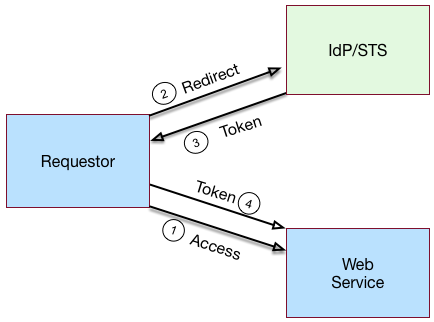
A simple REST STS process flow is as follows:
-
A requestor makes an access request to a web resource.
-
The web service redirects the requestor to the STS.
-
The requestor sends an HTTP(S) POST to the STS endpoint. The request includes credentials, token input type and desired token output type. An example curl request is shown below:
$ curl \
  --request POST \
  --header "iPlanetDirectoryPro: AQIC5..." \
  --header "Content-Type: application/json" \
  --data '{
     "input_token_state": {
       "token_type": "USERNAME",
       "username": "demo",
       "password": "changeit"
    },
     "output_token_state": {
       "token_type": "SAML2",
       "subject_confirmation": "BEARER"
    },
  }' \
https://openam.example.com:8443/openam/rest-sts/username-transformer?_action=translate
Or, you can run a command for an OIDC token:
$ curl \ --request POST --header "iPlanetDirectoryPro: AQIC5.." \ --header "Content-Type: application/json" \ --data '{ "input_token_state": { "token_type": "USERNAME", "username": "demo", "password": "changeit" }, "output_token_state": { "token_type": "OPENIDCONNECT" , "nonce":"12345678", "allow_access":true } }' \ http://forgerock-am.openrock.org:8080/openam/rest-sts/username-transformer?_action=translate -
The STS validates the signature, decodes the payload, and verifies that the requestor issued the transaction. The STS validates the requestor’s credentials, creates an interim OpenAM session, and optionally creates a CTS token for the session. The STS then issues a token to the requestor. If STS is configured to invalidate the interim OpenAM session, it does so. The requestor gets redirected to the web service.
-
The requestor presents the token to the web service. The web service validates the signature, decodes the payload, and verifies that the requestor issued the request. It then extracts and validates the token and processes the request.
-
If a CTS token was created for the session, the web service can call the REST STS to invalidate the token and the corresponding OpenAM session upon request.
"Basic SOAP STS Model" illustrates a basic SOAP STS topology between a requestor, web service, and STS. The STS instance is set up with the identity provider which has an existing trust relationship with the web service.
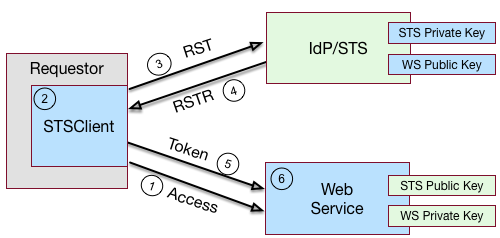
A basic SOAP STS process flow is as follows:
-
A requestor first accesses a protected resource for a web service. The requestor gets the web service’s WSDL file, which specifies the policy requirements to access its services.
-
The requestor creates and configures an
STSClientobject whose main task is to contact the STS. -
The
STSClientcontacts the STS to obtain its WSDL file. Each published STS instance exposes an API that is defined in its WSDL file. The WSDL file specifies the security policy bindings, which specify the type of token they must present to the API, and how this token is protected during transit. -
The
STSClientgenerates and sends a Request for Security Token (RST) to the STS. The RST specifies the what type of token is desired. The requestor’susernameTokenis embedded in the SOAP envelope that contains the RST and is used for authentication.The SOAP STS client SDK provides the classes, templates, and documentation to allow developers to set the state necessary to allow the Apache CXF runtime to generate the SOAP envelopt containing the RST, which satisfies the security policy bindings of the targeted STS.
-
The STS validates the requestor’s
usernameToken, creates an interim OpenAM session, and optionally creates a CTS token for the session. Upon successful authentication, the STS constructs a Request for Security Token Response (RSTR), signs the SAML v2.0 token, and embeds the token within the RSTR. If STS is configured to invalidate the interim token, it does so. The STS sends a Request for Security Token Response (RSTR) to theSTSClient. -
The
STSClientextracts the security token and sends it in the request’s message header. TheSTSClientsends the message to the web service. -
The web service extracts the SAML token and validates the signature to ensure that it came from the STS. The web service allows the user whose ID is specified in the SAML token to access its protected resource.
-
If a CTS token was created for the session, the web service can call the SOAP STS to invalidate the token and the corresponding OpenAM session upon request.
About the OpenAM STS
OpenAM 13 supports its own REST STS and a WS-Trust 1.4-compliant SOAP STS that transforms tokens from one type to SAML v2.0 or OIDC tokens. The STS can be deployed in existing federated systems to establish cross-domain trust relationships using token transformations.
OpenAM provides the ability for OpenAM administrators to publish or configure STS instances, each with its own distinct policy configurations, programmatically or via the OpenAM console.
The OpenAM SOAP STS is built upon the Apache CXF STS, an open-source implementation of JAX-WS and JAX-RS, as well as Apache WSS4j, an open-source Java implementation of the WS-Security specification.
About the OpenAM REST STS
OpenAM’s REST STS service provides an easier deployment alternative to SOAP STS to issue OpenID Connect 1.0 or SAML v2.0 tokens for a single service provider. Each REST STS instance is configured with the following elements:
-
Issuer. The issuer corresponds to the IdP
EntityID. -
SP EntityID. The SP
EntityIDis used in theAudienceRestrictionelement of theConditionsstatement of the issued assertion. -
SP Assertion Consumer Service URL. The SP assertion consumer service URL is used as the
Recipientattribute of thesubjectConfirmationelement in theSubjectstatement, which is required for bearer assertions according to the Web SSO profile.
For signing and encryption support, each REST STS instance has a configuration state, which specifies the keystore location containing the signing and encryption keys:
-
If assertion signature is configured, the keystore path and password must be specified as well as the alias and password corresponding to the
PrivateKeyused to sign the assertion. -
If assertion encryption is configured, the keystore path and password must be specified, as well as the alias corresponding the the SP’s X509Certificate encapsulating the
PublicKeyused to encrypt the symmetric key used to encrypt the generated assertion.Note that the keystore location can be specified via an absolute path on the local filesystem, or a path relative to the OpenAM classpath. Either the entire assertion can be encrypted, or the
NameIDand/orAttributeStatementAttributes.
All statements constituting a SAML v2.0 assertion can be customized. For each REST STS instance, you can provide custom plug-ins for Conditions, Subject, AuthenticationStatements, AttributeStatements, and AuthorizationDecisionStatements. If you specify the custom plug-ins in the configuration state of the published REST STS instance, the custom classes are consulted to provide the specific statements. See the interfaces in the org.forgerock.openam.sts.tokengeneration.saml2.statements package for details.
Each REST STS instance must specify the authentication context (that is, AuthnContext) to be included in the AuthenticationStatements of the generated assertion. This AuthnContext allows the generated SAML v2.0 assertion to specify the manner in which the assertion’s subject was authenticated. For a token transformation, this AuthnContext is a function of the input token type. By default, the following AuthnContext strings will be included in the SAML v2.0 assertion generated as part of the transformation of the following input token types:
-
OpenAM:
urn:oasis:names:tc:SAML:2.0:ac:classes:PreviousSession -
Username Token and OpenID Connect Token:
urn:oasis:names:tc:SAML:2.0:ac:classes:PasswordProtectedTransport -
X.509 Token:
urn:oasis:names:tc:SAML:2.0:ac:classes:X509
Note that you can override these default mappings by implementing the org.forgerock.openam.sts.token.provider.AuthnContextMapper interface and specifying the name of this implementation in the configuration of the published REST STS instance.
If you are interested in the REST STS, you should be familiar with the following specifications before setting up your deployment:
About the OpenAM SOAP STS
OpenAM 13 allows OpenAM administrators to publish WS-Trust 1.4-compliant STS instances, each with a distinct security policy configuration, and each issuing OpenID Connect (OIDC) v1.0 Tokens or SAML v2.0 (bearer, holder of key, and sender vouches) assertions.
The SOAP STS is deployed remotely from OpenAM in a Tomcat or Jetty container. Deploying both the OpenAM .war and the SOAP STS .war in the same container is not supported. The remotely-deployed SOAP STS .war file authenticates to OpenAM with SOAP STS agent credentials and pulls the configuration state for all SOAP instances published in its realm, exposing WS-Trust-compliant SOAP web services based on this configuration state. For more information, see "Deploying SOAP STS Instances".
OpenAM is the authentication authority for the STS instances and its configured data stores, which store the attributes that are included in OIDC tokens and generated SAML v2.0 assertions.
You can publish any number of SOAP STS instances programmatically, or by using the OpenAM console. Each instance is published with a specific WS-SecurityPolicy binding, which specifies:
-
Type of supporting token that asserts the caller’s identity.
-
Manner in which the supporting token is protected (symmetric, asymmetric, or transport binding).
Each published SOAP STS instance is protected by a security policy binding, which specifies what sort of token must be presented to assert the caller’s identity (also known as the supporting token), and how this supporting token is protected. There are three protection schemes: transport, symmetric, and asymmetric:
-
Transport Binding Assertion. Transport binding is used when the message is protected at the transport level, such as HTTPS, and thus requires no explicit enforcement at the security policy binding enforcement level. The SOAP keystore configuration allows a SOAP STS instance to be published referencing the keystore state necessary to enforce the symmetric and asymmetric bindings.
-
Symmetric Binding Assertion. Symmetric binding is used when only one party needs to generate security tokens. In a symmetric binding, the client generates symmetric key state used to sign and encrypt messages, and encrypts this symmetric key state with the STS’s public key, and includes the encrypted symmetric key in the request. Thus, the SOAP keystore configuration of a published STS instance, which is protected by the symmetric binding, must reference a keystore with the STS’s
PrivateKeyEntry, so that it may decrypt the symmetric key generated by the client. -
Asymmetric Binding Assertion. Asymmetric binding is used when both the client and the service both have security tokens. In an asymmetric binding, client requests are signed with the client’s secret key, and encrypted with the STS’s public key. STS responses are signed with the STS’s private key and encrypted with the client’s public key. The client’s X.509 certificate is included in the request, so that the STS can validate the client’s signature and encrypt responses to the client without requiring the presence of the client’s X.509 certificate in the STS’s keystore. However, the SOAP keystore configuration of a published STS instance protected by an asymmetric binding must reference a keystore with the STS’s PrivateKeyEntry, which allows the STS to both: 1) sign messages from STS to client, and 2) decrypt messages from the client.
The Decryption Key Alias in a SOAP STS instance’s configuration corresponds to the
PrivateKeyEntry.
The following bindings are available:
-
•
UsernameTokenover the Transport, Symmetric, and Asymmetric binding -
• OpenAM Session Token over the Transport and Unprotected binding
-
• X.509 certificates examples seen in WS-SecurityPolicy Examples Version 1.0 A SAML v2.0 assertion, defined in SAML V2.0, contains a
Subjectelement that identifies the principal, which is the subject of the statements in the assertion. TheSubjectelement contains an identifier and zero or moreSubjectConfirmationelements, which allows a relying party to verify the subject of the assertion with the entity with whom the relying party is communicating.
The SubjectConfirmation element contains a required Method attribute that specifies the URI identifying the protocol used to confirm the subject. The OpenAM STS supports the following subject confirmation methods:
-
Holder of Key. The holder of key subject confirmation method involves proving a relationship between the subject and claims. This is achieved by signing part of the SOAP message with a proof key sent in the SAML assertion. The additional proof key guards against any attempted man-in-the-middle attack by ensuring that the SAML assertion comes from the subject claiming to the be requestor.
URI: urn:oasis:names:tc:SAML:2.0:cm:holder-of-key -
Sender Vouches. The sender vouches subject confirmation method is used in cases where you have a proxy gateway that propagates the client identity via the SOAP messages on behalf of the client. The proxy gateway must protect the SOAP message containing the SAML assertion, so that the web service can verify that it has not been tampered with.
URI: urn:oasis:names:tc:SAML:2.0:cm:sender-vouches -
Bearer. The bearer subject confirmation method assumes that a trust relationship exists between the subject and the claims, and thus no keys are required when using a bearer token. No additional steps are required to prove or establish a relationship.
Since browser-based clients use bearer tokens and no keys are required, you must protect the SOAP message using a transport-level mechanism, such as SSL, as this is the only means to protect against man-in-the-middle attacks.
URI: urn:oasis:names:tc:SAML:2.0:cm:bearer
If you are interested in the SOAP STS, you should be familiar with the SOAP STS specifications:
Supporting Delegated Relationships in SOAP STS
SOAP STS supports the ability to issue SAML assertions with the sender vouches subject confirmation method. Sender vouches are used in proxy deployments, such as a proxying gateway, where the gateway requests a SAML assertion with a sender vouches confirmation from the STS.
In this case, the requestor’s credentials are set in the OnBehalfOf and ActAs elements in the request security token (RST) request included in the Issue invocation. The gateway calls the STS, and the gateway’s credentials satisfy the security policy bindings protecting the STS. The presence of either the OnBehalfOf and ActAs elements together with a token type of SAML v2.0 and a key type of PublicKey triggers the issuance of a sender vouches SAML v2.0 assertion.
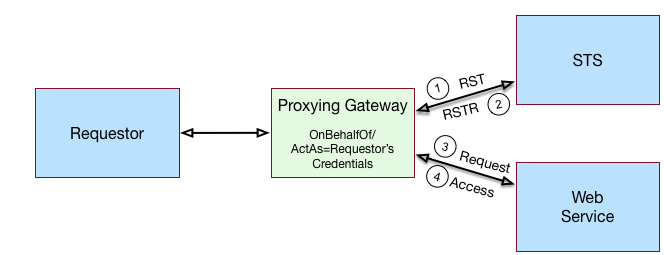
The STS runs token validators that validate the authenticity of the ActAs or OnBehalfOf token.
The SOAP STS configuration indicates whether token delegation relationships are supported in the STS in the ActAs and OnBehalfOf elements. If token delegation is supported, the configuration also indicates the token types that token validators use to validate the ActAs and OnBehalfOf token elements.
In the Request for Security Token (RST) invocation, Username and OpenAM tokens are supported for the OnBehalfOf element. In addition, you can specify that the SOAP STS instance be deployed with a user-specified implementation of the token delegation handler interface, org.apache.cxf.sts.token.delegation.TokenDelegationHandler.
A default token delegation handler is used if no custom token delegation handler is configured. The default token delegation handler rejects the delegation relationship if the token principal set to null in the token delegation parameters (that is, TokenDelegationParameters), as this is the case when no token validators have validated the ActAs and OnBehalfOf token. Thus, if you want the STS instance to support the ActAs and OnBehalfOf elements, you must specify one of the two following configuration properties:
-
The Delegation Relationships Supported property.
-
One or more Delegated Token types. For example, OpenAM or
Usernamefor which token validators are deployed to validate theActAsorOnBehalfOftokens and/or a custom token delegation handler.If you configure the
Usernametoken type as a delegated token type, OpenAM uses the configuration in the Authentication Target Mappings property to authenticateUsernametokens. OpenAM SSO tokens require no special configuration in the Authentication Target Mappings property.
Example Proxy Gateway STS Deployment
Suppose you want to deploy the SOAP STS to receive requests from a proxy gateway and issue SAML v2.0 assertions with sender vouches subject confirmation method. The gateway sends the SAML v2.0 assertion that asserts the identity of the gateway client and vouches for its identity.
Suppose the SOAP STS deployment has a security policy binding requiring the presentation of an X.509 certificate. This security policy binding can be satisfied by presenting the gateway’s X.509 certificate. However, the SOAP STS-issued SAML v2.0 assertion should assert the identity of the gateway client that presents its identity to the gateway as either a <username, password> combination or as an OpenAM session.
In this case, the published SOAP STS would specify an X.509-based security policy, the delegation relationships to be supported, and whether both OpenAM and Username token types should be supported. No custom token delegation handler need be specified.
Furthermore, the SOAP STS instance must be published with Authentication Target Mappings that specify how the Username token should be presented to OpenAM’s RESTful authentication context. The gateway code would then create a request for security token (RST) invocation using the classes in the openam-sts/openam-soap-sts/openam-soap-sts-client module, and include the gateway client’s <username, password> or OpenAM session state as the OnBehalfOf element. This setting allows the gateway to consume the SOAP STS to issue SAML v2.0 assertions with the sender vouches subject confirmation method, which asserts the identity of the gateway client corresponding to the presented <username, password> or OpenAM session state.
If, at a later date, you want to exclude or blacklist some users from attaining SAML v2.0 assertions, regardless of their possession of valid <username, password> or OpenAM session state, you can update the SOAP STS with the class name of a token delegation handler implementation, which would implement this blacklist functionality. The SOAP STS .war file would have to be re-created with this file in the classpath. The token delegation handler could reject the invocation for users or principals on the blacklist.
Validating Input Tokens
STS token transformations validate input tokens before generating output tokens. STS uses OpenAM authentication modules and chains to perform token validation. When deploying STS, you must configure OpenAM authentication so that it can validate input tokens.
This section describes authentication configuration requirements for username, X.509, and OpenID Connect tokens. No special authentication configuration is required when using OpenAM session tokens as the input tokens in token transformations.
Because REST STS instances are not part of a secure framework like WS-Trust 1.4, this section also mentions security issues you should consider when sending tokens across a network to a REST STS instance.
In addition to configuring OpenAM authentication to support input token validation, you must identify the authentication module or chain to be used to validate each input token type. To do so, configure the Authentication Target Mappings property in the STS instance configuration. For more information about this property, see "Hints for Configuring STS Instances".
Validating Username Tokens
Username tokens passed to REST STS instance contain the username/password combination in clear text. Tokens can be validated using any module type that supports username/password authentication, including Data Store, LDAP, and so forth.
With usernames and passwords in clear text, be sure to configure your deployment with an appropriate level of security. Deploy REST STS instances that support input username token transformations on TLS.
Validating X.509 Certificate Tokens
REST STS instances can obtain X.509 certificates used as input tokens in two ways:
-
From the header key defined in the REST STS instance’s Client Certificate Header Key property. In this case, STS also confirms that the request came from a host specified in the Trusted Remote Hosts property.
-
From the
javax.servlet.request.X509Certificateattribute in the ServletRequest. The REST STS instance obtains the X.509 certificate from the ServletRequest if no header key is configured in the Client Certificate Header Key property.
The OpenAM Certificate module authenticates the X.509 certificate input token. The module optionally performs certificate revocation list (CRL) or Online Certificate Status Protocol (OCSP) checking, and can optionally check to see that the specified certificate is in a LDAP datastore.
If certificates are passed to REST STS using HTTP headers, you must configure the Trusted Remote Hosts and Http Header Name for Client Certificate properties in the Certificate module to match your REST STS instance’s configuration.
Validating OpenID Connect Tokens
To validate OpenID Connect input tokens, a REST STS instance must reference an OpenID Connect id_token bearer authentication module in the Authentication Target Mappings property.
Configure the authentication module as follows:
-
Specify a header in the Name of header referencing the ID Token property. The REST STS instance’s Target Authentication Mapping property must reference the same header.
-
Specify the issuer name in the Token Issuer field, and configure the token issuer’s discovery URL, JWK URL or client secret in the OpenID Connect validation configuration value property.
-
If incoming OpenID Connect tokens contain
azpclaims, specify valid claims in the "List of accepted authorized parties" property. -
If incoming OpenID Connect tokens contains
audclaims, specify the valid claim in the Audience property. -
Configure attribute mappings so that JWK claims map to attributes in the OpenAM user store.
For more information about OpenID Connect id_token bearer authentication module properties, see "Hints for the OpenID Connect id_token bearer Module".
|
SOAP STS instances do not accept OpenID Connect tokens as input tokens in token transformations. |
Hints for Configuring STS Instances
Use these hints to configure properties for REST and SOAP STS instances.
REST STS Configuration Properties
The following are general configuration properties for REST STS instances:
- Persist Issued Tokens in Core Token Store
-
Specifies whether to enable token persistence in the Core Token Service (CTS).
OpenAM saves all STS-issued tokens to CTS when token persistence is enabled. A token’s lifetime in CTS has the same length as the Token Lifetime property specified for issued tokens.
STS token validation and cancellation capabilities require tokens to be present in CTS. Therefore, if your deployment requires token validation and cancellation, you must enable token persistence.
- Supported Token Transforms
-
Specifies one or more token transformations supported by this REST STS instance. Token transformations are listed in the OpenAM console using the notation
input_token_type → output_token_type.For each supported token transformation, OpenAM provides an option to invalidate the interim OpenAM session. When transforming a token, the STS creates an OpenAM session. If desired, you can invalidate the OpenAM session after token transformation is complete.
- Custom Token Validators
-
Specifies a validator class for a custom token type.
Use the format
CUSTOM_TOKEN_TYPE|custom_validator_classto specify each validator class. For example,CUSTOM|org.mycompany.tokens.myCustomTokenValidator.For more information about custom token validators, see "Extending STS to Support Custom Token Types" in the Developer’s Guide.
- Custom Token Providers
-
Specifies a provider class for a custom token type.
Use the format
CUSTOM_TOKEN_TYPE|custom_provider_class. To specify each provider class. For example,CUSTOM|org.mycompany.tokens.myCustomTokenProvider.For more information about custom token providers, see "Extending STS to Support Custom Token Types" in the Developer’s Guide.
- Custom Token Transforms
-
Specifies one or more token transformations that take a custom token type as the input or output token. If you specify a custom token validator or provider, you must also specify a custom token transform.
Specify the custom transform using three values separated by the vertical bar character | as follows:
-
The input token type
-
The output token type
-
Whether to invalidate the OpenAM session created during token transformation. Specify
TRUEto invalidate the session orFALSEto let the session remain valid.
For example, a value of
CUSTOM|SAML2|TRUEconfigures a token transformation that transforms aCUSTOMtoken to a SAML v2.0 assertion and then invalidates the created OpenAM session. -
The following are deployment configuration properties for REST STS instances:
- Deployment Url Element
-
Specifies a string that identifies this REST STS instance.
The Deployment Url Element is a component of the REST STS instance’s endpoint. For example, if you specified
myRESTSTSInstanceas the Deployment Url Element, the REST STS endpoint would berest-sts/myRealm/myRESTSTSInstance. - Authentication Target Mappings
-
Specifies one or more mappings that define how the REST STS instance authenticates input tokens.
Each mapping is a set of arguments separated by the vertical bar character | as follows:
-
(Required) The input token type:
USERNAME,OPENAM,X509,OPENIDCONNECT, or a custom token type. -
(Required) The value
serviceormodule. If the third argument is an authentication chain, specifyservice. If the third argument is an authentication module, specifymodule. -
(Required) The name of an OpenAM authentication chain or module to which the input token is authenticated.
-
(Optional) The name of the header to place the token in when authenticating to OpenAM. Specify this parameter for input
X509andOPENIDCONNECTtokens as follows:-
For
X509input tokens, the format isx509_token_auth_target_header_key=Header Name. -
For
OPENIDCONNECTinput tokens, the format isoidc_id_token_auth_target_header_key=Header Name.
-
Be sure to specify the header names configured in the Certificate or OpenID Connect id_token bearer authentication module properties as the Header Name argument.
This argument can also be used with custom token types to specify the name of a header or cookie from which to obtain a token. When using this argument with a custom token type, its format is determined by the custom validator class that validates the custom token type.
The following are example mappings:
-
USERNAME|service|myLDAPChainconfigures STS to authenticate inputUSERNAMEtokens to themyLDAPChainauthentication chain. -
X509|module|CertModule|x509_token_auth_target_header_key=ClientCertconfigures STS to obtain an X.509 certificate from theClientCertheader, use it as the input token, and authenticate it using theCertModuleauthentication module.
-
- Client Certificate Header Key
-
Specifies the name of a header that a TLS offloader should use to use to transmit client certificates.
Token transformations that take an X.509 certificate as the input token require the certificate to be presented using two-way TLS, so that the TLS handshake can validate client certificate ownership. A common way of obtaining the client certificate with two-way TLS is to use the
javax.servlet.request.X509Certificateattribute in the servlet request.However, in deployments with TLS offloading, the offloader must use an HTTP header to transmit the certificate to its destination. This configuration property is the name of the HTTP header whose value contains the certificate.
- Trusted Remote Hosts
-
Specifies one or more IP addresses of hosts trusted to transmit client X.509 certificates in deployments with TLS offloading.
To allow any host to transmit a certificate, specify
anyas the value of this property.As with the Client Certificate Header Key property, configure this property for deployments with TLS offloading.
This section lists configuration properties associated with STS-issued SAML v2.0 assertions for both REST and SOAP STS instances. The properties fall into two categories:
-
Properties that determine content in STS-issued SAML v2.0 assertion. For information about SAML v2.0 assertions, see Assertions and Protocols for the OASIS Security Assertion Markup Language (SAML) V2.0.
-
Properties that determine how the issued SAML v2.0 assertion is signed or encrypted.
- The SAML2 issuer Id
-
Specifies the IdP entity ID. Populates the
Issuerelement of the SAML v2.0 assertion. - Service Provider Entity Id
-
Specifies an audience attribute value. Populates the
AudienceRestrictionsubelement of theConditionselement of the SAML v2.0 assertion.This value is required when issuing Bearer assertions.
- Service Provider Assertion Consumer Service Url
-
Specifies a recipient attribute value. Populates the
Recipientsubelement of theSubjectConfirmationelement of the SAML v2.0 assertion.This value is required when issuing Bearer assertions.
- NameIdFormat
-
Specifies the name identifier format for the SAML v2.0 assertion.
- Token Lifetime
-
Specifies the lifetime, in seconds, for the assertion. The default is 600 seconds.
- Custom Conditions Provider Class Name
-
Specifies the name of a custom class that generates a
Conditionselement in the SAML v2.0 assertion. This property is optional: use a custom class when theConditionselement created by the default provider does not meet your needs.The class must implement the
org.forgerock.openam.sts.tokengeneration.saml2.statements.ConditionsProviderinterface, and must be bundled in the OpenAM.warfile. - Customs Subject Provider Class Name
-
Specifies the name of a custom class that generates a
Subjectelement in the SAML v2.0 assertion. This property is optional: use a custom class when theSubjectelement created by the default provider does not meet your needs.The class must implement the
org.forgerock.openam.sts.tokengeneration.saml2.statements.SubjectProviderinterface and must be bundled in the OpenAM.warfile. - Custom AuthenticationStatements Class Name
-
Specifies the name of a custom class that generates an
AuthnStatementelement in the SAML v2.0 assertion. This property is optional: use a custom class when theAuthnStatementelement created by the default provider does not meet your needs.The class must implement the
org.forgerock.openam.sts.tokengeneration.saml2.statements.AuthenticationStatementsProviderinterface and must be bundled in the OpenAM.warfile. - Custom AttributeStatements Class Name
-
Specifies the name of a custom class that generates an
AttributeStatementelement in the SAML v2.0 assertion. This property is optional: use a custom class when theAttributeStatementelement created by the default provider does not meet your needs.The class must implement the
org.forgerock.openam.sts.tokengeneration.saml2.statements.AttributeStatementsProviderinterface and must be bundled in the OpenAM.warfile. - Custom Authorization Decision Statements Class Name
-
Specifies the name of a custom class that generates an
AuthzDecisionStatementelement in the SAML v2.0 assertion. This property is optional: use a custom class when theAuthzDecisionStatementelement created by the default provider does not meet your needs.The class must implement the
org.forgerock.openam.sts.tokengeneration.saml2.statements.AuthzDecisionStatementsProviderinterface and must be bundled in the OpenAM.warfile. - Custom Attribute Mapper Class Name
-
Specifies the name of a custom attribute mapper class. An attribute mapper generates
attributeelements to be included in the SAML v2.0 assertion.The class must implement the
org.forgerock.openam.sts.tokengeneration.saml2.statements.AttributeMapperinterface and must be bundled in the OpenAM.warfile. - Custom Authentication Context Class Name
-
Specifies the name of a custom class that generates an
AuthnContextelement in the SAML v2.0 assertion. This property is optional: use a custom class when theAuthnContextelement created by the default provider does not meet your needs.The class must implement the
org.forgerock.openam.sts.tokengeneration.saml2.statements.AuthnContextMapperinterface and must be bundled in the OpenAM.warfile.By default, OpenAM generates the
AuthnContextelement based on the input token type as follows:-
For input OpenAM tokens:
urn:oasis:names:tc:SAML:2.0:ac:classes:PreviousSession -
For input username tokens and OpenID Connect ID tokens:
urn:oasis:names:tc:SAML:2.0:ac:classes:PasswordProtectedTransport -
For input X.509 tokens:
urn:oasis:names:tc:SAML:2.0:ac:classes:X509
-
- Attribute Mappings
-
Configures mappings between SAML v2.0 attribute names—map keys—and OpenAM user profile attributes or session properties in order to generate
Attributeelements in the SAML v2.0 assertion.OpenAM’s default attribute mapper generates
Attributeelements as follows:-
The map key populates the
Attributeelement’sNameproperty. -
The user profile or session property value populates the
Attributeelement’sAttributeValueproperty.
When specifying map keys in the Attribute Mappings property, use the following format:
[NameFormatURI]|SAML_ATTRIBUTE_NAME.Map values enclosed in quotes are included in the attribute without mapping. Specify
';binary'at the end of a map value for attributes that have binary values.The following are examples of attribute mappings:
-
EmailAddress=mail -
Address=postaladdress -
urn:oasis:names:tc:SAML:2.0:attrname-format:uri|urn:mace:dir:attribute-def:cn=cn -
partnerID="staticPartnerIDValue" -
urn:oasis:names:tc:SAML:2.0:attrname-format:uri|nameID="staticNameIDValue" -
photo=photo;binary -
urn:oasis:names:tc:SAML:2.0:attrname-format:uri|photo=photo;binary
-
- Sign Assertion
-
Specifies whether or not to sign the SAML v2.0 assertion.
When enabling assertion signing, you must also specify the KeystorePath, Keystore Password, Signature Key Alias, and Signature Key Password properties.
- Encrypt Assertion
-
Specifies whether to encrypt the entire SAML v2.0 assertion. When enabling assertion encryption:
-
You must also specify the KeystorePath, Keystore Password, and Encryption Key Alias properties.
-
You must not specify the Encrypt Attributes or Encrypt NameID options.
-
The Encryption Key Alias corresponds to the public key of the service provider that is the intended audience of the assertion. SAML v2.0 assertion encryption works as follows:
-
OpenAM generates a symmetric key.
-
OpenAM encrypts the symmetric key with the recipient’s public key.
-
OpenAM includes the encrypted key in the part of the assertion that is not symmetric key-encrypted.
-
The service provider—owner of the corresponding private key—uses the private key to decrypt the symmetric key included in the assertion.
-
The service provider can then use the decrypted symmetric key to decrypt the assertion.
- Encrypt Attributes
-
Specifies whether to encrypt the assertion’s attributes only. When specifying this option, do not specify the Encrypt Assertion option.
When encrypting attributes, you must also specify the KeystorePath, Keystore Password, and Encryption Key Alias properties.
- Encrypt NameID
-
Specifies whether to encrypt the assertion’s NameID only. When specifying this option, do not specify the Encrypt Assertion option.
When encrypting the NameID, you must also specify the KeystorePath, Keystore Password, and Encryption Key Alias properties.
- Encryption Algorithm
-
Specifies the encryption algorithm to use when encrypting the entire assertion, the assertion’s attributes, or the NameID.
- KeystorePath
-
Specifies the path to the Java keystore to be used for encrypting all or part of the SAML assertion. Specify an absolute path or a location in the OpenAM classpath.
OpenAM provides two keystores with test keys that are located at the
/path/to/openam/openam/path. For more information about the OpenAM keystores, see "Managing Certificates and Keystores".- Keystore Password
-
Specifies the encryption keystore’s password.
- Encryption Key Alias
-
Specifies the alias corresponding to the service provider’s X.509 certificate encapsulating the public key used to encrypt the symmetric key used to encrypt the generated assertion.
- Signature Key Alias
-
Specifies the alias corresponding to the private key used to sign the assertion.
- Signature Key Password
-
Specifies the password of the private key used to sign the assertion.
This section lists configuration properties associated with STS-issued OpenID Connect tokens for both REST and SOAP STS instances. The properties fall into two categories:
-
Properties that determine content in the issued OpenID Connect ID token. For information about OpenID Connect ID tokens, see the OpenID Connect Core 1.0 specification.
-
Properties that determine how the issued token is signed.
An STS instance configured to issue OpenID Connect tokens models the relationship between an OpenID Connect token provider and relying party. In other words, an STS instance issues tokens for a particular OAuth 2.0 client. The tokens contain aud and azp claims for the OAuth 2.0 client, and signing key state corresponding to a token provider.
In this model, when users call an STS instance to generate an OpenID Connect ID token, the process is analogous to the exchange between an OAuth 2.0 authorization server and resource owner following the initial redirection from an OAuth 2.0 client initiating the implicit flow. The STS instance returns the OpenID Connect ID token that corresponds to the authorization server’s authentication of the resource owner. OpenAM authenticates one of the following:
-
For REST STS, the token specified as the
input_token_statefor the token transformation -
For SOAP STS, the supporting token necessary to traverse the SecurityPolicy bindings protecting the WS-Trust operation
Implicit in this model is the notion that an OpenID Connect ID token has value outside of an OAuth 2.0 flow, and that an OAuth 2.0 client, as a relying party, could be generalized as a SAML v2.0 service provider. The ID token is not simply an an entity-provided verifiable authorized access to a specific resource set, but rather a generic service provider that consumes an OpenID Connect ID token to authenticate and authorize the subject asserted by the token.
Therefore, the configuration of an STS instance that issues OpenID Connect ID tokens contains information that defines the token provider and relying party.
Note that the nonce claim in the ID token is not a configuration property of an STS instance. STS consumers requesting an output OpenID Connect token provide a nonce value when making token transformation requests.
- The id of the OpenIdConnect Token Provider
-
Specifies the OpenID Connect token provider issuer ID. Populates the
issclaim of the ID token. - Token Lifetime
-
Specifies, in seconds, the ID token’s expiration. Populates the
expclaim of the ID token. - Token signature algorithm
-
Specifies an HMAC or RSA algorithm used to sign ID tokens.
- Public key reference type
-
Specifies how public keys should be referenced in issued ID tokens signed with RSA. OpenID Connect ID tokens are issued as JSON web tokens (JWTs). Tokens can reference RSA public keys as JSON web keys (JWKs), or not at all.
Used with RSA signing.
- KeyStore Location
-
Specifies the path to the Java keystore used for signing the ID token. Specify an absolute path or a location in the OpenAM classpath.
Used with RSA signing.
OpenAM provides two keystores with test keys that are located at the
/path/to/openam/openam/path. For more information about the OpenAM keystores, see "Managing Certificates and Keystores". - KeyStore password
-
Specifies the password of the keystore used for signing the ID token.
Used with RSA signing.
- KeyStore signing key alias
-
Specifies the alias corresponding to the private key used to sign the ID token.
Used with RSA signing.
- Signature key password
-
Specifies the password of the alias corresponding to the private key used to sign the ID token.
Used with RSA signing.
- Client secret
-
Specifies the secret shared between the client and the ID token generator used to sign the ID token.
Used with HMAC signing.
- The audience for issued tokens
-
Specifies the intended audience for the ID token. Populates the
audclaim of the ID token. - The authorized party
-
Specifies the party to which the ID token is being issued. Populates the
azpclaim of the ID token. - Claim map
-
Specifies additional claim entries to be inserted into the ID token.
Specifies entries using the format
claim_name=user_profile_attribute. When issuing the ID token, OpenAM populates the claim value with the value of the attribute in the authenticated user’s profile.For example, suppose the Claim map property had an entry with the value
email=mail. A generated OpenID Connect ID token for user Sam Carter would contain the claim"email":"scarter@example.com"if themailattribute in Sam Carter’s user profile had the valuescarter@example.com. - Custom claim mapper class
-
Specifies the name of a custom claim mapper class. A claim mapper generates additional claims to be included in the OpenID Connect ID token.
The class must implement the
org.forgerock.openam.sts.tokengeneration.oidc.OpenIdConntectTokenClaimMapperinterface and must be bundled in the OpenAM.warfile. - Custom authn context mapper class
-
Specifies the name of a custom class that generates an
acrclaim in the OpenID Connect ID token. Anacrclaim indicates which authentication context class was satisfied by the authentication of the principal asserted in the OpenID Connect ID token. Theacrclaim is optional and is not included in the generated ID token by default.For REST STS instances, the class must implement the
org.forgerock.openam.sts.rest.token.provider.oidc.OpenIdConnectTokenAuthnContextMapperinterface and must be bundled in the OpenAM.warfile.For SOAP STS instances, the class must implement the
org.forgerock.openam.sts.soap.token.provider.oidc.SoapOpenIdConnectTokenAuthnContextMapperinterface and must be bundled into the SOAP STS deployment.warfile. - Custom authn methods references mapper class
-
Specifies the name of a custom class that generates an
amrclaim in the OpenID Connect ID token. Anamrclaim indicates which authentication methods were used to authenticate the principal asserted in the OpenID Connect ID token. Theamrclaim is optional and is not included in the generated ID token by default.For REST STS instances, the class must implement the
org.forgerock.openam.sts.rest.token.provider.oidc.OpenIdConnectTokenAuthMethodReferencesMapperinterface and must be bundled in the OpenAM.warfile.For SOAP STS instances, the class must implement the
org.forgerock.openam.sts.soap.token.provider.oidc.SoapOpenIdConnectTokenAuthnMethodReferencesMapperinterface and must be bundled into the SOAP STS deployment.warfile.
SOAP STS Configuration Properties
The following are general configuration properties for SOAP STS instances:
- Persist Issued Tokens in Core Token Store
-
Specifies whether to enable token persistence in the Core Token Service (CTS).
OpenAM saves all STS-issued tokens to CTS when token persistence is enabled. A token’s lifetime in CTS has the same length as the Token Lifetime property specified for issued tokens.
STS token validation and cancellation capabilities require tokens to be present in CTS. Therefore, if your deployment requires token validation and cancellation, you must enable token persistence.
- Issued Tokens
-
Specifies the types of tokens that this SOAP STS instance issues as output tokens for token transformations.
- Security Policy Validated Token
-
Specifies the
SupportingTokentype in the WS-SecurityPolicy bindings in the SOAP STS deployment’s WSDL, and whether the OpenAM session created during token transformation should be invalidated after the token is issued.
The following are deployment configuration properties for SOAP STS instances:
- Deployment Url Element
-
Specifies a string that identifies this SOAP STS instance.
The Deployment Url Element is a component of the SOAP STS instance’s endpoint. For example, if you specified
mySOAPSTSInstanceas the Deployment Url Element, the SOAP STS endpoint would be SOAP STS .war File Name`/myRealm/mySOAPSTSInstance`. - Authentication Target Mappings
-
Specifies one or more mappings that define how the SOAP STS instance should authenticate input tokens.
Each mapping is a set of arguments separated by the | character as follows:
-
(Required) The input token type:
USERNAME,OPENAM, orX509. -
(Required) The value
serviceormodule. If the third argument is an authentication chain, specifyservice. If the third argument is an authentication module, specifymodule. -
(Required) The name of an OpenAM authentication chain or module to which the input token is authenticated.
-
(Optional) The name of the header in which to place the token when authenticating to OpenAM. For
X509input tokens, the format isx509_token_auth_target_header_key=Header Name.Be sure to specify the header name configured in the Certificate authentication module properties as the Header Name argument.
The following are example mappings:
-
USERNAME|service|myLDAPChainconfigures STS to authenticate inputUSERNAMEtokens to themyLDAPChainauthentication chain. -
X509|module|CertModule|x509_token_auth_target_header_key=ClientCertconfigures STS to obtain an X.509 certificate from theClientCertheader, use it as the input token, and authenticate it using theCertModuleauthentication module.
-
-
- Url of OpenAM
-
Specifies the OpenAM URL. For example,
https://openam.example.com:8443/openam. - Wsdl File Referencing Security Policy Binding Selection
-
Specifies a supporting token type and security policy binding to protect the SOAP STS instance. This choice will determine the SecurityPolicy bindings in the wsdl file defining the WS-Trust API.
If you select the
Custom wsdl fileoption, you must provide the path to a custom WSDL file in the Custom wsdl File property. - Custom wsdl File
-
Specifies the path to a custom WSDL file that defines the WS-Trust API.
- Custom Service QName
-
Specifies the
nameattribute of thewsdl:serviceelement. Configure this property when using a custom WSDL file. - Custom Port QName
-
Specifies the
nameattribute of thewsdl:portelement. Configure this property when using a custom WSDL file. - Delegation Relationships Supported
-
Enable this option if the request security token messages can include
wst14:ActAsorwst:OnBehalfOfparameters. Note that you must enable this option if the SOAP STS instance issues SAML v2.0 assertions withSenderVouchessubject confirmations. - Delegated Token Types
-
Specifies the types of validation support to enable in the SOAP STS instance for
USERNAMEandOPENAMtokens inwst14:ActAsorwst:OnBehalfOfparameters specified in request security token messages.If the SOAP STS instance supports delegated relationships, configure either the Delegated Token Types property or the Custom Delegation Handlers property, but not both properties.
- Custom Delegation Handlers
-
Specifies custom handlers that implement the
org.apache.cxf.sts.token.delegation.TokenDelegationHandlerinterface. The handlers provide validation support for the tokens inwst14:ActAsorwst:OnBehalfOfparameters specified in request security token messages. Custom delegation handlers are typically used when the tokens are custom tokens.If the SOAP STS instance supports delegated relationships, configure either the Delegated Token Types property or the Custom Delegation Handlers property, but not both properties.
The following are SOAP keystore configuration properties for SOAP STS instances:
- Soap Keystore Location
-
Specifies a keystore containing keys that enforce security policy when using the symmetric and asymmetric bindings with SOAP messaging.
Note that the Wsdl File Referencing Security Policy Binding Selection property determines the binding for a SOAP STS instance.
- Keystore Password
-
Specifies the SOAP keystore’s password.
- Signature Key Alias
-
Specifies the alias of the key used to sign messages from this SOAP STS instance. You must configure this property when using asymmetric binding.
- Signature Key Password
-
Specifies the password for the signature key.
- Decryption Key Alias
-
Specifies the alias of the key used by this SOAP STS instance to decrypt client messages for the asymmetric binding, and to decrypt the client-generated symmetric key for the symmetric binding.
- Decryption Key Password
-
Specifies the decryption key’s password.
This section lists configuration properties associated with STS-issued SAML v2.0 assertions for both REST and SOAP STS instances. The properties fall into two categories:
-
Properties that determine content in STS-issued SAML v2.0 assertion. For information about SAML v2.0 assertions, see Assertions and Protocols for the OASIS Security Assertion Markup Language (SAML) V2.0.
-
Properties that determine how the issued SAML v2.0 assertion is signed or encrypted.
- The SAML2 issuer Id
-
Specifies the IdP entity ID. Populates the
Issuerelement of the SAML v2.0 assertion. - Service Provider Entity Id
-
Specifies an audience attribute value. Populates the
AudienceRestrictionsubelement of theConditionselement of the SAML v2.0 assertion.This value is required when issuing Bearer assertions.
- Service Provider Assertion Consumer Service Url
-
Specifies a recipient attribute value. Populates the
Recipientsubelement of theSubjectConfirmationelement of the SAML v2.0 assertion.This value is required when issuing Bearer assertions.
- NameIdFormat
-
Specifies the name identifier format for the SAML v2.0 assertion.
- Token Lifetime
-
Specifies the lifetime, in seconds, for the assertion. The default is 600 seconds.
- Custom Conditions Provider Class Name
-
Specifies the name of a custom class that generates a
Conditionselement in the SAML v2.0 assertion. This property is optional: use a custom class when theConditionselement created by the default provider does not meet your needs.The class must implement the
org.forgerock.openam.sts.tokengeneration.saml2.statements.ConditionsProviderinterface, and must be bundled in the OpenAM.warfile. - Customs Subject Provider Class Name
-
Specifies the name of a custom class that generates a
Subjectelement in the SAML v2.0 assertion. This property is optional: use a custom class when theSubjectelement created by the default provider does not meet your needs.The class must implement the
org.forgerock.openam.sts.tokengeneration.saml2.statements.SubjectProviderinterface and must be bundled in the OpenAM.warfile. - Custom AuthenticationStatements Class Name
-
Specifies the name of a custom class that generates an
AuthnStatementelement in the SAML v2.0 assertion. This property is optional: use a custom class when theAuthnStatementelement created by the default provider does not meet your needs.The class must implement the
org.forgerock.openam.sts.tokengeneration.saml2.statements.AuthenticationStatementsProviderinterface and must be bundled in the OpenAM.warfile. - Custom AttributeStatements Class Name
-
Specifies the name of a custom class that generates an
AttributeStatementelement in the SAML v2.0 assertion. This property is optional: use a custom class when theAttributeStatementelement created by the default provider does not meet your needs.The class must implement the
org.forgerock.openam.sts.tokengeneration.saml2.statements.AttributeStatementsProviderinterface and must be bundled in the OpenAM.warfile. - Custom Authorization Decision Statements Class Name
-
Specifies the name of a custom class that generates an
AuthzDecisionStatementelement in the SAML v2.0 assertion. This property is optional: use a custom class when theAuthzDecisionStatementelement created by the default provider does not meet your needs.The class must implement the
org.forgerock.openam.sts.tokengeneration.saml2.statements.AuthzDecisionStatementsProviderinterface and must be bundled in the OpenAM.warfile. - Custom Attribute Mapper Class Name
-
Specifies the name of a custom attribute mapper class. An attribute mapper generates
attributeelements to be included in the SAML v2.0 assertion.The class must implement the
org.forgerock.openam.sts.tokengeneration.saml2.statements.AttributeMapperinterface and must be bundled in the OpenAM.warfile. - Custom Authentication Context Class Name
-
Specifies the name of a custom class that generates an
AuthnContextelement in the SAML v2.0 assertion. This property is optional: use a custom class when theAuthnContextelement created by the default provider does not meet your needs.The class must implement the
org.forgerock.openam.sts.tokengeneration.saml2.statements.AuthnContextMapperinterface and must be bundled in the OpenAM.warfile.By default, OpenAM generates the
AuthnContextelement based on the input token type as follows:-
For input OpenAM tokens:
urn:oasis:names:tc:SAML:2.0:ac:classes:PreviousSession -
For input username tokens and OpenID Connect ID tokens:
urn:oasis:names:tc:SAML:2.0:ac:classes:PasswordProtectedTransport -
For input X.509 tokens:
urn:oasis:names:tc:SAML:2.0:ac:classes:X509
-
- Attribute Mappings
-
Configures mappings between SAML v2.0 attribute names—map keys—and OpenAM user profile attributes or session properties in order to generate
Attributeelements in the SAML v2.0 assertion.OpenAM’s default attribute mapper generates
Attributeelements as follows:-
The map key populates the
Attributeelement’sNameproperty. -
The user profile or session property value populates the
Attributeelement’sAttributeValueproperty.
When specifying map keys in the Attribute Mappings property, use the following format:
[NameFormatURI]|SAML_ATTRIBUTE_NAME.Map values enclosed in quotes are included in the attribute without mapping. Specify
';binary'at the end of a map value for attributes that have binary values.The following are examples of attribute mappings:
-
EmailAddress=mail -
Address=postaladdress -
urn:oasis:names:tc:SAML:2.0:attrname-format:uri|urn:mace:dir:attribute-def:cn=cn -
partnerID="staticPartnerIDValue" -
urn:oasis:names:tc:SAML:2.0:attrname-format:uri|nameID="staticNameIDValue" -
photo=photo;binary -
urn:oasis:names:tc:SAML:2.0:attrname-format:uri|photo=photo;binary
-
- Sign Assertion
-
Specifies whether or not to sign the SAML v2.0 assertion.
When enabling assertion signing, you must also specify the KeystorePath, Keystore Password, Signature Key Alias, and Signature Key Password properties.
- Encrypt Assertion
-
Specifies whether to encrypt the entire SAML v2.0 assertion. When enabling assertion encryption:
-
You must also specify the KeystorePath, Keystore Password, and Encryption Key Alias properties.
-
You must not specify the Encrypt Attributes or Encrypt NameID options.
-
The Encryption Key Alias corresponds to the public key of the service provider that is the intended audience of the assertion. SAML v2.0 assertion encryption works as follows:
-
OpenAM generates a symmetric key.
-
OpenAM encrypts the symmetric key with the recipient’s public key.
-
OpenAM includes the encrypted key in the part of the assertion that is not symmetric key-encrypted.
-
The service provider—owner of the corresponding private key—uses the private key to decrypt the symmetric key included in the assertion.
-
The service provider can then use the decrypted symmetric key to decrypt the assertion.
- Encrypt Attributes
-
Specifies whether to encrypt the assertion’s attributes only. When specifying this option, do not specify the Encrypt Assertion option.
When encrypting attributes, you must also specify the KeystorePath, Keystore Password, and Encryption Key Alias properties.
- Encrypt NameID
-
Specifies whether to encrypt the assertion’s NameID only. When specifying this option, do not specify the Encrypt Assertion option.
When encrypting the NameID, you must also specify the KeystorePath, Keystore Password, and Encryption Key Alias properties.
- Encryption Algorithm
-
Specifies the encryption algorithm to use when encrypting the entire assertion, the assertion’s attributes, or the NameID.
- KeystorePath
-
Specifies the path to the Java keystore to be used for encrypting all or part of the SAML assertion. Specify an absolute path or a location in the OpenAM classpath.
OpenAM provides two keystores with test keys that are located at the
/path/to/openam/openam/path. For more information about the OpenAM keystores, see "Managing Certificates and Keystores".- Keystore Password
-
Specifies the encryption keystore’s password.
- Encryption Key Alias
-
Specifies the alias corresponding to the service provider’s X.509 certificate encapsulating the public key used to encrypt the symmetric key used to encrypt the generated assertion.
- Signature Key Alias
-
Specifies the alias corresponding to the private key used to sign the assertion.
- Signature Key Password
-
Specifies the password of the private key used to sign the assertion.
This section lists configuration properties associated with STS-issued OpenID Connect tokens for both REST and SOAP STS instances. The properties fall into two categories:
-
Properties that determine content in the issued OpenID Connect ID token. For information about OpenID Connect ID tokens, see the OpenID Connect Core 1.0 specification.
-
Properties that determine how the issued token is signed.
An STS instance configured to issue OpenID Connect tokens models the relationship between an OpenID Connect token provider and relying party. In other words, an STS instance issues tokens for a particular OAuth 2.0 client. The tokens contain aud and azp claims for the OAuth 2.0 client, and signing key state corresponding to a token provider.
In this model, when users call an STS instance to generate an OpenID Connect ID token, the process is analogous to the exchange between an OAuth 2.0 authorization server and resource owner following the initial redirection from an OAuth 2.0 client initiating the implicit flow. The STS instance returns the OpenID Connect ID token that corresponds to the authorization server’s authentication of the resource owner. OpenAM authenticates one of the following:
-
For REST STS, the token specified as the
input_token_statefor the token transformation -
For SOAP STS, the supporting token necessary to traverse the SecurityPolicy bindings protecting the WS-Trust operation
Implicit in this model is the notion that an OpenID Connect ID token has value outside of an OAuth 2.0 flow, and that an OAuth 2.0 client, as a relying party, could be generalized as a SAML v2.0 service provider. The ID token is not simply an an entity-provided verifiable authorized access to a specific resource set, but rather a generic service provider that consumes an OpenID Connect ID token to authenticate and authorize the subject asserted by the token.
Therefore, the configuration of an STS instance that issues OpenID Connect ID tokens contains information that defines the token provider and relying party.
Note that the nonce claim in the ID token is not a configuration property of an STS instance. STS consumers requesting an output OpenID Connect token provide a nonce value when making token transformation requests.
- The id of the OpenIdConnect Token Provider
-
Specifies the OpenID Connect token provider issuer ID. Populates the
issclaim of the ID token. - Token Lifetime
-
Specifies, in seconds, the ID token’s expiration. Populates the
expclaim of the ID token. - Token signature algorithm
-
Specifies an HMAC or RSA algorithm used to sign ID tokens.
- Public key reference type
-
Specifies how public keys should be referenced in issued ID tokens signed with RSA. OpenID Connect ID tokens are issued as JSON web tokens (JWTs). Tokens can reference RSA public keys as JSON web keys (JWKs), or not at all.
Used with RSA signing.
- KeyStore Location
-
Specifies the path to the Java keystore used for signing the ID token. Specify an absolute path or a location in the OpenAM classpath.
Used with RSA signing.
OpenAM provides two keystores with test keys that are located at the
/path/to/openam/openam/path. For more information about the OpenAM keystores, see "Managing Certificates and Keystores". - KeyStore password
-
Specifies the password of the keystore used for signing the ID token.
Used with RSA signing.
- KeyStore signing key alias
-
Specifies the alias corresponding to the private key used to sign the ID token.
Used with RSA signing.
- Signature key password
-
Specifies the password of the alias corresponding to the private key used to sign the ID token.
Used with RSA signing.
- Client secret
-
Specifies the secret shared between the client and the ID token generator used to sign the ID token.
Used with HMAC signing.
- The audience for issued tokens
-
Specifies the intended audience for the ID token. Populates the
audclaim of the ID token. - The authorized party
-
Specifies the party to which the ID token is being issued. Populates the
azpclaim of the ID token. - Claim map
-
Specifies additional claim entries to be inserted into the ID token.
Specifies entries using the format
claim_name=user_profile_attribute. When issuing the ID token, OpenAM populates the claim value with the value of the attribute in the authenticated user’s profile.For example, suppose the Claim map property had an entry with the value
email=mail. A generated OpenID Connect ID token for user Sam Carter would contain the claim"email":"scarter@example.com"if themailattribute in Sam Carter’s user profile had the valuescarter@example.com. - Custom claim mapper class
-
Specifies the name of a custom claim mapper class. A claim mapper generates additional claims to be included in the OpenID Connect ID token.
The class must implement the
org.forgerock.openam.sts.tokengeneration.oidc.OpenIdConntectTokenClaimMapperinterface and must be bundled in the OpenAM.warfile. - Custom authn context mapper class
-
Specifies the name of a custom class that generates an
acrclaim in the OpenID Connect ID token. Anacrclaim indicates which authentication context class was satisfied by the authentication of the principal asserted in the OpenID Connect ID token. Theacrclaim is optional and is not included in the generated ID token by default.For REST STS instances, the class must implement the
org.forgerock.openam.sts.rest.token.provider.oidc.OpenIdConnectTokenAuthnContextMapperinterface and must be bundled in the OpenAM.warfile.For SOAP STS instances, the class must implement the
org.forgerock.openam.sts.soap.token.provider.oidc.SoapOpenIdConnectTokenAuthnContextMapperinterface and must be bundled into the SOAP STS deployment.warfile. - Custom authn methods references mapper class
-
Specifies the name of a custom class that generates an
amrclaim in the OpenID Connect ID token. Anamrclaim indicates which authentication methods were used to authenticate the principal asserted in the OpenID Connect ID token. Theamrclaim is optional and is not included in the generated ID token by default.For REST STS instances, the class must implement the
org.forgerock.openam.sts.rest.token.provider.oidc.OpenIdConnectTokenAuthMethodReferencesMapperinterface and must be bundled in the OpenAM.warfile.For SOAP STS instances, the class must implement the
org.forgerock.openam.sts.soap.token.provider.oidc.SoapOpenIdConnectTokenAuthnMethodReferencesMapperinterface and must be bundled into the SOAP STS deployment.warfile.
Deploying SOAP STS Instances
This section describes the process for deploying SOAP STS instances. To deploy a SOAP STS instance, you create an agent that the SOAP STS deployment uses to authenticate to OpenAM, then configure the instance, prepare a deployment directory, run a wizard to package the instance into a .war file, and deploy the .war file into a web container.
When multiple SOAP STS instances are configured in the same realm, the SOAP STS deployment created by the wizard supports all of the realm’s SOAP STS instances. Their configurations are packaged together into a single .war file, and they use the same agent to authenticate to OpenAM.
Creating a SOAP STS Agent
SOAP STS deployments must run in a separate web container from OpenAM. They access OpenAM to perform the following tasks:
-
To obtain the configuration of SOAP STS instances published in the SOAP STS deployment realm
-
To authenticate supporting tokens specified in security policy bindings
-
To request token creation
-
To request token cancellation
In order to access OpenAM to perform these tasks, SOAP STS deployments need an identity that they can use to authenticate to OpenAM before they can request OpenAM services.
SOAP STS deployments use an agent identity to authenticate to OpenAM. Note that even if you have multiple SOAP STS instances in a deployment, you need only a single agent identity for the entire deployment, and not one agent identity per SOAP STS instance.
-
Navigate to Realms > Realm Name > Agents > SOAP STS Agent.
-
Click New to create a new agent.
-
Specify an agent name and password.
-
Specify the Poll Interval.
The Poll Interval property soecifies how often the SOAP STS deployment contacts OpenAM to obtain changes to the configuration of SOAP STS instances published in the SOAP STS deployment. Polling OpenAM enables the SOAP STS deployment to detect configuration changes to SOAP STS instances, deletion of SOAP STS instances in the deployment, and the addition of new SOAP STS instances to the deployment.
-
Click Create.
In a subsequent step in the deployment process, you run the Create a Soap STS Deployment wizard. The wizard prompts you to provide the SOAP STS agent name and password, and then configures the SOAP STS deployment to use the agent identity to authenticate to OpenAM.
Configuring a SOAP STS Instance
To configure a new SOAP STS instance using the OpenAM console, navigate to Realms > Realm Name > STS > SOAP STS Instances, and then click Add.
See "SOAP STS Configuration Properties" for detailed information about STS configuration properties.
You can also configure a SOAP STS instance programmatically. See "Publishing SOAP STS Instances" in the Developer’s Guide for more information.
Preparing the Deployment Directory
Before you can run the Create a SOAP STS Deployment wizard, which creates a .war file for the SOAP STS instance, you must prepare a directory with content that the wizard uses as input.
Prepare the deployment directory as follows:
-
Create a subdirectory in the OpenAM installation directory named
soapstsdeployment:$ cd /path/to/openam $ mkdir soapstsdeployment -
Create the SOAP STS server
.warfile and copy it to the deployment directory:-
If you have not already done so, download the git repository containing the OpenAM source code.
You can find information about downloading and compiling the OpenAM source code on the GitHub. The readme.md file also lists prerequisites for compiling the source code. Make sure that your system meets these prerequisites before proceeding.
-
Check out the tag in the source code repository for this release of OpenAM.
-
Build the SOAP STS server
.warfile:$ cd /path/to/openam-source $ cd openam-sts/openam-soap-sts/openam-soap-sts-server $ mvn install -
Copy the SOAP STS server
.warfile to the deployment directory:$ cd target $ cp openam-soap-sts-server-15.2.1.war /path/to/openam/soapstsdeployment
-
-
Copy all keystores specified in all SOAP STS instance configurations in the realm to the
/path/to/openam/soapstsdeploymentdirectory. Keystores are configured in the following fields under Realms > Realm Name > STS > SOAP STS Instances > Instance Name:-
Soap Keystore Location (in the Soap Keystore Configuration section)
-
KeystorePath (in the Issued SAML2 Token Configuration section)
-
KeystoreLocation (in the OpenIdConnect Token Configuration section)
-
-
If you specified custom WSDL files in the SOAP STS instance configuration for one or more SOAP STS instances in the realm, copy all of the custom WSDL files to the
/path/to/openam/soapstsdeploymentdirectory. Custom WSDL files are specified under Custom wsdl File.For more information about custom WDSL files in a SOAP STS deployment, see "Customizing the WSDL File".
Running the Wizard to Create a Deployment
After you have prepared the deployment directory, you are ready to run the wizard that creates a SOAP STS deployment .war file.
Run the wizard as follows:
-
In the OpenAM console, navigate to Realms > Realm Name > Dashboard, where Realm Name is the realm in which you configured one or more SOAP STS instances.
-
Click Create a Soap STS Deployment.
The Common Tasks > Create a Soap STS Deployment page appears.
-
Click Create a Soap STS Deployment again.
The Configure a Soap STS Deployment page appears.
-
Specify values in the Configure a Soap STS Deployment page as follows:
- Realm of Soap STS Deployment
-
The realm in which you have configured one or more SOAP STS instances.
- OpenAM URL
-
OpenAM’s deployment URL. For example,
https://openam.example.com:8443/openam. - SOAP STS Agent Name,SOAP STS Agent Password
-
The agent name and password that you defined when you created the SOAP STS agent. Creating the SOAP STS agent is described in "Creating a SOAP STS Agent".
- Custom wsdl file names
-
The file names of all custom WSDL files that are defined in the SOAP STS instance configurations in the realm. All the files that you specify in this field should have been copied to the
/path/to/openam/soapstsdeploymentdirectory when you prepared the deployment directory. - KeyStore file names
-
The file names of all keystores that are defined in the SOAP STS instance configurations in the realm. All the files that you specify in this field should have been copied to the
/path/to/openam/soapstsdeploymentdirectory when you prepared the deployment directory.
-
Click Create.
If the wizard runs successfully, a message appears letting you know that OpenAM successfully created a SOAP STS deployment
.warfile nameddeployable-soap-sts-server_timestamp.war. in the/path/to/openam/soapstsdeploymentdirectory.If the wizard does not run successfully, correct the error and rerun the wizard.
Adding Customized Classes to the SOAP STS Deployment
You can extend the default capabilities of a SOAP STS deployment with the following types of customized classes:
-
Token delegation handlers that validate credentials set in
ActAsandOnBehalfOfelements of request security tokens.Customized token delegation handlers are configured under Realms > Realm Name > STS > SOAP STS Instances > Instance Name > Deployment > Custom Delegation Handlers.
-
Classes that override the default
AuthnContextstrings included in generated SAML v2.0 assertions.These classes are configured under Realms > Realm Name > STS > SOAP STS Instances > Instance Name > Issued SAML2 Token Configuration > Custom Authentication Context Class Name.
-
Classes that provide
acrclaims in generated OpenID Connect tokens.These classes are configured under Realms > Realm Name > STS > SOAP STS Instances > Instance Name > OpenIdConnect Token Configuration > Custom authn context mapper class.
-
Classes that provide
amrclaims in generated OpenID Connect tokens.These classes are configured under Realms > Realm Name > STS > SOAP STS Instances > Instance Name > OpenIdConnect Token Configuration > Custom authn methods references mapper class.
To include any of the preceding customizations in a SOAP STS deployment, bundle the customized classes into the SOAP STS deployment .war file under deployment-context/WEB-INF/classes.
Deploying the SOAP STS Instance to a Web Container
After you run the Create a Soap STS Deployment wizard, you deploy the SOAP STS .war file created by the wizard to a web container.
Deploy the .war file as follows:
-
OpenAM supports the following web containers for SOAP STS deployments:
-
Apache Tomcat 6, 7, or 8
-
Jetty 7, 8, or 9
Install an instance of one of these web containers for the SOAP STS deployment, making sure the port numbers you specify in the web container’s configuration do not conflict with any active ports on the host on which you will run the web container.
-
-
Copy the SOAP STS deployment
.warfile from the/path/to/openam/soapstsdeploymentdirectory to the/path/to/soap-sts-web-container/webappsdirectory, renaming the file to eliminate colons in the file name. For example:$ cd /path/to/openam/soapstsdeployment $ cp deployable-soap-sts-server_timestamp.war mySOAPSTSDeployment.war $ cp mySOAPSTSDeployment.war /path/to/soap-sts-web-container/webappsSimplifying the
.warfile name eliminates web container startup errors that occur when the file name contains certain characters. -
Start the SOAP STS deployment web container.
-
Review the web container’s log file for errors. If errors are detected, correct the errors and restart the web container.
-
If you want to verify that the SOAP STS agent successfully connects to OpenAM, enable message-level debug logging on OpenAM, and then restart the SOAP STS deployment web container. For details about how to enable message-level debug logging, see "Debug Logging".
Review the
Sessiondebug log. You should see entries in the log that demonstrate that the SOAP STS agent successfully authenticated to OpenAM, and that the agent has a session with OpenAM.When you have finished verification, remember to turn off message-level debugging.
Customizing the WSDL File
You can publish SOAP STS instances that reference a custom WSDL file. The custom WSDL can also contains a user-entered port and service QNames (qualified names), which reference the to-be-exposed port and service defined in the WSDL file. You can customize the WSDL files, which must be diffs of the existing WSDL files defined in openam-sts/openam-soap-sts/openam-soap-sts-server/src/main/resources.
The following two customizations are supported:
-
You can copy the
Bindingelement in the specification of one WSDL file into another, so that a SOAP STS instance can be published and protected by two policy bindings. In other words, theExactlyOneelement of a given policy can have two binding definitions, so that the satisfaction of either will allow access to the SOAP STS. -
You can customize the
Policybindings governing the input or output messages to or from the SOAP STS instance.The existing set of security policy bindings specified in the pre-configured WSDL files are taken from Apache CXF-sanctioned definitions, and thus are correctly realized by Apache CXF/WSS4J. Any deviations from the standard definitions specified in the WSDL files in the OpenAM code base at
openam-sts/openam-soap-sts/openam-soap-sts-server/src/main/resourcesother than those specified above will not be supported.
Assume that you have the following WSDL definition:
<wsp:Policy wsu:Id="signed_body_input_policy">
  <wsp:ExactlyOne>
    <wsp:All>
      <sp:SignedParts>
        <sp:Body/>
      </sp:SignedParts>
    </wsp:All>
  </wsp:ExactlyOne>
</wsp:Policy>

<wsp:Policy wsu:Id="signed_body_output_policy">
  <wsp:ExactlyOne>
    <wsp:All>
      <sp:SignedParts>
        <sp:Body/>
      </sp:SignedParts>
    </wsp:All>
  </wsp:ExactlyOne>
</wsp:Policy>
Then, you can make the following changes:
<wsp:Policy wsu:Id="signed_body_input_policy">
  <wsp:ExactlyOne>
    <wsp:All>
      <sp:SignedParts>
        <sp:Body/>
      </sp:SignedParts>
      <sp:EncryptedParts>
        <sp:Body/>
      </sp:EncryptedParts>
    </wsp:All>
  </wsp:ExactlyOne>
</wsp:Policy>

<wsp:Policy wsu:Id="signed_body_output_policy">
  <wsp:ExactlyOne>
    <wsp:All>
      <sp:SignedParts>
        <sp:Body/>
      </sp:SignedParts>
      <sp:EncryptedParts>
        <sp:Body/>
      </sp:EncryptedParts>
    </wsp:All>
  </wsp:ExactlyOne>
</wsp:Policy>
Configuring the SOAP STS Logger
OpenAM SOAP STS logs to the Simple Logging Facade for Java (SLF4J) API. Because the Apache CXF framework, by default, logs to the java.util.logging object, the OpenAM SOAP STS is built with a maven dependency upon slf4j-jdk14, which allows OpenAM SOAP STS log entries to be configured via java.util.logging. As a result, you can implement both OpenAM SOAP STS and Apache CXF logging to be configured via the logging.properties file in the Tomcat conf directory.
You can configure and customize Apache CXF-related logging according to directions given at the following web site: http://cxf.apache.org/docs/debugging-and-logging.html
|
Because the OpenAM SOAP STS code logs to the SLF4J API, the manner in which these logs are realized is a function of the jar file state bundled in the OpenAM SOAP STS server Also, note that the |