Configuring REST APIs
You can configure the default behavior OpenAM will take when a REST call does not specify explicit version information using either of the following procedures:
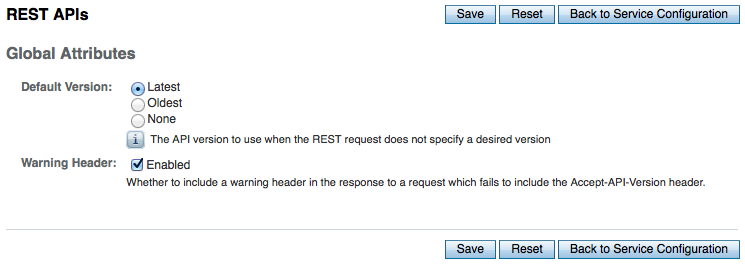
The available options for default behavior are as follows:
- Latest
-
The latest available supported version of the API is used.
This is the preset default for new installations of OpenAM.
- Oldest
-
The oldest available supported version of the API is used.
This is the preset default for upgraded OpenAM instances.
- None
-
No version will be used. When a REST client application calls a REST API without specifying the version, OpenAM returns an error and the request fails.
-
Log in as OpenAM administrator,
amadmin. -
Click Configure > Global Services, and then click REST APIs.
-
In Default Version, select the required response to a REST API request that does not specify an explicit version:
Latest,Oldest, orNone.
-
(Optional) Optionally, enable
Warning Headerto include warning messages in the headers of responses to requests. -
Save your work.
-
Use the
ssoadm set-attr-defscommand with theopenam-rest-apis-default-versionattribute set to eitherLATEST,OLDESTorNONE, as in the following example:$ ssh openam.example.com $ cd /path/to/openam-tools/admin/openam/bin $ ./ssoadm \ set-attr-defs \ --adminid amadmin \ --password-file /tmp/pwd.txt \ --servicename RestApisService \ --schematype Global \ --attributevalues openam-rest-apis-default-version=NONE Schema attribute defaults were set.