Configuration Reference
This chapter covers OpenAM configuration properties accessible through the Configure tab of the console, most of which can also be set by using the ssoadm command. The chapter is organized to follow the OpenAM console layout.
Authentication Configuration
As described in "Defining Authentication Services" in the Administration Guide, you configure authentication by realm at the following locations in the OpenAM console:
-
Under Realms > Realm Name > Authentication > Settings
-
Under Realms > Realm Name > Authentication > Modules
You can configure default values for authentication modules under Configure > Authentication using the same attributes you use to configure authentication modules per realm. These defaults are used when a module is created for a specific realm.
The core attributes page includes some fields that are not available under Realms > Realm Name > Authentication > Settings. Because attributes set under Configure > Authentication > Core Attributes apply on a server level, the changes you make here will apply to all realms. Attributes set by Realm only apply to the realm that you specify. The Authentication Module Defaults list under Configure > Authentication shows all existing types of modules available for configuration, including any customized modules you have added.
The following are the properties you can configure on the Global tab under Configure > Authentication > Core Attributes. The properties on the other tabs on that page are described in "Configuring Core Authentication Attributes" in the Administration Guide.
- Pluggable Authentication Module Classes
-
Add class names for custom authentication modules to this list.
ssoadmattribute:iplanet-am-auth-authenticators - LDAP Connection Pool Size, Default LDAP Connection Pool Size
-
Sets a minimum and maximum number of LDAP connections in the pool for connecting to a directory server. When tuning for production, start with
10:65(10 minimum, 65 maximum). Explicit settings for specific servers override the default.This attribute is for LDAP and Membership authentication services only.
This connection pool is different than the SDK connection pool configured in
serverconfig.xml.ssoadmattributes:iplanet-am-auth-ldap-connection-pool-size, andiplanet-am-auth-ldap-connection-pool-default-size - Remote Auth Security
-
Require the authenticating application to send its SSO token. This allows the Authentication Service to obtain the username and password associated with the application.
ssoadmattribute:sunRemoteAuthSecurityEnabled - Keep Post Process Objects for Logout Processing, Keep Authentication Module Objects for Logout Processing
-
When enabled, retain objects used to process authentication or post authentication operations in the user session until the user logs out.
ssoadmattributes:sunAMAuthKeepPostProcessInstances, andsunAMAuthKeepAuthModuleInstances - XUI Interface
-
When enabled, the initial login screen uses the XUI.
ssoadmattribute:openam-xui-interface-enabled
Console Configuration
Under Configure > Global Services > Console, you can customize which character sets the OpenAM console uses. This section describes the following sets of properties:
Globalization Settings
Globalization settings affect character sets and common name formats. See "Localization" for a list of supported locales.
ssoadm service name: iPlanetG11NSettings
- Charsets Supported by Each Locale
-
This table lets you configure the order of supported character sets used for each supported locale. Change the settings only if the defaults are not appropriate.
ssoadmattribute:sun-identity-g11n-settings-locale-charset-mapping - Charset Aliases
-
Use this list to map between different character set names used in Java and in MIME.
ssoadmattribute:sun-identity-g11n-settings-charset-alias-mapping - Auto Generated Common Name Format
-
Use this list to configure how OpenAM formats names shown in the console banner.
ssoadmattribute:sun-identity-g11n-settings-common-name-format
System Configuration
Under Configure > Global Services > System, you can change OpenAM settings for server logging, monitoring, service URL naming, locale, cookie domain, and how OpenAM detects specific clients. This section describes the following sets of properties:
Client Detection
OpenAM can detect client user agents by their HTTP requests.
ssoadm service name: iPlanetAMClientDetection
- Default Client Type
-
If no specific match is found for the client type, then this type is used. The default is
genericHTML, suitable for supported browsers.ssoadmattribute:iplanet-am-client-detection-default-client-type - Client Detection Class
-
The client detection plugin must implement the
com.iplanet.services.cdm.ClientDetectionInterface. Client type is a name that uniquely identifies the client to OpenAM. The plugin scans HTTP requests to determine the client type.ssoadmattribute:iplanet-am-client-detection-class - Enable Client Detection
-
If this is enabled, then OpenAM needs an appropriate client detection class implementation, and the authentication user interface must be appropriate for the clients detected.
ssoadmattribute:iplanet-am-client-detection-enabled
Logging
You configure OpenAM’s legacy logging settings on this page:
|
OpenAM 15.2.1 supports two Audit Logging Services: the legacy Logging Service, which is based on a Java SDK and is available in OpenAM versions prior to OpenAM 15.2.1, and a new common REST-based Audit Logging Service available in OpenAM 15.2.1. The legacy Logging Service will be deprecated in a future release. |
ssoadm service name: iPlanetAMLoggingService
- Log Rotation
-
Enable log rotation to cause new log files to be created when configured thresholds are reached, such as Maximum Log Size or Logfile Rotation Interval.
- Maximum Log Size
-
Sets the maximum log file size in bytes.
ssoadmattribute:iplanet-am-logging-max-file-size - Number of History Files
-
Sets the number of history files for each log that OpenAM keeps, including time-based histories. The previously live file is moved and is included in the history count, and a new log is created to serve as the live log file. Any log file in the history count that goes over the number specified here will be deleted. For time-based logs, a new set of logs will be created when OpenAM is started because of the time-based file names that are used.
ssoadmattribute:iplanet-am-logging-num-hist-file - Logfile Rotation Prefix
-
Set this if you want to add a prefix to log files governed by time-based log rotation.
ssoadmattribute:openam-logging-file-prefix - Logfile Rotation Suffix
-
Specify a string to append to log file names when time-based rotation is enabled by using the Logfile Rotation Interval setting.
Allows date and time patterns, as defined in SimpleDateFormat. The default value is
-MM.dd.yy-kk.mm.ssoadmattribute:openam-logging-file-suffix - Logfile Rotation Interval
-
Specify the amount of time before log file rotation occurs, in minutes. Set to
-1(the default) to disable time-based logfile rotation and revert to sized-based rotation. - Log File Location
-
This property is interpreted to determine the location of log files, taking either a file system location or a JDBC URL. The default is
%BASE_DIR%/%SERVER_URI%/log/.ssoadmattribute:iplanet-am-logging-location - Log Status
-
Set this to
INACTIVEto disable the logging system.ssoadmattribute:logstatus - Log Record Resolve Host Name
-
Enable this to have OpenAM perform a DNS host lookup to populate the host name field for log records. OpenAM requires DNS on the host where it runs. Enabling this feature increases the load on the logging system.
ssoadmattribute:resolveHostName - Logging Type
-
Set this to
DBto log to a database, orSyslogto log to a syslog server. Default:File. If you chooseDBthen be sure to set the connection attributes correctly, including the JDBC driver to use.ssoadmattribute:iplanet-am-logging-type - Database User Name
-
When logging to a database, set this to the user name used to connect to the database. If this attribute is incorrectly set, OpenAM performance suffers.
ssoadmattribute:iplanet-am-logging-db-user - Database User Password
-
When logging to a database, set this to the password used to connect to the database. If this attribute is incorrectly set, OpenAM performance suffers.
ssoadmattribute:iplanet-am-logging-db-password - Database Driver Name
-
When logging to a database, set this to the class name of the JDBC driver used to connect to the database. The default is for Oracle. OpenAM also works with the MySQL database driver.
ssoadmattribute:iplanet-am-logging-db-driver - Syslog server host
-
The URL or IP address of the syslog server, for example
http://mysyslog.example.com, orlocalhost.ssoadmattribute:iplanet-am-logging-syslog-host - Syslog server port
-
The port number the syslog server is configured to listen to. Often
514.ssoadmattribute:iplanet-am-logging-syslog-port - Syslog transport protocol
-
The protocol to use to connect to the syslog server. Either
UDPorTCP.ssoadmattribute:iplanet-am-logging-syslog-protocol - Syslog facility
-
Syslog uses the facility level to determine the type of program that is logging the message. Often between
local0andlocal7.ssoadmattribute:iplanet-am-logging-syslog-facility - Syslog connection timeout
-
The amount of time to wait when attempting to connect to the syslog server before reporting a failure, in seconds.
ssoadmattribute:iplanet-am-logging-syslog-connection-timeout - Configurable Log Fields
-
Select the fields OpenAM includes in log messages using this attribute. By default all fields are included in log messages.
ssoadmattribute:iplanet-am-logging-logfields - Log Verification Frequency
-
When secure logging is enabled, set this to how often OpenAM verifies log file content (in seconds).
ssoadmattribute:iplanet-am-logging-verify-period-in-seconds - Log Signature Time
-
When secure logging is enabled, set this to how often OpenAM signs log file content (in seconds).
ssoadmattribute:iplanet-am-logging-signature-period-in-seconds - Secure Logging
-
Set this to
ONto enable the secure logging system whereby OpenAM digitally signs and verifies log files. You must also set up the Logging Certificate Store for this feature to function.ssoadmattribute:iplanet-am-logging-security-status - Secure Logging Signing Algorithm
-
Set this to the algorithm used for digitally signing log records.
ssoadmattribute:iplanet-am-logging-secure-signing-algorithm - Logging Certificate Store Location
-
The secure logging system uses the certificate with alias
Loggerthat it finds in the keystore specified by this path. The default is%BASE_DIR%/%SERVER_URI%/Logger.jks.ssoadmattribute:iplanet-am-logging-secure-certificate-store - Maximum Number of Records
-
Set this to the maximum number of records read from the logs through the Logging API.
ssoadmattribute:iplanet-am-logging-max-records - Number of Files per Archive
-
Set this to the number of files to be archived by the secure logging system.
ssoadmattribute:iplanet-am-logging-files-per-keystore - Buffer Size
-
The number of log messages buffered in memory before OpenAM flushes them to the log file or the database.
ssoadmattribute:iplanet-am-logging-buffer-size - DB Failure Memory Buffer Size
-
Set this to the maximum number of log records to hold in memory if the database to which records are logged is unavailable. If the value is less than Buffer Size, that value takes precedence.
ssoadmattribute:sun-am-logging-db-max-in-mem - Buffer Time
-
Set the time in seconds that OpenAM buffers log messages in memory before flushing the buffer when Time Buffering is ON. The default is 60 seconds.
ssoadmattribute:iplanet-am-logging-buffer-time-in-seconds - Time Buffering
-
Set this to OFF to cause OpenAM to write each log message separately rather than the default of holding messages in a memory buffer that OpenAM flushes periodically, as specified using the Buffer Time attribute.
ssoadmattribute:iplanet-am-logging-time-buffering-status - Logging Level
-
Set the log level for OpenAM.
OFFis equivalent to setting the status toINACTIVE.ssoadmattribute:sun-am-log-level
Monitoring
You enable OpenAM monitoring by using these attributes.
ssoadm service name: iPlanetAMMonitoringService
- Monitoring Status
-
Enable monitoring using this attribute.
ssoadmattribute:iplanet-am-monitoring-enabled - Monitoring HTTP Port
-
Set the port number for the HTML monitoring interface.
ssoadmattribute:iplanet-am-monitoring-http-port - Monitoring HTTP interface status
-
Enable the HTML monitoring interface using this attribute.
ssoadmattribute:iplanet-am-monitoring-http-enabled - Monitoring HTTP interface authentication file path
-
Set this to path to indicate the file indicating the user name and password used to protect access to monitoring information. The default user name password combination is
demoandchangeit. You can encode a new password using the ampassword(1)command.ssoadmattribute:iplanet-am-monitoring-authfile-path - Monitoring RMI Port
-
Set the port number for the JMX monitoring interface.
ssoadmattribute:iplanet-am-monitoring-rmi-port - Monitoring RMI interface status
-
Enable the JMX monitoring interface using this attribute.
ssoadmattribute:iplanet-am-monitoring-rmi-enabled - Monitoring SNMP Port
-
Set the port number for the SNMP monitoring interface.
ssoadmattribute:iplanet-am-monitoring-snmp-port - Monitoring SNMP interface status
-
Enable the SNMP monitoring interface using this attribute.
ssoadmattribute:iplanet-am-monitoring-snmp-enabled - Policy evaluation monitoring history size
-
Maximum number of policy evaluations on which to base the data exposed through the monitoring system
Valid range is 100 - 1000000. Default: 10000
ssoadmattribute:iplanet-am-monitoring-policy-window - Session monitoring history size
-
Maximum number of session operations on which to base the data exposed through the monitoring system
Valid range is 100 - 1000000. Default: 10000
ssoadmattribute:iplanet-am-monitoring-session-window
Naming
You can configure URLs for service endpoints.
ssoadm service name: iPlanetAMNamingService
- Profile Service URL
-
Set the endpoint used by the profile service.
This attribute is deprecated.
ssoadmattribute:iplanet-am-naming-profile-url - Session Service URL
-
Set the endpoint used by the session service.
ssoadmattribute:iplanet-am-naming-session-url - Logging Service URL
-
Set the endpoint used by the logging service.
ssoadmattribute:iplanet-am-naming-logging-url - Policy Service URL
-
Set the endpoint used by the policy service.
ssoadmattribute:iplanet-am-naming-policy-url - Authentication Service URL
-
Set the endpoint used by the authentication service.
ssoadmattribute:iplanet-am-naming-auth-url - SAML Web Profile/Artifact Service URL
-
Set the SAML v1 endpoint.
ssoadmattribute:iplanet-am-naming-samlawareservlet-url - SAML SOAP Service URL
-
Set the endpoint used by the SAML v1 SOAP service.
ssoadmattribute:iplanet-am-naming-samlsoapreceiver-url - SAML Web Profile/POST Service URL
-
Set the SAML v1 Web Profile endpoint.
ssoadmattribute:iplanet-am-naming-samlpostservlet-url - SAML Assertion Manager Service URL
-
Set the endpoint used by the SAML v1 assertion service.
ssoadmattribute:iplanet-am-naming-samlassertionmanager-url - Federation Assertion Manager Service URL
-
Set the endpoint used by the ID-FF assertion manager service.
ssoadmattribute:iplanet-am-naming-fsassertionmanager-url - Security Token Manager URL
-
Set the STS endpoint.
ssoadmattribute:iplanet-am-naming-securitytokenmanager-url - JAXRPC Endpoint URL
-
Set the JAXRPC endpoint used by remote IDM/SMS APIs.
ssoadmattribute:iplanet-am-naming-jaxrpc-url - Identity Web Services Endpoint URL
-
Set the endpoint for Identity WSDL services.
ssoadmattribute:sun-naming-idsvcs-jaxws-url - Identity REST Services Endpoint URL
-
Set the endpoint used for Identity REST services.
ssoadmattribute:sun-naming-idsvcs-rest-url - Security Token Service Endpoint URL
-
Set the STS endpoint.
ssoadmattribute:sun-naming-sts-url - Security Token Service MEX Endpoint URL
-
Set the STS MEX endpoint.
ssoadmattribute:sun-naming-sts-mex-url
Platform
You can configure the default locale and list of cookie domains.
ssoadm service name: iPlanetAMPlatformService
- Platform Locale
-
Set the fallback locale used when the user locale cannot be determined.
ssoadmattribute:iplanet-am-platform-locale - Cookie Domains
-
Set the list of domains into which OpenAM writes cookies.
If you set multiple cookie domains, OpenAM still only sets the cookie in the domain the client uses to access OpenAM. If this property is left blank, then the fully qualified domain name of the server is used to set the cookie domain, meaning that a host cookie rather than a domain cookie is set.
Note that the HTTP response may contain multiple
Set-Cookieheaders for each cookie domain in the domain list. Generally, web browsers will ignoreSet-Cookieheaders for unknown domains.You can also configure cross domain single sign on (CDSSO) to allow single sign on across multiple domains managed by your organization. For details, see "Configuring Cross-Domain Single Sign-On" in the Administration Guide.
ssoadmattribute:iplanet-am-platform-cookie-domains
Global Configuration
Under Configure > Global Services, you can set defaults for a range of federation services, password reset, policy configuration, session management, and dynamic user attributes. This section describes the following sets of properties:
Audit Logging
ssoadm service name: AuditService
The following are global and realm configuration options:
- Audit logging
-
Enables audit logging.
Possible values:
true,falseDefault:
truessoadmattribute:auditEnabled - Field exclusion policies
-
Enables filtering of audit events, which will exclude any fields specified from the logs.
Default Class Name:
org.forgerock.openam.audit.configuration.EventFilterDefaultValuesssoadmattribute:fieldFilterPolicy
The following are CSV audit event handler configuration options:
- Enabled
-
Enables the CSV audit log handler.
Possible values:
true,falseDefault:
truessoadmattribute:enabled - Topics
-
Specifies the topics for the CSV handler.
Possible values:
-
Access -
Activity -
Authentication -
Configuration
Default:
-
Access -
Activity -
Authentication -
Configurationssoadmattribute:topics
-
- Log Directory
-
Specifies the location of the CSV audit log.
Default:
%BASE_DIR%/%SERVER_URI%/@LOG_DIR@/ssoadmattribute:location - Rotation Enabled
-
Enables the audit log rotation.
Possible values:
true,falseDefault:
truessoadmattribute:rotationEnabled - Maximum File Size
-
Specifies the maximum file size (bytes) until log rotation should occur.
Default:
100000000ssoadmattribute:rotationMaxFileSize - File Rotation Prefix
-
Specifies the prefix to prepend to audit filenames when rotating the audit files.
ssoadmattribute:rotationFilePrefix - File Rotation Suffix
-
Specifies the suffix to append to audit filenames when rotating the audit files. The suffix should be a timestamp format.
Default:
-yyyy.MM.dd-HH.mm.ssssoadmattribute:rotationFileSuffix - Rotation Interval
-
Specifies the interval to trigger audit file rotations. A negative or zero value disables this feature.
Default:
-1ssoadmattribute:rotationInterval - Rotation Times
-
Specifies a time duration after midnight to trigger file rotation, in seconds. For example, you can provide a value of
3600to trigger rotation at 1:00 AM.ssoadmattribute:rotationTimes - Maximum Number of Historical Files
-
Specifies a maximum number of allowed backup audit files. A value of -1 disables pruning of old audit files.
Default:
1ssoadmattribute:retentionMaxNumberOfHistoryFiles - Maximum Disk Space
-
Specifies the maximum amount of disk space the audit files can occupy. OpenAM does not check the amount of disk space audit log files occupy if yo specify a negative number or zero.
Default:
-1ssoadmattribute:retentionMaxDiskSpaceToUse - Minimum Free Space Required
-
Specifies the minimum amount of disk space required on the filesystem where audit files are stored. A negative or zero value disables this policy.
Default:
-1ssoadmattribute:retentionMinFreeSpaceRequired - Buffering Enabled
-
Enables log buffering.
Possible values:
true,falseDefault:
truessoadmattribute:bufferingEnabled - Flush Each Event Immediately
-
Enables automatic flushing of the buffer after each event.
Possible values:
true,falseDefault:
falsessoadmattribute:bufferingAutoFlush - Is Enabled
-
Enables tamper evident logging.
Possible values:
true,falseDefault:
falsessoadmattribute:securityEnabled - Certificate Store Location
-
Specifies the location of the Java keystore used for tamper proofing.
Default:
%BASE_DIR%/%SERVER_URI%/Logger.jksssoadmattribute:securityFilename - Certificate Store Password
-
Specifies the Java keystore password.
ssoadmattribute:securityPassword - Signature Interval
-
Specifies the time interval in seconds that a digital signature should be inserted into the audit log entry.
Default:
900(seconds)ssoadmattribute:securitySignatureInterval - Factory Class Name
-
Specifies the class name of the factory responsible for creating the Audit Event Handler. The class must implement the
org.forgerock.openam.audit.AuditEventHandlerFactoryinterface.Default:
org.forgerock.openam.audit.events.handlers.CsvAuditEventHandlerFactoryssoadmattribute:handlerFactory
The following are syslog audit event handler configuration options:
- Enabled
-
Enables the syslog audit log handler.
Possible values:
true,falseDefault:
truessoadmattribute:enabled - Topics
-
Specifies the topics for the syslog handler.
Possible values:
-
Access -
Activity -
Authentication -
ConfigurationDefault:
-
Access -
Activity -
Authentication -
Configurationssoadmattribute:topics
-
- Server Hostname
-
Specifies the syslog server hostname.
ssoadmattribute:host - Server Port
-
Specifies the syslog server port.
ssoadmattribute:port - Transport Protocol
-
Specifies the syslog transport protocol.
Possible values:
TCP,UDPDefault:
TCPssoadmattribute:transportProtocol - Connection timeout
-
Specifies the connection timeout (seconds) to the syslog server.
ssoadmattribute:connectTimeout - Facility
-
Specifies the syslog facility value to apply to all events.
Possible values:
-
AUTH -
AUTHPRIV -
CLOCKD -
CRON -
DAEMON -
FTP -
KERN -
LOCAL0 -
LOCAL1 -
LOCAL2 -
LOCAL3 -
LOCAL4 -
LOCAL5 -
LOCAL6 -
LOCAL7 -
LOGALERT -
LOGAUDIT -
LPR -
MAIL -
NEWS -
NTP -
SYSLOG -
USER -
UUCPDefault:
USER
ssoadmattribute:facility -
- Buffering Enabled
-
Enables log buffering.
Possible values:
true,falseDefault:
truessoadmattribute:bufferingEnabled - Factory Class Name
-
Specifies the class name of the factory responsible for creating the Audit Event Handler. The class must implement the
org.forgerock.openam.audit.AuditEventHandlerFactoryinterface.Default:
org.forgerock.openam.audit.events.handlers.SyslogAuditEventHandlerFactoryssoadmattribute:handlerFactory
The following are JDBC audit event handler configuration options:
- Enabled
-
Enables the JDBC audit log handler.
Possible values:
true,falseDefault:
truessoadmattribute:enabled - Topics
-
Specifies the topics for the JDBC handler.
Possible values:
-
Access -
Activity -
Authentication -
ConfigurationDefault:
-
Access -
Activity -
Authentication -
Configurationssoadmattribute:topics
-
- Database Type
-
Specifies the database type for the JDBC handler.
Possible values:
Oracle,MySQL,OtherDefault:
Oraclessoadmattribute:databaseType - JDBC Database URL
-
Specifies the database URL.
ssoadmattribute:jdbcUrl - JDBC Driver
-
Specifies the JDBC driver class name.
ssoadmattribute:driverClassName - Database Username
-
Specifies the username to access the database server.
ssoadmattribute:username - Database Password
-
Specifies the password to access the database server.
ssoadmattribute:password - Connection Timeout
-
Specifies the maximum wait time in seconds before failing the connection. attempt.
Default:
30(seconds)ssoadmattribute:connectionTimeout - Maximum Connection Idle Timeout
-
Specifies the maximum idle time in seconds before the connection is closed. attempt.
Default:
600(seconds)ssoadmattribute:idleTimeout - Maximum Connection Time
-
Specifies the maximum time in seconds a JDBC connection can be open. attempt.
Default:
1800(seconds)ssoadmattribute:maxLifetime - Minimum Idle Connections
-
Specifies the minimum number of idle connections in the connection pool.
Default:
10ssoadmattribute:minIdle - Maximum Connections
-
Specifies the maximum number of connections in the connection pool.
Default:
10ssoadmattribute:maxPoolSize - Autocommit (ssoadm only)
-
Specifies if the database connection should be in autocommit mode.
Possible values:
true,falseDefault:
falsessoadmattribute:autoCommit - Authentication Event Table (ssoadm only)
-
Specifies the authentication event table.
Default:
am_auditauthenticationssoadmattribute:authenticationEventTable - Authentication Event Columns (ssoadm only)
-
Specifies the authentication event columns.
Default Class Name:
org.forgerock.openam.audit.configuration.JdbcFieldToColumnDefaultValuesAttribute Value Pair:topic, authenticationssoadmattribute:authenticationEventColumns - Activity Event Table (ssoadm only)
-
Specifies the activity event table.
Default:
am_auditactivityssoadmattribute:activityEventTable - Activity Event Columns (ssoadm only)
-
Specifies the activity event columns.
Default Class Name:
org.forgerock.openam.audit.configuration.JdbcFieldToColumnDefaultValuesAttribute Value Pair:topic, activityssoadmattribute:activityEventColumns - Access Event Table (ssoadm only)
-
Specifies the access event table.
Default:
am_auditaccessssoadmattribute:accessEventTable - Access Event Columns (ssoadm only)
-
Specifies the access event columns.
Default Class Name:
org.forgerock.openam.audit.configuration.JdbcFieldToColumnDefaultValuesAttribute Value Pair:topic, accessssoadmattribute:accessEventColumns - Config Event Table (ssoadm only)
-
Specifies the config event table.
Default:
am_auditconfigssoadmattribute:configEventTable - Config Event Columns (ssoadm only)
-
Specifies the access event columns.
Default Class Name:
org.forgerock.openam.audit.configuration.JdbcFieldToColumnDefaultValuesAttribute Value Pair:topic, configssoadmattribute:configEventColumns - Buffering Enabled
-
Enables log buffering.
Possible values:
true,falseDefault:
truessoadmattribute:bufferingEnabled - Buffer Size
-
Specifies the size of the buffer queue.
Default:
100000ssoadmattribute:bufferingMaxSize - Write Interval
-
Specifies the interval (seconds) at which buffered events are written to the database.
Default:
5(seconds)ssoadmattribute:bufferingWriteInterval - Writer Threads
-
Specifies the number of threads used to write the buffered events.
Default:
1ssoadmattribute:bufferingWriterThreads - Max Batched Events
-
Specifies the maximum number of batched statements the database can support per connection.
Default:
100ssoadmattribute:bufferingMaxBatchedEvents - Factory Class Name
-
Specifies the class name of the factory responsible for creating the Audit Event Handler. The class must implement the
org.forgerock.openam.audit.AuditEventHandlerFactoryinterface.Default:
org.forgerock.openam.audit.events.handlers.JdbcAuditEventHandlerFactoryssoadmattribute:handlerFactory
The following are Elasticsearch audit event handler configuration options:
- Enabled
-
Enables the Elasticsearch audit log handler.
Possible values:
true,falseDefault:
truessoadmattribute:enabled - Topics
-
Specifies the topics for the Elasticsearch handler.
Possible values:
-
Access -
Activity -
Authentication -
ConfigurationDefault:
-
Access -
Activity -
Authentication -
Configurationssoadmattribute:topics
-
- Server Hostname
-
Host name or IP address of the Elasticsearch server.
ssoadmattribute:host - Server Port
-
Specifies the port number used to access Elasticsearch’s REST API.
Default:
9200ssoadmattribute:port - SSL Enabled
-
Specifies whether SSL is configured on the Elasticsearch server.
If SSL is enabled, be sure to import the CA certificate used to sign Elasticsearch node certificates into the Java keystore on the host that runs OpenAM before attempting to log audit events to Elasticsearch.
Possible values:
true,falseDefault:
falsessoadmattribute:sslEnabled - Elasticsearch Index
-
Specifies the name of the Elasticsearch index to be used for OpenAM audit logging.
ssoadmattribute:index - Username
-
Specifies the username to access the Elasticsearch server. Required if Elasticsearch Shield authentication is configured.
ssoadmattribute:username - Password
-
Specifies the password to access the Elasticsearch server. Required if Elasticsearch Shield authentication is configured.
ssoadmattribute:password - Buffering Enabled
-
Enables log buffering.
Possible values:
true,falseDefault:
truessoadmattribute:bufferingEnabled - Batch Size
-
Specifies the number of audit log events to hold in the buffer before writing them to Elasticsearch.
Default:
500ssoadmattribute:batchSize - Queue Capacity
-
Specifies the maximum number of audit events in the buffer. Additional audit events are dropped.
Default:
10000ssoadmattribute:maxEvents - Write Interval
-
Specifies the interval (milliseconds) at which buffered events are written to the database.
Default:
250(milliseconds)ssoadmattribute:writeInterval - Factory Class Name
-
Specifies the class name of the factory responsible for creating the Audit Event Handler. The class must implement the
org.forgerock.openam.audit.AuditEventHandlerFactoryinterface.Default:
org.forgerock.openam.audit.events.handlers.ElasticsearchAuditEventHandlerFactoryssoadmattribute:handlerFactory
The following are JMS audit event handler configuration options:
- Enabled
-
Enables the JMS audit log handler.
Possible values:
true,falseDefault:
truessoadmattribute:enabled - Topics
-
Specifies the topics [1] for the JMS audit log handler.
Possible values:
-
Access -
Activity -
Authentication -
ConfigurationDefault:
-
Access -
Activity -
Authentication -
Configurationssoadmattribute:topics
-
- Delivery Mode
-
Specifies whether JMS messages used to transmit audit events use persistent or non-persistent delivery.
With persistent delivery, the JMS provider ensures that messages are not lost in transit in case of a provider failure by logging messages to storage when they are sent.
Specify the delivery mode as persistent if it is unacceptable for delivery of audit events to be lost in JMS transit. If the possible loss of audit events is acceptable, choose non-persistent delivery, which provides better performance.
Possible values:
PERSISTENT,NON_PERSISTENTDefault:
NON_PERSISTENTssoadmattribute:deliveryMode - Session Mode
-
Specifies the JMS session acknowledgement mode: auto mode, duplicates OK mode, or client mode:
-
Auto mode guarantees once-only delivery of JMS messages used to transmit audit events.
-
Duplicates OK mode ensures that messages are delivered at least once.
-
Client mode does not ensure delivery.
Use the default setting,
AUTO, unless your JMS broker implementation requires otherwise. See your broker documentation for more information.Possible values:
AUTO,CLIENT,DUPS_OKDefault:
AUTO
ssoadmattribute:sessionMode -
- JNDI Context Properties
-
Specifies JNDI properties that OpenAM uses to connect to the JMS message broker to which OpenAM will publish audit events.
OpenAM acts as a JMS client, using a JMS connection factory to connect to your JMS message broker. In order for OpenAM to connect to the broker, the JNDI context properties must conform to those needed by the broker. See the documentation for your JMS message broker for required values.
Default: The default properties are example properties for connecting to Apache ActiveMQ:
-
[java.naming.factory.initial]=org.apache.activemq.jndi.ActiveMQInitialContextFactory -
[java.naming.provider.url]=tcp://localhost:61616 -
[topic.audit]=auditssoadmattribute:jndiContextProperties
-
- JMS Topic Name
-
Specifies the name of the JMS topic[1] to which OpenAM publishes audit events.
Default:
auditssoadmattribute:jndiTopicName - JMS Connection Factory Name
-
Specifies the JNDI lookup name for the connection factory exposed by your JMS message broker. OpenAM performs a JNDI lookup on this name to locate your broker’s connection factory.
See the documentation for your JMS message broker for the required value.
Default:
ConnectionFactory, which is the connection factory name for Apache ActiveMQ.ssoadmattribute:jndiConnectionFactoryName - Batch enabled
-
Enables batch delivery of audit events.
Possible values:
true,falseDefault:
truessoadmattribute:batchEnabled - Capacity
-
Specifies the maximum number of audit events in the batch queue. When this number is exceeded, additional audit events are dropped.
Default:
1000ssoadmattribute:batchCapacity - Max Batched
-
Specifies the maximum number of audit events transmitted before a batch acknowledgement is received from JMS.
Default:
100ssoadmattribute:maxBatchedEvents - Thread Count
-
Specifies the number of concurrent worker threads that OpenAM uses to pull audit events from the batch queue and transmit them to the JMS message broker.
Default:
3ssoadmattribute:batchThreadCount - Insert Timeout
-
Specifies the timeout period (seconds) for queued events to be transmitted to the JMS message broker.
Default:
60(seconds)ssoadmattribute:insertTimeoutSec - Polling Timeout
-
Specifies the period (seconds) that worker threads wait for new audit events before becoming idle.
Default:
10(seconds)ssoadmattribute:pollTimeoutSec - Shutdown Timeout
-
Specifies the period (seconds) that worker threads wait for new audit events before shutting down.
Default:
60(seconds)ssoadmattribute:shutdownTimeoutSec - Factory Class Name
-
Specifies the class name of the factory responsible for creating the Audit Event Handler. The class must implement the
org.forgerock.openam.audit.AuditEventHandlerFactoryinterface.Default:
org.forgerock.openam.audit.events.handlers.JmsAuditEventHandlerFactoryssoadmattribute:handlerFactory
Base URL Source
Configure the Base URL Source Service at the realm level, not as a global service.
For more information, see "Configuring the Base URL Source Service" in the Administration Guide.
Common Federation Configuration
ssoadm service name: sunFAMFederationCommon
- Datastore SPI implementation class
-
Used by the Federation system to access user profile attributes
ssoadmattribute:DatastoreClass - ConfigurationInstance SPI implementation class
-
Used by the Federation system to access service configuration
ssoadmattribute:ConfigurationClass - Logger SPI implementation class
-
Used by the Federation system to record log messages
ssoadmattribute:LoggerClass - SessionProvider SPI implementation class
-
Used by the Federation system to access the session service
ssoadmattribute:SessionProviderClass - Maximum allowed content length
-
Maximum number of bytes for Federation communications
ssoadmattribute:MaxContentLength - PasswordDecoder SPI implementation class
-
Used by the Federation system to decode passwords encoded by OpenAM
ssoadmattribute:PasswordDecoderClass - SignatureProvider SPI implementation class
-
Used by the Federation system digitally to sign SAML documents
ssoadmattribute:SignatureProviderClass - KeyProvider SPI implementation class
-
Used by the Federation system to access the Java keystore
ssoadmattribute:KeyProviderClass - Check presence of certificates
-
If enabled, OpenAM checks that the partner’s signing certificate presented in the XML matches the certificate from the partner’s metadata
ssoadmattribute:CheckCert - XML canonicalization algorithm
-
Algorithm used to render the canonical versions of XML documents
ssoadmattribute:CannonicalizationAlgorithm - XML signature algorithm
-
Algorithm used to sign XML documents
ssoadmattribute:SignatureAlgorithm - XML digest algorithm
-
Digest algorithm used to sign XML documents
ssoadmattribute:DigestAlgorithm - Query String signature algorithm (RSA)
-
Default signature algorithm used with RSA keys
ssoadmattribute:QuerySignatureAlgorithmRSA - Query String signature algorithm (DSA)
-
Default signature algorithm used with DSA keys
ssoadmattribute:QuerySignatureAlgorithmDSA - Query String signature algorithm (EC)
-
Default signature algorithm used with EC keys
ssoadmattribute:QuerySignatureAlgorithmEC - XML transformation algorithm
-
Algorithm used for XML transformations
ssoadmattribute:TransformationAlgorithm - SAML Error Page URL
-
OpenAM redirects users here when an error occurs in the SAML2 engine. Users are redirected to absolute URLs, whereas relative URLs are displayed within the request.
ssoadmattribute:SAMLErrorPageURL - SAML Error Page HTTP Binding
-
Set this either to
HTTP-Redirector toHTTP-POST.ssoadmattribute:SAMLErrorPageHTTPBinding - Monitoring Agent Provider Class
-
Used by the Federation system to access the monitoring system
ssoadmattribute:MonAgentClass - Monitoring Provider Class for SAML1
-
Used by the SAMLv1 engine to access the monitoring system
ssoadmattribute:MonSAML1Class - Monitoring Provider Class for SAML2
-
Used by the SAML2 engine to access the monitoring system
ssoadmattribute:MonSAML2Class - Monitoring Provider Class for ID-FF
-
Used by the ID-FF engine to access the monitoring system
ssoadmattribute:MonIDFFClass
Dashboard
ssoadm service name: dashboardService
The following properties are available for each Dashboard Service secondary configuration instance:
- Dashboard Class Name
-
Identifies how to access the application, for example
SAML2ApplicationClassfor a SAML v2.0 applicationssoadmattribute:dashboardClassName - Dashboard Name
-
The application name as it will appear to the administrator for configuring the dashboard
ssoadmattribute:dashboardName - Dashboard Display Name
-
The application name that displays on the dashboard client
ssoadmattribute:dashboardDisplayName - Dashboard Icon
-
The icon name that will be displayed on the dashboard client identifying the application
ssoadmattribute:dashboardIcon - Dashboard Login
-
The URL that takes the user to the application
ssoadmattribute:dashboardLogin
The following property is a realm attribute of the Dashboard Service:
- Available Dashboard Apps
-
List of application dashboard names available by default for realms with the Dashboard configured
ssoadmattribute:assignedDashboard
Email Service
ssoadm service name: ForgeRockSendEmailService
- Email Message Implementation Class
-
Specifies the class that sends email notifications, such as those sent for user registration and forgotten passwords.
Default:
org.forgerock.openam.services.email.MailServerImplssoadmattribute:forgerockMailServerImplClassName - Mail Server Host Name
-
Specifies the fully qualified domain name of the SMTP mail server through which to send email notifications.
Default:
smtp.gmail.comssoadmattribute:forgerockEmailServiceSMTPHostName - Mail Server Host Port
-
Specifies the port number for the SMTP mail server.
Default:
465ssoadmattribute:forgerockEmailServiceSMTPHostPort - Mail Server Authentication Username
-
Specifies the user name for the SMTP mail server.
Default:
forgerocksmtpssoadmattribute:forgerockEmailServiceSMTPUserName - Mail Server Authentication Password
-
Specifies the password for the SMTP user name.
ssoadmattribute:forgerockEmailServiceSMTPUserPassword - Mail Server Secure Connection
-
Specifies whether to connect to the SMTP mail server using SSL.
Default: use SSL (
true)ssoadmattribute:forgerockEmailServiceSMTPSSLEnabled - Email From Address
-
Specifies the address from which to send email notifications.
Default:
no-reply@openam.orgssoadmattribute:forgerockEmailServiceSMTPFromAddress - Email Attribute Name
-
Specifies the profile attribute from which to retrieve the end user’s email address.
Default:
mailssoadmattribute:openamEmailAttribute - Email Subject
-
Specifies a subject for notification messages. If you do not set this OpenAM does not set the subject for notification messages.
ssoadmattribute:forgerockEmailServiceSMTPSubject - Email Content
-
Specifies content for notification messages. If you do not set this OpenAM includes only the confirmation URL in the mail body.
ssoadmattribute:forgerockEmailServiceSMTPMessage
Authenticator (OATH) Service
ssoadm service name: AuthenticatorOATH
- Profile Storage Attribute
-
Attribute for storing Authenticator OATH profiles. The default attribute,
oathDeviceProfiles, is added to the user store during OpenAM installation. If you want to use a different attribute, you must make sure to add it to your user store schema prior to deploying two-step verification with a ForgeRock OATH authenticator app in OpenAM. OpenAM must be able to write to the attribute.Default:
oathDeviceProfilesssoadmattribute:iplanet-am-authenticator-oath-attr-name - Device Profile Encryption Scheme
-
Encryption scheme for securing device profiles stored on the server. You can choose not to encrypt the device profiles, or to use one of the following encryption schemes:
-
AES-128/HMAC-SHA-256 with RSA key wrapping
-
AES-256/HMAC-SHA-512 with RSA key wrapping
Default: no encryption.
ssoadmattribute:openam-authenticator-oath-device-settings-encryption-scheme -
- Encryption Key Store
-
Path to the keystore from which to load encryption keys.
ssoadmattribute:openam-authenticator-oath-device-settings-encryption-keystore - Key Store Type
-
Type of encryption keystore. Options include JCEKS, JKS, PKCS#11, and PKCS#12. Default:
JKSBefore using a PKCS#11 keystore, make sure your Java runtime environment supports it. For more information, see the JDK 8 PKCS#11 Reference Guide.
ssoadmattribute:openam-authenticator-oath-device-settings-encryption-keystore-type - Key Store Password
-
Password to unlock the keystore. This password is encrypted when it is saved in the OpenAM configuration. You should modify the default value,
changeit.ssoadmattribute:openam-authenticator-oath-device-settings-encryption-keystore-password - Key-Pair Alias
-
Alias of the certificate and private key in the keystore. The private key is used to encrypt and decrypt device profiles.
ssoadmattribute:openam-authenticator-oath-device-settings-encryption-keypair-alias - Private Key Password
-
Password to unlock the private key.
ssoadmattribute:openam-authenticator-oath-device-settings-encryption-privatekey-password - Authenticator (OATH) Device Skippable Attribute Name
-
The data store attribute that holds the user’s decision to enable or disable obtaining a providing a password obtained from a ForgeRock OATH authenticator app. This attribute must be writeable. The default attribute is
oath2faEnabled.ssoadmattribute:iplanet-am-authenticator-oath-skippable-name
Authenticator (Push) Service
ssoadm service name: AuthenticatorPush
- Profile Storage Attribute
-
Attribute for storing Authenticator Push device profiles. The default attribute,
pushDeviceProfiles, is added to the schema when you prepare a user store for use with OpenAM. If you want to use a different attribute, you must make sure to add it to your user store schema prior to deploying push notifications with the ForgeRock Authenticator app in OpenAM. OpenAM must be able to write to the attribute.Default:
pushDeviceProfilesssoadmattribute:iplanet-am-auth-authenticator-push-attr-name - Device Profile Encryption Scheme
-
Encryption scheme for securing device profiles stored on the server. You can choose not to encrypt the device profiles, or to use one of the following encryption schemes:
-
AES-128/HMAC-SHA-256 with RSA key wrapping
-
AES-256/HMAC-SHA-512 with RSA key wrapping
Default: no encryption.
ssoadmattribute:openam-auth-authenticator-push-device-settings-encryption-scheme -
- Encryption Key Store
-
Path to the keystore from which to load encryption keys.
ssoadmattribute:openam-auth-authenticator-push-device-settings-encryption-keystore - Key Store Type
-
Type of encryption keystore. Options include JCEKS, JKS, PKCS#11, and PKCS#12.
Before using a PKCS#11 keystore, make sure your Java runtime environment supports it. For more information, see the JDK 8 PKCS#11 Reference Guide.
Default:
JKSssoadmattribute:openam-auth-authenticator-push-device-settings-encryption-keystore-type - Key Store Password
-
Password to unlock the keystore. This password is encrypted when it is saved in the OpenAM configuration. You should modify the default value,
changeit.Default:
changeitssoadmattribute:openam-auth-authenticator-push-device-settings-encryption-keystore-password - Key-Pair Alias
-
Alias of the certificate and private key in the keystore. The private key is used to encrypt and decrypt device profiles.
ssoadmattribute:openam-auth-authenticator-push-device-settings-encryption-keypair-alias - Private Key Password
-
Password to unlock the private key.
ssoadmattribute:openam-auth-authenticator-push-device-settings-encryption-privatekey-password
Legacy User Self Service
|
OpenAM 15.2.1 supports two user self-service components: the Legacy User Self Service, which is based on a Java SDK and is available in OpenAM versions prior to OpenAM 15.2.1, and a new common REST-based/XUI-based User Self Service available in OpenAM 15.2.1. The Legacy User Self Service will be deprecated in a future release. |
ssoadm service name: RestSecurity
The order of options that appear in the console may vary depending on whether you are running from a new installation or an upgrade of OpenAM.
- Self-Registration for Users
-
If enabled, new users can sign up using a REST API client.
Default: not enabled
ssoadmattribute:forgerockRESTSecuritySelfRegistrationEnabled - Self-Registration Token LifeTime (seconds)
-
Maximum life time for the token allowing user self-registration using the REST API.
Default:
900(seconds)ssoadmattribute:forgerockRESTSecuritySelfRegTokenTTL - Self-Registration Confirmation Email URL
-
This page handles the HTTP GET request when the user clicks the link sent by email in the confirmation request.
Default:
deployment-base-url/XUI/confirm.htmlwhere deployment-base-url is something likehttps://openam.example.com:8443/openamssoadmattribute:forgerockRESTSecuritySelfRegConfirmationUrl - Forgot Password for Users
-
If enabled, users can assign themselves a new password using a REST API client.
Default: not enabled
ssoadmattribute:forgerockRESTSecurityForgotPasswordEnabled - Forgot Password Token LifeTime (seconds)
-
Maximum life time for the token that allows a user to process a forgotten password using the REST API.
Default:
900(seconds)ssoadmattribute:forgerockRestSecurityForgotPassTokenTTL - Forgot Password Confirmation Email URL
-
This page handles the HTTP GET request when the user clicks the link sent by email in the confirmation request.
Default:
deployment-base-url/XUI/confirm.htmlwhere deployment-base-url is something likehttps://openam.example.com:8443/openamssoadmattribute:forgerockRESTSecurityForgotPassConfirmationUrl - Protected User Attributes
-
A list of user profile attributes. Users modifying any of the attributes in this list will be required to enter a password as confirmation before the change is accepted.
This option applies to XUI deployments only.
Default: No user attributes are protected.
ssoadmattribute:forgerockRESTSecurityProtectedUserAttributes
Liberty ID-FF Service Configuration
ssoadm service name: sunFAMIDFFConfiguration
- Federation Cookie Name
-
Cookie name for Liberty ID-FF
ssoadmattribute:FedCookieName - IDP Proxy Finder SPI implementation class
-
Used by the ID-FF engine to find the IDP proxy
ssoadmattribute:IDPProxyFinderClass - Request cache cleanup interval
-
Seconds between times OpenAM cleans up the request cache
ssoadmattribute:RequestCacheCleanupInterval - Request cache timeout
-
Seconds cached requests remain valid
ssoadmattribute:RequestCacheTimeout - IDP Login URL
-
Login URL for the ID-FF IDP
ssoadmattribute:IDPLoginURL - XML signing on
-
If yes, require XML signing.
ssoadmattribute:XMLSigningOn
Multi-Federation Protocol
ssoadm service name: sunMultiFederationProtocol
- Single Logout Handler List
-
List of logout handlers used for each different federation protocol.
ssoadmattribute:SingleLogoutHandlerList
OAuth2 Provider
ssoadm service name: OAuth2Provider
- Token Blacklist Cache Size
-
Number of blacklisted tokesn to cache in memory to speed up blacklist checks and reduce the CST load.
Default:
10000Range: 0 to 2147483647
ssoadmattribute:blacklistCacheSize - Blacklist Poll Interval (seconds)
-
Length of time in seconds to poll for token blacklist changes from other servers.
Default:
60Range: 0 to 2147483647
ssoadmattribute:blacklistPollInterval - Blacklist Purge Delay (minutes)
-
Length of time in minutes to blacklist tokens beyond their expiry time.
Default:
1Range: 0 to 2147483647
ssoadmattribute:blacklistPurgeDelay - Use Stateless Access & Refresh Tokens
-
When enabled, OpenAM issues access and refresh tokens that can be inspected by resource servers.
Default:
falsessoadmattribute:statelessTokensEnabled - Authorization Code Lifetime (seconds)
-
Lifetime of OAuth 2.0 authorization code in seconds.
Default:
10ssoadmattribute:forgerock-oauth2-provider-authorization-code-lifetime - Refresh Token Lifetime (seconds)
-
Lifetime of OAuth 2.0 refresh token in seconds.
Set this value to
-1to issue refresh tokens that never expire.Default:
600ssoadmattribute:forgerock-oauth2-provider-refresh-token-lifetime - Access Token Lifetime (seconds)
-
Lifetime of OAuth 2.0 access token in seconds.
Default:
60ssoadmattribute:forgerock-oauth2-provider-access-token-lifetime - Issue Refresh Tokens
-
Whether to issue a refresh token when returning an access token.
ssoadmattribute:forgerock-oauth2-provider-issue-refresh-token - Issue Refresh Tokens on Refreshing Access Tokens
-
Whether to issue a refresh token when refreshing an access token.
ssoadmattribute:forgerock-oauth2-provider-issue-refresh-token-on-refreshing-token - Custom Login URL Template
-
Custom URL for handling login, to override the default OpenAM login page.
Supports Freemarker syntax, with the following variables:
Custom Login URL Freemarker Variables Variable Description gotoUrlThe URL to redirect to after login.
acrValuesThe Authentication Context Class Reference (acr) values for the authorization request.
realmThe OpenAM realm the authorization request was made on.
moduleThe name of the OpenAM authentication module requested to perform resource owner authentication.
serviceThe name of the OpenAM authentication chain requested to perform resource owner authentication.
localeA space-separated list of locales, ordered by preference.
The following example template redirects users to a non-OpenAM front end to handle login, which will then redirect back to the
/oauth2/authorizeendpoint with any required parameters:http://mylogin.com/login?goto=${goto} <#if acrValues??>&acr_values=${acrValues}</#if> <#if realm??>&realm=${realm}</#if> <#if module??>&module=${module}</#if> <#if service??>&service=${service}</#if> <#if locale??>&locale=${locale}</#if>Note that the example above has added line wraps for display purposes. The template should be entered on a single line.
ssoadmattribute:customLoginUrlTemplate - Scope Implementation Class
-
Name of class on OpenAM classpath implementing scopes.
Default:
org.forgerock.openam.oauth2.OpenAMScopeValidatorssoadmattribute:forgerock-oauth2-provider-scope-implementation-class - OIDC Claims Script
-
The script that is run when issuing an ID token or making a request to the
userinfoendpoint duing OpenID requests.The script gathers the scopes and populates claims, and has access to the access token, the user’s identity and, if available, the user’s session.
For more information on OpenID scopes and claims, see "Understanding OpenID Connect Scopes and Claims" in the Administration Guide. For more information on scripting, see "Scripting OpenAM" in the Developer’s Guide.
Default:
OIDC Claims Scriptssoadmattribute:forgerock-oauth2-provider-oidc-claims-extension-script - Response Type Plugins
-
List of plugins that handle the valid
response_typevalues. OAuth 2.0 clients pass response types as parameters to the OAuth 2.0 Authorization endpoint (/oauth2/authorize) to indicate which grant type is requested from the provider. For example, the client passescodewhen requesting an authorization code, andtokenwhen requesting an access token.Values in this list take the form
response-type|plugin-class-name.Defaults:
code|org.forgerock.restlet.ext.oauth2.flow.responseTypes.CodeResponseType,id_token|org.forgerock.restlet.ext.oauth2.flow.responseTypes.IDTokenResponseType,token|org.forgerock.restlet.ext.oauth2.flow.responseTypes.TokenResponseTypessoadmattribute:forgerock-oauth2-provider-response-type-map-class - User Profile Attribute(s) the Resource Owner is Authenticated On
-
Names of profile attributes that resource owners use to log in. The default is
uid, and you can add others, such asmail.ssoadmattribute:forgerock-oauth2-provider-authentication-attributes - Saved Consent Attribute Name
-
Name of a multi-valued attribute on resource owner profiles where OpenAM can save authorization consent decisions. When the resource owner chooses to save the decision to authorize access for a client application, then OpenAM updates the resource owner’s profile to avoid having to prompt the resource owner to grant authorization when the client issues subsequent authorization requests.
ssoadmattribute:forgerock-oauth2-provider-saved-consent-attribute - User Display Name attribute
-
The profile attribute that contains the name to be displayed for the user on the consent page.
Default:
cnssoadmattribute:displayNameAttribute - Supported Scopes
-
The set of supported scopes, with translations.
Scopes may be entered as simple strings or pipe-separated strings representing the internal scope name, locale, and localized description.
For example:
read|en|Permission to view email messages in your accountLocale strings are in the format:
language_country_variant, for exampleen,en_GB, oren_US_WIN.If the locale and pipe is omitted, the description is displayed to all users that have undefined locales.
If the description is also omitted, nothing is displayed on the consent page for the scope. For example specifying
read|would allow the scope read to be used by the client, but would not display it to the user on the consent page when requested.For more information on scopes and claims, see "Understanding OpenID Connect Scopes and Claims" in the Administration Guide.
ssoadmattribute:forgerock-oauth2-provider-supported-scopes - Remote JSON Web Key URL
-
The remote URL where the OpenID Connect provider’s JSON Web Key can be retrieved.
If this setting is not configured, then OpenAM provides a local URL to access the public key of the private key used to sign ID tokens.
ssoadmattribute:forgerock-oauth2-provider-jkws-uri - Subject Types supported
-
Set of OpenID Connect subject types supported. Valid values are as follows:
public-
Each client receives the same
sub(subject) value. pairwise-
Each client receives a different
sub(subject) value, to prevent correlation between clients.
Default:
publicssoadmattribute:forgerock-oauth2-provider-subject-types-supported - ID Token Signing Algorithms supported
-
Algorithms supported to sign OpenID Connect
id_tokens.Default:
RS256(RSA with SHA256, where the RSA key comes from the OpenAM keystore).OpenAM supports signing algorithms listed in JSON Web Algorithms (JWA): alg:
HMAC with SHA-256(HS256),HMAC with SHA-384(HS384),HMAC with SHA5-12(HS512), ECDSA with SHA-256 and NIST standard P-256 elliptic curve (ES256), ECDSA with SHA-384 and NIST standard P-384 elliptic curve (ES384), and ECDSA with SHA-512 and NIST standard P-521 elliptic curve (ES512).ssoadmattribute:forgerock-oauth2-provider-id-token-signing-algorithms-supported - ID Token Encryption Algorithms supported
-
Algorithms supported to encrypt OpenID Connect
id_tokensto hide its contents.Default:
RS1_5ssoadmattribute:supportedIDTokenEncryptionAlgorithms - ID Token Encryption Methods supported
-
Encryption methods supported to encrypt OpenID Connect
id_tokensto hide its contents.Default:
A128CBC-HS256,A256CBC-HS512ssoadmattribute:supportedIDTokenEncryptionMethods - Supported Claims
-
Set of claims supported by the OpenID Connect
/oauth2/userinfoendpoint.Claims may be entered as simple strings or pipe-separated strings representing the internal claim name, locale, and localized description.
For example:
zoneinfo|en|Your selected time zone.Locale strings are in the format:
language_country_variant, for exampleen,en_GB, oren_US_WIN.If the locale and pipe is omitted, the description is displayed to all users that have undefined locales.
If the description is also omitted, nothing is displayed on the consent page for the claim. For example specifying
family_name|would allow the claim family_name to be used by the client, but would not display it to the user on the consent page when requested.For more information on OpenID scopes and claims, see "Understanding OpenID Connect Scopes and Claims" in the Administration Guide.
ssoadmattribute:forgerock-oauth2-provider-supported-claims - OpenID Connect JWT Token Lifetime (seconds)
-
Time in seconds that a JWT is valid.
Default:
600ssoadmattribute:forgerock-oauth2-provider-jwt-token-lifetime - OAuth2 Token Signing Algorithm
-
Algorithm used to sign stateless OAuth2 tokens to detect tampering.
Default:
HS256Possible values:
HS256,HS384,HS512,RS256,ES256,ES384,ES512ssoadmattribute:tokenSigningAlgorithm - Token Signing HMAC Shared Secret
-
Base-64-encoded key used by HS256, HS384, and HS512.
ssoadmattribute:tokenSigningHmacSharedSecret - Token Signing RSA public/private key pair
-
Alias of key in OpenAM’s keystore that is used to sign ID Tokens.
Default:
test(OpenAM test key pair, not for use in production)See "To Change OpenAM Default test Signing Key " in the Administration Guide for instructions on changing the key pair.
ssoadmattribute:forgerock-oauth2-provider-keypair-name - Token Signing ECDSA public/private key pair alias
-
List of public/private key pairs used for the elliptic curve algorithms (ES256/ES384/ES512)
Default:
ES256|test,ES384|test,ES512|testssoadmattribute:tokenSigningECDSAKeyAlias - Allow Open Dynamic Client Registration
-
Allow clients to register without an access token.
If enabled, you should consider adding some form of rate limiting.
Default:
falsessoadmattribute:forgerock-oauth2-provider-allow-open-dynamic-registration - Generate Registration Access Tokens
-
Whether to generate Registration Access Tokens for clients that register via open dynamic client registration.
Registration tokens allow the client to access the client configuration endpoint as described in the OpenID Connect specification. This setting has no effect if open dynamic client registration is disabled.
Default:
truessoadmattribute:forgerock-oauth2-provider-generate-registration-access-tokens - OpenID Connect acr_values to Auth Chain Mapping
-
Map of Mobile Connect levels of assurance, sent as
acr_valuesin the authorization request, to OpenAM authentication chains provide those levels of assurance.For more information, see "Configuring OpenAM as an OP for Mobile Connect" in the Administration Guide.
ssoadmattribute:forgerock-oauth2-provider-loa-mapping - OpenID Connect default acr claim
-
The
acrclaim value to return in the ID Token when falling back to the default authentication chain.ssoadmattribute:forgerock-oauth2-provider-default-acr - OpenID Connect id_token amr values to Auth Module mappings
-
Map of the
amrvalues to return in the ID Token after successfully authenticating with specified authentication modules.For more information, see "Configuring OpenAM as an OP for Mobile Connect" in the Administration Guide.
ssoadmattribute:forgerock-oauth2-provider-amr-mappings - Modified Timestamp attribute name,Created Timestamp attribute name
-
The identity Data Store attributes used to return
updated_atvalues in the ID Token.For more information, see "Configuring OpenAM as an OP for Mobile Connect" in the Administration Guide.
ssoadmattributes:forgerock-oauth2-provider-modified-attribute-name,forgerock-oauth2-provider-created-attribute-name - Default Client Scopes
-
Set of scopes a client will be granted if they request dynamic registration without requesting specific scopes.
The default scopes are NOT automatically assigned to clients that are created by using the OpenAM console.
ssoadmattribute:forgerock-oauth2-provider-default-scopes - Enable "claims_parameter_supported"
-
Enable requests for individual claims by using query parameters, as described in the OpenID Connect specification.
ssoadmattribute:forgerock-oauth2-provider-claims-parameter-supported - Subject identifier hash salt
-
Used in the salting of hashes for returning specific sub claims to individuals that are using the same
request_uriorsector_identifier_uri.It is strongly recommended to configure this value if pairwise subject types are enabled.
Default:
changemessoadmattribute:forgerock-oauth2-provider-hash-salt - Always Return Claims in ID Tokens
-
If enabled, include scope-derived claims in the id_token, even if an access token is also returned that could provide access to get the claims from the
userInfoendpoint.If not enabled, if an access token is requested the client must use it to access the
userinfoendpoint for scope-derived claims, as they will not be included in the ID token.ssoadmattribute:alwaysAddClaimsToToken - Code Verifier Parameter Required
-
If enabled, requests using the authorization code grant require a
code_challengeattribute.For more information, see the Internet-Draft: Proof Key for Code Exchange by OAuth Public Clients.
ssoadmattribute:forgerock-oauth2-provider-code-verifier-enforced - Verification URL
-
The URL that users must visit to complete login and consent when using the OAuth 2.0 device flow.
For more information, see "OAuth 2.0 Device Flow" in the Administration Guide.
ssoadmattribute:verificationUrl - Device Completion URL
-
The URL that users are redirected to upon completion of login and consent when using the OAuth 2.0 device flow.
ssoadmattribute:completionUrl - Device Code Lifetime (seconds)
-
Lifetime of OAuth 2.0 device codes in seconds.
Default:
300ssoadmattribute:deviceCodeLifetime - Device Polling Interval
-
The minimum number of seconds devices should pause for between polling for authorization tokens when using the OAuth 2.0 device flow.
Default:
5ssoadmattribute:devicePollInterval - Store Ops Tokens
-
When enabled, OpenAM stores the operation tokens corresponding to OIDC sessions in CTS. Note that session management-related endpoints will not work when this setting is enabled.
Default:
truessoadmattribute:storeOpsTokens - Allow clients to skip consent
-
When enabled, clients may be configured so that the resource owner will not be asked for consent during authorization flows.
Default:
falsessoadmattribute:clientsCanSkipConsent - Idtokeninfo endpoint requires client authentication
-
If enabled, the
/oauth2/idtokeninfoendpoint requires client authentication if the signature algorithm is HS256/HS384/HS512.Default:
truessoadmattribute:idTokenInfoClientAuthenticationEnabled - Enable auth module messages for Password Credentials Grant
-
If enabled, authentication module failure messages are used to create Resource Owner Password Credentials Grant failure messages. If disabled, a standard authentication failed message is used.
Only applies to the password grant type which requires the
grant_type=passwordparameter.Default:`false`
ssoadmattribute:moduleMessageEnabledInPasswordGrant
Password Reset
|
OpenAM 15.2.1 supports two user password reset components: the legacy Password Reset Service, which is based on a Java SDK and is available in OpenAM versions prior to OpenAM 15.2.1, and a new common REST-based/XUI-based User Self Service available in OpenAM 15.2.1. The Legacy Password Reset Service will be deprecated in a future release. |
ssoadm service name: iPlanetAMPasswordResetService
- User Validation
-
OpenAM uses this LDAP attribute and the value entered by the user to look up the user profile in the data store.
ssoadmattribute:iplanet-am-password-reset-userValidate - Secret Question
-
This list corresponds to property values held in the file
amPasswordReset.propertiesinsideopenam-core-15.2.1.jar, which you can find underWEB-INF/lib/where OpenAM is installed.To make changes, extract a version from
openam-core-15.2.1.jar, copy it toWEB-INF/classes/where OpenAM is deployed, and then editWEB-INF/classes/amPasswordReset.properties.Localized versions of this file are named
amPasswordReset_locale.properties. You should localize only the questions at the end, leaving the rest of the localized file as is. For example, if the default properties file contains:favourite-restaurant=What is your favorite restaurant?Then
WEB-INF/classes/amPasswordReset_fr.propertiesought to contain:favourite-restaurant=Quel est votre restaurant préféré?After changing these files, you must restart OpenAM.
ssoadmattribute:iplanet-am-password-reset-question - Search Filter
-
An additional LDAP search filter you specify here is &-ed with the filter constructed for user validation to find the user entry in the data store.
ssoadmattribute:iplanet-am-password-reset-searchFilter - Base DN
-
If you specify no base DN for the search, the search for the user entry starts from the base DN for the realm.
ssoadmattribute:iplanet-am-password-reset-baseDN - Bind DN
-
The DN of the user with access to change passwords in the LDAP data store.
ssoadmattribute:iplanet-am-password-reset-bindDN - Bind Password
-
The password of the user with access to change passwords in the LDAP data store.
ssoadmattribute:iplanet-am-password-reset-bindPasswd - Reset Password Creator
-
Classname of a plugin that implements the
PasswordGeneratorinterface.Default:
com.sun.identity.password.plugins.RandomPasswordGeneratorssoadmattribute:iplanet-am-password-reset-option - Password Reset Notification Class
-
Classname of a plugin that implements the
NotifyPasswordinterface.Default:
com.sun.identity.password.plugins.EmailPasswordssoadmattribute:iplanet-am-password-reset-notification - Password Reset
-
Enables the service.
ssoadmattribute:iplanet-am-password-reset-enabled - Personal Question
-
When enabled, allows the user to create custom secret questions.
ssoadmattribute:iplanet-am-password-reset-user-personal-question - Maximum Number of Questions
-
Maximum number of questions to ask during password reset.
ssoadmattribute:iplanet-am-password-reset-max-num-of-questions - Force Change Password on Next Login
-
When enabled, the users must change their password next time they log in after OpenAM resetting their password.
ssoadmattribute:iplanet-am-password-reset-force-reset - Password Reset Failure Lockout
-
When enabled, users only gets the specified number of tries before their account is locked.
ssoadmattribute:iplanet-am-password-reset-failure-lockout-mode - Password Reset Failure Lockout Count
-
If Password Reset Failure Lockout is enabled, this specifies the maximum number of tries to reset a password within the specified interval before the user’s account is locked.
ssoadmattribute:iplanet-am-password-reset-failure-count - Password Reset Failure Lockout Interval
-
This interval applies when Password Reset Failure Lockout is enabled, and when Password Reset Failure Lockout Count is set. During this interval, user can try to reset their password the specified number of times before being locked out. For example, if this interval is 5 minutes and the count is set to 3, users get 3 tries during a given 5 minute interval to reset their password.
ssoadmattribute:iplanet-am-password-reset-failure-duration - Email Address to Send Lockout Notification
-
This specifies the administrator address(es) which receive(s) notification on user account lockout. Each address must be a full email address, such as
admin@example.com, oradmin@host.domain.OpenAM must be able to send mail through an SMTP-capable service for this to work.
ssoadmattribute:iplanet-am-password-reset-lockout-email-address - Warn User After N Failures
-
If you configure Password Reset Failure Lockout, set this to warn users who are about to use up their count of tries.
ssoadmattribute:iplanet-am-password-reset-lockout-warn-user - Password Reset Failure Lockout Duration
-
If you configure Password Reset Failure Lockout, set this to a number of minutes other than
0, so that lockout is temporary, requiring only that locked-out users wait to try again to reset their password, rather than asking for help from an administrator.ssoadmattribute:iplanet-am-password-reset-lockout-duration - Password Reset Lockout Attribute Name
-
If you configure Password Reset Failure Lockout, then OpenAM sets data store attribute to
inactiveupon lockout.ssoadmattribute:iplanet-am-password-reset-lockout-attribute-name - Password Reset Lockout Attribute Value
-
If set to
inactive, then users who are locked out cannot attempt to reset their password if the Password Reset Failure Lockout Duration is0.ssoadmattribute:iplanet-am-password-reset-lockout-attribute-value - Password Reset E-mail Attribute Name
-
Identity attribute that holds the user’s email address.
Default:
mailssoadmattribute:openam-password-reset-mail-attribute-nam - Invalid Character Check Regular Expression
-
Regular expression used to locate invalid characters in naming attribute.
Default:
[\*\(\)_%\W]ssoadmattribute:openam-am-password-reset-invalidchar-regex
Policy Configuration
You can change global policy configuration and the defaults per realm. The settings visible in the OpenAM console are listed first. Settings that must be changed using ssoadm, and are not visible in the OpenAM console, are listed next. These are labeled as (ssoadm only).
ssoadm service name: iPlanetAMPolicyConfigService
- Resource Comparator
-
OpenAM uses resource comparators to match resources specified in policy rules. When setting comparators on the command line, separate fields with
|characters.ssoadmattribute:iplanet-am-policy-config-resource-comparator - Continue Evaluation on Deny Decision
-
If no, then OpenAM stops evaluating policy as soon as it reaches a deny decision.
Default:
false(No)ssoadmattribute:iplanet-am-policy-config-continue-evaluation-on-deny-decision - Realm Alias Referrals
-
If yes, then OpenAM allows creation of policies for HTTP and HTTPS resources whose FQDN matches the DNS alias for the realm even when no referral policy exists.
Default:
false(No)ssoadmattribute:sun-am-policy-config-org-alias-mapped-resources-enabled - Primary LDAP Server
-
Configuration directory server host:port that OpenAM searches for policy information.
ssoadmattribute:iplanet-am-policy-config-ldap-server - LDAP Users Base DN
-
Base DN for LDAP Users subject searches.
ssoadmattribute:iplanet-am-policy-config-ldap-users-base-dn - OpenAM Roles Base DN
-
Base DN for OpenAM Roles searches
ssoadmattribute:iplanet-am-policy-config-is-roles-base-dn - LDAP Bind DN
-
Bind DN to connect to the directory server for policy information.
ssoadmattribute:iplanet-am-policy-config-ldap-bind-dn - LDAP Bind Password
-
Bind password to connect to the directory server for policy information.
ssoadmattribute:iplanet-am-policy-config-ldap-bind-password - LDAP Organization Search Filter
-
Search filter to match organization entries.
ssoadmattribute:iplanet-am-policy-config-ldap-organizations-search-filter - LDAP Users Search Filter
-
Search filter to match user entries.
ssoadmattribute:iplanet-am-policy-config-ldap-users-search-filter - LDAP Users Search Scope
-
Search scope to find user entries.
ssoadmattribute:iplanet-am-policy-config-ldap-users-search-scope - OpenAM Roles Search Scope
-
Search scope to find OpenAM roles entries.
ssoadmattribute:iplanet-am-policy-config-is-roles-search-scope - LDAP Users Search Attribute
-
Naming attribute for user entries
ssoadmattribute:iplanet-am-policy-config-ldap-users-search-attribute - Maximum Results Returned from Search.
-
Search limit for LDAP searches
ssoadmattribute:iplanet-am-policy-config-search-limit - Search Timeout
-
Seconds after which OpenAM returns an error for an incomplete search.
ssoadmattribute:iplanet-am-policy-config-search-timeout - LDAP SSL/TLS
-
If enabled, OpenAM connects securely to the directory server. This requires that you install the directory server certificate.
ssoadmattribute:iplanet-am-policy-config-ldap-ssl-enabled - LDAP Connection Pool Minimum Size
-
Minimum number of connections in the pool.
ssoadmattribute:iplanet-am-policy-config-connection_pool_min_size - LDAP Connection Pool Maximum Size
-
Maximum number of connections in the pool.
ssoadmattribute:iplanet-am-policy-config-connection_pool_max_size - Subjects Result Time to Live
-
Maximum minutes OpenAM caches a subject result for evaluating policy requests. A value of 0 prevents OpenAM from caching subject evaluations for policy decisions.
Default:
10ssoadmattribute:iplanet-am-policy-config-subjects-result-ttl - User Alias
-
If enabled, OpenAM can evaluate policy for remote users aliased to local users.
ssoadmattribute:iplanet-am-policy-config-user-alias-enabled - Heartbeat Interval
-
Specifies the interval at which OpenAM sends a heartbeat request to the policy store.
Use this option if a firewall or load balancer closes idle connections. The heartbeat requests ensure that the connections do not become idle.
Default:
10ssoadmattribute:openam-policy-config-heartbeat-interval - Heartbeat Unit
-
Defines the time unit corresponding to the Heartbeat Interval setting.
Possible values are:
HOURS,MINUTES, orSECONDS.Default:
SECONDSssoadmattribute:openam-policy-config-heartbeat-timeunit - Advices Handleable by OpenAM (
ssoadmonly) -
Lists advice names for which policy agents redirect users to OpenAM for further authentication and authorization.
This setting is not shown in the OpenAM console.
ssoadmattribute:sun-am-policy-config-advices-handleable-by-am - LDAP Base DN (
ssoadmonly) -
Base DN for policy searches.
This setting is not shown in the OpenAM console.
ssoadmattribute:iplanet-am-policy-config-ldap-base-dn - LDAP Organization Search Scope (
ssoadmonly) -
Search scope to find organization entries.
This setting is not shown in the OpenAM console.
ssoadmattribute:iplanet-am-policy-config-ldap-organizations-search-scope - LDAP Groups Search Filter (
ssoadmonly) -
Search filter to match group entries.
This setting is not shown in the OpenAM console.
ssoadmattribute:iplanet-am-policy-config-ldap-groups-search-filter - LDAP Groups Search Scope (
ssoadmonly) -
Search scope to find group entries.
This setting is not shown in the OpenAM console.
ssoadmattribute:iplanet-am-policy-config-ldap-groups-search-scope - LDAP Roles Search Filter (
ssoadmonly) -
Search filter to match nsRole definition entries.
This setting is not shown in the OpenAM console.
ssoadmattribute:iplanet-am-policy-config-ldap-roles-search-filter - LDAP Roles Search Scope (
ssoadmonly) -
Search scope to find nsRole definition entries.
This setting is not shown in the OpenAM console.
ssoadmattribute:iplanet-am-policy-config-ldap-roles-search-scope - LDAP Organization Search Attribute (
ssoadmonly) -
Naming attribute for organization entries.
This setting is not shown in the OpenAM console.
ssoadmattribute:iplanet-am-policy-config-ldap-organizations-search-attribute - LDAP Groups Search Attribute (
ssoadmonly) -
Naming attribute for group entries.
This setting is not shown in the OpenAM console.
ssoadmattribute:iplanet-am-policy-config-ldap-groups-search-attribute - LDAP Roles Search Attribute (
ssoadmonly) -
Naming attribute for nsRole definition entries.
This setting is not shown in the OpenAM console.
ssoadmattribute:iplanet-am-policy-config-ldap-roles-search-attribute - Selected Policy Subjects (
ssoadmonly) -
Lists subjects available for policy definition in realms.
This setting is not shown in the OpenAM console.
ssoadmattribute:iplanet-am-policy-selected-subjects - Selected Policy Conditions (
ssoadmonly) -
Lists conditions available for policy definition in realms.
This setting is not shown in the OpenAM console.
ssoadmattribute:iplanet-am-policy-selected-conditions - Selected Response Attribute Providers (
ssoadmonly) -
Lists response attribute providers available for policy definition.
This setting is not shown in the OpenAM console.
ssoadmattribute:sun-am-policy-selected-responseproviders - Selected Dynamic Response Attributes (
ssoadmonly) -
Lists dynamic response attributes available for policy definition.
This setting is not shown in the OpenAM console.
ssoadmattribute:sun-am-policy-dynamic-response-attributes
Push Notification Service
The Push Notification Service requires Amazon IAM user credentials, and Simple Notification Service endpoints in Amazon Resource Name (ARN) format.
Use the ForgeRock Backstage website to provision values for the following Simple Notification Service properties for configuring the Push Notification Service:
-
SNS Access Key ID
-
SNS Access Key Secret
-
SNS Endpoint for APNS
-
SNS Endpoint for GCM
-
SNS Client Region
For information on provisioning the credentials required by the Push Notification Service, see How do I set up AM/OpenAM Push Notification Service credentials in the BackStage Help Knowledge Base.
ssoadm service name: PushNotificationService
- SNS Access Key ID
-
The access key ID, for example
AKIAIOSFODNN7EXAMPLE, used to access Amazon Simple Notification Service (SNS) endpoints.ssoadmattribute:accessKey - SNS Access Key Secret
-
The access key secret associated with the access key ID, for example
wJalrXUtnFEMI/K7MDENG/bPxRfiCYEXAMPLEKEY, used to access Amazon Simple Notification Service endpoints.ssoadmattribute:secret - SNS Endpoint for APNS
-
The Simple Notification Service endpoint in Amazon Resource Name format, used to send push messages to the Apple Push Notification Service (APNS).
ssoadmattribute:appleEndpoint - SNS Endpoint for GCM
-
The Simple Notification Service endpoint in Amazon Resource Name format, used to send push messages to the Google Cloud Messaging (GCM) service.
ssoadmattribute:googleEndpoint - SNS Client Region
-
The region of the Amazon Simple Notification Service instance.
Default:
us-west-2ssoadmattribute:region - Message Transport Delegate Factory
-
The fully-qualified class name of the factory responsible for creating a
PushNotificationDelegate. The class must implement theorg.forgerock.openam.services.push.PushNotificationDelegateinterface.Default:
org.forgerock.openam.services.push.sns.SnsHttpDelegateFactoryssoadmattribute:delegateFactory - Response Cache Duration
-
The minimum lifetime (in seconds) to keep unanswered message records in the message dispatcher cache.
To keep unanswered message records indefinitely, set this property to
0.Should be tuned so that it is applicable to the use case of this service. For example, the Authenticator (Push) authentication module has a default timeout of 120 seconds.
Default:
120ssoadmattribute:mdDuration - Response Cache Concurrency
-
Level of concurrency to use when accessing the message dispatcher cache. Defaults to
16, and must be greater than0.Choose a value to accommodate as many threads as will ever concurrently access the message dispatcher cache.
Default:
16ssoadmattribute:mdConcurrency - Response Cache Size
-
Maximum size of the message dispatcher cache, in number of records. If set to
0the cache can grow indefinitely.If the number of records that need to be stored exceeds this maximum, then older items in the cache will be removed to make space.
Default:
10000ssoadmattribute:mdCacheSize
RADIUS Server
ssoadm service name: RadiusServerService
The following are global attributes of the RADIUS Server Service:
- Enabled
-
Enables the OpenAM RADIUS server to listen for requests on the listener port and to handle the requests.
Default:
NOssoadmattribute:radiusListenerEnabled - Listener Port
-
UDP port on which the OpenAM RADIUS server listens for incoming requests. Specify a value between
1024and65535.Default:
1812ssoadmattribute:radiusServerPort
OpenAM’s RADIUS server maintains a thread pool for handling incoming requests. Threads are consumed for the duration of a request, not for the duration of an authentication conversation. For example, if the RADIUS server issues an Access-Challenge message for an incoming request to continue an ongoing authentication conversation, the thread is returned to the pool after the challenge response is received from the client.
Configure the thread pool with the following global configuration attributes:
- Thread Pool Core Size
-
Number of threads to keep in the pool, even if they are idle. When a new incoming request is received by the RADIUS server, a new thread is created to handle the request if fewer than the Thread Pool Core Size threads are running even if other worker threads are idle.
Default:
1ssoadmattribute:radiusThreadPoolCoreSize - Thread Pool Max Size
-
Maximum number of threads allowed in the pool.
Default:
10ssoadmattribute:radiusThreadPoolMaxSize - Thread Pool Keep-Alive Seconds
-
Amount of idle time a thread can have before being terminated when there are more threads in the pool than the Thread Pool Core Size.
Default:
10ssoadmattribute:radiusThreadPoolKeepaliveSeconds - Thread Pool Queue Size
-
Number of requests that can be queued for the pool awaiting handling by a pool thread. When the number of pool threads is less than the Thread Pool Max Size and the queue is full, further requests cause new threads to be added until the Thread Pool Max Size is reached. When the number of pool threads is equal to the Thread Pool Max Size and the queue is full, further requests are silently dropped without any response to the client.
Default:
20ssoadmattribute:radiusThreadPoolQueueSize
The following are global attributes of secondary configuration instances of the RADIUS Server Service. Each secondary configuration instance identifies a registered RADIUS client that is allowed to connect to the UDP port on which the OpenAM RADIUS server is listening.
- Client IP Address
-
IP address of the client.
Default:
/127.0.0.1ssoadmattribute:clientIpAddress - Client Secret
-
Shared secret configured in the RADIUS client. The RADIUS protocol hashes users' passwords with the MD5 hashing algorithm using this shared secret.
Default: A generated value
ssoadmattribute:clientSecret - Log Packet Contents for this Client
-
Whether to log packet contents to the
Radiusdebug log. Enable packet logging only when troubleshooting, because logging increases the debug log file size significantly and slows RADIUS server performance.When packet logging is enabled, OpenAM obfuscates incoming passwords with asterisks so that users' passwords do not appear in clear text in the debug log file.
Default:
NOssoadmattribute:clientPacketsLogged - Handler Class
-
Java class that handles incoming
Access-Requestpackets and provides a suitable response. Specify the default value unless you have deployed a custom class that implements theorg.forgerock.openam.radius.server.spi.AccessRequestHandlerinterface.Default:
org.forgerock.openam.radius.server.spi.handlers.OpenAMAuthHandlerssoadmattribute:handlerClass - Handler Class Configuration Properties
-
One or more key value pairs in which the key and the value are separated by the = character. These properties are provided to the handler prior to calls to handle request packets.
The default
org.forgerock.openam.radius.server.spi.handlers.OpenAMAuthHandlerhandler uses the properties to control authentication to OpenAM.Default values:
realm=/andchain=ldapService.ssoadmattribute:handlerConfig
REST APIs
ssoadm service name: RestApisService
- Default Version
-
The API version to use when the REST request does not specify a desired version. Values are
Latest,Oldest, andNone.Default:
-
Latestfor new OpenAM installations. -
Oldestwhen upgrading OpenAM installations which do not already have the property. -
Imported when upgrading OpenAM installations which already have the property.
ssoadmattribute:openam-rest-apis-default-version -
- Warning Header
-
Whether to include a warning header in the response to a request that fails to include the Accept-API-Version header. Values are
EnabledandDisabled.Default:
Enabledssoadmattribute:openam-rest-apis-header-warning
SAML v2.0 Service Configuration
ssoadm service name: sunFAMSAML2Configuration
- Cache cleanup interval
-
Seconds between cache cleanup operations.
ssoadmattribute:CacheCleanupInterval - Attribute name for Name ID information
-
User entry attribute to store name identifier information.
ssoadmattribute:NameIDInfoAttribute - Attribute name for Name ID information key
-
User entry attribute to store the name identifier key.
ssoadmattribute:NameIDInfoKeyAttribute - Cookie domain for IDP Discovery Service
-
Specifies the cookie domain for the IDP discovery service.
ssoadmattribute:IDPDiscoveryCookieDomain - Cookie type for IDP Discovery Service
-
Indicates whether to use PERSISTENT or SESSION cookies
ssoadmattribute:IDPDiscoveryCookieType - URL scheme for IDP Discovery Service
-
Indicates whether to use HTTP or HTTPS.
ssoadmattribute:IDPDiscoveryURLScheme - XML Encryption SPI implementation class
-
Used by the SAML2 engine to encrypt and decrypt documents.
ssoadmattribute:XMLEncryptionClass - Include xenc:EncryptedKey Inside ds:KeyInfo Element
-
ssoadmattribute:EncryptedKeyInKeyInfo - XML Signing SPI implementation class
-
Used by the SAML2 engine to sign documents.
ssoadmattribute:XMLSigningClass - XML Signing Certificate Validation
-
If enabled, then validate certificates used to sign documents.
ssoadmattribute:SigningCertValidation - CA Certificate Validation
-
If enabled, then validate CA certificates.
ssoadmattribute:CACertValidation - Enable SAML v2.0 failover
-
If enabled, the OpenAM can failover requests to another instance.
ssoadmattribute:failOverEnabled - Buffer length to decompress request
-
The size is specified in bytes.
ssoadmattribute:bufferLength - Metadata signing key alias
-
Private key alias that is used when requesting signed metadata (either using
exportmetadata.jsporssoadm) to sign the entity’s metadata.ssoadmattribute:metadataSigningKey - Metadata signing key password
-
The password used to retrieve the signing key from the keystore.
ssoadmattribute:metadataSigningKeyPass
SAML v2.0 SOAP Binding
ssoadm service name: sunfmSAML2SOAPBindingService
- Request Handler List
-
List of handlers to deal with SAML2 requests bound to SOAP. The key for a request handler is the meta alias, whereas the class indicates the name of the class that implements the handler.
ssoadmattribute:sunSAML2RequestHandlerList
Scripting
ssoadm service name: ScriptingService
- Default Script Type
-
The default script context type when creating a new script.
ssoadmattribute:defaultScriptContextThe following properties are available for the Scripting Service primary configuration instances:
POLICY_CONDITION-
Policy Condition
AUTHENTICATION_SERVER_SIDE-
Server-side Authentication
AUTHENTICATION_CLIENT_SIDE-
Client-side Authentication
OIDC_CLAIMS-
OIDC Claims
The following properties are available for Scripting Service secondary configuration instances:
- Engine Configuration
-
Configure script engine parameters for running a particular script type in OpenAM.
ssoadmattribute:engineConfigurationTo access a secondary configuration instance using the
ssoadmcommand, use:--subconfigname [primary configuration]/[secondary configuration]For example:ssoadm set-sub-cfg \ --adminid amAdmin \ --password-file admin_pwd_file \ --servicename ScriptingService \ --subconfigname OIDC_CLAIMS/engineConfiguration \ --operation set \ --attributevalues maxThreads=300 queueSize=-1Supports server-side scripts only. OpenAM cannot configure engine settings for client-side scripts.
The configurable engine settings are as follows:
- Server-side Script Timeout
-
The maximum execution time any individual script should take on the server (in seconds). OpenAM terminates scripts which take longer to run than this value.
ssoadmattribute:serverTimeout - Core thread pool size
-
The initial number of threads in the thread pool from which scripts operate. OpenAM will ensure the pool contains at least this many threads.
ssoadmattribute:coreThreads - Maximum thread pool size
-
The maximum number of threads in the thread pool from which scripts operate. If no free thread is available in the pool, OpenAM creates new threads in the pool for script execution up to the configured maximum.
ssoadmattribute:maxThreads - Thread pool queue size
-
The number of threads to use for buffering script execution requests when the maximum thread pool size is reached.
ssoadmattribute:queueSize - Thread idle timeout (seconds)
-
Length of time (in seconds) for a thread to be idle before OpenAM terminates created threads. If the current pool size contains the number of threads set in
Core thread pool sizeidle threads will not be terminated, to maintain the initial pool size.ssoadmattribute:idleTimeout - Java class whitelist
-
Specifies the list of class-name patterns allowed to be invoked by the script. Every class accessed by the script must match at least one of these patterns.
You can specify the class name as-is or use a regular expression.
ssoadmattribute:whiteList - Java class blacklist
-
Specifies the list of class-name patterns that are NOT allowed to be invoked by the script. The blacklist is applied AFTER the whitelist to exclude those classes - access to a class specified in both the whitelist and the blacklist will be denied.
You can specify the class name to exclude as-is or use a regular expression.
ssoadmattribute:blackList - Use system SecurityManager
-
If enabled, OpenAM will make a call to
System.getSecurityManager().checkPackageAccess(…)for each class that is accessed. The method throwsSecurityExceptionif the calling thread is not allowed to access the package.This feature only takes effect if the security manager is enabled for the JVM.
ssoadmattribute:useSecurityManager
- Scripting languages
-
Select the languages available for scripts on the chosen type. Either
GROOVYorJAVASCRIPT.ssoadmattribute:languages - Default Script
-
The source code that is presented as the default when creating a new script of this type.
ssoadmattribute:defaultScript
Session
ssoadm service name: iPlanetAMSessionService
- Secondary Configuration Instance
-
When session failover is configured, you can set up additional configurations for connecting to the session repository here.
- DN Restriction Only Enabled
-
If enabled, OpenAM does not perform DNS lookups when checking restrictions in cookie hijacking mode.
ssoadmattribute:iplanet-am-session-dnrestrictiononly - Enable Session Trimming
-
If yes, then OpenAM stores only a limited set of session properties after session timeout and before session purging.
ssoadmattribute:iplanet-am-session-enable-session-trimming - Session Timeout Handler implementations
-
Lists plugin classes implementing session timeout handlers.
ssoadmattribute:openam-session-timeout-handler-list - Maximum Number of Search Results
-
Maximum number of results from a session search.
ssoadmattribute:iplanet-am-session-max-session-list-size - Timeout for Search
-
Seconds after which OpenAM sees an incomplete search as having failed.
ssoadmattribute:iplanet-am-session-session-list-retrieval-timeout - Enable Property Change Notifications
-
If on, then OpenAM notifies other applications participating in SSO when a session property in the Notification Properties list changes on a stateful session.
ssoadmattribute:iplanet-am-session-property-change-notification - Notification Properties
-
Lists session properties for which OpenAM can send notifications upon modification. Session notification applies to stateful sessions only.
ssoadmattribute:iplanet-am-session-notification-property-list - Enable Quota Constraints
-
If on, then OpenAM allows you to set constraints on stateful sessions.
ssoadmattribute:iplanet-am-session-enable-session-constraint - Read Timeout for Quota Constraint
-
Milliseconds after which OpenAM considers a search for live session count as having failed if quota constraints are enabled.
ssoadmattribute:iplanet-am-session-constraint-max-wait-time - Resulting behavior if session quota exhausted
-
You can either set the next expiring session to be destroyed,
DESTROY_NEXT_EXPIRING, the oldest session to be destroyed,DESTROY_OLDEST_SESSION, all previous sessions to be destroyed,DESTROY_OLD_SESSIONS, or deny the new session creation request,DENY_ACCESS.ssoadmattribute:iplanet-am-session-constraint-resulting-behavior - Deny user login when session repository is down
-
This attribute takes effect when quota constraints are enabled.
ssoadmattribute:iplanet-am-session-deny-login-if-db-is-down - Signing Algorithm Type
-
Specifies the algorithm that OpenAM uses to sign a JSON Web Token (JWT) containing a stateless session. Signing the JWT enables tampering detection. Note that OpenAM stores stateless sessions in a JWT that resides in an HTTP cookie.
Valid values are
HS256,HS384,HS512, andRS256.Applies only to deployments using stateless sessions.
Default:
HS256ssoadmattribute:openam-session-stateless-signing-type - Signing HMAC Shared Secret
-
Specifies the shared secret that OpenAM uses when performing HMAC signing on the stateless session JWT. Specify a shared secret when using a Signing Algorithm Type of
HS256,HS384, orHS512.Applies only to deployments using stateless sessions.
Default: An encoded key generated during OpenAM configuration. You can change this value.
ssoadmattribute:openam-session-stateless-signing-hmac-shared-secret - Signing RSA Certificate Alias
-
Specifies the name of a certificate containing a public/private key pair that OpenAM uses when performing RSA signing on the stateless session JWT. Specify a signing certificate alias when using a Signing Algorithm Type of
RS256.Applies only to deployments using stateless sessions.
Default:
testssoadmattribute:openam-session-stateless-signing-rsa-certificate-alias - Encryption Algorithm Type
-
Specifies the algorithm that OpenAM uses to encrypt JWTs containing stateless sessions. Encrypting the JWT hides its contents.
Valid values are
NONEandRSA.Applies only to deployments using stateless sessions.
ssoadmattribute:openam-session-stateless-encryption-type - Encryption RSA Certificate Alias
-
Specifies the name of a certificate containing a public/private key pair that OpenAM uses when encrypting a JWT. Specify an encryption certificate alias when using an Encryption Algorithm Type of
RSA.Applies only to deployments using stateless sessions.
ssoadmattribute:openam-session-stateless-encryption-rsa-certificate-alias - Enable Session Blacklisting
-
Enables session blacklisting for logged out stateless sessions.
Applies only to deployments using stateless sessions.
ssoadmattribute:openam-session-stateless-enable-session-blacklisting - Session Blacklist Cache Size
-
Specifies the size of the cache of logged out stateless sessions. The cache size should be around the number of logouts expected in the maximum session time.
Applies only to deployments using stateless sessions.
ssoadmattribute:openam-session-stateless-blacklist-cache-size - Blacklist Poll Interval
-
Specifies the interval, in seconds, at which OpenAM polls the Core Token Service for changes to logged out sessions. The longer the polling interval, the more time a malicious user has to connect to other OpenAM servers in a cluster and make use of a stolen session cookie. Shortening the polling interval improves the security for logged out sessions, but might incur a minimal decrease in overall OpenAM performance due to increased network activity.
Applies only to deployments using stateless sessions and session blacklisting.
ssoadmattribute:openam-session-stateless-blacklist-poll-interval - Blacklist Purge Delay
-
When added to the maximum session time, specifies the amount of time that OpenAM tracks logged out sessions. Increase the blacklist purge delay if you expect system clock skews in a cluster of OpenAM servers to be greater than one minute. There is no need to increase the blacklist purge delay for servers running a clock synchronization protocol, such as Network Time Protocol.
Applies only to deployments using stateless sessions and session blacklisting.
ssoadmattribute:openam-session-stateless-blacklist-purge-delay - Maximum Session Time
-
Maximum minutes a session can remain valid before OpenAM requires the user to authenticate again.
ssoadmattribute:iplanet-am-session-max-session-time - Maximum Idle Time
-
Maximum minutes a stateful session can remain idle before OpenAM requires the user to authenticate again.
ssoadmattribute:iplanet-am-session-max-idle-time - Maximum Caching Time
-
Maximum minutes before OpenAM refreshes a session that has been cached.
ssoadmattribute:iplanet-am-session-max-caching-time - Active User Sessions
-
Maximum number of concurrent stateful sessions OpenAM allows a user to have.
ssoadmattribute:iplanet-am-session-quota-limit
Session Property Whitelist
ssoadm service name: SessionPropertyWhitelistService
- Whitelisted Session Property Names
-
A list of properties that can be set in, or read from, users' sessions.
Adding properties to sessions increases OpenAM’s memory usage and can impact session failover performance. Because there is no size constraint limiting the set of properties you can add to sessions, keep in mind the performance implications before adding session properties.
ssoadmattribute:forgerock-session-property-whitelist
Social Authentication Implementations
Configure the Social Authentication Implementations Service at the realm level, not as a global service.
For more information, see "Configuring the Social Authentication Implementations Service" in the Administration Guide.
UMA Provider
ssoadm service name: UmaProvider
- Requesting Party Token Lifetime (seconds)
-
The maximum life of a Requesting Party Token (RPT) before it expires, in seconds.
Default:
3600ssoadmattribute:uma-rpt-lifetime - Permission Ticket Lifetime (seconds)
-
The maximum life of a permission ticket before it expires, in seconds.
Default:
60ssoadmattribute:uma-permission-ticket-lifetime - Delete user policies when Resource Server is removed
-
Delete all user policies that relate to a Resource Server when removing the OAuth2 agent entry or removing the
uma_protectionscope from the OAuth2 agent.Default:
true(Enabled)ssoadmattribute:uma-delete-policies-on-resource-server-deletion - Delete resource sets when Resource Server is removed
-
Delete all resource sets that relate to a Resource Server when removing the OAuth2 agent entry or removing the
uma_protectionscope from the OAuth2 agent.Default:
true(Enabled)ssoadmattribute:uma-delete-resource-sets-on-resource-server-deletion - Email Resource Owner on Pending Request creation
-
Email the Resource Owner if a Pending Request is created by a Requesting Party.
Default:
true(Enabled)ssoadmattribute:emailResourceOwnerOnPendingRequestCreation - Email Requesting Party on Pending Request approval
-
Email the Requesting Party when a Pending Request is allowed by the Resource Owner.
Default:
true(Enabled)ssoadmattribute:emailRequestingPartyOnPendingRequestApproval - User profile preferred Locale attribute
-
The profile attribute in which to store the user’s preferred Locale.
Default:
inetOrgPersonssoadmattribute:userProfileLocaleAttribute - Re-Sharing Mode
-
Allow all users to re-share resource sets that have been shared with them.
Permitted values are
IMPLICITorOFF.Default:
Implicit(Enabled)ssoadmattribute:resharingMode - Require Trust Elevation
-
Determine if trust elevation is required and claims (such as an OpenID Connection ID token) need to be present in the authorization request. If not, the AAT is sufficient to determine the requesting party of the authorization request.
Default:
True(Enabled)ssoadmattribute:requireTrustElevation
User
ssoadm service name: iPlanetAMUserService
- User Preferred Timezone
-
Time zone for accessing OpenAM console.
ssoadmattribute:preferredtimezone - Administrator DN Starting View
-
Specifies the DN for the initial screen when the OpenAM administrator successfully logs in to the OpenAM console.
ssoadmattribute:iplanet-am-user-admin-start-dn - Default User Status
-
Inactive users cannot authenticate, though OpenAM stores their profiles. Default:
Activessoadmattribute:iplanet-am-user-login-status
User Self Service
ssoadm service name: selfService
The following are general configuration options:
- Encryption Key Pair Alias
-
An encryption key alias in the OpenAM server’s JCEKS[2] keystore. OpenAM uses the key to encrypt the JWT token that OpenAM uses to track end users during user self-service operations. For more information, see "Configuring the Signing and Encryption Key Aliases" in the Administration Guide.
ssoadmattribute:selfServiceEncryptionKeyPairAlias - Signing Secret Key Alias
-
An signing secret key alias in the OpenAM server’s JCEKS[2] keystore. OpenAM uses the key to sign the JWT token that OpenAM uses to track end users during user self-service operations. For more information, see "Configuring the Signing and Encryption Key Aliases" in the Administration Guide.
ssoadmattribute:selfServiceSigningSecretKeyAlias - Google Re-captcha Site Key
-
Google reCAPTCHA plugin site key. For more information, see "Configuring the Google reCAPTCHA Plugin" in the Administration Guide.
ssoadmattribute:selfServiceCaptchaSiteKey - Google Re-captcha Secret Key
-
Google reCAPTCHA plugin secret key. For more information, see "Configuring the Google reCAPTCHA Plugin" in the Administration Guide.
ssoadmattribute:selfServiceCaptchaSecretKey - Google Re-captcha Verification URL
-
Google reCAPTCHA plugin verification URL. For more information, see "Configuring the Google reCAPTCHA Plugin" in the Administration Guide.
Default:
https://www.google.com/recaptcha/api/siteverifyssoadmattribute:selfServiceCaptchaVerificationUrl - Security Questions
-
Specifies the default set of knowledge-based authentication (KBA) security questions. The security questions can be set for the user self-registration, forgotten password reset, and forgotten username services, respectively.
Default:
OrderNum|ISO-3166-2 Country Code|Security Question-
1|en|What is the name of your favourite restaurant? -
2|en|What was the model of your first car? -
3|en|What was the name of your childhood pet? -
4|en|What is your mother’s maiden name?ssoadmattribute:selfServiceKBAQuestions
-
- Minimum Answers to Define
-
Specifies the minimum number of KBA answers that users must define.
Range:
0to30Default:
1ssoadmattribute:selfServiceMinimumAnswersToDefine - Minimum Answers to Verify
-
Specifies the minimum number of KBA questions that users need to answer to be granted the privilege to carry out an action, such as registering for an account, resetting a password, or retrieving a username.
Range:
0to50Default:
1ssoadmattribute:selfServiceMinimumAnswersToVerify - Valid Query Attributes
-
Specifies the valid query attributes used to search for the user. This is a list of attributes used to identify your account for forgotten password and forgotten username.
Default:
-
uid -
sn -
givenName -
mailssoadmattribute:selfServiceValidQueryAttributes
-
The following are user registration options:
- User Registration
-
If enabled, new users can sign up for an account.
Boolean values:
true,falseDefault:
falsessoadmattribute:selfServiceUserRegistrationEnabled - Captcha
-
If enabled, users can solve a Google reCAPTCHA puzzle during user self-registration to mitigate against software bots.
Boolean values:
true,falseDefault:
falsessoadmattribute:selfServiceUserRegistrationCaptchaEnabled - Email Verification
-
If enabled, users who self-register receive email verification.
Boolean values:
true,falseDefault:
truessoadmattribute:selfServiceUserRegistrationEmailVerificationEnabled - Security Questions
-
If enabled, users must set up their security questions during the self-registration process.
Boolean values:
true,falseDefault:
falsessoadmattribute:selfServiceUserRegistrationEmailKbaEnabled - Token Lifetime
-
Maximum lifetime for the token allowing user self-registration.
Range:
0to2147483647secondsDefault:
900secondsssoadmattribute:selfServiceUserRegistrationTokenTTL - Outgoing Email Subject
-
Customizes the user self-registration email verification subject text.
Default:
en|Registration emailssoadmattribute:selfServiceUserRegistrationEmailSubject - Outgoing Email Body
-
Customizes the user self-registration email body text.
Default:
en|<h2>Click on this <a href="%link%">link </a> to register.</h2>ssoadmattribute:selfServiceUserRegistrationEmailBody - Valid Creation Attributes
-
Specifies a list of user attributes that can be set during user creation.
Default:
-
mail -
inetUserStatus -
sn -
username -
userPassword -
kbaInfo -
givenNamessoadmattribute:selfServiceUserRegistrationValidUserAttributes
-
- Destination After Successful Registration
-
Specifies the action to be taken after a user successfully registers a new account.
Valid values:
-
default. User is sent to a success page without being logged in. -
login. User is automatically logged in and sent to the appropriate page. -
autologin. User is sent to the login page to authenticate.
Default:
defaultssoadmattribute:selfServiceUserRegistrationSuccessDestination -
The following are forgotten password options:
- Forgotten Password
-
If enabled, users can reset their password.
Possible Values:
true,falseDefault:
falsessoadmattribute:selfServiceForgottenPasswordEnabled - Captcha
-
If enabled, users can solve a Google reCAPTCHA puzzle during forgotten password reset to mitigate against software bots.
Possible Values:
true,falseDefault:
falsessoadmattribute:selfServiceForgottenPasswordCaptchaEnabled - Email Verification
-
If enabled, users receive email verification while attempting to retrieve a forgotten password.
Possible Values:
true,falseDefault:
truessoadmattribute:selfServiceForgottenPasswordEmailVerificationEnabled - Security Questions
-
If enabled, users must answer their security questions during the forgotten password process.
Possible Values:
true,falseDefault:
falsessoadmattribute:selfServiceForgottenPasswordKbaEnabled - Token Lifetime
-
Maximum lifetime for the token allowing forgotten password reset.
Range:
0to2147483647secondsDefault:
900secondsssoadmattribute:selfServiceForgottenPasswordTokenTTL - Outgoing Email Subject
-
Customizes the forgotten password email subject text.
Default:
en|Forgotten password emailssoadmattribute:selfServiceForgottenPasswordEmailSubject - Outgoing Email Body
-
Customizes the forgotten password email body text.
Default:
en|<h2>Click on this <a href="%link%"> link</a> to reset your password.</h2>ssoadmattribute:selfServiceForgottenPasswordEmailBody
The following are forgotten username options:
- Forgotten Username
-
If enabled, users can retrieve their forgotten username.
Boolean values:
true,falseDefault:
falsessoadmattribute:selfServiceForgottenUsernameEnabled - Captcha
-
If enabled, users can solve a Google reCAPTCHA puzzle during the forgotten username process to mitigate against software bots.
Boolean values:
true,falseDefault:
falsessoadmattribute:selfServiceForgottenUsernameCaptchaEnabled - Security Questions
-
If enabled, users must answer their security questions during the forgotten username process.
Boolean values:
true,falseDefault:
falsessoadmattribute:selfServiceForgottenUsernameKbaEnabled - Email Username
-
If enabled, users can receive their forgotten username by email.
Boolean values:
true,falseDefault:
truessoadmattribute:selfServiceForgottenUsernameEmailUsernameEnabled - Show Username
-
If enabled, users can receive their forgotten username on a browser page.
Boolean values:
true,falseDefault:
falsessoadmattribute:selfServiceForgottenUsernameShowUsernameEnabled - Token LifeTime
-
Maximum lifetime for the token allowing forgotten username.
Range:
0to2147483647Default:
900secondsssoadmattribute:selfServiceForgottenUsernameTokenTTL - Outgoing Email Subject
-
Customizes the forgotten username email subject text.
Default:
en|Forgotten username emailssoadmattribute:selfServiceForgottenUsernameEmailSubject - Outgoing Email Body
-
Customizes the forgotten username email body text.
Default:
en|<h2>Your username is <span style="color:blue" >%username%</span>.</h2>ssoadmattribute:selfServiceForgottenUsernameEmailEmailBody
The following is a profile management option:
- Protected Update Attributes
-
Specifies a profile’s protected user attributes, which causes re-authentication when the user attempts to modify these attributes.
ssoadmattribute:selfServiceProfileProtectedUserAttributes
The following are advanced configuration options:
- User Registration Confirmation Email URL
-
Specifies the confirmation URL that the user receives during the self-registration process.
Default:
@SERVER_PROTO@://@SERVER_HOST@:@SERVER_PORT@/@SERVER_URI@/XUI/#register/ssoadmattribute:selfServiceUserRegistrationConfirmationUrl - Forgotten Password Confirmation Email URL
-
Specifies the confirmation URL that the user receives after confirming their identity during the forgotten password process.
Default:
@SERVER_PROTO@://@SERVER_HOST@:@SERVER_PORT@/@SERVER_URI@/XUI/#passwordReset/ssoadmattribute:selfServiceForgottenPasswordConfirmationUrl - User Registration Service Config Provider Class
-
Specifies the provider class for any custom plugins.
Default:
org.forgerock.openam.selfservice.config.flows.UserRegistrationConfigProviderssoadmattribute:selfServiceUserRegistrationServiceConfigClass - Forgotten Password Service Config Provider Class
-
Specifies the provider class to configure any custom plugins.
Default:
org.forgerock.openam.selfservice.config.flows.ForgottenPasswordConfigProviderssoadmattribute:selfServiceUserForgottenPasswordServiceConfigClass - Forgotten Username Service Config Provider Class
-
Specifies the provider class to configure any custom plugins.
Default:
org.forgerock.openam.selfservice.config.flows.ForgottenUsernameConfigProviderssoadmattribute:selfServiceUserForgottenUsernameServiceConfigClass
Validation Service
ssoadm service name: validationService
- Valid goto URL Resources
-
By default, OpenAM redirects the user to one of the URLs specified in the
gotoparameter supplied to the authentication interface. To enhance security, a list of valid URL resources can be specified here so OpenAM can validate thegotoURL against them. OpenAM will only redirect a user if the goto URL matches any of the resources specified in this setting. If no setting is present, it is assumed that the goto URL is valid. Resources defined here can have the "" wildcard defined, where "" matches all characters except "?".Default: No validation URLs are specified. OpenAM accepts
gotoURLs without validation.ssoadmattribute:openam-auth-valid-goto-resources
Deployment Configuration
Under Deployment, you can manage different configurations for OpenAM server instances, and site configurations when using multiple OpenAM server instances. This section describes the following sets of properties.
Configuring Servers
OpenAM server properties reside in two places:
-
The default configuration, under Configure > Server Defaults
-
Per server basis configuration, under Deployment > Servers > Server Name.
Default server properties are applied to all server instances, and can be overriden on a per-server basis. Changes to the value of a default server property are applied to all servers that are not overriding that property. The ability to set default properties and override them for an individual server allows you to keep a set of properties with identical configuration across the environment, while providing the flexibility to change properties on specific servers when required.
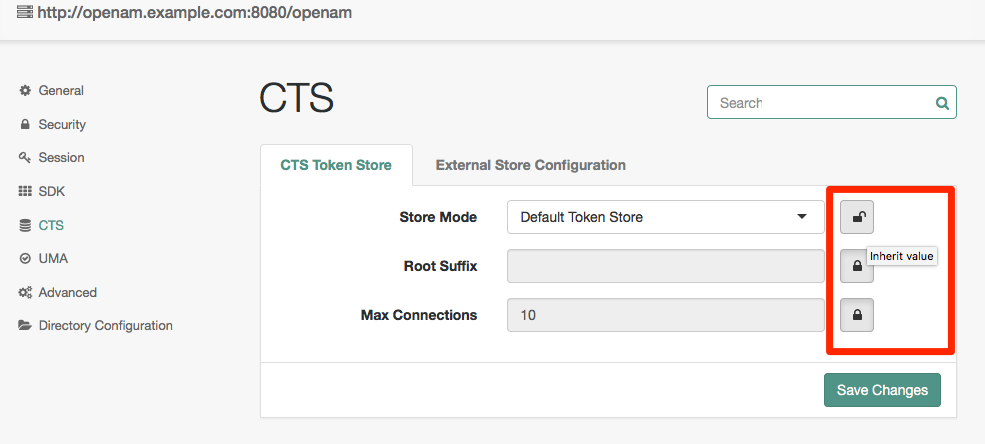
-
A closed lock means the property is inherited from the defaults. To change an inherited value click on the lock, and the property will become localized for that server.
-
An open lock means the property is localized for this server. To return to the inherited values, click on the lock.
The Advanced section also takes values from the defaults, but the properties do not have locks for inheritance. Instead, if you want to override a particular Advanced property value on a per-server basis, you need to add that property with its new value under Deployment > Servers > Server Name > Advanced.
|
After changing server configurations, restart OpenAM or the web application container where OpenAM runs for the changes to take effect unless otherwise noted. |
General
The General tab lets you access the settings to inherit, set the site for the server, and also set system, debug, and mail server attributes.
- Parent Site
-
Select the site from the list. You must first create at least one site.
- Base installation directory
-
OpenAM writes the configuration data and logs here.
property:
com.iplanet.services.configpath - Default Locale
-
The default requested locale when the client does not request a locale either by using the
localequery string parameter or by setting the HTTP header,Accept-Language.To set the locale when OpenAM cannot find UI files for the requested locale, set the JVM platform locale instead. For details, see "How OpenAM Looks Up UI Files" in the Installation Guide.
property:
com.iplanet.am.locale - Notification URL
-
The notification service endpoint.
property:
com.sun.identity.client.notification.url - XML Validation
-
If enabled, then OpenAM validates XML documents that it parses.
property:
com.iplanet.am.util.xml.validating - Debug Level
-
Set the log level shared across components for debug logging.
Changes to this property take effect immediately. No server restart is necessary.
property:
com.iplanet.services.debug.level - Merge Debug Files
-
If enabled, then OpenAM writes all debug log messages to a single file,
debug.out. By default, OpenAM writes a debug log per component.Changes to this property take effect immediately. No server restart is necessary.
property:
com.iplanet.services.debug.mergeall - Debug Directory
-
File system directory where OpenAM writes debug logs.
Changes to this property do not take effect until you restart the OpenAM server.
property:
com.iplanet.services.debug.directory - Mail Server Host Name
-
SMTP host name for email sent by OpenAM.
property:
com.iplanet.am.smtphost - Mail Server Port Number
-
SMTP port number for email sent by OpenAM.
property:
com.iplanet.am.smtpport
Security
Most security settings are inherited by default.
- Password Encryption Key
-
Encryption key for decrypting stored passwords.
The value of the
am.encryption.pwdproperty must be the same for all deployed servers in a site. You can set the Password Encryption Key property at Deployment > Servers > Server Name > Security. Verify that all servers have the same setting for this property.Example:
TF1Aue9c63bWTTY4mmZJeFYubJbNiSE3property:
am.encryption.pwd - Authentication Service Shared Secret
-
Shared secret for application authentication
Example:
AQICQ7QMKN5TSt1fpyFZBMZ8hRwkYkkrUaFkproperty:
com.iplanet.am.service.secret - Encryption class
-
Default class used to handle encryption
Default:
com.iplanet.services.util.JCEEncryptionproperty:
com.iplanet.security.encryptor - Secure Random Factory Class
-
The default implementation uses pure Java, rather than JSS.
Default:
com.iplanet.am.util.SecureRandomFactoryImplproperty:
com.iplanet.security.SecureRandomFactorImpl - Platform Low Level Comm. Max. Content Length
-
Maximum content length for an HTTP request
Default: 16384
property:
com.iplanet.services.comm.server.pllrequest.maxContentLength - Client IP Address Check
-
If enabled, then OpenAM checks client IP addresses when creating and validating SSO tokens.
Default: No
property:
com.iplanet.am.clientIPCheckEnabled - Cookie Name
-
Cookie name OpenAM uses to set a session handler ID during authentication.
Default:
iPlanetDirectoryProproperty:
com.iplanet.am.cookie.name - Secure Cookie
-
If yes, then OpenAM sets the cookie in secure mode such that the browser only returns the cookie if a secure protocol such as HTTPS is used.
Default: No
property:
com.iplanet.am.cookie.secure - Encode Cookie Value
-
If yes, then OpenAM URL encodes cookie values.
Default: No
property:
com.iplanet.am.cookie.encode - Keystore File
-
Path to OpenAM keystore file
Default: Path to
keystore.jceks, located in the directory that holds the OpenAM configuration.Example:
~/openam/openam/keystore.jceksproperty:
com.sun.identity.saml.xmlsig.keystore - Keystore Type
-
The OpenAM keystore type—either JCEKS or JKS
Default:
JCEKSproperty:
com.sun.identity.saml.xmlsig.storetype - Keystore Password File
-
Path to password file for keystore
Default: Path to
.storepass, located in the directory that holds the OpenAM configuration.Example:
~/openam/openam/.storepassproperty:
com.sun.identity.saml.xmlsig.storepass - Private Key Password File
-
Path to password file for OpenAM private key
Default: Path to
.keypass, located in the directory that holds the OpenAM configuration.Example:
~/openam/openam/.keypassproperty:
com.sun.identity.saml.xmlsig.keypass - Certificate Alias
-
Alias for OpenAM certificate stored in keystore
Not set by default
property:
com.sun.identity.saml.xmlsig.certalias - CRL: LDAP server host name
-
Directory server host name where the certificate revocation list (CRL) is cached
Not set by default
property:
com.sun.identity.crl.cache.directory.host - CRL: LDAP server port number
-
Directory server port number where the certificate revocation list is cached
Not set by default
property:
com.sun.identity.crl.cache.directory.port - CRL: SSL/TLS Enabled
-
If yes, then connect securely when accessing the CRL cache directory server
Default: No
property:
com.sun.identity.crl.cache.directory.ssl - CRL: LDAP server bind user name
-
Bind DN to access CRL cache directory server
Not set by default
property:
com.sun.identity.crl.cache.directory.user - CRL: LDAP server bind password
-
Bind password to access CRL cache directory server
Not set by default
property:
com.sun.identity.crl.cache.directory.password - CRL: LDAP search base DN
-
Base DN under which to search for CRL
Not set by default
property:
com.sun.identity.crl.cache.directory.searchlocs - CRL: Search Attributes
-
DN component of issuer’s subject DN used to retrieve the CRL
Not set by default
property:
com.sun.identity.crl.cache.directory.searchattr - OCSP: Check Enabled
-
If yes, then OpenAM runs Online Certificate Status Protocol (OCSP) checks.
Default: Yes
property:
com.sun.identity.authentication.ocspCheck - Responder URL
-
URL for OCSP responder
Not set by default
property:
com.sun.identity.authentication.ocsp.responder.url - Certificate Nickname
-
Nickname for OCSP responder certificate
Not set by default
property:
com.sun.identity.authentication.ocsp.responder.nickname - Object Deserialisation Class Whitelist
-
List of classes that are considered valid when OpenAM performs object deserialization operations.
property:
openam.deserialisation.classes.whitelist
Session
Session settings are inherited by default.
- Maximum Sessions
-
Maximum concurrent stateful sessions OpenAM permits
property:
com.iplanet.am.session.maxSessions - Invalidate Session Max Time
-
Minutes after which invalid stateful sessions are removed from the session table
property:
com.iplanet.am.session.invalidsessionmaxtime - Sessions Purge Delay
-
Minutes OpenAM delays purging of stateful sessions
property:
com.iplanet.am.session.purgedelay - Logging Interval
-
Seconds OpenAM delays between logging stateful session statistics
property:
com.iplanet.am.stats.interval - State
-
Whether to write statistics to a
file, to theconsole, or to turn recordingoffproperty:
com.iplanet.services.stats.state - Directory
-
Path to statistics logs directory
property:
com.iplanet.services.stats.directory - Enable Host Lookup
-
If yes, then OpenAM performs host lookup during stateful session logging.
property:
com.sun.am.session.enableHostLookUp - Notification Pool Size
-
Number of threads in the session change notification pool. Session notification applies to stateful sessions only.
property:
com.iplanet.am.notification.threadpool.size - Notification Thread Pool Threshold
-
Maximum number of tasks in the queue for serving session change notification threads. Session notification applies to stateful sessions only.
property:
com.iplanet.am.notification.threadpool.threshold - Case Insensitive client DN comparison
-
If yes, then OpenAM distinguished name comparison is case insensitive.
property:
com.sun.am.session.caseInsensitiveDN
SDK
Most SDK settings are inherited.
- Enable Datastore Notification
-
If yes, then OpenAM uses data store notification. Otherwise, OpenAM uses in-memory notification.
Changes to this property take effect immediately. No server restart is necessary.
property:
com.sun.identity.sm.enableDataStoreNotification - Enable Directory Proxy
-
If yes, then OpenAM accounts for the use of a directory proxy to access the directory server.
property:
com.sun.identity.sm.ldap.enableProxy - Notification Pool Size
-
Service management notification thread pool size
property:
com.sun.identity.sm.notification.threadpool.size - Number of retries for Event Service connections
-
Maximum number of attempts to reestablish Event Service connections
property:
com.iplanet.am.event.connection.num.retries - Delay between Event Service connection retries
-
Milliseconds between attempts to reestablish Entry Service connections
property:
com.iplanet.am.event.connection.delay.between.retries - Error codes for Event Service connection retries
-
LDAP error codes for which OpenAM retries rather than returning failure
property:
com.iplanet.am.event.connection.ldap.error.codes.retries - Disabled Event Service Connection
-
Persistent search connections OpenAM can disable
property:
com.sun.am.event.connection.disable.list - Number of retries for LDAP Connection
-
Maximum number of attempts to reestablish LDAP connections
property:
com.iplanet.am.ldap.connection.num.retries - Delay between LDAP connection retries
-
Milliseconds between attempts to reestablish LDAP connections
property:
com.iplanet.am.ldap.connection.delay.between.retries - Error Codes for LDAP connection retries
-
LDAP error codes for which OpenAM retries rather than returning failure
property:
com.iplanet.am.ldap.connection.ldap.error.codes.retries - SDK Caching Max. Size
-
Cache size used if SDK caching is enabled
Changes to this property take effect immediately. No server restart is necessary.
property:
com.iplanet.am.sdk.cache.maxSize - SDK Replica Retries
-
Maximum number of attempts to retrieve entries returned as not found
Changes to this property take effect immediately. No server restart is necessary.
property:
com.iplanet.am.replica.num.retries - Delay between SDK Replica Retries
-
Milliseconds between attempts to retrieve entries through the SDK
Changes to this property take effect immediately. No server restart is necessary.
property:
com.iplanet.am.replica.delay.between.retries - Cache Entry Expiration Enabled
-
If no, then cache entries expire based on User Entry Expiration Time
property:
com.iplanet.am.sdk.cache.entry.expire.enabled - User Entry Expiration Time
-
Minutes user entries remain valid after modification. When OpenAM accesses a user entry that has expired, it rereads the entry from the directory server.
property:
com.iplanet.am.sdk.cache.entry.user.expire.time - Default Entry Expiration Time
-
Minutes non-user entries remain valid after modification
property:
com.iplanet.am.sdk.cache.entry.default.expire.time
CTS
The Core Token Service (CTS) does not need to be configured in the same LDAP storage as the external or embedded user store. The CTS can instead be configured on its own external directory server. There are some specific requirements for indexing and replication which need to be accounted for. In particular, WAN replication is an important consideration which needs to be handled carefully for optimum performance.
You may also choose to set advanced properties related to token size, including com.sun.identity.session.repository.enableEncryption, com.sun.identity.session.repository.enableCompression, and com.sun.identity.session.repository.enableAttributeCompression. For more information, identify these variables in the following section: "Advanced".
.CTS Token Store
- Store Mode
-
CTS tokens are stored in the same external or embedded data store used for the OpenAM configuration when you specify the Default Token Store option. When using the default token store option, you can only configure the Root Suffix property.
You can separate the CTS store from the OpenAM configuration on different external servers by selecting the External Token Store option. When specifying this option, you can also configure token schema and indexes.
- Root Suffix
-
For either the default or external token stores, enter the base DN for CTS storage information in LDAP format, such as
dc=cts,dc=forgerock,dc=com. TheRoot Suffixwould be a database that can be maintained and replicated separately from the standard user data store. - Max Connections
-
Specifies the maximum number of remote connections to the external data store. For affinity deployments, this property specifies the maximum number of remote connections to each directory server in the connection string.
Default:
10
If you use OpenDJ, you can separate the CTS from the configuration on different external servers. On the external CTS server, you can also configure token schema and indexes.
- SSL/TLS Enabled
-
Access the directory service using StartTLS or LDAPS.
You can configure this field for external token stores only.
- Connection String(s)
-
Specifies the ordered list of connection strings for external OpenDJ servers. The format is
HOST:PORT[|SERVERID[|SITEID]], whereHOST:PORTare the LDAP server and its port.SERVERIDandSITEIDare optional parameters to specify an OpenAM instance that prioritizes the particular connection. This does not exclude other OpenAM instances from using that connection, although they must have no remaining priority connections available to them before they use it.When a failed OpenDJ server becomes available again, OpenAM instances create new connections to it based on the order specified in the list.
Examples for active/passive deployments:
cts-dj1.example.com:389,cts-dj2.example.com:389-
Every OpenAM instance accesses
cts-dj1.example.com:389for all CTS operations. If it goes down, they accesscts-dj2.example.com:389.Every instance will open new connections to
cts-dj1.example.com:389when it becomes available. cts-dj1.example.com:389|1|1,cts-dj2.example.com:389|2|1-
Server 1 site 1 gives priority to
cts-dj1.example.com:389. Server 2 site 1 gives priority tocts-dj2.example.com:389. Any server not specified accesses the first server on the list, while it is available.If
cts-dj1.example.com:389goes down, server 1 site 1 accessescts-dj2.example.com:389. Any server not specified access the second server on the list.If
cts-dj2.example.com:389goes down, server 2 site 1 accessescts-dj1.example.com:389. Any server not specified still accesses the first server on the list.Server 1 site 1 and any server not specified will open new connections to
cts-dj1.example.com:389when it becomes available. Only server 2 site 1 will open new connections tocts-dj2.example.com:389when it becomes available. cts-dj1.example.com:389|1|1,cts-dj2.example.com:389|1|1,cts-dj3.example.com:389|1|2-
Server 1 site 1 gives priority to
cts-dj1.example.com:389. Any server not specified accesses the first server on the list, while it is available.If
cts-dj1.example.comgoes down, server 1 site 1 accessescts-dj2.example.com:389. Any server not specified accesses the second server on the list.If both
cts-dj1.example.comandcts-dj2.example.comgo down, server 1 site 1 accessescts-dj3.example.com:389in site 2. Any server not specified accesses the third server on the list.Server 1 site 1 and any server not specified will open new connections to any server in site 1 when they become available, with
cts-dj1.example.combeing the preferred server.
Example for affinity deployments:
cts-dj1.example.com:389,cts-dj2.example.com:389,cts-dj3.example.com:389,cts-dj4.example.com:389-
Access CTS tokens from one of the four servers listed in the connection string. For any given CTS token, OpenAM determines the token’s affinity for one of the four servers, and always accesses the token from that same server. Tokens are distributed equally across the four servers.
- Login Id
-
Specifies the user, in DN format, needed to authenticate. The user needs sufficient privileges to read and write to the root suffix of the external data store.
You can configure this field for external token stores only.
- Password
-
Specifies the password associated with the login ID.
You can configure this field for external token stores only.
- Heartbeat
-
Specifies how often OpenAM should send a heartbeat request to the directory server to ensure that the connection does not remain idle, in seconds.
Default:
10You can configure this field for external token stores only.
- Affinity Enabled
-
When enabled, specifies whether to access the CTS token store by using multiple directory instances in an affinity deployment rather than a single master directory instance using an active/passive deployment.
When you enable this option, you must ensure that the value of the Connection String(s) property is identical for every server in multi-server deployments.
Default: Disabled
UMA
OpenAM stores four types of UMA information:
- Resource sets
-
Information about registered resource sets.
- UMA audit information
-
Audit information generated when users manage access to their protected resources.
- Pending requests
-
Pending requests for access to protected resources.
- UMA resource set labels
-
Information about user-created labels used for organizing resource sets.
The following settings are available for all store types:
- Store Mode
-
UMA tokens are stored in the embedded data store when you specify the Default Token Store option.
UMA tokens are stored in a separate external store when you specify the External Token Store option.
Additional options become available for each store where this option is enabled, see Configuring External UMA Stores.
- Root Suffix
-
Enter the base DN for storage information in LDAP format, such as
dc=uma-rs,dc=forgerock,dc=com. - Max Connections
-
Sets the maximum number of connections to the data store.
Configuring External UMA Stores
The options in this section become available when External Token Store is selected for a store type.
- SSL/TLS Enabled
-
Specifies if SSL or TLS is enabled for the connection to the store.
- Connection String(s)
-
Each connection string is composed as follows:
HOST:PORT[|SERVERID[|SITEID]], where SERVERID and SITEID are optional parameters that will prioritize that connection for use by the specified nodes. Multiple connection strings should be comma-separated, for example,host1:389,host2:50389|server1|site1,host3:50389.See the entry for Connection String(s) in "CTS" for syntax examples.
- Login Id
-
The DN of the store user that OpenAM authenticates as. This user needs sufficient privileges to read and write to the root suffix of the store.
- Password
-
Specifies the password associated with the login ID.
- Heartbeat
-
Specifies how often OpenAM should send a heartbeat request to the store to ensure that the connection does not remain idle, in seconds.
Default:
10
Advanced
Use this page to set advanced properties directly. A partial list of advanced properties follows.
For a list of inherited advanced properties, see the table under the Advanced tab for Default Server Settings.
com.iplanet.am.cookie.c66Encode-
Properly URL encode session tokens.
Default:
true com.iplanet.am.daemons-
Modules for which to open daemons at OpenAM startup.
Default:
securid com.iplanet.am.directory.ssl.enabled-
Whether to connect to the configuration directory server over LDAPS.
Default:
false com.iplanet.am.installdir-
OpenAM Configuration and log file location.
Default:
~/openam/server-uri, such as~/openam/openam com.iplanet.am.jssproxy.checkSubjectAltName-
When using JSS or JSSE, check whether the name values in the
SubjectAltNamecertificate match the server FQDN.Default:
false com.iplanet.am.jssproxy.resolveIPAddress-
When using JSS or JSSE, check that the IP address of the server resolves to the host name.
Default:
false com.iplanet.am.jssproxy.SSLTrustHostList-
When using JSS or JSSE, comma-separated list of server FQDNs to trust if they match the certificate CN, even if the domain name is not correct.
com.iplanet.am.jssproxy.trustAllServerCerts-
When using JSS or JSSE, set to
trueto trust whatever certificate is presented without checking.Default:
true com.iplanet.am.lbcookie.name-
Used with sticky load balancers that can inspect the cookie value.
Default:
amlbcookie com.iplanet.am.lbcookie.value-
Used with sticky load balancers that can inspect the cookie value. The value of this property defaults to the unique OpenAM server ID, although you can set your own unique value.
To reduce crosstalk between the OpenAM servers, keep the value of the
amlbcookiecookie set to the OpenAM server ID when using Web Policy Agent 4.1.x with CDSSO mode enabled.If you have replaced the value of the this property and you need to match the OpenAM server URLs with their corresponding server IDs, query the
global-config/serversendpoint. For example:$ curl -X GET \ --header 'Accept: application/json' \ --header "iPlanetDirectoryPro: AQIC5...NDU1*" \ 'https://openam.example.com:8443/openam/json/global-config/servers?_queryFilter=true' "result": [ { "_id": "01", "_rev": "-1541617246", "siteName": null, "url": "https://openam.example.com:8443/openam" } ], "resultCount": 1, "totalPagedResults": -1, "totalPagedResultsPolicy": "NONE"In the example above, the server ID for server
https://openam.example.com:8443/openamis01.Default:
01 com.iplanet.am.pcookie.name-
Persistent cookie name.
Default:
DProPCookie com.iplanet.am.profile.host-
Not used
Default: server-host, such as
openam.example.com com.iplanet.am.profile.port-
Not used
Default: server-port, such as
8080or8443 com.iplanet.am.sdk.caching.enabled-
Enables caching for configuration data and user data. See "Overall Server Cache Settings" in the Administration Guide for important information about this property.
Changes to this property take effect immediately. No server restart is necessary.
Default:
true com.iplanet.am.session.agentSessionIdleTime-
Time in minutes after which a policy agent’s stateful session expires. Note that this setting is ignored when OpenAM creates a stateless session for a policy agent.
Default:
0(never time out). You can set this property to0, or30and higher (no maximum limit). com.iplanet.am.session.client.polling.enable-
Whether client applications such as policy agents poll for stateful session changes. If
false, then client applications register listeners for notifications about changes to stateful sessions.Default:
false com.iplanet.am.session.client.polling.period-
If client applications poll for changes, number of seconds between polls.
Default:
180 com.iplanet.am.session.failover.cluster.stateCheck.period-
Time in milliseconds between health checks of other servers in the same site.
Default:
1000 com.iplanet.am.session.failover.cluster.stateCheck.timeout-
Socket timeout in milliseconds for health checks of other servers in the same site.
Default:
1000 com.iplanet.am.session.httpSession.enabled-
Create an
HttpSessionfor users on successful authentication.Default:
true com.iplanet.security.SSLSocketFactoryImpl-
SSL socket factory implementation used by OpenAM.
Default:
com.sun.identity.shared.ldap.factory.JSSESocketFactory, uses a pure Java provider com.iplanet.services.cdc.invalidGotoStrings-
Strings that OpenAM rejects as values in
gotoquery string parameters.Default:
<,>javascript:,javascript%3a,%3c,%3e com.sun.embedded.replicationport-
Replication port for embedded OpenDJ directory server.
Default:
8989 com.sun.embedded.sync.servers-
This property applies to multi-server OpenAM deployments that use the embedded OpenDJ store.
When this property is set to
on, OpenAM servers check during startup to determine whether the replication settings for the embedded store are consistent with the number of servers in the site. If they are not consistent, OpenAM reconfigures replication to match the existing number of servers in the site.Set this property on a per-server basis by navigating to Deployment > Servers > Server Name > Advanced, rather than globally under Configure > Server Defaults.
Default:
on com.sun.identity.am.cookie.check-
Whether to check for cookie support in the user agent, and if not to return an error.
Default:
false com.sun.identity.appendSessionCookieInURL-
Whether to append the session cookie to URL for a zero page session.
Default:
true com.sun.identity.auth.cookieName-
Cookie used by the OpenAM authentication service to handle the authentication process.
Default:
AMAuthCookie com.sun.identity.authentication.client.ipAddressHeader-
Set the name of the HTTP header that OpenAM can examine to learn the client IP address when requests go through a proxy or load balancer. (When requests go through an HTTP proxy or load balancer, checking the IP address on the request alone returns the address of the proxy or load balancer rather than that of the client.) OpenAM must be able to trust the proxy or load balancer to set the client IP address correctly in the header specified.
Example:
com.sun.identity.authentication.client.ipAddressHeader=X-Forwarded-For com.sun.identity.authentication.multiple.tabs.used-
Whether to allow users to open many browser tabs to the login page at the same time without encountering an error.
Default:
false com.sun.identity.authentication.setCookieToAllDomains-
Whether to allow multiple cookie domains.
Default:
true com.sun.identity.authentication.special.users-
List of special users always authenticated against the local directory server.
Default:
cn=dsameuser,ou=DSAME Users,dc=openam,dc=forgerock,dc=org|cn=amService-UrlAccessAgent,ou=DSAME Users,dc=openam,dc=forgerock,dc=org com.sun.identity.authentication.super.user-
OpenAM privileged administrator user.
Default:
uid=amAdmin,ou=People,dc=openam,dc=forgerock,dc=org com.sun.identity.authentication.uniqueCookieName-
When cookie hijacking protection is configured, name of the cookie holding the URL to the OpenAM server that authenticated the user.
Default:
sunIdentityServerAuthNServer com.sun.identity.client.notification.url-
Notification service endpoint for clients such as policy agents.
Default:
server-protocol://server-host:server-port/server-uri/notificationservice, such ashttps://openam.example.com:8443/openam/notificationservice com.sun.identity.common.systemtimerpool.size-
Number of threads in the shared system timer pool used to schedule operations such as session timeout.
Default:
3 com.sun.identity.cookie.httponly-
When set to
true, mark cookies as HTTPOnly to prevent scripts and third-party programs from accessing the cookies.Note that this configuration option is used only in non-XUI deployments. The XUI cannot set the HttpOnly name in a cookie.
Default:
false com.sun.identity.enableUniqueSSOTokenCookie-
If
true, then OpenAM is using protection against cookie hijacking.Default:
false com.sun.identity.jss.donotInstallAtHighestPriority-
Whether JSS should take priority over other providers.
Default:
true com.sun.identity.monitoring-
Whether monitoring is active for OpenAM.
Default:
off com.sun.identity.monitoring.local.conn.server.url-
URL for local connection to the monitoring service.
Default:
service:jmx:rmi:// com.sun.identity.password.deploymentDescriptor-
Internal property used by OpenAM.
Default: server-uri, such as
openam com.sun.identity.policy.Policy.policy_evaluation_weights-
Weights of the cost of evaluating policy subjects, rules, and conditions. Evaluation is in order of heaviest weight to lightest weight.
Default:
10:10:10, meaning evaluation of rules, then conditions, then subjects com.sun.identity.policy.resultsCacheMaxSize-
Maximum number of policy decisions OpenAM caches.
Default:
10000 com.sun.identity.security.checkcaller-
Whether to perform a Java security permissions check for OpenAM.
Default:
false com.sun.identity.server.fqdnMap-
Enables virtual hosts, partial hostname and IP address. Maps invalid or virtual name keys to valid FQDN values for proper redirection.
To map
myservertomyserver.example.com, setcom.sun.identity.server.fqdnMap[myserver]=myserver.example.com. com.sun.identity.session.repository.enableAttributeCompression-
For additional compression of CTS token JSON binaries, beyond GZip, if desired.
Default:
false com.sun.identity.session.repository.enableCompression-
For GZip-based compression of CTS tokens, if desired.
Default:
false com.sun.identity.session.repository.enableEncryption-
Enables tokens to be encrypted when stored.
Multi-instance deployments require consistent use of this property, which should be configured under Configure > Server Defaults > Advanced.
The
am.encryption.pwdproperty must also be the same for all deployed instances. You can set the Password Encryption Key property under Deployment > Servers > Server Name > Security. Verify that all servers have the same setting for this property.Default:
false com.sun.identity.sm.cache.enabled-
Enables service configuration caching. See "Overall Server Cache Settings" in the Administration Guide for important information about this property.
Changes to this property take effect immediately. No server restart is necessary.
Default:
true com.sun.identity.sm.cache.ttl-
When service configuration caching time-to-live is enabled, this sets the time to live in minutes.
Changes to this property take effect immediately. No server restart is necessary.
Default:
30 com.sun.identity.sm.cache.ttl.enable-
If service configuration caching is enabled, whether to enable a time-to-live for cached configuration.
Changes to this property take effect immediately. No server restart is necessary.
Default:
false com.sun.identity.sm.flatfile.root_dir-
File system directory to hold file-based representation of OpenAM configuration.
Default:
~/openam/server-uri/smssuch as~/openam/openam/sms com.sun.identity.sm.sms_object_class_name-
Class used to read and write OpenAM service configuration entries in the directory.
Default:
com.sun.identity.sm.ldap.SMSEmbeddedLdapObject com.sun.identity.url.readTimeout-
Used to set the read timeout in milliseconds for HTTP and HTTPS connections to other servers.
Default:
30000 com.sun.identity.urlchecker.dorequest-
Whether to perform an HTTP GET on
com.sun.identity.urlchecker.targeturlas a health check against another server in the same site.If set to
false, then OpenAM only checks the Socket connection, and does not perform an HTTP GET.If each OpenAM server runs behind a reverse proxy, then the default setting of
truemeans the health check actually runs against the OpenAM instance, rather than checking only the Socket to the reverse proxy.Default:
true com.sun.identity.urlchecker.targeturl-
URL to monitor when
com.sun.identity.urlchecker.dorequestis set totrue.Default: URL to the
/openam/namingserviceendpoint on the remote server com.sun.identity.urlconnection.useCache-
Whether to cache documents for HTTP and HTTPS connections to other servers.
Default:
false com.sun.identity.webcontainer-
Name of the web container to correctly set character encoding, if necessary.
Default:
WEB_CONTAINER console.privileged.users-
Used to assigned privileged console access to particular users. Set to a
|separated list of users' Universal IDs, such asconsole.privileged.users=uid=demo,ou=user,dc=openam,dc=forgerock,dc=org|uid=demo2,ou=user,dc=openam,dc=forgerock,dc=org. openam.auth.destroy_session_after_upgrade-
Where to destroy the old session after a session is successfully upgraded.
Default:
true openam.auth.distAuthCookieName-
Cookie used by the OpenAM distributed authentication service to handle the authentication process.
Default:
AMDistAuthCookie openam.auth.session_property_upgrader-
Class that controls which session properties are copied during session upgrade, where default is to copy all properties to the upgraded session.
Default:
org.forgerock.openam.authentication.service.DefaultSessionPropertyUpgrader openam.auth.version.header.enabled-
The X-DSAMEVersion http header provides detailed information about the version of OpenAM currently running on the system, including the build and date/time of the build. OpenAM will need to be restarted once this property is enabled.
Default:
false openam.authentication.ignore_goto_during_logout-
Whether to ignore the
gotoquery string parameter on logout, instead displaying the logout page.Default:
false openam.cdm.default.charset-
Character set used for globalization.
Default:
UTF-8 openam.forbidden.to.copy.headers-
Comma-separated list of HTTP headers not to copy when the distributed authentication server forwards a request to another distributed authentication server.
Default:
connection openam.forbidden.to.copy.request.headers-
Comma-separated list of HTTP headers not to copy when the distributed authentication server forwards a request to another distributed authentication server.
Default:
connection openam.retained.http.headers-
Comma-separated list of HTTP headers to copy to the forwarded response when the server forwards a request to another server.
Requests are forwarded when the server receiving the request is not the server that originally initiated authentication. The server that originally initiated authentication is identified by a cookie.
When the distributed authentication service (DAS) is in use, then the cookie is the
AMDistAuthCookiethat identifies the DAS server by its URL.When authentication is done directly on OpenAM, then the cookie is the
AMAuthCookiethat holds a session ID that identifies the OpenAM server.On subsequent requests the server receiving the request checks the cookie. If the cookie identifies another server, the current server forwards the request to that server.
If a header such as
Cache-Controlhas been included in the list of values for the propertyopenam.retained.http.request.headersand the header must also be copied to the response, then add it to the list of values for this property.Example:
openam.retained.http.headers=X-DSAMEVersion,Cache-ControlDefault:
X-DSAMEVersion
openam.retained.http.request.headers-
Comma-separated list of HTTP headers to copy to the forwarded request when the server forwards a request to another server.
Requests are forwarded when the server receiving the request is not the server that originally initiated authentication. The server that originally initiated authentication is identified by a cookie.
When the distributed authentication service (DAS) is in use, then the cookie is the
AMDistAuthCookiethat identifies the DAS server by its URL.When authentication is done directly on OpenAM, then the cookie is the
AMAuthCookiethat holds a session ID that identifies the OpenAM server.On subsequent requests the server receiving the request checks the cookie. If the cookie identifies another server, the current server forwards the request to that server.
When configuring the distributed authentication service, or when a reverse proxy is set up to provide the client IP address in the
X-Forwarded-Forheader, if your deployment includes multiple OpenAM servers, then this property must be set to include the header.Example:
openam.retained.http.request.headers=X-DSAMEVersion,X-Forwarded-ForOpenAM copies the header when forwarding a request to the authoritative server where the client originally began the authentication process, so that the authoritative OpenAM server receiving the forwarded request can determine the real client IP address.
In order to retain headers to return in the response to the OpenAM server that forwarded the request, use the property
openam.retained.http.headers.Default:
X-DSAMEVersion openam.session.case.sensitive.uuid-
Whether universal user IDs are considered case sensitive when matching them.
Default:
false openam.session.useLocalSessionsInMultiServerMode-
This property is for use in multi-server deployments where session failover is not available. If
true, calculate session quotas per server. In other words, if the session quota is 5 sessions and users can access up to 4 servers, they can have a maximum of 20 (5 * 4) sessions.Default:
false opensso.protocol.handler.pkgs-
If the web application containers sets
java.protocol.handler.pkgs, then set this property tocom.sun.identity.protocol. org.forgerock.embedded.dsadminport-
Administration port for embedded OpenDJ directory server.
Default:
4444 org.forgerock.openam.authentication.accountExpire.days-
Days until account expiration set after successful authentication by the account expiration post authentication plugin.
Default:
30 org.forgerock.openam.cdc.validLoginURIs-
This property sets a whitelist of valid login URIs. It is used by the CDCServlet to validate
LoginURIparameter values.Set only the URIs, not the query string parameters. If the actual
LoginURIparameter value includes query string parameters, then OpenAM strips them off before comparing the URI with the value or values in the whitelist.Separate multiple values with a comma, as in the following example:
org.forgerock.openam.cdc.validLoginURIs=/UI/Login,/customLoginURI.Default:
/UI/Login org.forgerock.openam.core.resource.lookup.cache.enabled-
Controls whether the results of resource file lookup should be cached.
While you are customizing the UI as described in "Customizing the Classic User Interface (Legacy)" in the Installation Guide, set this property to
falseto allow OpenAM immediately to pick up changes to the files as you customize them.Reset this to the default,
true, when using OpenAM in production.Default:
true org.forgerock.openam.cts.rest.enabled-
Enables access to the CTS REST endpoint
/json/tokens.Even when access to the CTS REST endpoint is enabled, only the OpenAM global administrator has authorization to perform operations against
/json/tokens.Default:
falseAfter changing this property, you must restart OpenAM or the container in which it runs for the change to take effect.
org.forgerock.openam.ldap.default.time.limit-
Configures the client-side timeout, in milliseconds, applied to LDAP operations performed with the Netscape LDAP SDK.
Default:
0(no time limit) org.forgerock.openam.openidconnect.allow.open.dynamic.registration-
Controls whether OpenID Connect clients can register dynamically without providing an access token.
If you set this to
truein production, take care to limit or throttle dynamic client registrations.Default:
false org.forgerock.openam.redirecturlvalidator.maxUrlLength-
Specifies the maximum length of redirection URLs validated by OpenAM. The Validation Service and other OpenAM services perform redirection URL validation.
The default value should be adequate in most cases. Increase the default value as needed if messages similar to the following appear in your debug log files with message-level debugging enabled:
RedirectUrlValidator.isRedirectUrlValid: The url was length 2015 which is longer than the allowed maximum of 2000Default:
2000 org.forgerock.openam.slf4j.enableTraceInMessage-
Controls whether trace-level logging messages are generated when message-level debug logging is enabled in OpenAM.
Certain components that run in OpenAM’s JVM—for example, embedded OpenDJ configuration stores—write a large volume of trace-level debug records that are not required for troubleshooting in many cases. With this option set to
false, trace-level debug records are not written for these components.If you set this to
truein production, take care to monitor the amount of disk space occupied by the OpenAM debug logs.Default:
false org.forgerock.policy.subject.evaluation.cache.size-
Maintains a record of subject IDs matched or not matched in a given session. The cache is keyed on the token ID, and the session is cleared when destroyed.
Default:`10000`
org.forgerock.services.datalayer.connection.timeout-
Timeout in seconds for LDAP connections to the configuration data store.
Default:
10(seconds)For suggested settings, see "Tuning LDAP CTS and Configuration Store Settings" in the Administration Guide.
org.forgerock.services.datalayer.connection.timeout.cts.async-
Timeout in seconds for LDAP connections used for most CTS operations.
Default:
10(seconds)For suggested settings, see "Tuning LDAP CTS and Configuration Store Settings" in the Administration Guide.
org.forgerock.services.datalayer.connection.timeout.cts.reaper-
Timeout in seconds for the LDAP connection used for CTS token cleanup.
Default: None (do not time out)
For suggested settings, see "Tuning LDAP CTS and Configuration Store Settings" in the Administration Guide.
securidHelper.ports-
Port on which SecurID daemon listens.
Default: 58943
ssoadm.disabled-
Set to
falseto enablessoadm.jsp.Default:
true
Directory Configuration
Use this tab to change connection settings and add additional LDAP configuration directory server instances.
- Minimum Connection Pool
-
Set the minimum number of connections in the pool.
Changes to this property take effect immediately. No server restart is necessary.
- Maximum Connection Pool
-
Set the maximum number of connections in the pool.
Changes to this property take effect immediately. No server restart is necessary.
- Bind DN
-
Set the bind DN to connect to the configuration directory servers.
Changes to this property take effect immediately. No server restart is necessary.
- Bind Password
-
Set the bind password to connect to the configuration directory servers.
Changes to this property take effect immediately. No server restart is necessary.
Configuring Sites
Sites involve multiple OpenAM servers working together to provide services. You can use sites with load balancers and session failover to configure pools of servers capable of responding to client requests in highly available fashion.
- Primary URL
-
Set the primary entry point to the site, such as the URL to the load balancer for the site configuration.
- Secondary URLs
-
Set alternate entry points to the site. Used when session failover is configured.