Configuring Single Sign-On Within One Domain
This chapter describes the configuration of Single Sign-On (SSO) services for multiple resources on one domain. To understand how SSO works, you need to understand some key elements of the HTTP cookie, as described in RFC 6525, HTTP State Management Mechanism. With SSO, a user can access multiple independent services from a single session.
The Basics of the HTTP Cookie
Within an HTTP cookie, you can store a single custom name=value pair, such as sessionid=value. Other custom names within a cookie are as follows:
- Domain
-
Normally set to the full URL that was used to access the configurator. To work with multiple subdomains, the
Domainshould be set to a URL likeDomain`=server.example.net`. This is also known as the cookie domain, as defined in "Configuration Reference" in the Reference. - Path
-
The directory in the URL to which the cookie applies. If the
Path=/openam, the cookie applies to the/openamsubdirectory of the FQDN, and lower level directories, includingopenam/UIandopenam/UI/Login. - Secure
-
If the
Securename is included, the cookie can be transferred only over HTTPS. When a request is made over HTTP, the cookie is not made available to the application. - HttpOnly
-
When the
HttpOnlyname is included, that cookie will not be accessible through JavaScript. According to RFC 6265, the noted flag "instructs the user agent to omit the cookie when providing access to cookies via 'non-HTTP' APIs (for example, a web browser API that exposes cookies to scripts)." - Expires
-
The lifetime of a cookie can be limited, with an
Expiresname configured with a time, based on UTC (GMT).
|
Be careful. Do not take a shortcut with a top-level domain. Web browser clients today are designed to ignore cookies set to top-level domains including |
Cookies and the SSO Session Process
OpenAM uses cookies to track user sessions. The diagram shown next illustrates how OpenAM assigns and tracks cookies. In the diagram:
-
The domain shown in the description is
example.net. -
The protected resource application can be found on
app.example.net. -
The OpenAM server is located on
sso.example.net.
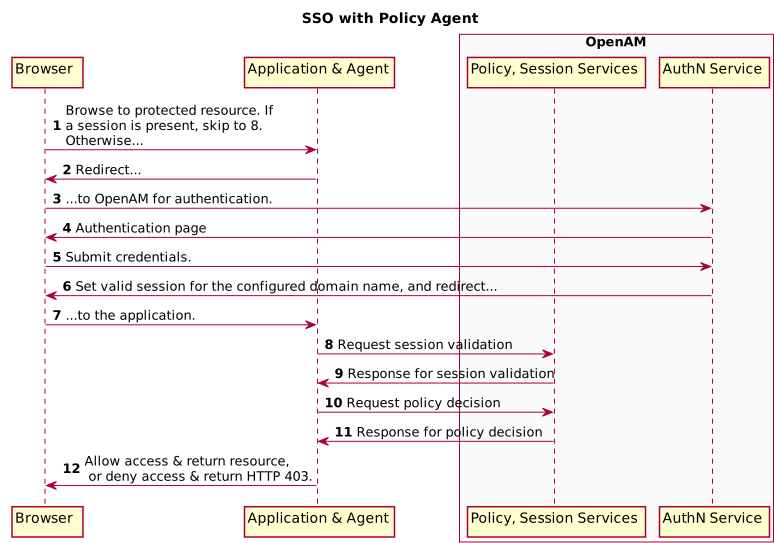
A client points their browser to a protected resource application. An agent on the application checks the client browser cookies for the presence of a session. If a session cookie exists and is valid, the agent requests validation (see arrow 8).
If no valid session cookie exists, the agent redirects the client to OpenAM for authentication (AuthN). The client is then sent to OpenAM for AuthN. If the client submits valid credentials, the AuthN service creates a session cookie for the configured domain. The contents of the session cookie varies, depending on the configuration of the realm to which the user authenticates:
-
If the realm is configured for stateful sessions, an SSO token is embedded in the cookie.
-
If the realm is configured for stateless sessions, the session itself is embedded in the cookie.
OpenAM issues an HTTP redirect to send the client browser back to the protected resource.
The agent then verifies the validity of the session with the OpenAM session service, before granting access.
Potential Problems
In general, problems with SSO relate to some sort of mismatch of domain names. For example, a cookie that is configured on a third-level domain, such as sso.example.net will not work with an application on a similar domain, such as app.example.net. Even if the Session ID is valid, the application will not receive the SSO Token. The request is then redirected to OpenAM. The client gets what appears as a SSO Token in the diagram, which is actually a valid SSO tracking cookie that redirects immediately, and the cycle continues. Other issues that may lead to similar problems are shown here:
-
When a cookie domain does not match a domain for the protected application.
Assume the application is configured on a domain named
example.org. That application will not receive an SSO Token configured on theexample.netdomain. -
When a third-level domain is used for the SSO Token.
If an SSO Token is configured on
sso.example.net, an application onapp.example.netdoes not receive the corresponding cookie. In this case, the solution is to configure the SSO Token onexample.net. -
When the
Secureflag is used with a regular HTTP application.If you need encrypted communications for an application protected by OpenAM, use the
Secureflag and make sure the application is accessible over HTTPS. -
When the path listed in the cookie does not match the path for the application.
Perhaps the cookie is configured with a
/helloworldpath; that will not match an application that might be configured with a/hellomarspath. In that case, the application will not receive the cookie. -
When an inappropriate name is used for the cookie domain
As noted earlier, client browsers are configured to ignore first-level domains, such as
comandnetas well as functional equivalents, such asco.ukandco.jp. -
When working with different browsers
The
name=valuepairs described earlier may not apply to all browsers. The requirements for an HTTP cookie sent to an IE browser may differ from the requirements for other standard browsers, such as Firefox and Chrome. Based on anecdotal reports, IE does not recognize domain names that start with a number. In addition, IE reportedly refuses cookies that include the underscore (_) character in the FQDN. -
When a stateless session cookie exceeds the maximum size permitted by the browser
As described in "Session Cookies", the default size of the
iPlanetDirectoryProcookie is approximately 2,000 bytes. When you customize OpenAM sessions by adding attributes, the cookie size grows. Browsers allow cookie sizes between 4,000 and 5,200 bytes, depending on the browser. OpenAM single sign-on does not function correctly when the cookie size exceeds the maximum size allowed by the browser.
Configure SSO on One Domain
Now that you have read about the SSO process, you should be able to set it up on a server configured with OpenAM and a web service protected by an OpenAM agent. The following procedure assumes that you know how to configure OpenAM, the Apache Web server, and associated OpenAM Apache agent.
-
Install OpenAM as described in the Installation Guide. This procedure uses a Server URL of
http://openam.example.net:8080/openam. -
Install the appropriate policy agent, as described in the OpenAM Web Policy Agent User’s Guide or the OpenAM Java EE Policy Agent User’s Guide. This procedure uses an agent URL of
http://app.example.net:80, and an agent name ofwebagent1. -
Make sure that both URLs are configured with IP addresses, as described in "Installing OpenAM Core Services" in the Installation Guide.
-
Return to the OpenAM server on
http://openam.example.net:8080/openam. Log in as the administrative user, normallyamadmin. To activate and configure the agent, follow the procedure described in the OpenAM Web Policy Agent User’s Guide or the OpenAM Java EE Policy Agent User’s Guide. -
Now you can configure SSO Only mode. In the OpenAM console, click Realms > Realm Name > Agents >
webagent1. Scroll down to SSO Only Mode and activate the Enabled box. -
Save your changes.
-
Make sure you have configured the SSO domain, in this case,
example.net. Navigate to Configure > Global Services > System, and then click Platform. Make sureexample.net(or your chosen domain) is selected as a cookie domain. -
Save your changes.
-
Restart the web server. The agent should be active. You should now be able to log out of the OpenAM server.
-
Verify the agent URL, in this case,
http://app.example.net. The OpenAM web agent should now redirect requests to the OpenAM server.
If you want to configure OpenAM and an application on two different cookie domains, such as example.org and example.net, you will need to set up Cross-Domain SSO (CDSSO). For more information, see the chapter on "Configuring Cross-Domain Single Sign-On".