Customizing OpenAM
Service provider interfaces (SPI’s) provide a framework to customize all OpenAM service modules such as adding custom authentication modules, federation plugins, and policy conditions.
This part of the guide covers customizing OpenAM functionality.
Customizing Profile Attributes
You can extend user profiles by adding custom attributes. This section demonstrates how to add a custom attribute to a user profile when storing user profiles in the embedded LDAP directory.
Adding a custom attribute involves both updating the iPlanetAMUserService, and also updating the identity repository schema to hold the new attribute. Furthermore, to allow users to update the attribute in their own profiles, you must also update the OpenAM policy configuration stored in the configuration directory.
|
In OpenAM 15.2.1, the ability to edit custom profile attributes is limited to the classic UI. Custom profile attributes do not appear in the user profile when users log in to OpenAM using the XUI. |
This section includes the following procedures.
Follow the steps below to create a custom attribute in OpenAM.
-
Create a backup copy of the configuration file for the
iPlanetAMUserService.$ cp ~/openam/config/xml/amUser.xml ~/openam/config/xml/amUser.xml.orig -
Edit the file to add your attribute as one of the list of
<User>attributes.<AttributeSchema name="customAttribute" type="single" syntax="string" any="display" i18nKey="Custom Attribute"> </AttributeSchema>Here, the name refers to the attribute type name used in LDAP. The
i18nKeyholds either the reference, or in this case the content, of the text that appears in the user interface. -
Delete
iPlanetAMUserService, and then create it from your updated configuration file.$ cd /path/to/tools/openam/bin/ $ ssoadm \ delete-svc \ --adminid amadmin \ --password-file /tmp/pwd.txt \ --servicename iPlanetAMUserService Service was deleted. $ ssoadm \ create-svc \ --adminid amadmin \ --password-file /tmp/pwd.txt \ --xmlfile $HOME/openam/config/xml/amUser.xml Service was added.
Follow the steps below to update the identity repository LDAP schema for the custom attribute, and then update OpenAM to use the custom attribute and object class.
If you are adding an existing attribute that is already allowed on user profile entries, you can skip this procedure.
|
If you are using OpenDJ as the identity repository, you can update the schema through OpenDJ Control Panel > Schema > Manage Schema, as described in the OpenDJ documentation. |
-
Prepare the attribute type object class definitions in LDIF format.
$ cat custom-attr.ldif dn: cn=schema changetype: modify add: attributeTypes attributeTypes: ( temp-custom-attr-oid NAME 'customAttribute' EQUALITY case IgnoreMatch ORDERING caseIgnoreOrderingMatch SUBSTR caseIgnoreSubstrings Match SYNTAX 1.3.6.1.4.1.1466.115.121.1.15 USAGE userApplications ) - add: objectClasses objectClasses: ( temp-custom-oc-oid NAME 'customObjectclass' SUP top AUXILIARY MAY customAttribute ) -
Add the schema definitions to the directory.
$ /path/to/opendj/bin/ldapmodify \ --port 1389 \ --hostname openam.example.com \ --bindDN "cn=Directory Manager" \ --bindPassword password \ --filename custom-attr.ldif Processing MODIFY request for cn=schema MODIFY operation successful for DN cn=schema -
In OpenAM console, browse to Realms > Realm Name > Data Stores > Data Store Name.
-
Add the object class, here
customObjectclass, to the LDAP User Object Class list. -
Add the attribute type, here
customAttribute, to the LDAP User Attributes list. -
Save your work.
Follow these steps to make the new attribute editable by users. The steps imply use of the embedded configuration directory. If you use a different directory server to store the configuration, then adapt them for your tools.
-
Login to the control panel for the embedded configuration directory.
$ ./openam/opends/bin/control-panel &Connect using bind DN
cn=Directory Managerand the the password foramadmin. -
Select Manage Entries to open the LDAP browser.
-
Search with
LDAP Filter:set toou=SelfWriteAttributes, and then expand the tree views to see the two entries found. -
In the entry under
iPlanetAMPolicyService, edit thesunKeyValueattribute to add your custom attribute to the list of self-writable attributes, as in<Value>customAttribute</Value>. -
In the entry under
sunEntitlementIndexes, edit thesunKeyValueattribute by adding your custom attribute to theattributesJSON array. -
Restart OpenAM or the web container where it runs. The following example applies to Tomcat.
$ /path/to/tomcat/bin/shutdown.sh $ /path/to/tomcat/bin/startup.sh -
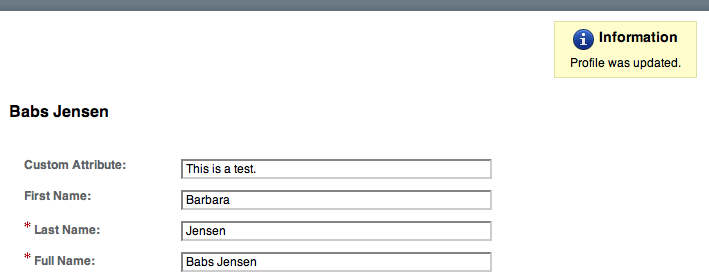
Login to OpenAM console as a user to check that a user can save a value for your new, custom attribute.
Customizing OAuth 2.0 Scope Handling
RFC 6749, The OAuth 2.0 Authorization Framework, describes access token scopes as a set of case-sensitive strings defined by the authorization server. Clients can request scopes, and resource owners can authorize them.
The default scopes implementation in OpenAM treats scopes as profile attributes for the resource owner. When a resource server or other entity uses the access token to get token information from OpenAM, OpenAM populates the scopes with profile attribute values. For example, if one of the scopes is mail, OpenAM sets mail to the resource owner’s email address in the token information returned.
You can change this behavior by writing your own scope validator plugin. This section shows how to write a custom OAuth 2.0 scope validator plugin for use in an OAuth 2.0 provider (authorization server) configuration.
Designing an OAuth 2.0 Scope Validator Plugin
A scope validator plugin implements the org.forgerock.oauth2.core.ScopeValidator interface. As described in the API specification, the ScopeValidator interface has several methods that your plugin overrides.
The following example plugin sets whether read and write permissions were granted.
package org.forgerock.openam.examples;

import org.forgerock.oauth2.core.AccessToken;
import org.forgerock.oauth2.core.ClientRegistration;
import org.forgerock.oauth2.core.OAuth2Request;
import org.forgerock.oauth2.core.ScopeValidator;
import org.forgerock.oauth2.core.Token;
import org.forgerock.oauth2.core.UserInfoClaims;
import org.forgerock.oauth2.core.exceptions.InvalidClientException;
import org.forgerock.oauth2.core.exceptions.NotFoundException;
import org.forgerock.oauth2.core.exceptions.ServerException;
import org.forgerock.oauth2.core.exceptions.UnauthorizedClientException;

import java.util.HashMap;
import java.util.HashSet;
import java.util.Map;
import java.util.Set;

/**
 * Custom scope validators implement the
 * {@link org.forgerock.oauth2.core.ScopeValidator} interface.
 *
 * <p>
 * This example sets read and write permissions according to the scopes set.
 * </p>
 *
 * <ul>
 *
 * <li>
 * The {@code validateAuthorizationScope} method
 * adds default scopes, or any allowed scopes provided.
 * </li>
 *
 * <li>
 * The {@code validateAccessTokenScope} method
 * adds default scopes, or any allowed scopes provided.
 * </li>
 *
 * <li>
 * The {@code validateRefreshTokenScope} method
 * adds the scopes from the access token,
 * or any requested scopes provided that are also in the access token scopes.
 * </li>
 *
 * <li>
 * The {@code getUserInfo} method
 * populates scope values and sets the resource owner ID to return.
 * </li>
 *
 * <li>
 * The {@code evaluateScope} method
 * populates scope values to return.
 * </li>
 *
 * <li>
 * The {@code additionalDataToReturnFromAuthorizeEndpoint} method
 * returns no additional data (an empty Map).
 * </li>
 *
 * <li>
 * The {@code additionalDataToReturnFromTokenEndpoint} method
 * adds no additional data.
 * </li>
 *
 * </ul>
 */
public class CustomScopeValidator implements ScopeValidator {
    @Override
    public Set<String> validateAuthorizationScope(
            ClientRegistration clientRegistration,
            Set<String> scope,
            OAuth2Request request) {
        if (scope == null || scope.isEmpty()) {
            return clientRegistration.getDefaultScopes();
        }

        Set<String> scopes = new HashSet<String>(
                clientRegistration.getAllowedScopes());
        scopes.retainAll(scope);
        return scopes;
    }

    @Override
    public Set<String> validateAccessTokenScope(
            ClientRegistration clientRegistration,
            Set<String> scope,
            OAuth2Request request) {
        if (scope == null || scope.isEmpty()) {
            return clientRegistration.getDefaultScopes();
        }

        Set<String> scopes = new HashSet<String>(
                clientRegistration.getAllowedScopes());
        scopes.retainAll(scope);
        return scopes;
    }

    @Override
    public Set<String> validateRefreshTokenScope(
            ClientRegistration clientRegistration,
            Set<String> requestedScope,
            Set<String> tokenScope,
            OAuth2Request request) {
        if (requestedScope == null || requestedScope.isEmpty()) {
            return tokenScope;
        }

        Set<String> scopes = new HashSet<String>(tokenScope);
        scopes.retainAll(requestedScope);
        return scopes;
    }

   @Override
   public UserInfoClaims getUserInfo(
           AccessToken token,
           OAuth2Request request)
           throws UnauthorizedClientException, NotFoundException {
       Map<String, Object> response = mapScopes(token);
       response.put("sub", token.getResourceOwnerId());
       UserInfoClaims claims = new UserInfoClaims(response, null);
       return claims;
   }

    /**
     * Set read and write permissions according to scope.
     *
     * @param token The access token presented for validation.
     * @return The map of read and write permissions,
     *         with permissions set to {@code true} or {@code false},
     *         as appropriate.
     */
    private Map<String,Object> mapScopes(AccessToken token) {
        Set<String> scopes = token.getScope();
        Map<String, Object> map = new HashMap<String, Object>();
        final String[] permissions = {"read", "write"};

        for (String scope : permissions) {
            if (scopes.contains(scope)) {
                map.put(scope, true);
            } else {
                map.put(scope, false);
            }
        }
        return map;
    }

    @Override
    public Map<String, Object> evaluateScope(AccessToken token) {
        return mapScopes(token);
    }

    @Override
    public Map<String, String> additionalDataToReturnFromAuthorizeEndpoint(
            Map<String, Token> tokens,
            OAuth2Request request) {
        return new HashMap<String, String>(); // No special handling
    }

    @Override
    public void additionalDataToReturnFromTokenEndpoint(
            AccessToken token,
            OAuth2Request request)
            throws ServerException, InvalidClientException {
        // No special handling
    }
}
Building the OAuth 2.0 Scope Validator Sample Plugin
The sample scope validator plugin source is available online. Get a local clone so that you can try the sample on your system. In the sources you find the following files.
pom.xml-
Apache Maven project file for the module
This file specifies how to build the sample scope validator plugin, and also specifies its dependencies on OpenAM components.
src/main/java/org/forgerock/openam/examples/CustomScopeValidator.java-
Core class for the sample OAuth 2.0 scope validator plugin
See "Designing an OAuth 2.0 Scope Validator Plugin" for a listing.
Build the module using Apache Maven.
$ cd /path/to/openam-scope-sample
$ mvn install
[INFO] Scanning for projects...
[INFO]
[INFO] ------------------------------------------------------------------------
[INFO] Building openam-scope-sample 1.0.0-SNAPSHOT
[INFO] ------------------------------------------------------------------------

...

[INFO]
[INFO] --- maven-jar-plugin:2.3.2:jar (default-jar) @ openam-scope-sample ---
[INFO] Building jar: .../target/openam-scope-sample-1.0.0-SNAPSHOT.jar

...

[INFO] ------------------------------------------------------------------------
[INFO] BUILD SUCCESS
[INFO] ------------------------------------------------------------------------
[INFO] Total time: 1.827s
[INFO] Finished at: Tue Jun 03 10:40:31 CEST 2014
[INFO] Final Memory: 27M/357M
[INFO] ------------------------------------------------------------------------
After you successfully build the module, you find the .jar in the target/ directory of the project.
Configuring OpenAM to Use the Plugin
After building your plugin .jar file, copy the .jar file under WEB-INF/lib/ where you deployed OpenAM.
Restart OpenAM or the container in which it runs.
In OpenAM console, you can either configure a specific OAuth 2.0 provider to use your plugin, or configure your plugin as the default for new OAuth 2.0 providers. In either case, you need the class name of your plugin. The class name for the sample plugin is org.forgerock.openam.examples.CustomScopeValidator.
-
To configure a specific OAuth 2.0 provider to use your plugin, navigate to Realms > Realm Name > Services, click OAuth2 Provider, and enter the class name of your scopes plugin to the Scope Implementation Class field.
-
To configure your plugin as the default for new OAuth 2.0 providers, add the class name of your scopes plugin. Navigate to Configure > Global Services, click OAuth2 Provider, and set Scope Implementation Class.
Trying the Sample Plugin
In order to try the sample plugin, make sure you have configured an OAuth 2.0 provider to use the sample plugin. Also, set up an OAuth 2.0 client of the provider that takes scopes read and write.
Next try the provider as shown in the following example:
$ curl \
 --request POST \
 --data "grant_type=client_credentials \
&client_id=myClientID&client_secret=password&scope=read" \
 https://openam.example.com:8443/openam/oauth2/access_token

{
    "scope": "read",
    "expires_in": 59,
    "token_type": "Bearer",
    "access_token": "c8860442-daba-4af0-a1d9-b607c03e5a0b"
}

$ curl https://openam.example.com:8443/openam/oauth2/tokeninfo\
?access_token=0d492486-11a7-4175-b116-2fc1cbff6d78
{
    "scope": [
        "read"
    ],
    "grant_type": "client_credentials",
    "realm": "/",
    "write": false,
    "read": true,
    "token_type": "Bearer",
    "expires_in": 24,
    "access_token": "c8860442-daba-4af0-a1d9-b607c03e5a0b"
}
As seen in this example, the requested scope read is authorized, but the write scope has not been authorized.
Creating a Custom Authentication Module
This section shows how to customize authentication with a sample custom authentication module. For deployments with particular requirements not met by existing OpenAM authentication modules, determine whether you can adapt one of the built-in or extension modules for your needs. If not, build the functionality into a custom authentication module.
About the Sample Authentication Module
The sample authentication module prompts for a user name and password to authenticate the user, and handles error conditions. The sample shows how you integrate an authentication module into OpenAM such that you can configure the module through OpenAM console, and also localize the user interface.
For information on downloading and building OpenAM sample source code, see How do I access and build the sample code provided for OpenAM 12.x in the Knowledge Base.
Get a local clone so that you can try the sample on your system. In the sources, you find the following files under the /path/to/openam-source/openam-samples/custom-authentication-module directory:
pom.xml-
Apache Maven project file for the module
This file specifies how to build the sample authentication module, and also specifies its dependencies on OpenAM components and on the Java Servlet API.
src/main/java/org/forgerock/openam/examples/SampleAuth.java-
Core class for the sample authentication module
This class is called by OpenAM to initialize the module and to process authentication. See "The Sample Authentication Logic" for details.
src/main/java/org/forgerock/openam/examples/SampleAuthPrincipal.java-
Class implementing
java.security.Principalinterface that defines how to map credentials to identitiesThis class is used to process authentication. See "The Sample Auth Principal" for details.
src/main/resources/amAuthSampleAuth.properties-
Properties file mapping UI strings to property values
This file makes it easier to localize the UI. See "Sample Auth Properties" for details.
src/main/resources/amAuthSampleAuth.xml-
Configuration file for the sample authentication service
This file is used when registering the authentication module with OpenAM. See "The Sample Auth Service Configuration" for details.
src/main/resources/config/auth/default/SampleAuth.xml-
Callback file for OpenAM classic UI authentication pages
The sample authentication module does not include localized versions of this file. See "Sample Auth Callbacks" for details.
Sample Auth Properties
OpenAM uses a Java properties file per locale to retrieve the appropriate, localized strings for the authentication module.
The following is the Sample Authentication Module properties file, amAuthSampleAuth.properties.
sampleauth-service-description=Sample Authentication Module
a500=Authentication Level
a501=Service Specific Attribute

sampleauth-ui-login-header=Login
sampleauth-ui-username-prompt=User Name:
sampleauth-ui-password-prompt=Password:

sampleauth-error-1=Error 1 occurred during the authentication
sampleauth-error-2=Error 2 occurred during the authentication
Sample Auth Callbacks
OpenAM callbacks XML files are used to build the classic UI to prompt the user for identity information needed to process the authentication. The document type for a callback XML file is described in WEB-INF/Auth_Module_Properties.dtd where OpenAM is deployed.
The value of the moduleName property in the callbacks file must match your custom authentication module’s class name. Observe that the module name in "Sample Auth Callbacks File", SampleAuth, matches the class name in "Sample Authentication Module Code".
The following is the SampleAuth.xml callbacks file.
<!DOCTYPE ModuleProperties PUBLIC
 "=//iPlanet//Authentication Module Properties XML Interface 1.0 DTD//EN"
        "jar://com/sun/identity/authentication/Auth_Module_Properties.dtd">

<ModuleProperties moduleName="SampleAuth" version="1.0" >
    <Callbacks length="0" order="1" timeout="600" header="#NOT SHOWN#" />
    <Callbacks length="2" order="2" timeout="600" header="#TO BE SUBSTITUTED#">
        <NameCallback isRequired="true">
            <Prompt>#USERNAME#</Prompt>
        </NameCallback>
        <PasswordCallback echoPassword="false" >
            <Prompt>#PASSWORD#</Prompt>
        </PasswordCallback>
    </Callbacks>
    <Callbacks length="1" order="3" timeout="600" header="#TO BE SUBSTITUTED#"
        error="true" >
        <NameCallback>
            <Prompt>#THE DUMMY WILL NEVER BE SHOWN#</Prompt>
        </NameCallback>
    </Callbacks>
</ModuleProperties>
This file specifies three states.
-
The initial state (order="1") is used dynamically to replace the dummy strings shown between hashes (for example,
USERNAME) by thesubstituteUIStrings()method inSampleAuth.java. -
The next state (order="2") handles prompting the user for authentication information.
-
The last state (order="3") has the attribute
error="true". If the authentication module state machine reaches this order then the authentication has failed. TheNameCallbackis not used and not displayed to user. OpenAM requires that the callbacks array have at least one element. Otherwise OpenAM does not permit header substitution.
The Sample Authentication Logic
An OpenAM authentication module must extend the com.sun.identity.authentication.spi.AMLoginModule abstract class, and must implement the methods shown below.
See the OpenAM Java SDK API Specification for reference.
// OpenAM calls the init() method once when the module is created.
public void init(Subject subject, Map sharedState, Map options)

// OpenAM calls the process() method when the user submits authentication
// information. The process() method determines what happens next:
// success, failure, or the next state specified by the order
// attribute in the callbacks XML file.
public int process(Callback[] callbacks, int state) throws LoginException

// OpenAM expects the getPrincipal() method to return an implementation of
// the java.security.Principal interface.
public Principal getPrincipal()
OpenAM does not reuse authentication module instances. This means that you can store information specific to the authentication process in the instance.
The implementation, SampleAuth.java, is shown below.
/**
 * DO NOT ALTER OR REMOVE COPYRIGHT NOTICES OR THIS HEADER.
 *
 * Copyright (c) 2011-2018 ForgeRock AS. All Rights Reserved
 *
 * The contents of this file are subject to the terms
 * of the Common Development and Distribution License
 * (the License). You may not use this file except in
 * compliance with the License.
 *
 * You can obtain a copy of the License at legal/CDDLv1.0.txt.
 * See the License for the specific language governing
 * permission and limitations under the License.
 *
 * When distributing Covered Code, include this CDDL
 * Header Notice in each file and include the License file at legal/CDDLv1.0.txt.
 * If applicable, add the following below the CDDL Header,
 * with the fields enclosed by brackets [] replaced by
 * your own identifying information:
 * "Portions Copyrighted [year] [name of copyright owner]"
 *
 */

package org.forgerock.openam.examples;

import java.security.Principal;
import java.util.Map;
import java.util.ResourceBundle;

import javax.security.auth.Subject;
import javax.security.auth.callback.Callback;
import javax.security.auth.callback.NameCallback;
import javax.security.auth.callback.PasswordCallback;
import javax.security.auth.login.LoginException;

import com.sun.identity.authentication.spi.AMLoginModule;
import com.sun.identity.authentication.spi.AuthLoginException;
import com.sun.identity.authentication.spi.InvalidPasswordException;
import com.sun.identity.authentication.util.ISAuthConstants;
import com.sun.identity.shared.datastruct.CollectionHelper;
import com.sun.identity.shared.debug.Debug;

/**
 * SampleAuth authentication module example.
 *
 * If you create your own module based on this example, you must modify all
 * occurrences of "SampleAuth" in addition to changing the name of the class.
 *
 * Please refer to OpenAM documentation for further information.
 *
 * Feel free to look at the code for authentication modules delivered with
 * OpenAM, as they implement this same API.
 */
public class SampleAuth extends AMLoginModule {

    // Name for the debug-log
    private final static String DEBUG_NAME = "SampleAuth";
    private final static Debug debug = Debug.getInstance(DEBUG_NAME);

    // Name of the resource bundle
    private final static String amAuthSampleAuth = "amAuthSampleAuth";

    // User names for authentication logic
    private final static String USERNAME = "demo";
    private final static String PASSWORD = "changeit";

    private final static String ERROR_1_USERNAME = "test1";
    private final static String ERROR_2_USERNAME = "test2";

    // Orders defined in the callbacks file
    private final static int STATE_BEGIN = 1;
    private final static int STATE_AUTH = 2;
    private final static int STATE_ERROR = 3;

    // Errors properties
    private final static String SAMPLE_AUTH_ERROR_1 = "sampleauth-error-1";
    private final static String SAMPLE_AUTH_ERROR_2 = "sampleauth-error-2";

    private Map<String, String> options;
    private ResourceBundle bundle;
    private Map<String, String> sharedState;

    public SampleAuth() {
        super();
    }


    /**
     * This method stores service attributes and localized properties for later
     * use.
     * @param subject
     * @param sharedState
     * @param options
     */
    @Override
    public void init(Subject subject, Map sharedState, Map options) {

        debug.message("SampleAuth::init");

        this.options = options;
        this.sharedState = sharedState;
        this.bundle = amCache.getResBundle(amAuthSampleAuth, getLoginLocale());
    }

    @Override
    public int process(Callback[] callbacks, int state) throws LoginException {

        debug.message("SampleAuth::process state: {}", state);

        switch (state) {

            case STATE_BEGIN:
                // No time wasted here - simply modify the UI and
                // proceed to next state
                substituteUIStrings();
                return STATE_AUTH;

            case STATE_AUTH:
                // Get data from callbacks. Refer to callbacks XML file.
                NameCallback nc = (NameCallback) callbacks[0];
                PasswordCallback pc = (PasswordCallback) callbacks[1];
                String username = nc.getName();
                String password = String.valueOf(pc.getPassword());

                //First errorstring is stored in "sampleauth-error-1" property.
                if (ERROR_1_USERNAME.equals(username)) {
                    setErrorText(SAMPLE_AUTH_ERROR_1);
                    return STATE_ERROR;
                }

                //Second errorstring is stored in "sampleauth-error-2" property.
                if (ERROR_2_USERNAME.equals(username)) {
                    setErrorText(SAMPLE_AUTH_ERROR_2);
                    return STATE_ERROR;
                }

                if (USERNAME.equals(username) && PASSWORD.equals(password)) {
                    debug.message("SampleAuth::process User '{}' " +
                            "authenticated with success.", username);
                    return ISAuthConstants.LOGIN_SUCCEED;
                }

                throw new InvalidPasswordException("password is wrong",
                        USERNAME);

            case STATE_ERROR:
                return STATE_ERROR;
            default:
                throw new AuthLoginException("invalid state");
        }
    }

    @Override
    public Principal getPrincipal() {
        return new SampleAuthPrincipal(USERNAME);
    }

    private void setErrorText(String err) throws AuthLoginException {
        // Receive correct string from properties and substitute the
        // header in callbacks order 3.
        substituteHeader(STATE_ERROR, bundle.getString(err));
    }

    private void substituteUIStrings() throws AuthLoginException {
        // Get service specific attribute configured in OpenAM
        String ssa = CollectionHelper.getMapAttr(options, "specificAttribute");

        // Get property from bundle
        String new_hdr = ssa + " " +
                bundle.getString("sampleauth-ui-login-header");
        substituteHeader(STATE_AUTH, new_hdr);

        replaceCallback(STATE_AUTH, 0, new NameCallback(
                bundle.getString("sampleauth-ui-username-prompt")));
        replaceCallback(STATE_AUTH, 1, new PasswordCallback(
                bundle.getString("sampleauth-ui-password-prompt"), false));
    }
}
The Sample Auth Principal
The implementation, SampleAuthPrincipal.java, is shown below.
/**
 * DO NOT ALTER OR REMOVE COPYRIGHT NOTICES OR THIS HEADER.
 *
 * Copyright (c) 2011-2018 ForgeRock AS. All Rights Reserved
 *
 * The contents of this file are subject to the terms
 * of the Common Development and Distribution License
 * (the License). You may not use this file except in
 * compliance with the License.
 *
 * You can obtain a copy of the License at legal/CDDLv1.0.txt.
 * See the License for the specific language governing
 * permission and limitations under the License.
 *
 * When distributing Covered Code, include this CDDL
 * Header Notice in each file and include the License file at legal/CDDLv1.0.txt.
 * If applicable, add the following below the CDDL Header,
 * with the fields enclosed by brackets [] replaced by
 * your own identifying information:
 * "Portions Copyrighted [year] [name of copyright owner]"
 *
 */

package org.forgerock.openam.examples;

import java.io.Serializable;
import java.security.Principal;

/**
 * SampleAuthPrincipal represents the user entity.
 */
public class SampleAuthPrincipal implements Principal, Serializable {
    private final static String COLON = " : ";

    private final String name;

    public SampleAuthPrincipal(String name) {

        if (name == null) {
            throw new NullPointerException("illegal null input");
        }

        this.name = name;
    }

    /**
     * Return the LDAP username for this SampleAuthPrincipal.
     *
     * @return the LDAP username for this SampleAuthPrincipal
     */
    @Override
    public String getName() {
        return name;
    }

    /**
     * Return a string representation of this SampleAuthPrincipal.
     *
     * @return a string representation of this
     *         TestAuthModulePrincipal.
     */
    @Override
    public String toString() {
        return new StringBuilder().append(this.getClass().getName())
                .append(COLON).append(name).toString();
    }

    /**
     * Compares the specified Object with this SampleAuthPrincipal
     * for equality. Returns true if the given object is also a
     *  SampleAuthPrincipal  and the two SampleAuthPrincipal have
     * the same username.
     *
     * @param o Object to be compared for equality with this
     *          SampleAuthPrincipal.
     * @return true if the specified Object is equal equal to this
     *         SampleAuthPrincipal.
     */
    @Override
    public boolean equals(Object o) {
        if (o == null) {
            return false;
        }

        if (this == o) {
            return true;
        }

        if (!(o instanceof SampleAuthPrincipal)) {
            return false;
        }
        SampleAuthPrincipal that = (SampleAuthPrincipal) o;

        if (this.getName().equals(that.getName())) {
            return true;
        }
        return false;
    }

    /**
     * Return a hash code for this SampleAuthPrincipal.
     *
     * @return a hash code for this SampleAuthPrincipal.
     */
    @Override
    public int hashCode() {
        return name.hashCode();
    }
}
The Sample Auth Service Configuration
OpenAM requires that all authentication modules be configured by means of an OpenAM service. At minimum, the service must include an authentication level attribute. Your module can access these configuration attributes in the options parameter passed to the init() method.
Some observations about the service configuration file follow in the list below.
-
The document type for a service configuration file is described in
WEB-INF/sms.dtdwhere OpenAM is deployed. -
The service name is derived from the module name. The service name must have the following format:
-
It must start with either
iPlanetAMAuthorsunAMAuth. -
The module name must follow. The case of the module name must match the case of the class that implements the custom authentication module.
-
It must end with
Service.
In the Sample Auth service configuration, the module name is
SampleAuthand the service name isiPlanetAMAuthSampleAuthService. -
-
The service must have a localized description, retrieved from a properties file.
-
The
i18nFileNameattribute in the service configuration holds the default (non-localized) base name of the Java properties file. Thei18nKeyattributes indicate properties keys to string values in the Java properties file. -
The authentication level attribute name must have the following format:
-
It must start with
iplanet-am-auth-,sun-am-auth-, orforgerock-am-auth-. -
The module name must follow, and must appear in lower case if the attribute name starts with
iplanet-am-auth-orforgerock-am-auth-. If the attribute name starts withsun-am-auth-, it must exactly match the case of the module name as it appears in the service name. -
It must end with
-auth-level.
In the Sample Auth service configuration, the authentication level attribute name is
iplanet-am-auth-sampleauth-auth-level. -
-
The Sample Auth service configuration includes an example
sampleauth-service-specific-attribute, which can be configured through OpenAM console.
The service configuration file, amAuthSampleAuth.xml, is shown below. Save a local copy of this file, which you use when registering the module.
<?xml version="1.0" encoding="UTF-8"?>
<!--
   DO NOT ALTER OR REMOVE COPYRIGHT NOTICES OR THIS HEADER.

   Copyright (c) 2011-2018 ForgeRock AS.

   The contents of this file are subject to the terms
   of the Common Development and Distribution License
   (the License). You may not use this file except in
   compliance with the License.

   You can obtain a copy of the License at legal/CDDLv1.0.txt.
   See the License for the specific language governing
   permission and limitations under the License.

   When distributing Covered Code, include this CDDL
   Header Notice in each file and include the License file at legal/CDDLv1.0.txt.
   If applicable, add the following below the CDDL Header,
   with the fields enclosed by brackets [] replaced by
   your own identifying information:
   "Portions Copyrighted [year] [name of copyright owner]"
-->
<!DOCTYPE ServicesConfiguration
    PUBLIC "=//iPlanet//Service Management Services (SMS) 1.0 DTD//EN"
    "jar://com/sun/identity/sm/sms.dtd">

<ServicesConfiguration>
 <Service name="iPlanetAMAuthSampleAuthService" version="1.0">
  <Schema
   serviceHierarchy="/DSAMEConfig/authentication/iPlanetAMAuthSampleAuthService"
   i18nFileName="amAuthSampleAuth" revisionNumber="10"
   i18nKey="sampleauth-service-description" resourceName="sample">
   <Organization>
    <!-- Specify resourceName for a JSON-friendly property in the REST SMS -->
    <AttributeSchema name="iplanet-am-auth-sampleauth-auth-level" resourceName="authLevel"
     type="single" syntax="number_range" rangeStart="0" rangeEnd="2147483647"
     i18nKey="a500">
     <DefaultValues>
      <Value>1</Value>
     </DefaultValues>
    </AttributeSchema>

    <!-- No need for resourceName when the name is JSON-compatible -->
    <AttributeSchema name="specificAttribute"
     type="single" syntax="string" validator="no" i18nKey="a501" />

    <!--
     For Auth Modules, the parent Schema element specifies the REST SMS resourceName,
     and the nested SubSchema must have resourceName="USE-PARENT"
    -->
    <SubSchema name="serverconfig" inheritance="multiple" resourceName="USE-PARENT">
     <AttributeSchema name="iplanet-am-auth-sampleauth-auth-level" resourceName="authLevel"
      type="single" syntax="number_range" rangeStart="0" rangeEnd="2147483647"
      i18nKey="a500">
      <DefaultValues>
       <Value>1</Value>
      </DefaultValues>
     </AttributeSchema>

     <!-- No need for a DefaultValues element when the default is blank -->
     <AttributeSchema name="specificAttribute"
      type="single" syntax="string" validator="no" i18nKey="a501" />

    </SubSchema>
   </Organization>
  </Schema>
 </Service>
</ServicesConfiguration>
Building and Installing the Sample Auth Module
Build the module with Apache Maven, and install the module in OpenAM.
Building the Module
Build the module with Apache Maven, and install the module in OpenAM.
After you successfully build the module, you find the .jar file in the target/ directory of the project.
For information on downloading and building OpenAM sample source code, see How do I access and build the sample code provided for OpenAM 12.x in the Knowledge Base.
Installing the Module
Installing the sample authentication module consists of copying the .jar file to OpenAM’s WEB-INF/lib/ directory, registering the module with OpenAM, and then restarting OpenAM or the web application container where it runs.
-
Copy the sample authentication module
.jarfile toWEB-INF/lib/where OpenAM is deployed.$ cp target/custom*.jar /path/to/tomcat/webapps/openam/WEB-INF/lib/ -
Register the module with OpenAM using the
ssoadmcommand.$ ssoadm \ create-svc \ --adminid amadmin \ --password-file /tmp/pwd.txt \ --xmlfile src/main/resources/amAuthSampleAuth.xml Service was added. $ ssoadm \ register-auth-module \ --adminid amadmin \ --password-file /tmp/pwd.txt \ --authmodule org.forgerock.openam.examples.SampleAuth Authentication module was registered.See the ssoadm(1) in the Reference a full list of Authentication Service Management subcommands.
-
Restart OpenAM or the container in which it runs.
For example if you deployed OpenAM in Apache Tomcat, then you shut down Tomcat and start it again.
$ /path/to/tomcat/bin/shutdown.sh
$ /path/to/tomcat/bin/startup.sh
$ tail -1 /path/to/tomcat/logs/catalina.out
INFO: Server startup in 14736 ms
Configuring & Testing the Sample Auth Module
Authentication modules are registered as services with OpenAM globally, and then set up for use in a particular realm. In this example, you set up the sample authentication module for use in the realm / (Top Level Realm).
Log in to the OpenAM console as an administrator, such as amadmin, and browse to Realms > Top Level Realm > Authentication > Modules. Click Add Module to create an instance of the Sample Authentication Module. Name the module Sample.
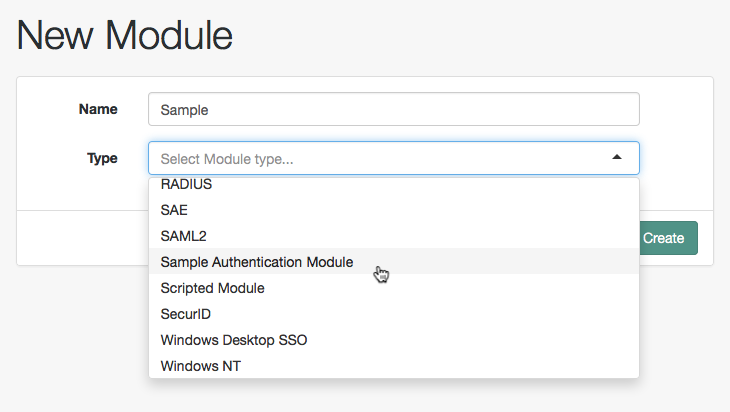
Click Create, and then configure the authentication module as appropriate.
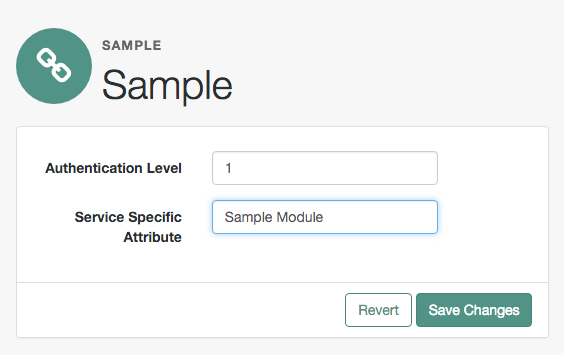
Now that the module is configured, log out of the OpenAM console.
Finally, try the module by specifying the Sample module using a query string parameter. Browse to the login URL such as http://openam.example.com:8080/openam/XUI/#login/&module=Sample, and then authenticate with user name demo and password changeit.
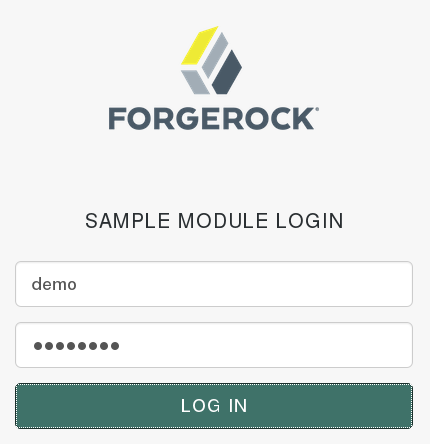
After authentication you are redirected to the end user page for the demo user. You can logout of OpenAM console, and then try to authenticate as the non-existent user test123 to see what the error handling looks like to the user.
Customizing Session Quota Exhaustion Actions
This section demonstrates a custom session quota exhaustion action plugin. OpenAM calls a session quota exhaustion action plugin when a user tries to open more stateful sessions than their quota allows. Note that session quotas are not available for stateless sessions.
You only need a custom session quota exhaustion action plugin if the built-in actions are not flexible enough for your deployment. See "To Configure Session Quotas and Exhaustion Actions" in the Administration Guide.
Creating & Installing a Custom Session Quota Exhaustion Action
You build custom session quota exhaustion actions into a .jar that you then plug in to OpenAM. You must also add your new action to the Session service configuration, and restart OpenAM in order to be able to configure it for your use.
Your custom session quota exhaustion action implements the com.iplanet.dpro.session.service.QuotaExhaustionAction interface, overriding the action method. The action method performs the action when the session quota is met, and returns true only if the request for a new session should not be granted.
The example in this section simply removes the first session it finds as the session quota exhaustion action.
package org.forgerock.openam.examples.quotaexhaustionaction;

import com.iplanet.dpro.session.Session;
import com.iplanet.dpro.session.SessionException;
import com.iplanet.dpro.session.SessionID;
import com.iplanet.dpro.session.service.InternalSession;
import com.iplanet.dpro.session.service.QuotaExhaustionAction;
import com.iplanet.dpro.session.service.SessionService;
import com.sun.identity.shared.debug.Debug;
import java.util.Map;

/**
 * This is a sample {@link QuotaExhaustionAction} implementation,
 * which randomly kills the first session it finds.
 */
public class SampleQuotaExhaustionAction implements QuotaExhaustionAction {

    private static Debug debug = SessionService.sessionDebug;

    /**
     * Check if the session quota for a given user has been exhausted and
     * if so perform the necessary actions. This implementation randomly
     * destroys the first session it finds.
     *
     * @param is               The InternalSession to be activated.
     * @param existingSessions All existing sessions that belong to the same
     *                         uuid (Map:sid->expiration_time).
     * @return true If the session activation request should be rejected,
     *              otherwise false.
     */
    @Override
    public boolean action(
            InternalSession is,
            Map<String, Long> existingSessions) {
        for (Map.Entry<String, Long> entry : existingSessions.entrySet()) {
            try {
                // Get an actual Session instance based on the session ID.
                Session session =
                        Session.getSession(new SessionID(entry.getKey()));
                // Use the session to destroy itself.
                session.destroySession(session);
                // Only destroy the first session.
                break;
            } catch (SessionException se) {
                if (debug.messageEnabled()) {
                    debug.message("Failed to destroy existing session.", se);
                }
                // In this case, deny the session activation request.
                return true;
            }
        }
        return false;
    }
}
The sample plugin source is available online. Get a local clone so that you can try the sample on your system. In the sources you find the following files.
pom.xml-
Apache Maven project file for the module
This file specifies how to build the sample plugin, and also specifies its dependencies on OpenAM components and on the Servlet API.
src/main/java/org/forgerock/openam/examples/quotaexhaustionaction/SampleQuotaExhaustionAction.java-
Core class for the sample quota exhaustion action plugin
Build the module using Apache Maven.
$ cd /path/to/openam-examples-quotaexhaustionaction
$ mvn install
[INFO] Scanning for projects...
[INFO]
[INFO] ------------------------------------------------------------------------
[INFO] Building OpenAM Example Quota Exhaustion Action 1.0.0-SNAPSHOT
[INFO] ------------------------------------------------------------------------

...

[INFO]
[INFO] --- maven-jar-plugin:2.3.1:jar (default-jar) @ quotaexhaustionaction ---
[INFO] Building jar: .../target/quotaexhaustionaction-1.0.0-SNAPSHOT.jar

...

[INFO] ------------------------------------------------------------------------
[INFO] BUILD SUCCESS
[INFO] ------------------------------------------------------------------------
[INFO] Total time: 10.138s
[INFO] Finished at: Mon Nov 25 15:59:10 CET 2013
[INFO] Final Memory: 18M/129M
[INFO] ------------------------------------------------------------------------
Copy the .jar to WEB-INF/lib/ where OpenAM is deployed.
$ cp target/*.jar /path/to/tomcat/webapps/openam/WEB-INF/lib/Using the ssoadm command or the ssoadm.jsp page in OpenAM Console, update the Session service configuration.
$ ssoadm \
 set-attr-choicevals \
 --adminid amadmin \
 --password-file /tmp/pwd.txt \
 --servicename iPlanetAMSessionService \
 --schematype Global \
 --attributename iplanet-am-session-constraint-handler \
 --add \
 --choicevalues myKey=\
org.forgerock.openam.examples.quotaexhaustionaction.SampleQuotaExhaustionAction

Choice Values were set.
Extract amSession.properties and if necessary the localized versions of this file from openam-core-15.2.1.jar to WEB-INF/classes/ where OpenAM is deployed. For example, if OpenAM is deployed under /path/to/tomcat/webapps/openam, then you could run the following commands.
$ cd /path/to/tomcat/webapps/openam/WEB-INF/classes/
$ jar -xvf ../lib/openam-core-15.2.1.jar amSession.properties
 inflated: amSession.properties
Add the following line to amSession.properties.
myKey=Randomly Destroy SessionRestart OpenAM or the container in which it runs.
You can now use the new session quota exhaustion action. In the OpenAM Console, navigate to Configure > Global Services, click Session, scroll to Resulting behavior if session quota exhausted, and then choose an option.
Before moving to your test and production environments, be sure to add your .jar file and updates to amSession.properties into a custom .war file that you can then deploy. You must still update the Session service configuration in order to use your custom session quota exhaustion action.
Listing Session Quota Exhaustion Actions
List session quota exhaustion actions by using the ssoadm command or by using the ssoadm.jsp page.
$ ssoadm \
 get-attr-choicevals \
 --adminid amadmin \
 --password-file /tmp/pwd.txt \
 --servicename iPlanetAMSessionService \
 --schematype Global \
 --attributename iplanet-am-session-constraint-handler

I18n Key                  Choice Value
------------------------- ---...-----------------------------------------
choiceDestroyOldSession   org...session.service.DestroyOldestAction
choiceDenyAccess          org...session.service.DenyAccessAction
choiceDestroyNextExpiring org...session.service.DestroyNextExpiringAction
choiceDestroyAll          org...session.service.DestroyAllAction
myKey                     org...examples...SampleQuotaExhaustionAction
Removing a Session Quota Exhaustion Action
Remove a session quota exhaustion action by using the ssoadm command or by using the ssoadm.jsp page.
$ ssoadm \
 remove-attr-choicevals \
 --adminid amadmin \
 --password-file /tmp/pwd.txt \
 --servicename iPlanetAMSessionService \
 --schematype Global \
 --attributename iplanet-am-session-constraint-handler \
 --choicevalues \
 org.forgerock.openam.examples.quotaexhaustionaction.SampleQuotaExhaustionAction

Choice Values were removed.
Customizing Policy Evaluation
OpenAM policies let you restrict access to resources based both on identity and group membership, and also on a range of conditions including session age, authentication chain or module used, authentication level, realm, session properties, IP address and DNS name, user profile content, resource environment, date, day, time of day, and time zone. Yet, some deployments require further distinctions for policy evaluation. This section explains how to customize policy evaluation for deployments with particular requirements not met by built-in OpenAM functionality.
This section shows how to build and use a custom policy plugin that implements a custom subject condition, a custom environment condition, and a custom resource attribute.
About the Sample Plugin
The OpenAM policy framework lets you build plugins that extend subject conditions, environment conditions, and resource attributes.
For information on downloading and building OpenAM sample source code, see How do I access and build the sample code provided for OpenAM 12.x in the Knowledge Base.
Get a local clone so that you can try the sample on your system. In the sources, you find the following files under the /path/to/openam-source/openam-samples/policy-evaluation-plugin directory:
pom.xml-
Apache Maven project file for the module
This file specifies how to build the sample policy evaluation plugin, and also specifies its dependencies on OpenAM components.
src/main/java/org/forgerock/openam/examples/SampleAttributeType.java-
Extends the
com.sun.identity.entitlement.ResourceAttributeinterface, and shows an implementation of a resource attribute provider to send an attribute with the response. src/main/java/org/forgerock/openam/examples/SampleConditionType.java-
Extends the
com.sun.identity.entitlement.EntitlementConditioninterface, and shows an implementation of a condition that is the length of the user name.A condition influences whether the policy applies for a given access request. If the condition is fulfilled, then OpenAM includes the policy in the set of policies to evaluate in order to respond to a policy decision request.
src/main/java/org/forgerock/openam/examples/SampleSubjectType.java-
Extends the
com.sun.identity.entitlement.EntitlementSubjectinterface, and shows an implementation that defines a user to whom the policy applies.A subject, like a condition, influences whether the policy applies. If the subject matches in the context of a given access request, then the policy applies.
src/main/java/org/forgerock/openam/examples/SampleEntitlementModule.java,src/main/resources/META-INF/services/org.forgerock.openam.entitlement.EntitlementModule-
These files serve to register the plugin with OpenAM.
The Java class,
SampleEntitlementModule, implements theorg.forgerock.openam.entitlement.EntitlementModuleinterface. In the sample, this class registersSampleAttribute,SampleCondition, andSampleSubject.The services file,
org.forgerock.openam.entitlement.EntitlementModule, holds the fully qualified class name of theEntitlementModulethat registers the custom implementations. In this case,org.forgerock.openam.entitlement.EntitlementModule.
Building the Sample Plugin
Follow the steps in this procedure to build the sample plugin:
-
If you have not already done so, download and build the samples.
For information on downloading and building OpenAM sample source code, see How do I access and build the sample code provided for OpenAM 12.x in the Knowledge Base.
-
Check out the
masterbranch of the OpenAM source. -
Build the module using Apache Maven:
$ cd /path/to/openam-source/openam-samples $ cd policy-evaluation-plugin $ mvn install [INFO] Scanning for projects... [INFO] [INFO] ------------------------------------------------------------------------ [INFO] Building policy-evaluation-plugin 15.2.1 [INFO] ------------------------------------------------------------------------ [INFO] [INFO] --- maven-resources-plugin:2.6:resources (default-resources) @ [INFO] policy-evaluation-plugin --- ... [INFO] Building jar: .../target/policy-evaluation-plugin-15.2.1.jar [INFO] ... [INFO] ------------------------------------------------------------------------ [INFO] BUILD SUCCESS [INFO] ------------------------------------------------------------------------ [INFO] Total time: 5.264 s [INFO] Finished at: 2016-05-11T19:39:23+02:00 [INFO] Final Memory: 32M/85M [INFO] ------------------------------------------------------------------------ -
Copy the .jar to the
WEB-INF/libdirectory where you deployed OpenAM:$ cp target/*.jar /path/to/tomcat/webapps/openam/WEB-INF/lib/ -
Edit the
/path/to/tomcat/webapps/openam/XUI/locales/en/translation.jsonfile to update the user interface to include the custom subject and environment conditions:-
Locate the line that contains the following text:
"subjectTypes": { -
Insert the following text after the line you located in the previous step:
"SampleSubject": { "title": "Sample Subject", "props": { "name": "Name" } }, -
Locate the line that contains the following text:
"conditionTypes": { -
Insert the following text after the line you located in the previous step:
"SampleCondition": {
    "title": "Sample Condition",
    "props": {
        "nameLength": "Minimum username length"
    }
},
-
-
If you require additional translations under
/path/to/tomcat/webapps/openam/XUI/locales, modify othertranslation.jsonfiles as needed. -
Clear your browser’s cache and restart your browser.
Clearing the cache and refreshing the browser is required when you modify the
translation.jsonfile. -
Restart OpenAM or the container in which it runs.
Adding Custom Policy Implementations to Existing Policy Sets
In order to use your custom policy in existing policy sets, you must update the policy sets. Note that you cannot update a policy set that already has policies configured. When there are already policies configured for a policy set, you must instead first delete the policies, and then update the policy set.
Update the iPlanetAMWebAgentService policy set in the top level realm of a fresh installation. First, authenticate to OpenAM as the amadmin user:
$ curl \
 --request POST \
 --header "Content-Type: application/json" \
 --header "X-OpenAM-Username: amadmin" \
 --header "X-OpenAM-Password: password" \
 --data "{}" \
 https://openam.example.com:8443/openam/json/authenticate
{"tokenId":"AQIC5wM2...","successUrl":"/openam/console"}
Then update the iPlanetAMWebAgentService policy set by adding the SampleSubject subject condition and the SampleCondition environment condition:
$ curl \
 --request PUT \
 --header "iPlanetDirectoryPro: AQIC5wM2..." \
 --header "Content-Type: application/json" \
 --data '{
    "name": "iPlanetAMWebAgentService",
    "conditions": [
        "LEAuthLevel",
        "Script",
        "AuthenticateToService",
        "SimpleTime",
        "AMIdentityMembership",
        "OR",
        "IPv6",
        "IPv4",
        "SessionProperty",
        "AuthScheme",
        "AuthLevel",
        "NOT",
        "AuthenticateToRealm",
        "AND",
        "ResourceEnvIP",
        "LDAPFilter",
        "OAuth2Scope",
        "Session",
        "SampleCondition"
    ],
    "subjects": [
        "NOT",
        "OR",
        "JwtClaim",
        "AuthenticatedUsers",
        "AND",
        "Identity",
        "NONE",
        "SampleSubject"
    ],
    "applicationType": "iPlanetAMWebAgentService",
    "entitlementCombiner": "DenyOverride"
   }' https://openam.example.com:8443/openam/json/applications/iPlanetAMWebAgentService
Trying the Sample Subject and Environment Conditions
Using the OpenAM console, add a policy to the iPlanetAMWebAgentService policy set in the top level realm that allows HTTP GET access for URLs based on the template http://www.example.com:80/* and uses the custom subject and environment conditions.
Create the policy with the following properties:
| Property | Value |
|---|---|
Name |
|
Resource Type |
|
Resources |
Use the |
Actions |
Allow |
Subject Conditions |
Add a subject condition of type |
Environment Conditions |
Add an environment condition of type |
With the policy in place, authenticate both as a user who can request policy decisions and also as a user trying to access a resource, such as demo in the example above. Both calls return tokenId values for use in the policy decision request.
$ curl \
 --request POST \
 --header "Content-Type: application/json" \
 --header "X-OpenAM-Username: amadmin" \
 --header "X-OpenAM-Password: password" \
 --data "{}" \
 https://openam.example.com:8443/openam/json/authenticate

{"tokenId":"AQIC5wM2LY4Sfcw...","successUrl":"/openam/console"}

$ curl \
 --request POST \
 --header "Content-Type: application/json" \
 --header "X-OpenAM-Username: demo" \
 --header "X-OpenAM-Password: changeit" \
 --data "{}" \
 https://openam.example.com:8443/openam/json/authenticate

{"tokenId":"AQIC5wM2LY4Sfcy...","successUrl":"/openam/console"}
Use the administrator tokenId as the header of the policy decision request, and the user tokenId as the subject ssoToken value.
$ curl \
 --request POST \
 --header "Content-Type: application/json" \
 --header "iPlanetDirectoryPro: AQIC5wM2LY4Sfcw..." \
 --data '{
    "subject": {
      "ssoToken": "AQIC5wM2LY4Sfcy..."},
    "resources": [
        "http://www.example.com:80/index.html"
    ],
    "application": "iPlanetAMWebAgentService"
 }' \
 https://openam.example.com:8443/openam/json/policies?_action=evaluate

[
   {
       "resource": "http://www.example.com:80/index.html",
       "actions": {
           "GET": true
       },
       "attributes": {},
       "advices": {}
   }
]
Notice that the actions returned from the policy evaluation call are set in accordance with the policy.
Trying the Sample Resource Attributes
The sample custom policy plugin can have OpenAM return an attribute with the policy decision. In order to make this work, list the resource type for the URL resource type to obtain its UUID, and then update your policy to return a test attribute:
$ curl \
 --request GET \
 --header "iPlanetDirectoryPro: AQIC5wM2..." \
 https://openam.example.com:8443/openam/json/resourcetypes?_queryFilter=name%20eq%20%22URL%22
{
  "result":[
    {
      "uuid":"URL-resource-type-UUID",
      "name":"URL",
      "description":"The built-in URL Resource Type available to OpenAM Policies.",
      "patterns":["*://*:*/*","*://*:*/*?*"],
      ...
    }
  ],
  "resultCount":1,
  "pagedResultsCookie":null,
  "totalPagedResultsPolicy":"NONE",
  "totalPagedResults":-1,
  "remainingPagedResults":0
}

$ curl \
 --request PUT \
 --header "iPlanetDirectoryPro: AQIC5wM2LY4Sfcw..." \
 --header "Content-Type: application/json" \
 --data '{
    "name": "Sample Policy",
    "active": true,
    "description": "Try sample policy plugin",
    "resourceTypeUuid": "URL-resource-type-UUID",
    "resources": [
        "http://www.example.com:80/*"
    ],
    "applicationName": "iPlanetAMWebAgentService",
    "actionValues": {
        "GET": true
    },
    "subject": {
        "type": "SampleSubject",
        "name": "demo"
    },
    "condition": {
        "type": "SampleCondition",
        "nameLength": 4
    },
    "resourceAttributes": [
        {
            "type": "SampleAttribute",
            "propertyName": "test"
        }
    ]
}' http://openam.example.com:8088/openam/json/policies/Sample%20Policy
When you now request the same policy decision as before, OpenAM returns the test attribute that you configured in the policy.
$ curl \
 --request POST \
 --header "Content-Type: application/json" \
 --header "iPlanetDirectoryPro: AQIC5wM2LY4Sfcw..." \
 --data '{
    "subject": {
      "ssoToken": "AQIC5wM2LY4Sfcy..."},
    "resources": [
        "http://www.example.com:80/index.html"
    ],
    "application": "iPlanetAMWebAgentService"
 }' \
 http://openam.example.com:8080/openam/json/policies?_action=evaluate

[
    {
        "resource": "http://www.example.com/profile",
        "actions": {
            "GET": true
        },
        "attributes": {
            "test": [
                "sample"
            ]
        },
        "advices": {}
    }
]
Extending the ssoadm Classpath
After customizing your OpenAM deployment to use policy evaluation plugins, inform ssoadm users to add the jar file containing the plugins to the classpath before running policy management subcommands.
To add a jar file to the ssoadm classpath, set the CLASSPATH environment variable before running the ssoadm command.
$ export CLASSPATH=/path/to/jarfile:$CLASSPATH
$ ssoadm ...
Customizing Identity Data Storage
OpenAM maps user and group identities into a realm using data stores. An OpenAM data store relies on a Java identity repository (IdRepo) plugin to implement interaction with the identity repository where the users and groups are stored.
About the Identity Repository Plugin
This section describes how to create a custom identity repository plugin. OpenAM includes built-in support for LDAP identity repositories. For most deployments, you therefore do not need to create your own custom identity repository plugin. Only create custom identity repository plugins for deployments with particular requirements not met by built-in OpenAM functionality.
|
Before creating your own identity repository plugin, start by reading the OpenAM source code for the |
IdRepo Inheritance
Your identity repository plugin class must extend the com.sun.identity.idm.IdRepo abstract class, and must include a constructor method that takes no arguments.
IdRepo Lifecycle
When OpenAM instantiates your IdRepo plugin, it calls the initialize() method.
public void initialize(Map configParams)The configParams are service configuration parameters for the realm where the IdRepo plugin is configured. The configParams normally serve to set up communication with the underlying identity data store. OpenAM calls the initialize() method once, and considers the identity repository ready for use.
If you encounter errors or exceptions during initialization, catch and store them in your plugin for use later when OpenAM calls other plugin methods.
After initialization, OpenAM calls the addListener() and removeListener() methods to register listeners that inform OpenAM client code of changes to identities managed by your IdRepo.
public int addListener(SSOToken token, IdRepoListener listener)
public void removeListener()
You must handle listener registration in your IdRepo plugin, and also return events to OpenAM through the IdRepoListener.
When stopping, OpenAM calls your IdRepo plugin shutdown() method.
public void shutdown()You are not required to implement shutdown() unless your IdRepo plugin has shut down work of its own to do, such as close connections to the underlying identity data store.
IdRepo Plugin Capabilities
Your IdRepo plugin provides OpenAM with a generic means to manage subjects—including users and groups but also special types such as roles, realms, and agents— and to create, read, update, delete, and search subjects. In order for OpenAM to determine your plugin’s capabilities, it calls the methods described in this section.
public Set getSupportedTypes()The getSupportedTypes() method returns a set of IdType objects, such as IdType.USER and IdType.GROUP. You can either hard-code the supported types into your plugin, or make them configurable through the IdRepo service.
public Set getSupportedOperations(IdType type)The getSupportedOperations() method returns a set of IdOperation objects, such as IdOperation.CREATE and IdOperation.EDIT. You can also either hard-code these, or make them configurable.
public boolean supportsAuthentication()The supportsAuthentication() method returns true if your plugin supports the authenticate() method.
Identity Repository Plugin Implementation
Your IdRepo plugin implements operational methods depending on what you support. These methods perform the operations in your data store.
- Create
-
OpenAM calls
create()to provision a new identity in the repository, wherenameis the new identity’s name, andattrMapholds the attributes names and values.public String create(SSOToken token, IdType type, String name, Map attrMap) throws IdRepoException, SSOException - Read
-
OpenAM calls the following methods to retrieve subjects in the identity repository, and to check account activity. If your data store does not support binary attributes, return an empty
MapforgetBinaryAttributes().public boolean isExists( SSOToken token, IdType type, String name ) throws IdRepoException, SSOException public boolean isActive( SSOToken token, IdType type, String name ) throws IdRepoException, SSOException public Map getAttributes( SSOToken token, IdType type, String name ) throws IdRepoException, SSOException public Map getAttributes( SSOToken token, IdType type, String name, Set attrNames ) throws IdRepoException, SSOException public Map getBinaryAttributes( SSOToken token, IdType type, String name, Set attrNames ) throws IdRepoException, SSOException public RepoSearchResults search( SSOToken token, IdType type, String pattern, Map avPairs, boolean recursive, int maxResults, int maxTime, Set returnAttrs ) throws IdRepoException, SSOException public RepoSearchResults search( SSOToken token, IdType type, String pattern, int maxTime, int maxResults, Set returnAttrs, boolean returnAllAttrs, int filterOp, Map avPairs, boolean recursive ) throws IdRepoException, SSOException - Edit
-
OpenAM calls the following methods to update a subject in the identity repository.
public void setAttributes( SSOToken token, IdType type, String name, Map attributes, boolean isAdd ) throws IdRepoException, SSOException public void setBinaryAttributes( SSOToken token, IdType type, String name, Map attributes, boolean isAdd ) throws IdRepoException, SSOException public void removeAttributes( SSOToken token, IdType type, String name, Set attrNames ) throws IdRepoException, SSOException public void modifyMemberShip( SSOToken token, IdType type, String name, Set members, IdType membersType, int operation ) throws IdRepoException, SSOException public void setActiveStatus( SSOToken token, IdType type, String name, boolean active ) - Authenticate
-
OpenAM calls
authenticate()with the credentials from theDataStoreauthentication module.public boolean authenticate(Callback[] credentials) throws IdRepoException, AuthLoginException - Delete
-
The
delete()method removes the subject from the identity repository. Thenamespecifies the subject.public void delete(SSOToken token, IdType type, String name) throws IdRepoException, SSOException - Service
-
The
IdOperation.SERVICEoperation is rarely used in recent OpenAM deployments.
Identity Repository Plugin Deployment
When you build your IdRepo plugin, include openam-core-15.2.1.jar in the classpath. This file is found under WEB-INF/lib/ where OpenAM is deployed.
You can either package your plugin as a .jar, and then add it to WEB-INF/lib/, or add the classes under WEB-INF/classes/.
To register your plugin with OpenAM, you add a SubSchema to the sunIdentityRepositoryService using the ssoadm command. First, you create the SubSchema document having the following structure.
<SubSchema i18nKey="x4000" inheritance="multiple" maintainPriority="no"
           name="CustomRepo" supportsApplicableOrganization="no" validate="yes">
 <AttributeSchema cosQualifier="default" isSearchable="no"
                  name="RequiredValueValidator" syntax="string"
                  type="validator" >
  <DefaultValues>
   <Value>com.sun.identity.sm.RequiredValueValidator</Value>
  </DefaultValues>
 </AttributeSchema>
 <AttributeSchema any="required" cosQualifier="default"
                  i18nKey="x4001" isSearchable="no"
                  name="sunIdRepoClass" syntax="string"
                  type="single" validator="RequiredValueValidator" >
  <DefaultValues>
   <Value>org.test.CustomRepo</Value>
  </DefaultValues>
 </AttributeSchema>
 <AttributeSchema cosQualifier="default" i18nKey="x4002" isSearchable="no"
                  name="sunIdRepoAttributeMapping" syntax="string" type="list">
  <DefaultValues>
    <Value></Value>
  </DefaultValues>
 </AttributeSchema>
</SubSchema>
Also include the AttributeSchema required to configure your IdRepo plugin.
Notice the i18nKey attributes on SubSchema elements. The i18nKey attribute values correspond to properties in the amIdRepoService.properties file under WEB-INF/classes/ where OpenAM is deployed. OpenAM console displays the label for the configuration user interface that it retrieves from the value of the i18nKey property in the amIdRepoService.properties file.
To make changes to the properties, first extract amIdRepoService.properties and if necessary the localized versions of this file from openam-core-15.2.1.jar to WEB-INF/classes/ where OpenAM is deployed. For example, if OpenAM is deployed under /path/to/tomcat/webapps/openam, then you could run the following commands.
$ cd /path/to/tomcat/webapps/openam/WEB-INF/classes/
$ jar -xvf ../lib/openam-core-15.2.1.jar amIdRepoService.properties
 inflated: amIdRepoService.properties
Register your plugin using the ssoadm command after copy the files into place.
$ ssoadm \
 add-sub-schema \
 --adminid amadmin \
 --password-file /tmp/pwd.txt \
 --servicename sunIdentityRepositoryService \
 --schematype Organization \
 --filename customIdRepo.xml
Log in to the OpenAM console as administrator, then browse to Realms > Realm Name > Data Stores. In the Data Stores table, click New… to create a Data Store corresponding to your custom IdRepo plugin. In the first screen of the wizard, name the Data Store and select the type corresponding to your plugin. In the second screen of the wizard, add the configuration for your plugin.
After creating the Data Store, create a new subject in the realm to check that your plugin works as expected. You can do this under Realms > Realm Name > Subjects.
If your plugin supports authentication, then users should now be able to authenticate using the DataStore module for the realm.
http://openam.example.com:8080/openam/UI/Login?realm=test&module=DataStore