Configuring Java EE Policy Agents
You install policy agents in web servers and web application containers to enforce access policies OpenAM applies to protected web sites and web applications. Policy agents depend on OpenAM for all authentication and authorization decisions. Their primary responsibility consists of enforcing what OpenAM decides in a way that is unobtrusive to the user. In organizations with many servers, you might well install many policy agents.
Policy agents can have local configurations where they are installed, but usually you store all policy agent configuration information in the OpenAM configuration store, defining policy agent profiles for each, and then letting the policy agents access their profiles through OpenAM such that you manage all agent configuration changes centrally. This chapter describes how to set up policy agent profiles in OpenAM for centralized configuration.
Configuration Location
Policy agent configuration properties can either be stored centrally in the OpenAM configuration store, or locally as a flat-file installed alongside the policy agent.
Policy agent configuration settings are stored centrally by default in the OpenAM configuration store, which allows you to configure your policy agents on the OpenAM console for easier management and convenience. Any property change made in OpenAM using the console or the ssoadm command-line tool is immediately communicated to the agent by using a notification. Many policy agent properties are hot-swap enabled, allowing the change to take effect immediately without a server restart.
Policy agent configuration settings can also be stored locally in a Java properties flatfile, such as Agent_001/config/OpenSSOAgentConfiguration.properties, which is created when you install the agent. If you choose to use a local properties file, you must make all configuration changes by modifying property values in the OpenSSOAgentConfiguration.properties file.
OpenIG or Policy Agent?
OpenAM supports both OpenIG and also a variety of policy agents. OpenIG and the policy agents can both enforce policy, redirecting users to authenticate when necessary, and controlling access to protected resources. OpenIG runs as a self-contained reverse proxy located between the users and the protected applications. Policy agents are installed into the servers where applications run, intercepting requests in that context.
Use OpenIG to protect access to applications not suited for a policy agent. Not all web servers and Java EE applications have policy agents. Not all operating systems work with policy agents.
Policy agents have the advantage of sitting within your existing server infrastructure. Once you have agents installed into the servers with web applications or sites to protect, then you can manage their configurations centrally from OpenAM.
For organizations with both servers on which you can install policy agents and also applications that you must protect without touching the server, you can use policy agents on the former and OpenIG for the latter.
Types of Agent
You can configure a number of different types of agents.
Each agent type requires an agent profile in OpenAM. The agent profile contains essential configuration for agent operation, such as a password to authenticate the agent, and the URL the agent resides at. For agents that support it, the agent profile can store all agent configuration centrally, rather than locally on the agent server.
Web and J2EE policy agents are the most common, requiring the least integration effort. The available agent types are:
- Web
-
You install web agents in web servers to protect web sites.
- J2EE
-
You install J2EE agents in web application containers to protect web applications.
- 2.2 Agents
-
Version 2.2 web and Java EE policy agents hold their configuration locally, connecting to OpenAM with a username/password combination. This agent type is provided for backwards compatibility.
- OAuth 2.0/OpenID Connect Client
-
Register OAuth 2.0 and OpenID Connect clients using this type of profile.
- Agent Authenticator
-
The agent authenticator can read agent profiles by connecting to OpenAM with a user name, password combination, but unlike the agent profile administrator, cannot change agent configuration.
- SOAP STS Agent
-
Secure requests to the SOAP Security Token Service using this type of agent profile.
Creating Agent Profiles
This section concerns creating agent profiles, and creating groups that let agents inherit settings when you have many agents with nearly the same profile settings.
To create a new Java EE policy agent profile, you need to create a name and password for the agent. You also need the URLs to OpenAM and the application to protect:
-
Login to OpenAM Console as an administrative user.
-
On the Realms menu of the OpenAM console, select the realm in which the agent profile is to be managed.
-
Click the Agents link, click the tab page for the kind of agent profile you want to create, and then click the New button in the Agent table.
-
In the Name field, enter a name for the agent profile.
-
In the Password and Re-Enter Password fields, enter a password for the new agent profile.
-
Click
LocalorCentralized(Default) to determine where the agent properties are stored. If you selectLocal, the properties are stored on the server on which the agent is running. If you selectCentralized, the properties are stored on the OpenAM server. -
In the Server URL field, enter the URL to OpenAM. For example,
http://openam.example.com:8080/openam. -
In the Agent URL field, enter the primary URL of the web or application server protected by the policy agent. For Java EE policy agents, an example URL must include the
agentappcontext:http://shop.example.com:28080/agentapp.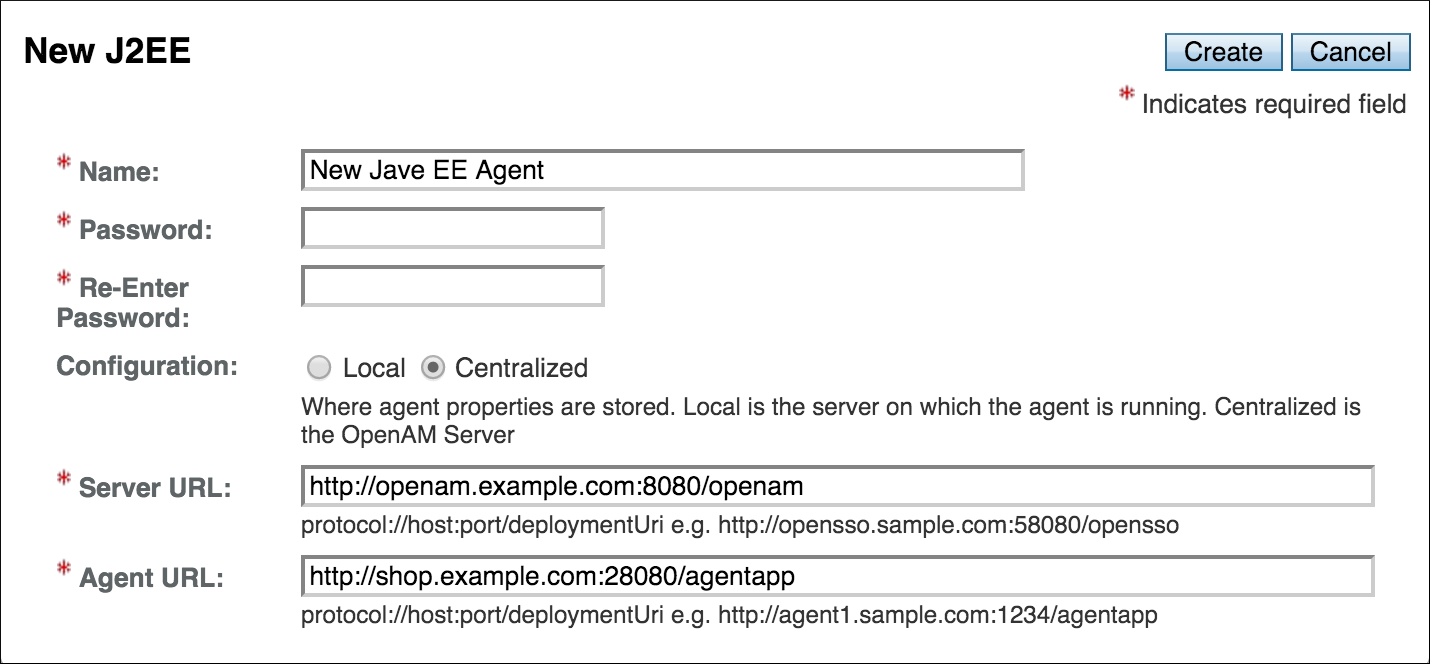
-
Click Create. After creating the agent profile, you can click the link to the new profile to adjust and export the configuration.
Agent profile groups let you set up multiple agents to inherit settings from the group. To create a new agent profile group, you need a name and the URL to the OpenAM server in which you store the profile:
-
Login to OpenAM Console as an administrative user.
-
On the Realms menu of the OpenAM console, Select the realm in which you manage agents.
-
Click the Agents link, click the tab page for the kind of agent group you want to create, and then in the Group table, click New.
After creating the group profile, you can click the link to the new group profile to fine-tune or export the configuration.
-
Inherit group settings by selecting your agent profile, and then selecting the group name in the Group drop-down list near the top of the profile page.
You can then adjust inheritance by clicking Inheritance Settings on the agent profile page.
You can create a policy agent profile in OpenAM using the ssoadm command-line tool. You do so by specifying the agent properties either as a list of attributes, or by using an agent properties file as shown below. Export an existing policy agent configuration before you start to see what properties you want to set when creating the agent profile.
The following procedure demonstrates creating a policy agent profile using the ssoadm command:
-
Make sure the
ssoadmcommand is installed. See To Set Up Administration Tools in the OpenAM Installation Guide. -
Determine the list of properties to set in the agent profile.
The following properties file shows a minimal configuration for a policy agent profile:
$ cat myAgent.properties com.sun.identity.agents.config.agenturi.prefix=http://shop.example.com:28080/amagent com.sun.identity.agents.config.cdsso.cdcservlet.url[0]= \ https://openam.example.com:8080/openam/cdcservlet com.sun.identity.agents.config.fqdn.default=www.example.com com.sun.identity.agents.config.login.url[0]= \ http://openam.example.com:8080/openam/UI/Login com.sun.identity.agents.config.logout.url[0]= \ http://openam.example.com:8080/openam/UI/Logout com.sun.identity.agents.config.remote.logfile=amAgent_shop_example_com_28080.log com.sun.identity.agents.config.repository.location=centralized com.sun.identity.client.notification.url= \ http://www.example.com:80/UpdateAgentCacheServlet?shortcircuit=false sunIdentityServerDeviceKeyValue[0]=agentRootURL=http://shop.example.com:28080/ sunIdentityServerDeviceStatus=Active userpassword=password -
Set up a password file used when authenticating to OpenAM. The password file must be read-only for the user who creates the policy agent profile, and must not be accessible to other users:
$ echo password > /tmp/pwd.txt $ chmod 400 /tmp/pwd.txt -
Create the profile in OpenAM:
$ ssoadm create-agent \
  --realm / \
  --agentname myAgent \
  --agenttype J2EE \
  --adminid amadmin
  --password-file /tmp/pwd.txt \
  --datafile myAgent.properties

Agent configuration was created.
At this point you can view the profile in OpenAM Console under Realms > Realm Name > Agents to make sure the configuration is what you expect.
Delegating Agent Profile Creation
If you want to create policy agent profiles when installing policy agents, then you need the credentials of an OpenAM user who can read and write agent profiles.
You can use the OpenAM administrator account when creating policy agent profiles. If you delegate policy agent installation, then you might not want to share OpenAM administrator credentials with everyone who installs policy agents.
Follow these steps to create agent administrator users for a realm:
-
In OpenAM console, browse to Realms > Realm Name > Subjects.
-
Under Group click New… and create a group for agent administrators.
-
Switch to the Privileges tab for the realm, and click the name of the group you created.
-
Select Read and write access to all configured agents, and then Save your work.
-
Return to the Subjects tab, and under User create as many agent administrator users as needed.
-
For each agent administrator user, edit the user profile.
Under the Group tab of the user profile, add the user to agent profile administrator group, and then Save your work.
-
Provide each system administrator who installs policy agents with their agent administrator credentials.
When installing the policy agent with the
--custom-installoption, the system administrator can choose the option to create the profile during installation, and then provide the agent administrator user name and the path to a read-only file containing the agent administrator password. For silent installs, you can add the--acceptLicenseoption to auto-accept the software license agreement.
Configuring Java EE Policy Agent Properties
When you create a Java EE policy agent profile and install the agent, you can choose to store the agent configuration centrally and configure the agent through OpenAM console. Alternatively, you can store the agent configuration locally and configure the agent by changing values in the properties file. This section covers centralized configuration, indicating the corresponding properties for use in a local configuration file where applicable. [1]
|
To show the agent properties in configuration file format that correspond to what you see in the console, click Export Configuration after editing agent properties. |
After changing properties specified as "Hot swap: no", you must restart the agent’s container for the changes to take effect.
Configuring Java EE Policy Agent Bootstrap Properties
These properties are set in the config/OpenSSOAgentBootstrap.properties file.
am.encryption.pwd-
When using an encrypted password, set this to the encryption key used to encrypt the agent profile password.
com.iplanet.am.naming.url-
Set this to the naming service URL(s) used for naming lookups in OpenAM. Separate multiple URLs with single space characters.
com.iplanet.am.service.secret-
When using a plain text password, set this to the password for the agent profile, and leave
am.encryption.pwdblank.When using an encrypted password, set this to the encrypted version of the password for the agent profile. Use the command
./agentadmin --encrypt agentInstance passwordFileto get the encrypted version. com.iplanet.am.services.deploymentDescriptor-
Set this to the URI under which OpenAM is deployed, such as
/openam. com.iplanet.services.debug.directory-
Set this to the full path of the agent’s debug log directory where the agent writes debug log files.
com.sun.identity.agents.app.username-
Set this to the agent profile name.
com.sun.identity.agents.config.local.logfile-
Set this to the full path for agent’s audit log file.
com.sun.identity.agents.config.lock.enable-
Set this to
trueto require an agent restart to allow agent configuration changes, even for hot-swappable parameters. Default isfalse. com.sun.identity.agents.config.organization.name-
Set this to the realm name where the agent authenticates to OpenAM.
com.sun.identity.agents.config.profilename-
Set this to the profile name used to fetch agent configuration data. Unless multiple agents use the same credentials to authenticate, this is the same as
com.sun.identity.agents.app.username. com.sun.identity.agents.config.service.resolver-
Set this to the class name of the service resolver used by the agent.
com.sun.services.debug.mergeall-
When set to
on, the default, the agent writes all debug messages to a single file undercom.iplanet.services.debug.directory.
Configuring Java EE Policy Agent Global Properties
This section covers global Java EE agent properties. After creating the agent profile, you access these properties in the OpenAM console under Realms > Realm Name > Agents > J2EE > Agent Name > Global.
This section describes the following property groups:
- Group
-
For assigning the agent to a previously configured Java EE agent group in order to inherit selected properties from the group.
- Password
-
Agent password used when creating the password file and when installing the agent.
- Status
-
Status of the agent configuration.
- Agent Notification URL
-
URL used by agent to register notification listeners.
Property:
com.sun.identity.client.notification.urlHot swap: no
- Location of Agent Configuration Repository
-
Whether the agent’s configuration is managed centrally through OpenAM (
centralized) or locally in the policy agent configuration file (local).If you change this to a local configuration, you can no longer manage the policy agent configuration through OpenAM console.
Property:
com.sun.identity.agents.config.repository.location - Configuration Reload Interval
-
Interval in seconds to fetch agent configuration from OpenAM. Used if notifications are disabled. Default: 0
Property:
com.sun.identity.agents.config.load.interval - Agent Configuration Change Notification
-
Enable agent to receive notification messages from OpenAM server for configuration changes.
Property:
com.sun.identity.agents.config.change.notification.enable - Agent Root URL for CDSSO
-
The agent root URL for CDSSO. The valid value is in the format
protocol://hostname:port/where protocol represents the protocol used, such ashttporhttps, hostname represents the host name of the system where the agent resides, and port represents the port number on which the agent is installed. The slash following the port number is required.If your agent system also has virtual host names, add URLs with the virtual host names to this list as well. OpenAM checks that
gotoURLs match one of the agent root URLs for CDSSO.
- Agent Filter Mode
-
Specifies how the agent filters requests to protected web applications. The global value functions as a default, and applies for protected applications that do not have their own filter settings. Valid settings include the following.
ALL-
Enforce both the Java EE policy defined for the web container where the protected application runs, and also OpenAM policies.
When setting the filter mode to
ALL, set the Map Key, but do not set any Corresponding Map Value. J2EE_POLICY-
Enforce only the J2EE policy defined for the web container where the protected application runs.
NONE-
Do not enforce policies to protect resources. In other words, turn off access management. Not for use in production.
SSO_ONLY-
Enforce only authentication, not policies.
URL_POLICY-
Enforce only URL resource-based policies defined in OpenAM.
When setting the filter mode to
URL_POLICY, set the Map Key to the application name and the Corresponding Map Value toURL_POLICY.
Property:
com.sun.identity.agents.config.filter.modeHot swap: no
- HTTP Session Binding
-
When enabled, the agent invalidates the HTTP session upon login failure, when the user has no SSO session, or when the principal user name does not match the SSO user name.
Property:
com.sun.identity.agents.config.httpsession.binding - Login Attempt Limit
-
When set to a value other than zero, this defines the maximum number of failed login attempts allowed during a single browser session, after which the agent blocks requests from the user.
Property:
com.sun.identity.agents.config.login.attempt.limit - Custom Response Header
-
Specifies the custom headers the agent sets for the client. The key is the header name. The value is the header value.
Property:
com.sun.identity.agents.config.response.headerFor example,
com.sun.identity.agents.config.response.header[Cache-Control]=no-cache. - Redirect Attempt Limit
-
When set to a value other than zero, this defines the maximum number of redirects allowed for a single browser session, after which the agent blocks the request.
Property:
com.sun.identity.agents.config.redirect.attempt.limit - Agent Debug Level
-
Default is
Error. Increase toMessageor evenAllfor fine-grained detail.Property:
com.iplanet.services.debug.level
- User Mapping Mode
-
Specifies the mechanism used to determine the user ID. This property can take four values:
-
USER_ID. The agent reads the propertycom.sun.identity.agents.config.user.principal:-
If
true, the agent sets the principal user name as the user ID. -
If
false, the user ID is set to the value of the session property specified by thecom.sun.identity.agents.config.user.tokenproperty as the user ID.
-
-
PROFILE_ATTRIBUTE. The user ID is set to the value of a named profile attribute, as specified by thecom.sun.identity.agents.config.user.attribute.nameproperty. -
HTTP_HEADER. The user ID is set to the value of a named HTTP header, as specified by thecom.sun.identity.agents.config.user.attribute.nameproperty. -
SESSION_PROPERTY. The user ID is set to the value of a named session property, as specified by thecom.sun.identity.agents.config.user.attribute.nameproperty.If the user ID cannot be set, the user will not be logged in and access requests will be denied.
Property:
com.sun.identity.agents.config.user.mapping.mode
Default:
USER_ID -
- User Attribute Name
-
Specifies the data store attribute that contains the user ID.
Property:
com.sun.identity.agents.config.user.attribute.nameDefault:
employeenumber - User Principal Flag
-
When enabled, OpenAM uses both the principal user name and also the user ID for authentication.
Property:
com.sun.identity.agents.config.user.principal - User Token Name
-
Specifies the session property name for the authenticated user’s ID.
Property:
com.sun.identity.agents.config.user.tokenDefault:
USER_ID
- Audit Access Types
-
Types of messages to log based on user URL access attempts.
Property:
com.sun.identity.agents.config.audit.accesstypeValid values for the configuration file property include
LOG_NONE,LOG_ALLOW,LOG_DENY, andLOG_BOTH. - Audit Log Location
-
Specifies where audit messages are logged. By default, audit messages are logged remotely.
Property:
com.sun.identity.agents.config.log.dispositionValid values for the configuration file property include
REMOTE,LOCAL, andALL. - Remote Log File Name
-
Name of file stored on OpenAM server that contains agent audit messages if log location is remote or all.
Property:
com.sun.identity.agents.config.remote.logfileHot swap: no
- Rotate Local Audit Log
-
When enabled, audit log files are rotated when reaching the specified size.
Property:
com.sun.identity.agents.config.local.log.rotate - Local Audit Log Rotation Size
-
When beyond this size limit in bytes, the agent rotates the local audit log file if rotation is enabled.
Property:
com.sun.identity.agents.config.local.log.sizeDefault: 50 MB
- FQDN Check
-
Enables checking of FQDN default value and FQDN map values.
Property:
com.sun.identity.agents.config.fqdn.check.enable - FQDN Default
-
FQDN users should use to access resources.
This property ensures that when users access protected resources on the web server without specifying the FQDN, the agent can redirect the users to URLs containing the correct FQDN.
Property:
com.sun.identity.agents.config.fqdn.default - FQDN Virtual Host Map
-
Maps virtual, invalid, or partial hostnames, and IP addresses to the FQDN to access protected resources. The property allows agents to redirect users to the FQDN and receive cookies belonging to the domain. It also ensures that invalid FQDN values that can cause the application server to become unusable or render resources inaccessible get properly mapped to the FQDN.
The property accepts an invalid_hostname and a validN Map Key value. The invalid_hostname maps an invalid or a partial hostname, or an IP address to a FQDN. The validN (where N = 1, 2, 3 …) Map Key maps virtual hostnames to a FQDN.
com.sun.identity.agents.config.fqdn.mapping[invalid_hostname] = valid_hostname
      com.sun.identity.agents.config.fqdn.mapping[validN] = valid_hostname
For example, to map the partial hostname
myservertomyserver.mydomain.example, entermyserverin the Map Key field, entermyserver.mydomain.examplein the Corresponding Map Value field and then click Add. This corresponds to:com.sun.identity.agents.config.fqdn.mapping[myserver] = myserver.mydomain.exampleTo address a server as
xyz.hostname.com, when the actual name of the server isabc.hostname.com, entervalid1in the Map Key field, enterxyz.hostname.examplein the Corresponding Map Value field and then click Add. This corresponds to:com.sun.identity.agents.config.fqdn.mapping[valid1] = xyz.hostname.comIf you have multiple virtual servers
rst.hostname.com,uvw.hostname.com, andxyz.hostname.compointing to the same actual serverabc.hostname.comand each virtual server has its own policies defined, the properties can be defined as:com.sun.identity.agents.config.fqdn.mapping[valid1] = rst.hostname.com com.sun.identity.agents.config.fqdn.mapping[valid2] = uvw.hostname.com com.sun.identity.agents.config.fqdn.mapping[valid3] = xyz.hostname.comProperty:
com.sun.identity.agents.config.fqdn.mapping
Configuring Java EE Policy Agent Application Properties
This section covers application J2EE agent properties. After creating the agent profile, you access these properties in the OpenAM console under Realms > Realm Name > Agents > J2EE > Agent Name > Application.
This section describes the following property groups:
- Login Form URI
-
Specifies the list of absolute URIs corresponding to a protected application’s
web.xmlform-login-pageelement, such as/myApp/jsp/login.jsp.Property:
com.sun.identity.agents.config.login.form - Login Error URI
-
Specifies the list of absolute URIs corresponding to a protected application’s
web.xmlform-error-pageelement, such as/myApp/jsp/error.jsp.Property:
com.sun.identity.agents.config.login.error.uri - Use Internal Login
-
When enabled, the agent uses the internal default content file for the login.
Property:
com.sun.identity.agents.config.login.use.internal - Login Content File Name
-
Full path name to the file containing custom login content when Use Internal Login is enabled.
Property:
com.sun.identity.agents.config.login.content.file
- Application Logout Handler
-
Specifies how logout handlers map to specific applications. The key is the web application name. The value is the logout handler class.
To set a global logout handler for applications without other logout handlers defined, leave the key empty and set the value to the global logout handler class name,
GlobalApplicationLogoutHandler.To set a logout handler for a specific application, set the key to the name of the application, and the value to the logout handler class name.
Property:
com.sun.identity.agents.config.logout.application.handler - Application Logout URI
-
Specifies request URIs that indicate logout events. The key is the web application name. The value is the application logout URI.
To set a global logout URI for applications without other logout URIs defined, leave the key empty and set the value to the global logout URI,
/logout.jsp.To set a logout URI for a specific application, set the key to the name of the application, and the value to the application logout page.
Property:
com.sun.identity.agents.config.logout.uri - Logout Request Parameter
-
Specifies parameters in the HTTP request that indicate logout events. The key is the web application name. The value is the logout request parameter.
To set a global logout request parameter for applications without other logout request parameters defined, leave the key empty and set the value to the global logout request parameter,
logoutparam.To set a logout request parameter for a specific application, set the key to the name of the application, and the value to the application logout request parameter, such as
logoutparam.Property:
com.sun.identity.agents.config.logout.request.param - Logout Introspect Enabled
-
When enabled, the agent checks the HTTP request body to locate the Logout Request Parameter you set.
Property:
com.sun.identity.agents.config.logout.introspect.enabled - Logout Entry URI
-
Specifies the URIs to return after successful logout and subsequent authentication. The key is the web application name. The value is the URI to return.
To set a global logout entry URI for applications without other logout entry URIs defined, leave the key empty and set the value to the global logout entry URI,
/welcome.html.To set a logout entry URI for a specific application, set the key to the name of the application, and the value to the application logout entry URI, such as
/myApp/welcome.html.Property:
com.sun.identity.agents.config.logout.entry.uri
- Resource Access Denied URI
-
Specifies the URIs of custom pages to return when access is denied. The key is the web application name. The value is the custom URI.
To set a global custom access denied URI for applications without other custom access denied URIs defined, leave the key empty and set the value to the global custom access denied URI,
/sample/accessdenied.html.To set a custom access denied URI for a specific application, set the key to the name of the application, and the value to the application access denied URI, such as
/myApp/accessdenied.html.Property:
com.sun.identity.agents.config.access.denied.uri
- Not Enforced URIs
-
List of URIs for which no authentication is required, and the agent does not protect access. You can use wildcards to define a pattern for a URI.
The
wildcard matches all characters except question mark (?), cannot be escaped, and spans multiple levels in a URI. Multiple forward slashes do not match a single forward slash, somatchesmult/iple/dirs, yetmult/*/dirsdoes not matchmult/dirs.The
--wildcard matches all characters except forward slash (/) or question mark (?), and cannot be escaped. As it does not match/,--does not span multiple levels in a URI.OpenAM does not let you mix
and--in the same URI.Examples include
/logout.html,/images/,/css/--, and/.jsp?locale=.Trailing forward slashes are not recognized as part of a resource name. Therefore
/images//and/imagesare equivalent.Property:
com.sun.identity.agents.config.notenforced.uri - Invert Not Enforced URIs
-
Only enforce not enforced list of URIs. In other words, enforce policy only for those URIs and patterns specified in the list.
Property:
com.sun.identity.agents.config.notenforced.uri.invert - Not Enforced URIs Cache Enabled
-
When enabled, the agent caches evaluation of the not enforced URI list.
Property:
com.sun.identity.agents.config.notenforced.uri.cache.enable - Not Enforced URIs Cache Size
-
When caching is enabled, this limits the number of not enforced URIs cached.
Property:
com.sun.identity.agents.config.notenforced.uri.cache.sizeDefault: 1000
- Refresh Session Idle Time
-
When enabled, the agent resets the stateful session idle time when granting access to a not enforced URI, prolonging the time before the user must authenticate again. This setting has no effect on users with stateless sessions.
Property:
com.sun.identity.agents.config.notenforced.refresh.session.idletime
- Not Enforced Client IP List
-
No authentication and authorization are required for the requests coming from these client IP addresses.
Property:
com.sun.identity.agents.config.notenforced.ipLoopback addresses are not considered valid IPs on the Not Enforced IP list. If specified, the policy agent ignores the loopback address.
- Not Enforced IP Invert List
-
Only enforce the not enforced list of IP addresses. In other words, enforce policy only for those client addresses and patterns specified in the list.
Property:
com.sun.identity.agents.config.notenforced.ip.invert - Not Enforced IP Cache Flag
-
When enabled, the agent caches evaluation of the not enforced IP list.
Property:
com.sun.identity.agents.config.notenforced.ip.cache.enable - Not Enforced IP Cache Size
-
When caching is enabled, this limits the number of not enforced addresses cached.
Property:
com.sun.identity.agents.config.notenforced.ip.cache.sizeDefault: 1000
- Profile Attribute Fetch Mode
-
When set to
HTTP_COOKIEorHTTP_HEADER, profile attributes are introduced into the cookie or the headers, respectively. When set toREQUEST_ATTRIBUTE, profile attributes are part of the HTTP request.Property:
com.sun.identity.agents.config.profile.attribute.fetch.mode - Profile Attribute Mapping
-
Maps the profile attributes to HTTP headers for the currently authenticated user. Map Keys are attribute names, and Map Values are HTTP header names. The user profile can be stored in LDAP or any other arbitrary data store.
To populate the value of profile attribute CN under
CUSTOM-Common-Name: enter CN in the Map Key field, and enterCUSTOM-Common-Namein the Corresponding Map Value field. This corresponds tocom.sun.identity.agents.config.profile.attribute.mapping[cn]=CUSTOM-Common-Name.In most cases, in a destination application where an HTTP header name shows up as a request header, it is prefixed by
HTTP_, lower case letters become upper case, and hyphens (-) become underscores (_). For example,common-namebecomesHTTP_COMMON_NAME.Property:
com.sun.identity.agents.config.profile.attribute.mapping
- Response Attribute Fetch Mode
-
When set to
HTTP_COOKIEorHTTP_HEADER, response attributes are introduced into the cookie or the headers, respectively. When set toREQUEST_ATTRIBUTE, response attributes are part of the HTTP request.Property:
com.sun.identity.agents.config.response.attribute.fetch.mode - Response Attribute Mapping
-
Maps the policy response attributes to HTTP headers for the currently authenticated user. The response attribute is the attribute in the policy response to be fetched.
To populate the value of response attribute
uidunderCUSTOM-User-Name: enteruidin the Map Key field, and enterCUSTOM-User-Namein the Corresponding Map Value field. This corresponds tocom.sun.identity.agents.config.response.attribute.mapping[uid]=Custom-User-Name.In most cases, in a destination application where an HTTP header name shows up as a request header, it is prefixed by
HTTP_, lower case letters become upper case, and hyphens (-) become underscores (_). For example,response-attr-onebecomesHTTP_RESPONSE_ATTR_ONE.Property:
com.sun.identity.agents.config.response.attribute.mapping
- Cookie Separator Character
-
Specifies the separator for multiple values of the same attribute when it is set as a cookie. Default:
|(also known as the vertical bar character).Property:
com.sun.identity.agents.config.attribute.cookie.separator - Fetch Attribute Date Format
-
Specifies the
java.text.SimpleDateFormatof date attribute values used when an attribute is set in an HTTP header. Default:EEE, d MMM yyyy hh:mm:ss z.Property:
com.sun.identity.agents.config.attribute.date.format - Attribute Cookie Encode
-
When enabled, attribute values are URL-encoded before being set as a cookie.
Property:
com.sun.identity.agents.config.attribute.cookie.encode
- Session Attribute Fetch Mode
-
When set to
HTTP_COOKIEorHTTP_HEADER, session attributes are introduced into the cookie or the headers, respectively. When set toREQUEST_ATTRIBUTE, session attributes are part of the HTTP request.Property:
com.sun.identity.agents.config.session.attribute.fetch.mode - Session Attribute Mapping
-
Maps session attributes to HTTP headers for the currently authenticated user. The session attribute is the attribute in the session to be fetched.
To populate the value of session attribute
UserTokenunderCUSTOM-userid: enterUserTokenin the Map Key field, and enterCUSTOM-useridin the Corresponding Map Value field. This corresponds tocom.sun.identity.agents.config.session.attribute.mapping[UserToken]=CUSTOM-userid.In most cases, in a destination application where an HTTP header name shows up as a request header, it is prefixed by
HTTP_, lower case letters become upper case, and hyphens (-) become underscores (_). For example,success-urlbecomesHTTP_SUCCESS_URL.Property:
com.sun.identity.agents.config.session.attribute.mapping
Privileged attributes are used when the agent is running in ALL or J2EE_POLICY filter mode. Privileged attributes contain the list of declarative Java EE roles that the user can have:
- Default Privileged Attribute
-
Specifies that every authenticated user with a valid OpenAM session will have the
AUTHENTICATED_USERSrole.Property:
com.sun.identity.agents.config.default.privileged.attribute - Privileged Attribute Type
-
Specifies the group and role memberships that will be turned into roles for each user.
Property:
com.sun.identity.agents.config.privileged.attribute.type - Privileged Attributes To Lower Case
-
Specifies how privileged attribute types should be converted to lower case.
Property:
com.sun.identity.agents.config.privileged.attribute.tolowercase - Privileged Session Attribute
-
Specifies the list of session property names when an authenticated user’s roles are store within a session property.
Property:
com.sun.identity.agents.config.privileged.session.attribute - Enable Privileged Attribute Mapping
-
When enabled, lets you use Privileged Attribute Mapping.
Property:
com.sun.identity.agents.config.privileged.attribute.mapping.enable - Privileged Attribute Mapping
-
OpenAM allows original attribute values to be mapped to other values. For example, you can map UUIDs to principal names in roles specified in a web application’s deployment descriptor. To map the UUID
id=employee,ou=group,o=openamto the principal nameam_employee_rolein the deployment descriptor, set the key toid=employee,ou=group,o=openam, and the value toam_employee_role.Property:
com.sun.identity.agents.config.privileged.attribute.mapping
- Custom Authentication Handler
-
Specifies custom authentication handler classes for users authenticated with the application server. The key is the web application name and the value is the authentication handler class name.
Property:
com.sun.identity.agents.config.auth.handler - Custom Logout Handler
-
Specifies custom logout handler classes to log users out of the application server. The key is the web application name and the value is the logout handler class name.
Property:
com.sun.identity.agents.config.logout.handler - Custom Verification Handler
-
Specifies custom verification classes to validate user credentials with the local user repository. The key is the web application name and the value is the validation handler class name.
Property:
com.sun.identity.agents.config.verification.handler
Configuring Java EE Policy Agent SSO Properties
This section covers SSO J2EE agent properties. After creating the agent profile, you access these properties in the OpenAM console under Realms > Realm Name > Agents > J2EE > Agent Name > SSO.
This section describes the following property groups:
- SSO Cache Enable
-
When enabled, the agent exposes SSO Cache through the agent SDK APIs.
Property:
com.sun.identity.agents.config.amsso.cache.enable
- Cross-Domain SSO
-
Enables CDSSO.
Property:
com.sun.identity.agents.config.cdsso.enable - CDSSO Redirect URI
-
Specifies a URI the agent uses to process CDSSO requests.
Property:
com.sun.identity.agents.config.cdsso.redirect.uri - CDSSO Servlet URL
-
List of URLs of the available CDSSO controllers that the agent can use for CDSSO processing. For example,
http://openam.example.com:8080/openam/cdcservlet.Property:
com.sun.identity.agents.config.cdsso.cdcservlet.url - CDSSO Clock Skew
-
When set to a value other than zero, specifies the clock skew in seconds that the agent accepts when determining the validity of the CDSSO authentication response assertion.
Property:
com.sun.identity.agents.config.cdsso.clock.skew - CDSSO Trusted ID Provider
-
Specifies the list of OpenAM servers or identity providers the agent trusts when evaluating CDC Liberty Responses.
Property:
com.sun.identity.agents.config.cdsso.trusted.id.provider - CDSSO Secure Enable
-
When enabled, the agent marks the SSO Token cookie as secure, thus the cookie is only transmitted over secure connections.
Property:
com.sun.identity.agents.config.cdsso.secure.enable - CDSSO Domain List
-
List of domains, such as
.example.com, in which cookies have to be set in CDSSO.Property:
com.sun.identity.agents.config.cdsso.domain
Configuring Java EE Policy Agent OpenAM Services Properties
This section covers OpenAM services J2EE agent properties. After creating the agent profile, you access these properties in the OpenAM console under Realms > Realm Name > Agents > J2EE > Agent Name > OpenAM Services.
This section describes the following property groups:
- OpenAM Login URL
-
OpenAM login page URL, such as
http://openam.example.com:8080/openam/UI/Login, to which the agent redirects incoming users without sufficient credentials so that they can authenticate. If CDSSO is enabled, this property is not used, instead the CDCServlet URL will be used.Property:
com.sun.identity.agents.config.login.url - OpenAM Conditional Login URL (Not yet in OpenAM console)
-
To conditionally redirect users based on the incoming request URL, set this property.
This takes the incoming request domain to match, a vertical bar (
|), and then a comma-separated list of URLs to which to redirect incoming users.If the domain before the vertical bar matches an incoming request URL, then the policy agent uses the list of URLs to determine how to redirect the user-agent. If the global property FQDN Check (
com.sun.identity.agents.config.fqdn.check.enable) is enabled for the policy agent, then the policy agent iterates through the list until it finds an appropriate redirect URL that matches the FQDN check. Otherwise, the policy agent redirects the user-agent to the first URL in the list.Property:
com.sun.identity.agents.config.conditional.login.urlExamples:
com.sun.identity.agents.config.conditional.login.url[0]= login.example.com|http://openam1.example.com/openam/UI/Login, http://openam2.example.com/openam/UI/Login,com.sun.identity.agents.config.conditional.login.url[1]= signin.example.com|http://openam3.example.com/openam/UI/Login, http://openam4.example.com/openam/UI/LoginIf CDSSO is enabled for the policy agent, then this property takes CDSSO Servlet URLs for its values (
com.sun.identity.agents.config.cdsso.cdcservlet.url), rather than OpenAM login URLs.CDSSO examples:
com.sun.identity.agents.config.conditional.login.url[0]= login.example.com|http://openam1.example.com/openam/cdcservlet, http://openam2.example.com/openam/cdcservlet,com.sun.identity.agents.config.conditional.login.url[1]= signin.example.com|http://openam3.example.com/openam/cdcservlet, http://openam4.example.com/openam/cdcservlet - Login URL Prioritized
-
When enabled, OpenAM uses the priority defined in the OpenAM Login URL list as the priority for Login and CDSSO URLs when handling failover.
Property:
com.sun.identity.agents.config.login.url.prioritized - Login URL Probe
-
When enabled, OpenAM checks the availability of OpenAM Login URLs before redirecting to them.
Property:
com.sun.identity.agents.config.login.url.probe.enabled - Login URL Probe Timeout
-
Timeout period in milliseconds for OpenAM to determine whether to failover between Login URLs when Login URL Probe is enabled.
Property:
com.sun.identity.agents.config.login.url.probe.timeoutDefault: 2000
- OpenAM Logout URL
-
OpenAM logout page URLs, such as
http://openam.example.com:8080/openam/UI/Logout. The user is logged out of the OpenAM session when accessing these URLs.Property:
com.sun.identity.agents.config.logout.url - OpenAM Conditional Logout URL (Not yet in OpenAM console)
-
The values take the incoming request URL to match and a comma-separated list of URLs to which to redirect users logging out.
Property:
com.sun.identity.agents.config.conditional.logout.urlExample:
com.sun.identity.agents.config.conditional.logout.url[0]= logout.example.com|http://openam1.example.com/openam/UI/Logout, http://openam2.example.com/openam/UI/Logout - Logout URL Prioritized
-
When enabled, OpenAM uses the priority defined in the OpenAM Logout URL list as the priority for Logout URLs when handling failover.
Property:
com.sun.identity.agents.config.logout.url.prioritized - Logout URL Probe
-
When enabled, OpenAM checks the availability of OpenAM Logout URLs before redirecting to them.
Property:
com.sun.identity.agents.config.logout.url.probe.enabled - Logout URL Probe Timeout
-
Timeout period in milliseconds for OpenAM to determine whether to failover between Logout URLs when Logout URL Probe is enabled.
Property:
com.sun.identity.agents.config.logout.url.probe.timeoutDefault: 2000
- OpenAM Authentication Service Protocol
-
Specifies the protocol used by the OpenAM authentication service.
Property:
com.iplanet.am.server.protocolHot swap: no
- OpenAM Authentication Service Host Name
-
Specifies the OpenAM authentication service host name.
Property:
com.iplanet.am.server.hostHot swap: no
- OpenAM Authentication Service Port
-
Specifies the OpenAM authentication service port number.
Property:
com.iplanet.am.server.portHot swap: no
- Realm
-
Realm where OpenAM starts policy evaluation for this policy agent.
Default: Top Level Realm (/)
Edit this property when OpenAM should start policy evaluation in a realm other than the Top Level Realm,
/, when handling policy decision requests from this policy agent.This property is recognized by OpenAM, not the policy agent.
Property:
org.forgerock.openam.agents.config.policy.evaluation.realmHot swap: yes
- Application
-
The name of the policy set where OpenAM looks for policies to evaluate for this policy agent.
Default:
iPlanetAMWebAgentServiceEdit this property when OpenAM should look for policies that belong to a policy set other than
iPlanetAMWebAgentServicewhen handling policy decision requests from this policy agent.This property is recognized by OpenAM, not the policy agent.
Property:
org.forgerock.openam.agents.config.policy.evaluation.applicationHot swap: yes
- Enable Policy Notifications
-
When enabled, OpenAM sends notification about changes to policy.
Property:
com.sun.identity.agents.notification.enabledHot swap: no
- Policy Client Polling Interval
-
Specifies the time in minutes after which the policy cache is refreshed.
Property:
com.sun.identity.agents.polling.intervalDefault: 3
Hot swap: no
- Policy Client Cache Mode
-
Set to cache mode subtree when only a small number of policy rules are defined. For large numbers of policy rules, set to self.
Property:
com.sun.identity.policy.client.cacheModeDefault: self
Hot swap: no
- Policy Client Boolean Action Values
-
Specifies the values, such as
allowanddeny, that are associated with boolean policy decisions. The string is presented below in multiple lines for readability purposes.Default:
iPlanetAMWebAgentService|GET|allow|deny: iPlanetAMWebAgentService|POST|allow|deny: iPlanetAMWebAgentService|PUT|allow|deny: iPlanetAMWebAgentService|DELETE|allow|deny: iPlanetAMWebAgentService|HEAD|allow|deny: iPlanetAMWebAgentService|OPTIONS|allow|deny: iPlanetAMWebAgentService|PATCH|allow|denyProperty:
com.sun.identity.policy.client.booleanActionValuesHot swap: no
- Policy Client Resource Comparators
-
Specifies the comparators used for service names in policy.
Default:
serviceType=iPlanetAMWebAgentService| class=com.sun.identity.policy.plugins.HttpURLResourceName|wildcard=*| delimiter=/|caseSensitive=falseProperty:
com.sun.identity.policy.client.resourceComparatorsHot swap: no
- Policy Client Clock Skew
-
Time in seconds used to adjust time difference between agent system and OpenAM. Clock skew in seconds = AgentTime - OpenAMServerTime.
Default: 10
Property:
com.sun.identity.policy.client.clockSkewHot swap: no
- URL Policy Env GET Parameters
-
Specifies the list of HTTP GET request parameters whose names and values the agents set in the environment map for URL policy evaluation by the OpenAM server.
Property:
com.sun.identity.agents.config.policy.env.get.param - URL Policy Env POST Parameters
-
Specifies the list of HTTP POST request parameters whose names and values the agents set in the environment map for URL policy evaluation by the OpenAM server.
Property:
com.sun.identity.agents.config.policy.env.post.param - URL Policy Env jsession Parameters
-
Specifies the list of HTTP session attributes whose names and values the agents set in the environment map for URL policy evaluation by the OpenAM server.
Property:
com.sun.identity.agents.config.policy.env.jsession.param - Use HTTP-Redirect for composite advice
-
When enabled, the remote policy client is configured to use HTTP-Redirect instead of HTTP-POST for composite advice.
Property:
com.sun.identity.agents.config.policy.advice.use.redirect
- Enable Notification of User Data Caches
-
When enabled, receive notification from OpenAM to update user management data caches.
Property:
com.sun.identity.idm.remote.notification.enabledHot swap: no
- User Data Cache Polling Time
-
If notifications are not enabled and set to a value other than zero, specifies the time in minutes after which the agent polls to update cached user management data.
Property:
com.iplanet.am.sdk.remote.pollingTimeDefault: 1
Hot swap: no
- Enable Notification of Service Data Caches
-
When enabled, receive notification from OpenAM to update service configuration data caches.
Property:
com.sun.identity.sm.notification.enabledHot swap: no
- Service Data Cache Time
-
If notifications are not enabled and set to a value other than zero, specifies the time in minutes after which the agent polls to update cached service configuration data.
Property:
com.sun.identity.sm.cacheTimeDefault: 1
Hot swap: no
- Enable Client Polling
-
When enabled, the session client polls to update the session cache rather than relying on notifications from OpenAM.
Property:
com.iplanet.am.session.client.polling.enableHot swap: no
- Client Polling Period
-
Specifies the time in seconds after which the session client requests an update from OpenAM for cached session information.
Property:
com.iplanet.am.session.client.polling.periodDefault: 180
Hot swap: no
Configuring Java EE Policy Agent Miscellaneous Properties
This section covers miscellaneous J2EE agent properties. After creating the agent profile, you access these properties in the OpenAM console under Realms > Realm Name > Agents > J2EE > Agent Name > Miscellaneous.
This section describes the following property groups:
- Locale Language
-
The default language for the agent.
Property:
com.sun.identity.agents.config.locale.languageHot swap: no
- Locale Country
-
The default country for the agent.
Property:
com.sun.identity.agents.config.locale.countryHot swap: no
- Port Check Enable
-
When enabled, activate port checking, correcting requests on the wrong port.
Property:
com.sun.identity.agents.config.port.check.enable - Port Check File
-
Specifies the name of the file containing the content to handle requests on the wrong port when port checking is enabled.
Property:
com.sun.identity.agents.config.port.check.file - Port Check Setting
-
Specifies which ports correspond to which protocols. The agent uses the map when handling requests with invalid port numbers during port checking.
Property:
com.sun.identity.agents.config.port.check.setting
- Bypass Principal List
-
Specifies a list of principals the agent bypasses for authentication and search purposes, such as
guestortestuser.Property:
com.sun.identity.agents.config.bypass.principal
- Encryption Provider
-
Specifies the agent’s encryption provider class.
Default:
com.iplanet.services.util.JCEEncryptionProperty:
com.iplanet.security.encryptorHot swap: no
- Ignore Path Info in Request URL
-
When enabled, strip the path information from the request URL while doing the Not Enforced List check, and URL policy evaluation. This is designed to prevent a user from accessing a URI by appending the matching pattern in the policy or not enforced list.
For example, if the not enforced list includes
/*.gif, then stripping path info from the request URL prevents access tohttp://host/index.htmlby usinghttp://host/index.html?hack.gif.Property:
com.sun.identity.agents.config.ignore.path.info
- Goto Parameter Name
-
Property used only when CDSSO is enabled. Only change the default value,
gotowhen the login URL has a landing page specified, such ascom.sun.identity.agents.config.cdsso.cdcservlet.url = http://openam.example.com:8080/openam/cdcservlet?goto= http://www.example.com/landing.jsp. The agent uses this parameter to append the original request URL to this cdcservlet URL. The landing page consumes this parameter to redirect to the original URL.As an example, if you set this value to
goto2, then the complete URL sent for authentication ishttp://openam.example.com:8080/openam/cdcservlet?goto= http://www.example.com/landing.jsp?goto2=http://www.example.com/original.jsp.Property:
com.sun.identity.agents.config.redirect.param - Legacy User Agent Support Enable
-
When enabled, provide support for legacy browsers.
Property:
com.sun.identity.agents.config.legacy.support.enable - Legacy User Agent List
-
List of header values that identify legacy browsers. Entries can use the wildcard character,
*.Property:
com.sun.identity.agents.config.legacy.user.agent - Legacy User Agent Redirect URI
-
Specifies a URI the agent uses to redirect legacy user agent requests.
Property:
com.sun.identity.agents.config.legacy.redirect.uri
Configuring Java EE Policy Agent Advanced Properties
This section covers advanced J2EE agent properties. After creating the agent profile, you access these properties in the OpenAM console under Realms > Realm Name > Agents > J2EE > Agent Name > Advanced.
This section describes the following property groups:
If the agent is behind a proxy or load balancer, then the agent can get client IP and host name values from the proxy or load balancer. For proxies and load balancers that support providing the client IP and host name in HTTP headers, you can use the following properties.
When multiple proxies or load balancers sit in the request path, the header values can include a comma-separated list of values with the first value representing the client, as in client,next-proxy,first-proxy.
- Client IP Address Header
-
HTTP header name that holds the IP address of the client.
If the agent is behind a proxy or load balancer, then the agent can get client IP address values from the proxy or load balancer. Use this property if the proxy or load balancer supports providing the IP address in an HTTP header.
Property:
com.sun.identity.agents.config.client.ip.header - Client Hostname Header
-
HTTP header name that holds the hostname of the client.
If the agent is behind a proxy or load balancer, then the agent can get client host name values from the proxy or load balancer. Use this property if the proxy or load balancer supports providing the host name in an HTTP header.
When multiple proxies or load balancers sit in the request path, the header values can include a comma-separated list of values with the first value representing the client, as in
client,next-proxy,first-proxy.Property:
com.sun.identity.agents.config.client.hostname.header
- Web Service Enable
-
Enable web service processing.
Property:
com.sun.identity.agents.config.webservice.enable - Web Service End Points
-
Specifies a list of web application end points that represent web services.
Property:
com.sun.identity.agents.config.webservice.endpoint - Web Service Process GET Enable
-
When enabled, the agent processes HTTP GET requests for web service endpoints.
Property:
com.sun.identity.agents.config.webservice.process.get.enable - Web Service Authenticator
-
Specifies a class implementing
com.sun.identity.agents.filter.IWebServiceAuthenticator, used to authenticate web service requests.Property:
com.sun.identity.agents.config.webservice.authenticator - Web Service Response Processor
-
Specifies a class implementing
com.sun.identity.agents.filter.IWebServiceResponseProcessor, used to process web service responses.Property:
com.sun.identity.agents.config.webservice.responseprocessor - Web Service Internal Error Content File
-
Specifies a file the agent uses to generate an internal error fault for the client application.
Property:
com.sun.identity.agents.config.webservice.internalerror.content - Web Service Authorization Error Content File
-
Specifies a file the agent uses to generate an authorization error fault for the client application.
Property:
com.sun.identity.agents.config.webservice.autherror.content
- Alternative Agent Host Name
-
Specifies the host name of the agent protected server to show to client browsers, rather than the actual host name.
Property:
com.sun.identity.agents.config.agent.host - Alternative Agent Port Name
-
Specifies the port number of the agent protected server to show to client browsers, rather than the actual port number.
Property:
com.sun.identity.agents.config.agent.port - Alternative Agent Protocol
-
Specifies the protocol used to contact the agent from the browser client browsers, rather than the actual protocol used by the server. Either
httporhttps.Property:
com.sun.identity.agents.config.agent.protocol
- WebAuthentication Available
-
When enabled, allow programmatic authentication with the JBoss container using the WebAuthentication feature. This feature works only with certain versions of JBoss when the
J2EE_POLICYorALLfilter mode is in use.Property:
com.sun.identity.agents.config.jboss.webauth.availableThis setting is not necessary for the JBoss v7 agent.
- Possible XSS code elements
-
Specifies strings that, when found in the request, cause the agent to redirect the client to an error page.
Property:
com.sun.identity.agents.config.xss.code.elements - XSS detection redirect URI
-
Maps applications to URIs of customized pages to which to redirect clients upon detection of XSS code elements.
For example, to redirect clients of MyApp to
/myapp/error.html, enter MyApp as the Map Key and/myapp/error.htmlas the Corresponding Map Value.Property:
com.sun.identity.agents.config.xss.redirect.uri
- POST Data Preservation enabled
-
Enables HTTP POST data preservation, storing POST data before redirecting the browser to the login screen, and then autosubmitting the same POST after successful authentication to the original URL.
Property:
com.sun.identity.agents.config.postdata.preserve.enable - Missing PDP entry URI
-
Specifies a list of application-specific URIs if the referenced Post Data Preservation entry cannot be found in the local cache because it has exceeded its POST entry TTL. Either the agent redirects to a URI in this list, or it shows an HTTP 403 Forbidden error.
Property:
com.sun.identity.agents.config.postdata.preserve.cache.noentry.url - PDP entry TTL
-
POST data storage lifetime in milliseconds. Default: 300000.
Property:
com.sun.identity.agents.config.postdata.preserve.cache.entry.ttl - PDP Stickysession mode
-
Specifies whether to create a cookie, or to append a query string to the URL to assist with sticky load balancing.
Property:
com.sun.identity.agents.config.postdata.preserve.stickysession.mode - PDP Stickysession key-value
-
Specifies the key-value pair for stickysession mode. For example, a setting of
lb=myservereither sets anlbcookie withmyservervalue, or addslb=myserverto the URL query string.Property:
com.sun.identity.agents.config.postdata.preserve.stickysession.value
- TCP Connection Timeout
-
Sets the TCP connection timeout for outbound HTTP connections created by the Java EE policy agent. Set the property in the
OpenSSOAgentBootstrap.propertiesfile.Property:
org.forgerock.openam.url.connectTimeout
- Custom Properties
-
Additional properties to augment the set of properties supported by agent. Such properties take the following forms.
-
customproperty=custom-value1 -
customlist[0]=customlist-value-0 -
customlist[1]=customlist-value-1 -
custommap[key1]=custommap-value-1 -
custommap[key2]=custommap-value-2
Property:
com.sun.identity.agents.config.freeformproperties -
Configuring Java EE Policy Agents Behind Load Balancers
This chapter provides information about configuring policy agents on protected application servers that operate behind network load balancers.
The Role of the Load Balancing Layer
A load balancing layer that stands between clients and protected servers can distribute the client load, and fail client traffic over when a protected server goes offline. In the simplest case, the load balancing layer passes requests from the clients to servers and responses from servers to clients, managing the traffic so the client experience is as smooth as possible.
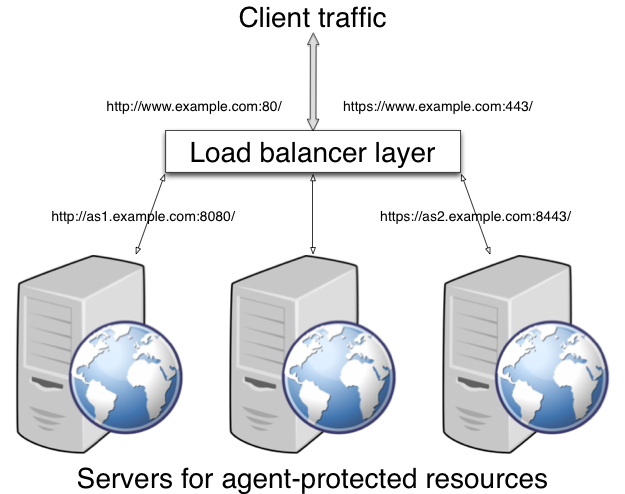
A load balancing layer can also offload processor-intensive public-key encryption algorithms involved in SSL transactions to a hardware accelerator, reducing the load on the protected servers. The client connects to the load balancer over HTTPS, but the load balancer connects to the servers over HTTP.
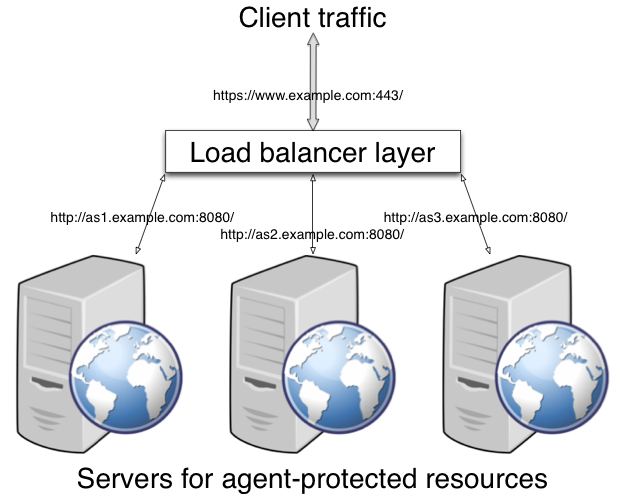
Configuring the Agent Behind the Load Balancer
Configure your agent to map the agent host name to the load balancer host name, and to set alternate agent URL properties. Follow the steps in To Map the Agent Host Name to the Load Balancer Host Name and To Set Alternate Agent URL Properties.
This procedure explains how to do so for a centralized Java EE policy agent profile configured in OpenAM Console. The steps also mention the properties for Java EE agent profiles that rely on local, file-based configurations:
-
Login to OpenAM Console as an administrative user with rights to modify the policy agent profile.
-
Browse to Realms > Realm Name > Agents > J2EE > Agent Name to open the Java EE agent profile for editing.
-
In the Global tab page section Fully Qualified Domain Name Checking, make sure FQDN checking is selected (the default).
The equivalent property setting is
com.sun.identity.agents.config.fqdn.check.enable=true. -
Set FQDN Default to the fully qualified domain name of the load balancer, such as
lb.example.com, rather than the protected server FQDN where the policy agent is installed.The equivalent property setting is
com.sun.identity.agents.config.fqdn.default=lb.example.com. -
Set FQDN Virtual Host Map to map the protected server FQDN to the load balancer FQDN, for example, where the key
agent.example.com(protected server) has valuelb.example.com(load balancer).The equivalent property setting is
com.sun.identity.agents.config.fqdn.mapping[agent.example.com]=lb.example.com. -
Save your work, and then restart the agent or the protected server.
Use the alternate agent URL properties to show the load balancer protocol, host, and port to show client browsers.
This procedure explains how to do so for a centralized Java EE policy agent profile configured in OpenAM Console. The steps also mention the properties for Java EE agent profiles that rely on local, file-based configurations.
-
Login to OpenAM Console as an administrative user with rights to modify the policy agent profile.
-
Browse to Realms > Realm Name > Agents > J2EE > Agent Name to open the Java EE agent profile for editing.
-
In the Advanced tab page section Alternate Agent URL, set the Alternative Agent Host Name to that of the load balancer. such as
lb.The equivalent property setting is similar to the following:
com.sun.identity.agents.config.agent.host=lb. -
If the host name is different on the load balancer, in the Advanced tab page section Alternate Agent URL, set the Alternative Agent Port number to that of the load balancer, such as
80.The equivalent property setting is similar to the following:
com.sun.identity.agents.config.agent.port=80. -
If the protocol is different on the load balancer, in the Advanced tab page section Alternate Agent URL, set the Alternative Agent Protocol to either
httporhttps.The equivalent property setting is similar to the following:
com.sun.identity.agents.config.agent.protocol=https. -
Save your work, and then restart the agent or the protected server.
Configuring Agent Authenticators
An agent authenticator has read-only access to multiple agent profiles defined in the same realm, typically allowing an agent to read web service agent profiles.
After creating the agent profile, you access agent properties in the OpenAM console under Realms > Realm Name > Agents > Agent Authenticator > Agent Name.
- Password
-
Specifies the password the agent uses to connect to OpenAM.
- Status
-
Specifies whether the agent profile is active, and so can be used.
- Agent Profiles allowed to Read
-
Specifies which agent profiles in the realm the agent authenticator can read.
- Agent Root URL for CDSSO
-
Specifies the list of agent root URLs for CDSSO. The valid value is in the format
protocol://hostname:port/where protocol represents the protocol used, such ashttporhttps, hostname represents the host name of the system where the agent resides, and port represents the port number on which the agent is installed. The slash following the port number is required.If your agent system also has virtual host names, add URLs with the virtual host names to this list as well. OpenAM checks that
gotoURLs match one of the agent root URLs for CDSSO.
Configuring Container Declarative Security
In addition to the policy agent’s protection, some applications in your environment may require role-based access control at container level. For example, you may want to only allow authenticated members of the manager group defined in the user data store to access certain servlets and JSP pages.
Introducing Declarative Security
The Java EE security model is declarative; it describes roles and permissions in the web.xml file of each application, isolating the security component from the application code.
An application configured for declarative security contains <security-constraint> elements in its web.xml file. Consider the following example:
<security-constraint>
  <web-resource-collection>
     <web-resource-name>Protected Servlet</web-resource-name>
     <url-pattern>/protectedservlet</url-pattern>
  </web-resource-collection>
  <auth-constraint>
     <role-name>id=manager,ou=group,dc=openam,dc=forgerock,dc=org</role-name>
   </auth-constraint>
</security-constraint>-
The
<web-resource-collection>element defines the protected resource:/protectedservlet. -
The
<auth-constraint>element defines the rule that constrains user access: only members of the groupid=manager,ou=group,dc=openam,dc=forgerock,dc=orgcan access the/protectedservletservlet.
When the container gets a request for a resource protected by declarative security, it prompts the user to log in using the page specified in the <form-login-page> element of the web.xml file. For example:
<form-login-config>
  <form-login-page>/authentication/login.html</form-login-page>
  <form-error-page>/authentication/accessdenied.html</form-error-page>
</form-login-config>
If the user does not satisfy the security requirements for the application, the container redirects the user to the page specified by the <form-error-page> element.
|
For more details on declarative security elements, see the following:
|
Configuring the Java EE Policy Agent for Declarative Security
When configuring an application with declarative security to work alongside a Java EE policy agent, the agent acts as an additional layer of security between the user and the protected resource. The following sequence diagram shows the high-level flow of a request for a resource passing through the policy agent and the declarative security layer when the policy agent’s filter mode is configured as ALL.
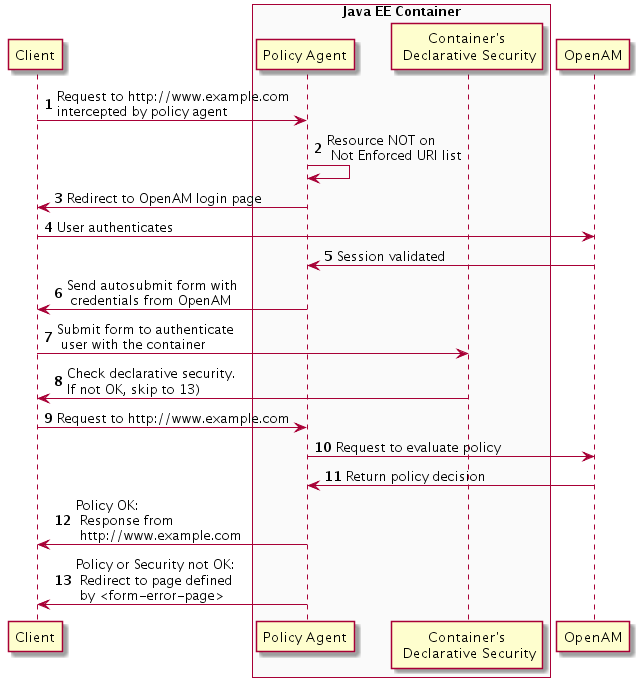
If the policy agent’s filter mode was set to J2EE_POLICY, the diagram’s flow would have ended at step 8), after the check on declarative security.
To configure the Java EE policy agent to work with the container’s declarative security, perform the steps in the following procedure:
This procedure assumes you have already installed a policy agent and that it is configured to protect the application. To configure the agent for declarative security, perform the following steps:
-
Ensure that the application
<login-config>element is configured, and that its<auth-method>element is set toFORM. For example:<login-config> <auth-method>FORM</auth-method> <form-login-config> <form-login-page>/authentication/login.html</form-login-page> <form-error-page>/authentication/accessdenied.html</form-error-page> </form-login-config> </login-config>Consider the following points:
-
By default, the policy agent is configured to handle the login process without honoring the value of the
<form-login-page>element. This allows for the configuration of declarative security for applications that are not designed to use theFORMlogin mechanism. Therefore, these applications can define a dummy value for the<form-login-page>element. -
The
<form-error-page>element is mandatory. It is the page where the container redirects users that do not satisfy OpenAM policies and declarative security rules. If this page does not exist, a 404 error may display.
-
-
In the OpenAM console, navigate to Realms > Realm Name > Agents > J2EE > Agent Name, and select the General tab.
-
Ensure that the Agent Filter Mode property value is either
ALLorJ2EE_POLICY. -
In the OpenAM console, navigate to Realms > Realm Name > Agents > J2EE > Agent Name, and select the Application tab.
-
Configure the Login Form URI property using the value of the
<form-login-page>element. For example,/HR/authentication/login.html.Note that the agent requires the URI context to be specified as part of the login form, in this case,
/HR/. -
Configure the Login Error URI property using the value of the
<form-error-page>element. For example,/HR/authentication/accessdenied.html.Note that the agent requires the URI context to be specified as part of the login form, in this case,
/HR/. -
Save your changes.
-
Configure mappings to the roles required for declarative security. For more information, see Privilege Attributes Processing Properties.
The sample application distributed with the policy agent,
agentsample.war, contains an example about how to configure some of these properties.