Changing Server Certificates
This chapter covers how to replace OpenDJ key pairs and public key certificates. In this chapter you will learn to:
-
Replace a key pair for securing a connection handler
-
Replace a key pair used for replication
OpenDJ uses keystores (for private keys) and truststores (for public, signed certificates). Up to three sets of keystores are used, as shown in the following illustration.
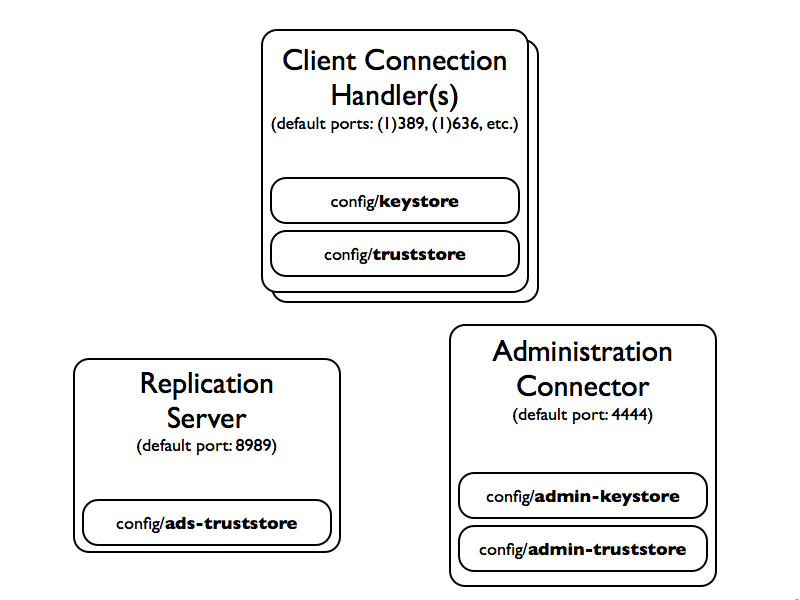
By default the keystores are located in the /path/to/opendj/config directory:
-
The
keystoreandtruststorehold keys for securing connections with client applications. -
The
admin-keystoreandadmin-truststorehold keys for securing administrative connections, such as those used when connecting with thedsconfigcommand. -
The
ads-truststoreholds keys for securing replication connections with other OpenDJ servers in the replication topology.
Each keystore has a specific purpose:
admin-keystore-
This Java Keystore holds the private key and administrative certificate for the server,
admin-cert. This key pair is used to protect communications on the administration port. The password, stored inadmin-keystore.pin, is also the key password foradmin-cert. admin-truststore-
This Java Keystore holds a copy of the administrative certificate,
admin-cert. The password is the same as for theadmin-keystore, in other words the string inadmin-keystore.pin. ads-truststore-
This Java Keystore holds public key certificates of all servers replicating with the current server. It also includes the
ads-certificatekey pair of the current server. The password is stored inads-truststore.pin.Do not change this keystore directly.
keystore-
This Java Keystore holds the private key and server certificate,
server-cert, used to protect TLS/SSL communications with client applications. The password, stored inkeystore.pin, is also the key password forserver-cert. truststore-
This Java Keystore holds a copy of the
server-certcertificate from thekeystore. This is also where you import certificates of client applications if you want OpenDJ to recognize them. The password is the same as for thekeystore, in other words the string inkeystore.pin.
|
Examples in this chapter use self-signed certificates, but you can also use certificates signed by a Certificate Authority (CA). When importing a certificate ( |
This procedure shows how to replace a server key pair in the admin-keystore and copy of the administrative certificate in admin-truststore.
The examples also apply when replacing a key pair in the keystore and copy of the server certificate in truststore. Just adapt the commands to use the correct keystore, truststore, and PIN file names.
This procedure does not apply for replication key pairs. Instead, see "To Replace the Key Pair Used for Replication".
-
Check the alias of the key pair and certificate copy to replace:
$ cd /path/to/opendj/config
$ keytool -list -keystore admin-keystore -storepass `cat admin-keystore.pin`

Keystore type: JKS
Keystore provider: SUN

Your keystore contains 1 entry

admin-cert, May 20, 2015, PrivateKeyEntry,
Certificate fingerprint (SHA1): 21:9F:F0:E8:A3:22:A3:62:1D:C7:04:BD:12:44:A6:FA:0C:3F:3A:35
$ keytool -list -keystore admin-truststore -storepass `cat admin-keystore.pin`

Keystore type: JKS
Keystore provider: SUN

Your keystore contains 1 entry

admin-cert, May 20, 2015, trustedCertEntry,
Certificate fingerprint (SHA1): 21:9F:F0:E8:A3:22:A3:62:1D:C7:04:BD:12:44:A6:FA:0C:3F:3A:35
This alias is also stored in the server configuration.
-
Remove the key pair and certificate copy to replace:
$ keytool \ -delete \ -alias admin-cert \ -keystore admin-keystore \ -storepass `cat admin-keystore.pin` $ keytool \ -delete \ -alias admin-cert \ -keystore admin-truststore \ -storepass `cat admin-keystore.pin` -
Generate a new key pair in the keystore:
$ keytool \
 -genkey \
 -alias admin-cert \
 -keyalg RSA \
 -validity 7300 \
 -keysize 2048 \
 -ext "san=dns:opendj.example.com" \
 -dname "CN=opendj.example.com, O=Administration Connector Self-Signed Certificate" \
 -keystore admin-keystore \
 -storepass `cat admin-keystore.pin` \
 -keypass `cat admin-keystore.pin`
Notice that the
-aliasoption takes the same alias as before. This is because thessl-cert-nicknamefor the Administration Connector is configured asadmin-cert. Also, the-dnameoption has a CN value corresponding to the fully qualified domain name of the host where OpenDJ directory server is running. -
Get the new key pair’s certificate signed, using one of the following alternatives:
-
Self-sign the certificate:
$ keytool \ -selfcert \ -alias admin-cert \ -validity 7300 \ -keystore admin-keystore \ -storepass `cat admin-keystore.pin` -
Create a certificate signing request, have it signed by a CA, and import the signed certificate from the CA reply.
For examples of the
keytoolcommands to use, see "To Request and Install a CA-Signed Certificate".
-
-
Export a copy of the certificate from the keystore:
$ keytool \ -export \ -alias admin-cert \ -keystore admin-keystore \ -storepass `cat admin-keystore.pin` \ -file admin-cert.crt Certificate stored in file <admin-cert.crt> -
Import the copy of the certificate into the truststore:
$ keytool \ -import \ -alias admin-cert \ -keystore admin-truststore \ -storepass `cat admin-keystore.pin` \ -file admin-cert.crt Owner: CN=opendj.example.com, O=Administration Connector Self-Signed Certificate Issuer: CN=opendj.example.com, O=Administration Connector Self-Signed Certificate Serial number: 4cdd42a Valid from: Thu May 28 11:32:05 CEST 2015 until: Wed May 23 11:32:05 CEST 2035 Certificate fingerprints: MD5: 40:38:24:5D:DD:BE:EC:D6:07:56:08:25:95:D9:61:FE SHA1: BC:3D:A9:26:CD:4E:71:04:44:16:1E:A5:79:DA:43:2A:65:E8:85:85 SHA256: D3:41:EE:44:5A:54:74:11:5A:...:9F:8F:08:13:09:DD:71:52:7E:35:66:7E Signature algorithm name: SHA256withRSA Version: 3 Extensions: #1: ObjectId: 2.5.29.17 Criticality=false SubjectAlternativeName [ DNSName: opendj.example.com ] #2: ObjectId: 2.5.29.14 Criticality=false SubjectKeyIdentifier [ KeyIdentifier [ 0000: 08 E3 D3 62 AA 68 E6 02 52 25 F8 22 C4 43 82 2D ...b.h..R%.".C.- 0010: 20 C1 39 99 .9. ] ] Trust this certificate? [no]: yes Certificate was added to keystore -
Restart OpenDJ to make sure it reloads the keystores:
$ cd /path/to/opendj/bin $ stop-ds --restart -
If you have client applications trusting the self-signed certificate, have them import the new one (
admin-cert.crtin this example).
Follow these steps to replace the key pair that is used to secure replication connections.
-
Generate a new key pair for the server.
The changes you perform are replicated across the topology.
OpenDJ has an
ads-certificateand private key, which is a local copy of the key pair used to secure replication connections.To generate the new key pair, you remove the
ads-certificatekey pair, prompt OpenDJ to generate a newads-certificatekey pair, and then add a copy to the administrative data using the MD5 fingerprint of the certificate to define the RDN.-
Delete the
ads-certificateentry:$ ldapmodify \ --port 1389 \ --hostname opendj.example.com \ --bindDN "cn=Directory Manager" \ --bindPassword password dn: ds-cfg-key-id=ads-certificate,cn=ads-truststore changetype: delete Processing DELETE request for ds-cfg-key-id=ads-certificate,cn=ads-truststore DELETE operation successful for DN ds-cfg-key-id=ads-certificate, cn=ads-truststore -
Prompt OpenDJ to generate a new, self-signed
ads-certificatekey pair.You do this by adding an
ads-certificateentry with object classds-cfg-self-signed-cert-request:$ ldapmodify \ --port 1389 \ --hostname opendj.example.com \ --bindDN "cn=Directory Manager" \ --bindPassword password dn: ds-cfg-key-id=ads-certificate,cn=ads-truststore changetype: add objectclass: ds-cfg-self-signed-cert-request Processing ADD request for ds-cfg-key-id=ads-certificate,cn=ads-truststore ADD operation successful for DN ds-cfg-key-id=ads-certificate,cn=ads-truststore -
Retrieve the
ads-certificateentry:$ ldapsearch \ --port 1389 \ --hostname opendj.example.com \ --baseDN cn=ads-truststore \ "(ds-cfg-key-id=ads-certificate)" dn: ds-cfg-key-id=ads-certificate,cn=ads-truststore ds-cfg-key-id: ads-certificate ds-cfg-public-key-certificate;binary:: MIIB6zCCAVSgAwIBAgIEDKSUFjANBgkqhkiG9w0BA QUFADA6MRswGQYDVQQKExJPcGVuREogQ2VydGlmaWNhdGUxGzAZBgNVBAMTEm9wZW5hbS5leGFtcGxl LmNvbTAeFw0xMzAyMDcxMDMwMzNaFw0zMzAyMDIxMDMwMzNaMDoxGzAZBgNVBAoTEk9wZW5ESiBDZXJ 0aWZpY2F0ZTEbMBkGA1UEAxMSb3BlbmFtLmV4YW1wbGUuY29tMIGfMA0GCSqGSIb3DQEBAQUAA4GNAD CBiQKBgQCfGLAiUOz4sC8CM9T5DPTk9V9ErNC8N59XwBt1aN7UjhQl4/JZZsetubtUrZBLS9cRrnYdZ cpFgLQNEmXifS+PdZ0DJkaLNFmd8ZX0spX8++fb4SkkggkmNRmi1fccDQ/DHMlwl7kk884lXummrzcD GbZ7p4vnY7y7GmD1vZSP+wIDAQABMA0GCSqGSIb3DQEBBQUAA4GBAJciUzUP8T8A9VV6dQB0SYCNG1o 7IvpE7jGVZh6KvM0m5sBNX3wPbTVJQNij3TDm8nx6yhi6DUkpiAZfz/OBL5k+WSw80TjpIZ2+klhP1s srsST4Um4fHzDZXOXHR6NM83XxZBsR6MazYecL8CiGwnYW2AeBapzbAnGn1J831q1q objectClass: top objectClass: ds-cfg-instance-key -
Retrieve the MD5 fingerprint of the
ads-certificate.In this example, the MD5 fingerprint is
07:35:80:D8:F3:CE:E1:39:9C:D0:73:DB:6C:FA:CC:1C:$ keytool \ -list \ -v \ -alias ads-certificate \ -keystore /path/to/opendj/config/ads-truststore \ -storepass `cat /path/to/opendj/config/ads-truststore.pin` Alias name: ads-certificate Creation date: Feb 7, 2013 Entry type: PrivateKeyEntry Certificate chain length: 1 Certificate[1]: Owner: CN=opendj.example.com, O=OpenDJ Certificate Issuer: CN=opendj.example.com, O=OpenDJ Certificate Serial number: ca49416 Valid from: Thu Feb 07 11:30:33 CET 2013 until: Wed Feb 02 11:30:33 CET 2033 Certificate fingerprints: MD5: 07:35:80:D8:F3:CE:E1:39:9C:D0:73:DB:6C:FA:CC:1C SHA1: 56:30:F6:79:AA:C0:BD:61:88:3E:FB:38:38:9D:84:70:0B:E4:43:57 SHA256: A8:4B:81:EE:30:2A:0C:09:2E:...:C1:41:F5:AB:19:C6:EE:AB:50:64 Signature algorithm name: SHA1withRSA Version: 3 -
Using the MD5 fingerprint and the certificate entry, prepare LDIF to update
cn=admin datawith the new server certificate:$ cat /path/to/update-server-cert.ldif dn: ds-cfg-key-id=073580D8F3CEE1399CD073DB6CFACC1C,cn=instance keys, cn=admin data changetype: add ds-cfg-key-id: 073580D8F3CEE1399CD073DB6CFACC1C ds-cfg-public-key-certificate;binary:: MIIB6zCCAVSgAwIBAgIEDKSUFjANBgkqhkiG9w0BA QUFADA6MRswGQYDVQQKExJPcGVuREogQ2VydGlmaWNhdGUxGzAZBgNVBAMTEm9wZW5hbS5leGFtcGxl LmNvbTAeFw0xMzAyMDcxMDMwMzNaFw0zMzAyMDIxMDMwMzNaMDoxGzAZBgNVBAoTEk9wZW5ESiBDZXJ 0aWZpY2F0ZTEbMBkGA1UEAxMSb3BlbmFtLmV4YW1wbGUuY29tMIGfMA0GCSqGSIb3DQEBAQUAA4GNAD CBiQKBgQCfGLAiUOz4sC8CM9T5DPTk9V9ErNC8N59XwBt1aN7UjhQl4/JZZsetubtUrZBLS9cRrnYdZ cpFgLQNEmXifS+PdZ0DJkaLNFmd8ZX0spX8++fb4SkkggkmNRmi1fccDQ/DHMlwl7kk884lXummrzcD GbZ7p4vnY7y7GmD1vZSP+wIDAQABMA0GCSqGSIb3DQEBBQUAA4GBAJciUzUP8T8A9VV6dQB0SYCNG1o 7IvpE7jGVZh6KvM0m5sBNX3wPbTVJQNij3TDm8nx6yhi6DUkpiAZfz/OBL5k+WSw80TjpIZ2+klhP1s srsST4Um4fHzDZXOXHR6NM83XxZBsR6MazYecL8CiGwnYW2AeBapzbAnGn1J831q1q objectClass: top objectClass: ds-cfg-instance-key dn: cn=opendj.example.com:4444,cn=Servers,cn=admin data changetype: modify replace: ds-cfg-key-id ds-cfg-key-id: 073580D8F3CEE1399CD073DB6CFACC1C -
Update the administrative data, causing OpenDJ to create a copy of the new
ads-certificatewith its MD5 signature as the alias in theads-truststore:$ ldapmodify \ --port 1389 \ --hostname opendj.example.com \ --bindDN "cn=Directory Manager" \ --bindPassword password \ --filename /path/to/update-server-cert.ldif Processing ADD request for ds-cfg-key-id=073580D8F3CEE1399CD073DB6CFACC1C, cn=instance keys,cn=admin data ADD operation successful for DN ds-cfg-key-id=073580D8F3CEE1399CD073DB6CFACC1C, cn=instance keys,cn=admin data Processing MODIFY request for cn=opendj.example.com:4444,cn=Servers, cn=admin data MODIFY operation successful for DN cn=opendj.example.com:4444,cn=Servers, cn=admin data
-
-
Force OpenDJ to reopen replication connections using the new key pair.
Stop replication temporarily and then start it again as described in "Configuring Replication":
$ dsconfig \
 set-synchronization-provider-prop \
 --port 4444 \
 --hostname opendj.example.com \
 --bindDN "cn=Directory Manager" \
 --bindPassword password \
 --provider-name "Multimaster Synchronization" \
 --set enabled:false \
 --no-prompt

$ dsconfig \
 set-synchronization-provider-prop \
 --port 4444 \
 --hostname opendj.example.com \
 --bindDN "cn=Directory Manager" \
 --bindPassword password \
 --provider-name "Multimaster Synchronization" \
 --set enabled:true \
 --no-prompt